
SpringMVC国际化
如何将我们网站的其它内容(如菜单、标题等)做国际化处理呢?这就是本篇要将的内容—>国际化。
一.基于浏览器请求的国际化实现:
首先配置我们项目的springservlet-config.xml文件添加的内容如下:
<bean id="messageSource" class="org.springframework.context.support.ResourceBundleMessageSource">

    <!-- 国际化信息所在的文件名 -->

    <property name="basename" value="messages" />

    <!-- 如果在国际化资源文件中找不到对应代码的信息,就用这个代码作为名称  -->

    <property name="useCodeAsDefaultMessage" value="true" />

</bean>
在com.demo.web.controllers包中添加GlobalController.java内容如下:

package com.demo.web.controllers;

import java.util.Date;

import javax.servlet.http.HttpServletRequest;

import org.springframework.stereotype.Controller;

import org.springframework.ui.Model;

import org.springframework.web.bind.annotation.RequestMapping;

import org.springframework.web.bind.annotation.RequestMethod;

import org.springframework.web.servlet.support.RequestContext;

import com.demo.web.models.FormatModel;

@Controller

@RequestMapping(value = "/global")

public class GlobalController {

    @RequestMapping(value="/test", method = {RequestMethod.GET})

    public String test(HttpServletRequest request,Model model){

        if(!model.containsAttribute("contentModel")){

            //从后台代码获取国际化信息

            RequestContext requestContext = new RequestContext(request);

            model.addAttribute("money", requestContext.getMessage("money"));

            model.addAttribute("date", requestContext.getMessage("date"));

            FormatModel formatModel=new FormatModel();

            formatModel.setMoney(12345.678);

            formatModel.setDate(new Date());

            model.addAttribute("contentModel", formatModel);

        }

        return "globaltest";

    }

}
这里展示模型还用系列(7)中的作为演示。
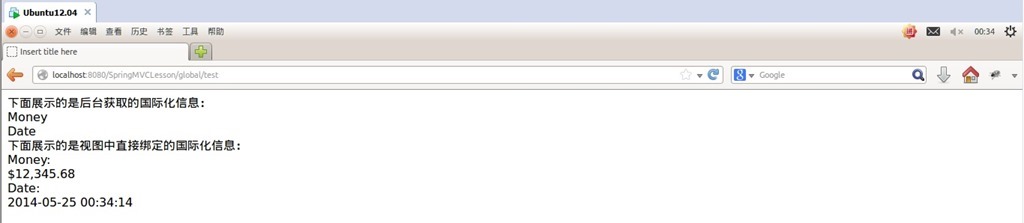
在项目中的源文件夹resources中添加messages.properties、messages_zh_CN.properties、 messages_en_US.properties三个文件,其中messages.properties、 messages_zh_CN.properties里面的"money", "date",为中文,messages_en_US.properties里面的为英文。
在views文件夹中添加globaltest.jsp视图,内容如下:
<%@ page language="java" contentType="text/html; charset=UTF-8"

    pageEncoding="UTF-8"%>

<!DOCTYPE html PUBLIC "-//W3C//DTD HTML 4.01 Transitional//EN" "http://www.w3.org/TR/html4/loose.dtd">

<%@taglib prefix="spring" uri="http://www.springframework.org/tags" %>

<html>

<head>

<meta http-equiv="Content-Type" content="text/html; charset=UTF-8">

<title>Insert title here</title>

</head>

<body>

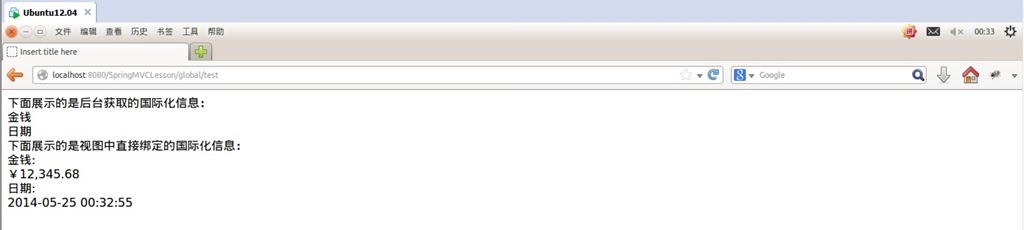
    下面展示的是后台获取的国际化信息:<br/>

    ${money}<br/>

    ${date}<br/>

    下面展示的是视图中直接绑定的国际化信息:<br/>

    <spring:message code="money"/>:<br/>

    <spring:eval expression="contentModel.money"></spring:eval><br/>

    <spring:message code="date"/>:<br/>

    <spring:eval expression="contentModel.date"></spring:eval><br/>

</body>

</html>
运行测试:
更改浏览器语言顺序,刷新页面:
二.基于Session的国际化实现:
在项目的springservlet-config.xml文件添加的内容如下(第一种时添加的内容要保留):
<mvc:interceptors>

    <!-- 国际化操作拦截器 如果采用基于(请求/Session/Cookie)则必需配置 -->

    <bean class="org.springframework.web.servlet.i18n.LocaleChangeInterceptor" />

</mvc:interceptors>

<bean id="localeResolver" class="org.springframework.web.servlet.i18n.SessionLocaleResolver" />
更改globaltest.jsp视图为如下内容:
<%@ page language="java" contentType="text/html; charset=UTF-8"

    pageEncoding="UTF-8"%>

<!DOCTYPE html PUBLIC "-//W3C//DTD HTML 4.01 Transitional//EN" "http://www.w3.org/TR/html4/loose.dtd">

<%@taglib prefix="spring" uri="http://www.springframework.org/tags" %>

<html>

<head>

<meta http-equiv="Content-Type" content="text/html; charset=UTF-8">

<title>Insert title here</title>

</head>

<body>

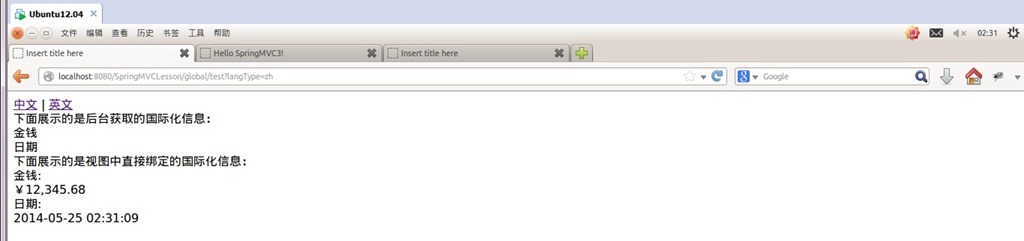
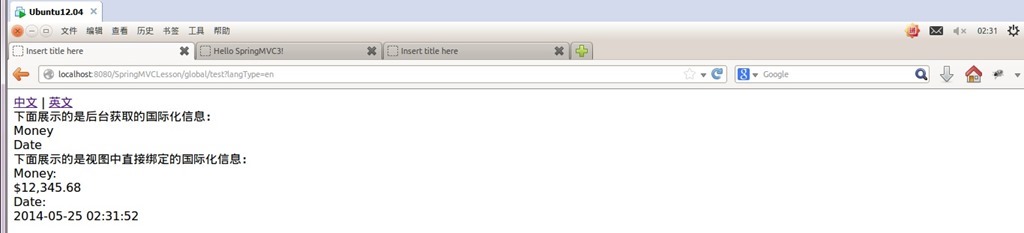
    <a href="test?langType=zh">中文</a> | <a href="test?langType=en">英文</a><br/>

    下面展示的是后台获取的国际化信息:<br/>

    ${money}<br/>

    ${date}<br/>

    下面展示的是视图中直接绑定的国际化信息:<br/>

    <spring:message code="money"/>:<br/>

    <spring:eval expression="contentModel.money"></spring:eval><br/>

    <spring:message code="date"/>:<br/>

    <spring:eval expression="contentModel.date"></spring:eval><br/>

</body>

</html>
更改GlobalController.java为如下内容:
package com.demo.web.controllers;

import java.util.Date;

import java.util.Locale;

import javax.servlet.http.HttpServletRequest;

import org.springframework.context.i18n.LocaleContextHolder;

import org.springframework.stereotype.Controller;

import org.springframework.ui.Model;

import org.springframework.web.bind.annotation.RequestMapping;

import org.springframework.web.bind.annotation.RequestMethod;

import org.springframework.web.bind.annotation.RequestParam;

import org.springframework.web.servlet.i18n.SessionLocaleResolver;

import org.springframework.web.servlet.support.RequestContext;

import com.demo.web.models.FormatModel;

@Controller

@RequestMapping(value = "/global")

public class GlobalController {

    @RequestMapping(value="/test", method = {RequestMethod.GET})

    public String test(HttpServletRequest request,Model model, @RequestParam(value="langType", defaultValue="zh") String langType){

        if(!model.containsAttribute("contentModel")){

            if(langType.equals("zh")){

                Locale locale = new Locale("zh", "CN");

                request.getSession().setAttribute(SessionLocaleResolver.LOCALE_SESSION_ATTRIBUTE_NAME,locale);

            }

            else if(langType.equals("en")){

                Locale locale = new Locale("en", "US");

                request.getSession().setAttribute(SessionLocaleResolver.LOCALE_SESSION_ATTRIBUTE_NAME,locale);

            }

            else

                request.getSession().setAttribute(SessionLocaleResolver.LOCALE_SESSION_ATTRIBUTE_NAME,LocaleContextHolder.getLocale());

            //从后台代码获取国际化信息

            RequestContext requestContext = new RequestContext(request);

            model.addAttribute("money", requestContext.getMessage("money"));

            model.addAttribute("date", requestContext.getMessage("date"));

            FormatModel formatModel=new FormatModel();

            formatModel.setMoney(12345.678);

            formatModel.setDate(new Date());

            model.addAttribute("contentModel", formatModel);

        }

        return "globaltest";

    }

}
运行测试:
三.基于Cookie的国际化实现:
把实现第二种方法时在项目的springservlet-config.xml文件中添加的
<bean id="localeResolver" class="org.springframework.web.servlet.i18n.SessionLocaleResolver" />
注释掉,并添加以下内容:
<bean id="localeResolver" class="org.springframework.web.servlet.i18n.CookieLocaleResolver" />
更改GlobalController.java为如下内容:
package com.demo.web.controllers;

import java.util.Date;

import java.util.Locale;

import javax.servlet.http.HttpServletRequest;

import javax.servlet.http.HttpServletResponse;

import org.springframework.context.i18n.LocaleContextHolder;

import org.springframework.stereotype.Controller;

import org.springframework.ui.Model;

import org.springframework.web.bind.annotation.RequestMapping;

import org.springframework.web.bind.annotation.RequestMethod;

import org.springframework.web.bind.annotation.RequestParam;

import org.springframework.web.servlet.i18n.CookieLocaleResolver;

//import org.springframework.web.servlet.i18n.SessionLocaleResolver;

import org.springframework.web.servlet.support.RequestContext;

import com.demo.web.models.FormatModel;

@Controller

@RequestMapping(value = "/global")

public class GlobalController {

    @RequestMapping(value="/test", method = {RequestMethod.GET})

    public String test(HttpServletRequest request, HttpServletResponse response, Model model, @RequestParam(value="langType", defaultValue="zh") String langType){

        if(!model.containsAttribute("contentModel")){

            /*if(langType.equals("zh")){

                Locale locale = new Locale("zh", "CN");

                request.getSession().setAttribute(SessionLocaleResolver.LOCALE_SESSION_ATTRIBUTE_NAME,locale);

            }

            else if(langType.equals("en")){

                Locale locale = new Locale("en", "US");

                request.getSession().setAttribute(SessionLocaleResolver.LOCALE_SESSION_ATTRIBUTE_NAME,locale);

            }

            else

                request.getSession().setAttribute(SessionLocaleResolver.LOCALE_SESSION_ATTRIBUTE_NAME,LocaleContextHolder.getLocale());*/

            if(langType.equals("zh")){

                Locale locale = new Locale("zh", "CN");

                //request.getSession().setAttribute(SessionLocaleResolver.LOCALE_SESSION_ATTRIBUTE_NAME,locale);

                (new CookieLocaleResolver()).setLocale (request, response, locale);

            }

            else if(langType.equals("en")){

                Locale locale = new Locale("en", "US");

                //request.getSession().setAttribute(SessionLocaleResolver.LOCALE_SESSION_ATTRIBUTE_NAME,locale);

                (new CookieLocaleResolver()).setLocale (request, response, locale);

            }

            else

                //request.getSession().setAttribute(SessionLocaleResolver.LOCALE_SESSION_ATTRIBUTE_NAME,LocaleContextHolder.getLocale());

                (new CookieLocaleResolver()).setLocale (request, response, LocaleContextHolder.getLocale());

            //从后台代码获取国际化信息

            RequestContext requestContext = new RequestContext(request);

            model.addAttribute("money", requestContext.getMessage("money"));

            model.addAttribute("date", requestContext.getMessage("date"));

            FormatModel formatModel=new FormatModel();

            formatModel.setMoney(12345.678);

            formatModel.setDate(new Date());

            model.addAttribute("contentModel", formatModel);

        }

        return "globaltest";

    }

}
运行测试:
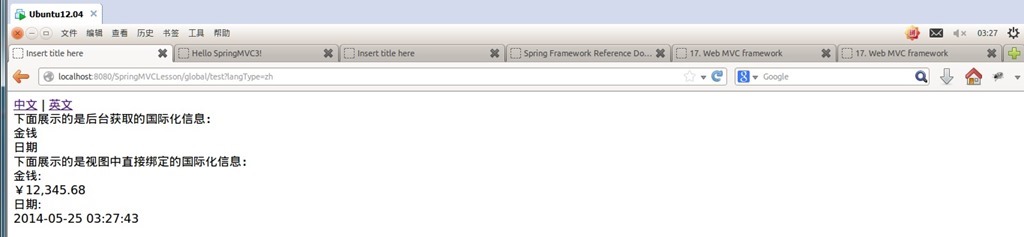
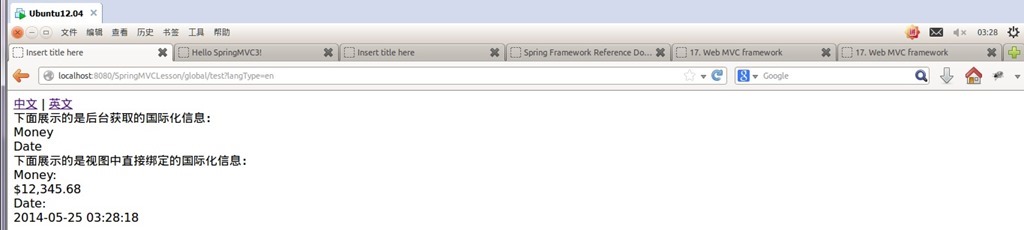
关于<bean id="localeResolver" class="org.springframework.web.servlet.i18n.CookieLocaleResolver" />3个属性的说明(可以都不设置而用其默认值):
<bean id="localeResolver" class="org.springframework.web.servlet.i18n.CookieLocaleResolver">

    <!-- 设置cookieName名称,可以根据名称通过js来修改设置,也可以像上面演示的那样修改设置,默认的名称为 类名+LOCALE(即:org.springframework.web.servlet.i18n.CookieLocaleResolver.LOCALE-->

    <property name="cookieName" value="lang"/>

    <!-- 设置最大有效时间,如果是-1,则不存储,浏览器关闭后即失效,默认为Integer.MAX_INT-->

    <property name="cookieMaxAge" value="100000">

    <!-- 设置cookie可见的地址,默认是“/”即对网站所有地址都是可见的,如果设为其它地址,则只有该地址或其后的地址才可见-->

    <property name="cookiePath" value="/">

</bean>
四.基于URL请求的国际化的实现:
首先添加一个类,内容如下:
import java.util.Locale;

import javax.servlet.http.HttpServletRequest;

import javax.servlet.http.HttpServletResponse;

import org.springframework.web.servlet.DispatcherServlet;

import org.springframework.web.servlet.LocaleResolver;

public class MyAcceptHeaderLocaleResolver extends AcceptHeaderLocaleResolver {

    private Locale myLocal;

    public Locale resolveLocale(HttpServletRequest request) {

        return myLocal;

    }

    public void setLocale(HttpServletRequest request, HttpServletResponse response, Locale locale) {

        myLocal = locale;

    }

}
然后把实现第二种方法时在项目的springservlet-config.xml文件中添加的
<bean id="localeResolver" class="org.springframework.web.servlet.i18n.SessionLocaleResolver" />
注释掉,并添加以下内容:
<bean id="localeResolver" class="xx.xxx.xxx.MyAcceptHeaderLocaleResolver"/>
“xx.xxx.xxx”是刚才添加的MyAcceptHeaderLocaleResolver 类所在的包名。
保存之后就可以在请求的URL后附上 locale=zh_CN 或 locale=en_US 如 http://xxxxxxxx?locale=zh_CN 来改变语言了,具体这里不再做演示了。
国际化部分的内容到此结束。
SpringMVC国际化的更多相关文章
- 【SpringMVC】SpringMVC系列14之SpringMVC国际化
14.SpringMVC国际化 14.1.概述 14.2.用户切换选择语言
- springmvc国际化 基于请求的国际化配置
springmvc国际化 基于请求的国际化配置 基于请求的国际化配置是指,在当前请求内,国际化配置生效,否则自动以浏览器为主. 项目结构图: 说明:properties文件中为国际化资源文件.格式相关 ...
- springmvc国际化 基于浏览器语言的国际化配置
当前标签: springmvc springmvc国际化 基于浏览器语言的国际化配置 苏若年 2013-10-09 13:03 阅读:305 评论:0 SpringMVC中应用Ajax异步通讯 ...
- 基于session 的springMvc 国际化
项目中采用springMvc的框架,需要动态切换语言,找了一些资料,最后决定采用基于session的动态切换,实现动态切换中文,英文,韩文,其实就是把中文翻译成其他语言显示 springMvc国际化包 ...
- JAVA记录-SpringMVC国际化配置
1.搭建SpringMVC框架,不过多阐述 2.spring-mvc.xml加入以下配置: <!-- 国际化资源配置,资源文件绑定器--> <bean id="messag ...
- 【问题记录】springmvc国际化问题
异常-Cannot change HTTP accept header - use a different locale resolution strategy springmvc国际化时,local ...
- 学习SpringMVC——国际化+上传+下载
每个星期一道菜,这个星期也不例外~~~ 一个软件,一个产品,都是一点点开发并完善起来的,功能越来越多,性能越来越强,用户体验越来越好……这每个指标的提高都需要切切实实的做点东西出来,好比,你的这个产品 ...
- SpringMVC 国际化
SpringMVC学习系列(8) 之 国际化 在系列(7)中我们讲了数据的格式化显示,Spring在做格式化展示的时候已经做了国际化处理,那么如何将我们网站的其它内容(如菜单.标题等)做国际化处理呢? ...
- SpringMVC 国际化-中英文切换
项目结构 1.pom.xml <project xmlns="http://maven.apache.org/POM/4.0.0" xmlns:xsi="http: ...
- SpringMVC国际化支持
这周公司领导希望我对一个项目,出一个国际化的解决方案,研究两个小时,采用了SpringMVC的国际化支持,在此记录下. 原理: 在DispatchServlet中注册localeResolver(区域 ...
随机推荐
- phpstorm10.0.1 注册
注册时选择License server,填http://idea.lanyus.com,然后点击OK,就注册了
- HTML 列表详解
1.有序列表 有序列表是编号列表,用于对网页中的某些内容进行编号排列,以便使读者清晰地了解每行的顺序.在HTML中插入有序列表是通过<ol>和<li>标签来实现的.首标签 ...
- 基于注解的SpringMVC简单介绍
SpringMVC是一个基于DispatcherServlet的MVC框架,每一个请求最先访问的都是DispatcherServlet,DispatcherServlet负责转发每一个Request请 ...
- 未能加载文件或程序集“AspNetPager”或它的某一个依赖项。参数错误(转)
未能加载文件或程序集“AspNetPager”或它的某一个依赖项.参数错误. 看你的的开发框架用的是多少的2.0, 3.0, 3.5, 4.0 那么删除的框架的文件夹也相对应的变化 删除 C:\W ...
- 我是如何社工TDbank获取朋友隐私的
原创 ziwen@beebeeto 转载请保留本行 个人感觉 国外的安全方面对社工的了解和防范并不是很好 即使他们使用社工的时间比我们要长很多 比如 他们的visa在pos机上使用是不需要密码的 而且 ...
- 为什么js加事件时不要写括号
function al(){alert("我擦")}此时,al代表这个函数的对象,al()就是直接运行了.var nfun=al;就是让nfun也指向了al,此时nfun()就相当 ...
- lnmp搭建的常见错误
1:运行nginx时的错误 ./configure: error: the HTTP rewrite module requires the PCRE library. 解决: [root@svr11 ...
- MyEclipse优化-六步攻略
1.首先是jsp的可视化页面 windows -> preferences->General-> Editors -> File Associations 在上方框内选择*. ...
- Javascript 中的神器——Promise
Promise in js 回调函数真正的问题在于他剥夺了我们使用 return 和 throw 这些关键字的能力.而 Promise 很好地解决了这一切. 2015 年 6 月,ECMAScript ...
- oracle数据库从入门到精通
oracle产品线围绕企业开发平台的企业开发平台四大组件:unix,weblogic中间件,java编程语言,oracle数据库oracle 开发主要分两类数据库管理:dba数据库编程:分两部分 ...