
selenium处理select标签的下拉框
有时候我们会碰到<select></select>标签的下拉框。直接点击下拉框中的选项不一定可行。Selenium专门提供了Select类来处理下拉框。
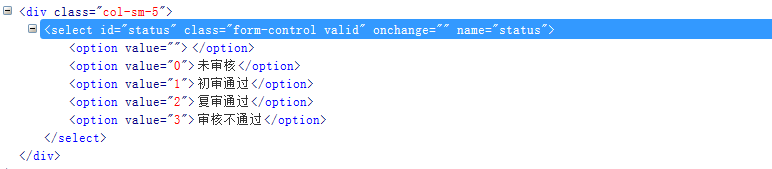
<select id="status" class="form-control valid" onchange="" name="status">

    <option value=""></option>

    <option value="0">未审核</option>

    <option value="1">初审通过</option>

    <option value="2">复审通过</option>

    <option value="3">审核不通过</option>

</select>
Python
先以python为例,查看Selenium代码select.py文件的实现:
...\selenium\webdriver\support\select.py
class Select:

    def __init__(self, webelement):

        """

        Constructor. A check is made that the given element is, indeed, a SELECT tag. If it is not,

        then an UnexpectedTagNameException is thrown.

        :Args:

         - webelement - element SELECT element to wrap

        Example:

            from selenium.webdriver.support.ui import Select \n

            Select(driver.find_element_by_tag_name("select")).select_by_index(2)

        """

        if webelement.tag_name.lower() != "select":

            raise UnexpectedTagNameException(

                "Select only works on <select> elements, not on <%s>" %

                webelement.tag_name)

        self._el = webelement

        multi = self._el.get_attribute("multiple")

        self.is_multiple = multi and multi != "false"
查看Select类的实现需要一个元素的定位。并且Example中给了例句。
Select(driver.find_element_by_tag_name("select")).select_by_index(2)
def select_by_index(self, index):

        """Select the option at the given index. This is done by examing the "index" attribute of an

           element, and not merely by counting.

           :Args:

            - index - The option at this index will be selected

           """

        match = str(index)

        matched = False

        for opt in self.options:

            if opt.get_attribute("index") == match:

                self._setSelected(opt)

                if not self.is_multiple:

                    return

                matched = True

        if not matched:

            raise NoSuchElementException("Could not locate element with index %d" % index)
继续查看select_by_index() 方法的使用并符合上面的给出的下拉框的要求,因为它要求下拉框的选项必须要有index属性,例如index=”1”。
def select_by_value(self, value):

        """Select all options that have a value matching the argument. That is, when given "foo" this

           would select an option like:

           <option value="foo">Bar</option>

           :Args:

            - value - The value to match against

           """

        css = "option[value =%s]" % self._escapeString(value)

        opts = self._el.find_elements(By.CSS_SELECTOR, css)

        matched = False

        for opt in opts:

            self._setSelected(opt)

            if not self.is_multiple:

                return

            matched = True

        if not matched:

            raise NoSuchElementException("Cannot locate option with value: %s" % value)
继续查看select_by_value() 方法符合我们的需求,它用于选取<option>标签的value值。最终,可以通过下面有实现选择下拉框的选项。
from selenium.webdriver.support.select import Select

……

sel = driver.find_element_by_xpath("//select[@id='status']")

Select(sel).select_by_value('')  #未审核

Select(sel).select_by_value('')  #初审通过

Select(sel).select_by_value('')  #复审通过

Select(sel).select_by_value('')  #审核不通过
Java
当然,在java中的用法也类似,唯一不区别在语法层面有。
package com.jase.base;

import org.openqa.selenium.WebDriver;

import org.openqa.selenium.By.ById;

import org.openqa.selenium.chrome.ChromeDriver;

import org.openqa.selenium.support.ui.Select;

public class SelectTest {

    public static void main(String[] args){

        WebDriver driver = new  ChromeDriver();

        driver.get("http://www.you_url.com");

        // ……

        Select sel = new Select(driver.findElement(ById.xpath("//select[@id='status']")));

        sel.selectByValue("0"); //未审核

        sel.selectByValue("1"); //初审通过

        sel.selectByValue("2"); //复审通过

        sel.selectByValue("3"); //审核不通过

    }

}
selenium处理select标签的下拉框的更多相关文章
- Selenium: 利用select模块操作下拉框
在利用selenium进行UI自动化测试过程中,经常会遇到下拉框选项,这篇博客,就介绍下如何利用selenium的Select模块来对标准select下拉框进行操作... 首先导入Select模块: ...
- 前端 HTML form表单标签 select标签 option 下拉框
<select></select> select里面通常跟option配合使用 <!DOCTYPE html> <html lang="en&quo ...
- select标签的下拉框为图片的插件
1 参考文献: [1] https://github.com/rvera/imag...[2] https://rvera.github.io/image... [3] http://webseman ...
- jquery美化select,自定义下拉框样式
select默认的样式比较丑,有些应用需要美化select,在网上找到一个很好的美化样式效果,本人很喜欢,在这里分享一下. <!DOCTYPE html PUBLIC "-//W3C/ ...
- Selenium:利用select模块处理下拉框
在利用selenium进行UI自动化测试过程中,经常会遇到下拉框选项,这篇博客,就介绍下如何利用selenium的Select模块来对标准select下拉框进行操作... 首先导入Select模块: ...
- selenium操作隐藏的元素 (下拉框类型)
有时候我们会碰到一些元素不可见,这个时候selenium就无法对这些元素进行操作了.例如,下面的情况: Python 页面主要通过“display:none”来控制整个下拉框不可见.这个时候如果直接操 ...
- Selenium实战总结(webwiew下拉框定位)
基于常见的两种下拉框的展示形式: 1.点击弹出下拉框: 2.鼠标移动弹出下拉框(move_to_element) 实例一[鼠标点击弹出的下拉框]: e.g百度首页的设置--高级搜索--时间: 导包: ...
- Python + Selenium 定位非selected型下拉框的方法
最近在尝试给自己负责的模块写UI自动化的Demo 登录及切换页面比较顺利 但是遇到下拉框的选择时,遇到了一点困难 我负责的模块页面的下拉框并非Select类型,无法使用select_by_index ...
- element-ui select可搜索下拉框无法在IOS或Ipad调起小键盘输入法
参考:https://segmentfault.com/q/1010000021748033 原因:常规select是可以调起小键盘的.但是element-ui的select其实是input.并且这个 ...
随机推荐
- SQLSERVER中如何快速比较两张表的不一样
SQLSERVER中如何快速比较两张表的不一样 不知不觉要写2014年的最后一篇博文了~ 一般来说,如何检测两张表的内容是否一致,体现在复制的时候发布端和订阅端的两端的数据上面 我这里罗列了一些如何从 ...
- Groonga 3.0.8 发布,全文搜索引擎
Groonga 3.0.8 改进了管理界面的可用性,支持 groonga_query_log_path 指令(groonga-httpd) 提供基于 nginx 的 HTTP 服务功能,改进了 del ...
- Invalidate,Update与Refresh的区别
在做Windows Forms开发的时候,免不了需要手动刷新窗口,以重绘所需更改的控件,或其它什么的.当出现这类需求时,你有三个选择,使用Invalidate,Update或者Refresh方法. I ...
- .NET转Java学习规则
做一个个人Blog(博客) 过程分3个大阶段: 使用servlet/jsp和jdbc,mysql完成第一阶段Blog 项目修改为Spring(IOC+MVC)+SpringJdbc+MyBatis模式 ...
- 我的ORM之五-- 事务
我的ORM索引 单库事务与分布式事务 单库事务: 性能更好,应用于一个数据库时的场景,当数据库发生变化,如拆分为多个服务器,代码需要修改. 分布式事务:性能相对较差,但有更大的适用场景.当数据库发生变 ...
- dojo/dom-form
表单的处理在前端开发中一样意义非凡,dojo/dom-form模块提供了一系列方法来处理表单元素.比如: fieldToObject: 将一个表单字段转化成JavaScript原生类型,可能是stri ...
- windows10的激活及SQL Server 2008 的安装
在我第一次安装的SQL Server的时候,由于我的电脑是windows8专业版未激活的系统,当时安装的时候,首先出现提示说我电脑缺少了某一个插件,于是乎就下了安装.但是后来又是安装不上,各种问题一一 ...
- Html5 舞动的雨伞
HMTL5的学习断断续续,方法不用又生疏了,昨天做的一个雨伞的Demo,先看看效果 主要是运用了中心点变换和旋转两个方法.不同的动画用定时器控制, 下面是全部代码: <canvas id=&qu ...
- channel vs mutex
记录许总演讲PPT指出的实践: channel– 本质上是一个 MessageQueue– 非常正统的执行体间通讯设施• sync.Mutex/RWMutex/Cond/etc– 不要把 channe ...
- 翻译:AKKA笔记 - 介绍Actors
任何以前做过多线程的人都不会否认管理多线程程序是困难并且痛苦的. 我说管理是因为它开始很容易而且当你看到性能提升时会很兴奋.但是,当你看到你没法从子线程的错误中恢复 或者 这些僵尸bug很难重现 或者 ...