
Convert HTML to Text(转载)
原文地址:http://www.blackbeltcoder.com/Articles/strings/convert-html-to-text
 Download Source Code
Introduction
Recently, I wrote an article that presented code to convert plain text to HTML. So it occurred to me that it might be useful to publish some code that does the opposite: convert HTML to plain text.
Any application that extracts information from web pages will need to deal with HTML. For these applications, a conversion is required if you want to produce plain text. This conversion includes removing HTML tags, stripping tag content that isn't readable text (from tags such as <script>), and removing excess whitespace.
For the most part, this conversion is pretty simple. However, I'll discuss a few issues I ran into that made it a little more complicated.
The HtmlToText Class
Listing 1 shows my HtmlToText class. This class contains a single public method, Convert(), which converts HTML to plain text. This method loops through each character in the input text and performs the translation as it goes.
If it encounters an HTML tag, the code starts by parsing the tag from the input. Special handling is included for the <body> and<pre> tags. This method works fine with HTML that does not include a <body> tag. But, if it encounters one, it goes ahead and discards any data that came before it. In my testing, there is no point trying to extract useful text from outside the <body> tags.
Normally, the method will discard excess whitespace characters just as Web browsers do. However, if the code encounters a<pre> (preformatted) tag, then it changes mode and no whitespace is removed while in preformatted mode.
Next, the code looks up the tag in the _tags dictionary. This dictionary contains a list of tags and text that should replace them. For example, since <p> (paragraph) tags separate enclosed text from the surrounding text, the replacement text for both <p> and</p> is a new line. (Note that the parser is happy with just "\n" as a newline). By placing this information in a table this way, it is very easy to customize the translations without changing the code.
Finally, the code attempts to lookup the tag in the _ignoreTags list. If found, this indicates the contents of this tag should not be written to the output. For example, the inner text from a <script> tag should not be part of the resulting plain text. In this case, the EatInnerContent() method is called to consume text inside this tag. Because tags can be nested, this method will recursively call itself to process any tags it finds within the inner text.
For characters that are not part of any tag, they are written to the output string with special handling for whitespace, which I'll discuss next.
Handling Whitespace
When writing this code, I was able to get this far in pretty short order. However, things then became a little more complex. What I was ending up with was a lot of extra whitespace.
As mentioned previously, I wanted the code to replace any sequence of whitespace with a single space character, just as browsers do. But there are exceptions. For example, all whitespace is retained when in preformatted mode. And I don't want to discard whitespace specified using . Also, I don't really want spaces at the beginning or end of a line, so they should be discarded too.
In addition, I had to deal with the fact that the replacement text in the _tags dictionary included a lot of newlines. My initial results included places with many empty lines between text. Sometimes I want a single newline, other times I want a double newline, but I really don't want more than two newlines together.
As you can see, this can start getting a little convoluted. I ended up adding a protected helper class, TextBuilder. This class includes the logic to handle the conditions I've described above. The main class calls the TextBuilder class with text to be added to the output, and the TextBuilder class takes care to remove extra whitespace.
Note on the HttpUtility.HtmlDecode() Method
I should point out that my code uses the HttpUtility.HtmlDecode() method to decode HTML-encoded text. This method is defined in System.Web. By default, a reference to System.Web is added to ASP.NET applications but not to desktop applications.
If you want to use this code from a desktop application, you'll need to go into your project's properties and set the target framework to ".NET Framework 4" instead of ".NET Framework 4 Client", add a reference to System.Web, and add using System.Web; in your source file.
Listing 1: The HtmlToText Class
/// <summary>
/// Converts HTML to plain text.
/// </summary>
class HtmlToText
{
// Static data tables
protected static Dictionary<string, string> _tags;
protected static HashSet<string> _ignoreTags; // Instance variables
protected TextBuilder _text;
protected string _html;
protected int _pos; // Static constructor (one time only)
static HtmlToText()
{
_tags = new Dictionary<string, string>();
_tags.Add("address", "\n");
_tags.Add("blockquote", "\n");
_tags.Add("div", "\n");
_tags.Add("dl", "\n");
_tags.Add("fieldset", "\n");
_tags.Add("form", "\n");
_tags.Add("h1", "\n");
_tags.Add("/h1", "\n");
_tags.Add("h2", "\n");
_tags.Add("/h2", "\n");
_tags.Add("h3", "\n");
_tags.Add("/h3", "\n");
_tags.Add("h4", "\n");
_tags.Add("/h4", "\n");
_tags.Add("h5", "\n");
_tags.Add("/h5", "\n");
_tags.Add("h6", "\n");
_tags.Add("/h6", "\n");
_tags.Add("p", "\n");
_tags.Add("/p", "\n");
_tags.Add("table", "\n");
_tags.Add("/table", "\n");
_tags.Add("ul", "\n");
_tags.Add("/ul", "\n");
_tags.Add("ol", "\n");
_tags.Add("/ol", "\n");
_tags.Add("/li", "\n");
_tags.Add("br", "\n");
_tags.Add("/td", "\t");
_tags.Add("/tr", "\n");
_tags.Add("/pre", "\n"); _ignoreTags = new HashSet<string>();
_ignoreTags.Add("script");
_ignoreTags.Add("noscript");
_ignoreTags.Add("style");
_ignoreTags.Add("object");
} /// <summary>
/// Converts the given HTML to plain text and returns the result.
/// </summary>
/// <param name="html">HTML to be converted</param>
/// <returns>Resulting plain text</returns>
public string Convert(string html)
{
// Initialize state variables
_text = new TextBuilder();
_html = html;
_pos = 0; // Process input
while (!EndOfText)
{
if (Peek() == '<')
{
// HTML tag
bool selfClosing;
string tag = ParseTag(out selfClosing); // Handle special tag cases
if (tag == "body")
{
// Discard content before <body>
_text.Clear();
}
else if (tag == "/body")
{
// Discard content after </body>
_pos = _html.Length;
}
else if (tag == "pre")
{
// Enter preformatted mode
_text.Preformatted = true;
EatWhitespaceToNextLine();
}
else if (tag == "/pre")
{
// Exit preformatted mode
_text.Preformatted = false;
} string value;
if (_tags.TryGetValue(tag, out value))
_text.Write(value); if (_ignoreTags.Contains(tag))
EatInnerContent(tag);
}
else if (Char.IsWhiteSpace(Peek()))
{
// Whitespace (treat all as space)
_text.Write(_text.Preformatted ? Peek() : ' ');
MoveAhead();
}
else
{
// Other text
_text.Write(Peek());
MoveAhead();
}
}
// Return result
return HttpUtility.HtmlDecode(_text.ToString());
} // Eats all characters that are part of the current tag
// and returns information about that tag
protected string ParseTag(out bool selfClosing)
{
string tag = String.Empty;
selfClosing = false; if (Peek() == '<')
{
MoveAhead(); // Parse tag name
EatWhitespace();
int start = _pos;
if (Peek() == '/')
MoveAhead();
while (!EndOfText && !Char.IsWhiteSpace(Peek()) &&
Peek() != '/' && Peek() != '>')
MoveAhead();
tag = _html.Substring(start, _pos - start).ToLower(); // Parse rest of tag
while (!EndOfText && Peek() != '>')
{
if (Peek() == '"' || Peek() == '\'')
EatQuotedValue();
else
{
if (Peek() == '/')
selfClosing = true;
MoveAhead();
}
}
MoveAhead();
}
return tag;
} // Consumes inner content from the current tag
protected void EatInnerContent(string tag)
{
string endTag = "/" + tag; while (!EndOfText)
{
if (Peek() == '<')
{
// Consume a tag
bool selfClosing;
if (ParseTag(out selfClosing) == endTag)
return;
// Use recursion to consume nested tags
if (!selfClosing && !tag.StartsWith("/"))
EatInnerContent(tag);
}
else MoveAhead();
}
} // Returns true if the current position is at the end of
// the string
protected bool EndOfText
{
get { return (_pos >= _html.Length); }
} // Safely returns the character at the current position
protected char Peek()
{
return (_pos < _html.Length) ? _html[_pos] : (char)0;
} // Safely advances to current position to the next character
protected void MoveAhead()
{
_pos = Math.Min(_pos + 1, _html.Length);
} // Moves the current position to the next non-whitespace
// character.
protected void EatWhitespace()
{
while (Char.IsWhiteSpace(Peek()))
MoveAhead();
} // Moves the current position to the next non-whitespace
// character or the start of the next line, whichever
// comes first
protected void EatWhitespaceToNextLine()
{
while (Char.IsWhiteSpace(Peek()))
{
char c = Peek();
MoveAhead();
if (c == '\n')
break;
}
} // Moves the current position past a quoted value
protected void EatQuotedValue()
{
char c = Peek();
if (c == '"' || c == '\'')
{
// Opening quote
MoveAhead();
// Find end of value
int start = _pos;
_pos = _html.IndexOfAny(new char[] { c, '\r', '\n' }, _pos);
if (_pos < 0)
_pos = _html.Length;
else
MoveAhead(); // Closing quote
}
} /// <summary>
/// A StringBuilder class that helps eliminate excess whitespace.
/// </summary>
protected class TextBuilder
{
private StringBuilder _text;
private StringBuilder _currLine;
private int _emptyLines;
private bool _preformatted; // Construction
public TextBuilder()
{
_text = new StringBuilder();
_currLine = new StringBuilder();
_emptyLines = 0;
_preformatted = false;
} /// <summary>
/// Normally, extra whitespace characters are discarded.
/// If this property is set to true, they are passed
/// through unchanged.
/// </summary>
public bool Preformatted
{
get
{
return _preformatted;
}
set
{
if (value)
{
// Clear line buffer if changing to
// preformatted mode
if (_currLine.Length > 0)
FlushCurrLine();
_emptyLines = 0;
}
_preformatted = value;
}
} /// <summary>
/// Clears all current text.
/// </summary>
public void Clear()
{
_text.Length = 0;
_currLine.Length = 0;
_emptyLines = 0;
} /// <summary>
/// Writes the given string to the output buffer.
/// </summary>
/// <param name="s"></param>
public void Write(string s)
{
foreach (char c in s)
Write(c);
} /// <summary>
/// Writes the given character to the output buffer.
/// </summary>
/// <param name="c">Character to write</param>
public void Write(char c)
{
if (_preformatted)
{
// Write preformatted character
_text.Append(c);
}
else
{
if (c == '\r')
{
// Ignore carriage returns. We'll process
// '\n' if it comes next
}
else if (c == '\n')
{
// Flush current line
FlushCurrLine();
}
else if (Char.IsWhiteSpace(c))
{
// Write single space character
int len = _currLine.Length;
if (len == 0 || !Char.IsWhiteSpace(_currLine[len - 1]))
_currLine.Append(' ');
}
else
{
// Add character to current line
_currLine.Append(c);
}
}
} // Appends the current line to output buffer
protected void FlushCurrLine()
{
// Get current line
string line = _currLine.ToString().Trim(); // Determine if line contains non-space characters
string tmp = line.Replace(" ", String.Empty);
if (tmp.Length == 0)
{
// An empty line
_emptyLines++;
if (_emptyLines < 2 && _text.Length > 0)
_text.AppendLine(line);
}
else
{
// A non-empty line
_emptyLines = 0;
_text.AppendLine(line);
} // Reset current line
_currLine.Length = 0;
} /// <summary>
/// Returns the current output as a string.
/// </summary>
public override string ToString()
{
if (_currLine.Length > 0)
FlushCurrLine();
return _text.ToString();
}
}
}
Conclusion
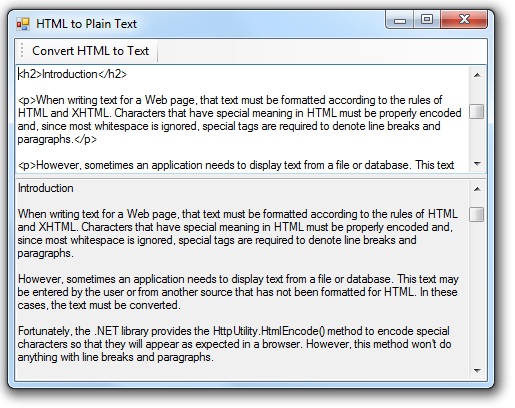
Using the HtmlToText class is simply a matter of passing your HTML text to the Convert() method. The included download includes code for the class and a test project.
Listing 2: Using the HtmlToText Class
HtmlToText convert = new HtmlToText();

textBox2.Text = convert.Convert(textBox1.Text);
I guess that pretty much rounds out my articles on converting between HTML and plain text.
End-User License
Use of this article and any related source code or other files is governed by the terms and conditions of The Code Project Open License.
Author Information

I'm a software and website developer working out of the greater Salt Lake City area of Utah. I've developed many websites including Black Belt Coder, Trail Calendar, and others.
I hike each week with my dogs Suki and Sasha. You can see my hiking blog at Hiking Salt Lake.

Convert HTML to Text(转载)的更多相关文章
- Html.text(转载)
2.Html.ValidationSummary:用来显示ModelState字典中所有验证错误的无序列表,使用布尔值类型参数(true)来告知辅助方法排除属性级别的错误,只显示ModelState中 ...
- WinForm轻松实现自定义分页 (转载)
转载至http://xuzhihong1987.blog.163.com/blog/static/267315872011315114240140/ 以前都是做web开发,最近接触了下WinForm, ...
- 装饰者模式的学习(c#) EF SaveChanges() 报错(转载) C# 四舍五入 保留两位小数(转载) DataGridView样式生成器使用说明 MSSQL如何将查询结果拼接成字符串 快递查询 C# 通过smtp直接发送邮件 C# 带参访问接口,WebClient方式 C# 发送手机短信 文件 日志 写入 与读取
装饰者模式的学习(c#) 案例转自https://www.cnblogs.com/stonefeng/p/5679638.html //主体基类 using System;using System.C ...
- C#通用类型转换 Convert.ChangeType
]; object innerValue = ChangeType(value, innerType); return Activator.CreateInstance ...
- linq to sql转载
LINQ简介 LINQ:语言集成查询(Language INtegrated Query)是一组用于c#和Visual Basic语言的扩展.它允许编写C#或者Visual Basic代码以查询数据库 ...
- 【转载】Using the Web Service Callbacks in the .NET Application
来源 This article describes a .NET Application model driven by the Web Services using the Virtual Web ...
- asp.net2.0安全性(2)--用户个性化设置(1)--转载来自车老师
在Membership表中可以存储一些用户的基本信息,但有的时候,我们需要记录的用户信息远远不止Membership表中提供的这些,如QQ.MSN.家庭住址.联系电话等等.那如何把这些用户信息记录到数 ...
- C#客户端和服务端数据的同步传输 (转载)
客户端: using System;using System.Collections.Generic;using System.ComponentModel;using System.Data;u ...
- C#多线程解决界面卡死问题的完美解决方案,BeginInvoke而不是委托delegate 转载
问题描述:当我们的界面需要在程序运行中不断更新数据时,当一个textbox的数据需要变化时,为了让程序执行中不出现界面卡死的现像,最好的方法就是多线程来解决一个主线程来创建界面,使用一个子线程来执行程 ...
随机推荐
- 关于databinding的细节
原文在此:http://www.codeproject.com/Articles/24656/A-Detailed-Data-Binding-Tutorial 完整译文在此:http://www.cn ...
- python---time和datetime
#python中时间日期格式化符号 %y 两位数的年份表示(00-99) %Y 四位数的年份表示(000-9999) %m 月份(01-12) %d 月内中的一天(0-31) %H 24小时制小时数( ...
- 处理ios webview 更新缓存本地css、js后webview缓存无法更新的问题
项目中需要使用app本地css.js,并且可以根据服务下发自动更新本地css.js.测试发现只要更新后的css或者js和更新前路径一致,webview加载的还是更新前的css.js.怀疑是webvie ...
- Hibernate5.2之QBC查询
Hibernate5.2值QBC查询 一.简介 Hibenate的QBC查询个人认为是Hib ...
- html_博客博主
csdn: 工匠若水 http://blog.csdn.net/yanbober yunama: IT蓝豹:http://www.itlanbao.com/: http://ask.dcloud.ne ...
- EventBus--介绍
注意: 1,post()方法里面的类型和onEvent()中的类型要一致., 2,订阅者对象中 必须有 onEvent 的 public 方法 ---public void onEvent(O ...
- 每天一个 Linux 命令(18):locate 命令
locate 让使用者可以很快速的搜寻档案系统内是否有指定的档案.其方法是先建立一个包括系统内所有档案名称及路径的数据库,之后当寻找时就只需查询这个数据库,而不必实际深入档案系统之中了.在一般的 di ...
- 用exp导数据时遇到oracle 1455的错误
exp scott/scott@orcl file=d:\impbak\20161214.dmp owner=scott TRIGGERS=n INDEXES=n STATISTICS=none(ow ...
- eclispe中在线安装maven插件
启动Eclipse之后,在菜单栏中选择Help,然后选择Install New Software-,接着你会看到一个Install对话框, 点击Work with:字段边上的Add按钮,你会得到一个新 ...
- 反转链表,时间复杂度O(n),空间复杂度O(1)
原理:使用三个指针,p,q指向交换的元素,r指向后续元素 代码如下: class Node{ int data; Node next; Node(int data){ this.data=data; ...