
java word文档 转 html文件
一、简介
一般word文件后缀有doc、docx两种。docx是office word 2007以及以后版本文档的扩展名;doc是office word 2003文档保存的扩展名。对于这两种格式的word转换成html需要使用不同的方法。
对于docx格式的文档使用xdocreport进行转换。依赖如下:
<dependency>

    <groupId>fr.opensagres.xdocreport</groupId>

    <artifactId>fr.opensagres.xdocreport.document</artifactId>

    <version>1.0.5</version>

</dependency>

<dependency>

    <groupId>fr.opensagres.xdocreport</groupId>

    <artifactId>org.apache.poi.xwpf.converter.xhtml</artifactId>

    <version>1.0.5</version>

</dependency>
对于docx格式的文档使用poi进行转换。依赖如下:
<dependency>

    <groupId>org.apache.poi</groupId>

    <artifactId>poi</artifactId>

    <version>3.12</version>

</dependency>

<dependency>

    <groupId>org.apache.poi</groupId>

    <artifactId>poi-scratchpad</artifactId>

    <version>3.12</version>

</dependency>
二:示例
代码示例如下:
 package com.test.word;

 import java.io.File;

 import java.io.FileInputStream;

 import java.io.FileNotFoundException;

 import java.io.FileOutputStream;

 import java.io.IOException;

 import java.io.InputStream;

 import java.io.OutputStream;

 import javax.xml.parsers.DocumentBuilderFactory;

 import javax.xml.parsers.ParserConfigurationException;

 import javax.xml.transform.OutputKeys;

 import javax.xml.transform.Transformer;

 import javax.xml.transform.TransformerException;

 import javax.xml.transform.TransformerFactory;

 import javax.xml.transform.dom.DOMSource;

 import javax.xml.transform.stream.StreamResult;

 import org.apache.poi.hwpf.HWPFDocument;

 import org.apache.poi.hwpf.converter.PicturesManager;

 import org.apache.poi.hwpf.converter.WordToHtmlConverter;

 import org.apache.poi.hwpf.usermodel.PictureType;

 import org.apache.poi.xwpf.converter.core.FileImageExtractor;

 import org.apache.poi.xwpf.converter.core.FileURIResolver;

 import org.apache.poi.xwpf.converter.xhtml.XHTMLConverter;

 import org.apache.poi.xwpf.converter.xhtml.XHTMLOptions;

 import org.apache.poi.xwpf.usermodel.XWPFDocument;

 import org.junit.Test;

 import org.w3c.dom.Document;

 /**

  * word 转换成html

  */

 public class WordToHtml {

     /**

      * 2007版本word转换成html

      * @throws IOException

      */

     @Test

     public void Word2007ToHtml() throws IOException {

         String filepath = "C:/test/";

         String fileName = "滕王阁序2007.docx";

         String htmlName = "滕王阁序2007.html";

         final String file = filepath + fileName;

         File f = new File(file);

         if (!f.exists()) {

             System.out.println("Sorry File does not Exists!");

         } else {

             if (f.getName().endsWith(".docx") || f.getName().endsWith(".DOCX")) {

                 // 1) 加载word文档生成 XWPFDocument对象

                 InputStream in = new FileInputStream(f);

                 XWPFDocument document = new XWPFDocument(in);

                 // 2) 解析 XHTML配置 (这里设置IURIResolver来设置图片存放的目录)

                 File imageFolderFile = new File(filepath);

                 XHTMLOptions options = XHTMLOptions.create().URIResolver(new FileURIResolver(imageFolderFile));

                 options.setExtractor(new FileImageExtractor(imageFolderFile));

                 options.setIgnoreStylesIfUnused(false);

                 options.setFragment(true);

                 // 3) 将 XWPFDocument转换成XHTML

                 OutputStream out = new FileOutputStream(new File(filepath + htmlName));

                 XHTMLConverter.getInstance().convert(document, out, options);

                 //也可以使用字符数组流获取解析的内容

 //                ByteArrayOutputStream baos = new ByteArrayOutputStream();

 //                XHTMLConverter.getInstance().convert(document, baos, options);

 //                String content = baos.toString();

 //                System.out.println(content);

 //                 baos.close();

             } else {

                 System.out.println("Enter only MS Office 2007+ files");

             }

         }

     }

     /**

      * /**

      * 2003版本word转换成html

      * @throws IOException

      * @throws TransformerException

      * @throws ParserConfigurationException

      */

     @Test

     public void Word2003ToHtml() throws IOException, TransformerException, ParserConfigurationException {

         String filepath = "C:/test/";

         final String imagepath = "C:/test/image/";

         String fileName = "滕王阁序2003.doc";

         String htmlName = "滕王阁序2003.html";

         final String file = filepath + fileName;

         InputStream input = new FileInputStream(new File(file));

         HWPFDocument wordDocument = new HWPFDocument(input);

         WordToHtmlConverter wordToHtmlConverter = new WordToHtmlConverter(DocumentBuilderFactory.newInstance().newDocumentBuilder().newDocument());

         //设置图片存放的位置

         wordToHtmlConverter.setPicturesManager(new PicturesManager() {

             public String savePicture(byte[] content, PictureType pictureType, String suggestedName, float widthInches, float heightInches) {

                 File imgPath = new File(imagepath);

                 if(!imgPath.exists()){//图片目录不存在则创建

                     imgPath.mkdirs();

                 }

                 File file = new File(imagepath + suggestedName);

                 try {

                     OutputStream os = new FileOutputStream(file);

                     os.write(content);

                     os.close();

                 } catch (FileNotFoundException e) {

                     e.printStackTrace();

                 } catch (IOException e) {

                     e.printStackTrace();

                 }

                 return imagepath + suggestedName;

             }

         });

         //解析word文档

         wordToHtmlConverter.processDocument(wordDocument);

         Document htmlDocument = wordToHtmlConverter.getDocument();

         File htmlFile = new File(filepath + htmlName);

         OutputStream outStream = new FileOutputStream(htmlFile);

         //也可以使用字符数组流获取解析的内容

 //        ByteArrayOutputStream baos = new ByteArrayOutputStream();

 //        OutputStream outStream = new BufferedOutputStream(baos);

         DOMSource domSource = new DOMSource(htmlDocument);

         StreamResult streamResult = new StreamResult(outStream);

         TransformerFactory factory = TransformerFactory.newInstance();

         Transformer serializer = factory.newTransformer();

         serializer.setOutputProperty(OutputKeys.ENCODING, "utf-8");

         serializer.setOutputProperty(OutputKeys.INDENT, "yes");

         serializer.setOutputProperty(OutputKeys.METHOD, "html");

         serializer.transform(domSource, streamResult);

         //也可以使用字符数组流获取解析的内容

 //        String content = baos.toString();

 //        System.out.println(content);

 //        baos.close();

         outStream.close();

     }

 }
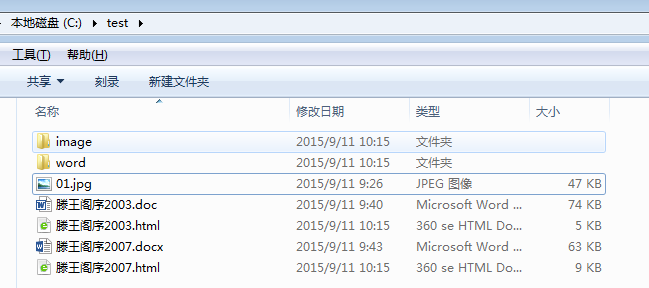
运行生存文件结果如下:

java word文档 转 html文件的更多相关文章
- 微信公众号怎么添加附件?比如word文档,pdf文件等
微信公众号怎么添加附件?比如word文档,pdf文件等 我们都知道创建一个微信公众号,在公众号中发布一些文章是非常简单的,但公众号添加附件下载的功能却被限制,如今可以使用小程序“微附件”进行在公众 ...
- JAVA使用aspose实现word文档转pdf文件
引入jar包 下载地址:https://yvioo.lanzous.com/iezpdno3mob 然后打开下载的目录打开cmd执行 mvn install:install-file -Dfile=a ...
- POI实现word文档转html文件
POI word文件转html package com.feiruo.officeConvert; import java.io.BufferedWriter; import java.io.File ...
- 如何在PowerDesigner将PDM导出生成WORD文档或者html文件
a) 使用PowerDesigner打开pdm文件 b) 点击Report Temlates 制作模板 点击PowerDesigner菜单栏“Report” -> ...
- 批量转换word文档到pdf文件
最近在整理每周的工作记录.因为每周的工作记录大都是单独的word文件,有时候忘记了也不容易找出来,一个个打开查找太费劲,因此想着把这些文件通过word2016的另存为功能转换为pdf,然后永Acrob ...
- Java 使用 jacob 将 word 文档转换为 pdf 文件
网上查询了许许多多的博客,说利用 poi.iText.Jsoup.jdoctopdf.使用 jodconverter 来调用 openOffice 的服务来转换等等,我尝试了很多种,但要么显示不完全, ...
- DEV word文档转换为pdf文件
引用aspose.net控件2.0. docement doc=new document(文件路径和名称); doc.save(输出路径\file.pdf);
- 转换Word文档为PDF文件
1.使用 Office COM组件的Microsoft.Office.Interop.word.dll库 该方法需要在电脑上安装Office软件,并且需要Office支持转换为PDF格式,如果不支持, ...
- 算法笔记_104:蓝桥杯练习 算法提高 新建Microsoft Word文档(Java)
目录 1 问题描述 2 解决方案 1 问题描述 问题描述 L正在出题,新建了一个word文档,想不好取什么名字,身旁一人惊问:“你出的题目叫<新建Microsoft Word文档>吗? ...
随机推荐
- Oracle的建立表格
找到table右键点击,选择新建: 输入名称,用拼音或者英文,中文容易出现错误.输入完名称选择列: 列也写好名称,类型可以选择,VARCHAR2()是字符串类型,括号里面写数字代表长度,英文字母和数字 ...
- loadrunner11中java vuser引用jar包
1.创建工程,新建类,HelloWorld.java,代码如下: package com.liuke; public class HelloWorld { public String getHello ...
- GJM : 进程、线程和协程的理解
感谢您的阅读.喜欢的.有用的就请大哥大嫂们高抬贵手"推荐一下"吧!你的精神支持是博主强大的写作动力以及转载收藏动力.欢迎转载! 版权声明:本文原创发表于 [请点击连接前往] ,未经 ...
- IO复用_select函数
select函数: #include <sys/select.h> #include <time.h> #include <sys/types.h> #includ ...
- IClient for js开发之地图的加载
进行web开发之前首先需要安装IServer以及iClient for JavaScript的开发包.在这两中都具备的前提下进行第一步,如何调用IServer中发布的服务 调用iServer 中发布的 ...
- jQuery Countdown Timer 倒计时效果
这个一款简单的 jQuery 倒计时插件,用于显示剩余的天数,小时,分钟和秒.倒计时功能是非常有用的一个小功能,可以告诉用户多久以后您的网站将会发布或者关闭进行维护,还可以用于举办活动的开始和停止的倒 ...
- 2015年免费的25款 WordPress 网站模板
2015年 WordPress 插件和主题的数量继续在增长.这一年,我们可以期待WP主题引入一些新的技术,从背景,自适应响应式图像到从背景图片中提取主色. 本文包含25款最近发布的 WordPress ...
- 12款支持移动设备的响应式 WordPress 主题
响应式和现代设计风格的多用途 WordPress 主题与能够非常灵活的适应所有设备.而高级主题能够更大可能性的轻松定制.所有的主题是完全响应式的,您可以从主题选项中启用响应模式. 今天,这个列表收集了 ...
- Spring(2) ------ 依赖注入
spring框架为我们提供了三种注入方式,分别是set注入,构造方法注入,接口注入. 1.set注入: 采用属性的set方法进行初始化,就成为set注入. 1)给普通字符类型赋值. public cl ...
- crm2013关于contentIFrame不能使用
在CRM2011里面,我们可以在页面的控制台里面输入: contentIFrame.Xrm.Page.data.entity.getEntityName(); contentIFrame.Xrm.Pa ...