
iOS(本地通知与远程通知)
iOS 推送通知有两种:本地推送、远程推送.
本地推送 : 在不需要联网的情况下,由APP发出推送,常用于某一时刻的通知,如闹钟。本地通送有局限性在于当APP处于后台或者退出时就无法发出通知。
远程推送: APNs和第三方推送,第三方推送最终也需要APNs转发,
本地推送实现
注册通知:
float sysVer = [[UIDevice currentDevice].systemVersion floatValue];

    if (sysVer < 10) {

        //设置通知类型 弹框、脚标、声音

        UIUserNotificationSettings* setting = [UIUserNotificationSettings settingsForTypes:UIUserNotificationTypeAlert | UIUserNotificationTypeBadge | UIUserNotificationTypeSound categories:nil];

        [[UIApplication sharedApplication] registerUserNotificationSettings:setting];

    }else{

        UNUserNotificationCenter* center =[UNUserNotificationCenter currentNotificationCenter];

        [center requestAuthorizationWithOptions:(UNAuthorizationOptionAlert | UNAuthorizationOptionBadge) completionHandler:^(BOOL granted, NSError * _Nullable error) {

            if (granted) {

                NSLog(@"通知注册成功");

            }

        }];

    }
发送通知:
float sysVer = [[UIDevice currentDevice].systemVersion floatValue];

    if(sysVer < 10){

        UILocalNotification* local = [[UILocalNotification alloc] init];

        //给这些属性赋值才能让通知有特定的内容

        local.alertBody=@"航海王:One Piece";

        //特定的时间让显示出来()

        NSString* dateStr = @"2016-12-01 16:30:00";

        NSDateFormatter* dateFormatter = [[NSDateFormatter alloc]init];

        dateFormatter.dateFormat = @"yyyy-MM-dd hh:mm:ss";

        local.fireDate=[NSDate dateWithTimeIntervalSinceNow:60];

        //滑动解锁的文字(在推送通知信息的下面一小行字)

        local.alertAction =@" ";

        //有声音给声音,没声音用默认的

        local.soundName=@"UILocalNotificationDefaultSoundName";

        //设置图标右上角数字

        local.applicationIconBadgeNumber=1;

        //用户信息

        local.userInfo=@{@"name":@"航海王",@"content":@"One Piece",@"time":@"20161201"};

        //3:定制一个通知

        [[UIApplication sharedApplication]scheduleLocalNotification:local];

    }else{

        UNMutableNotificationContent* content = [[UNMutableNotificationContent alloc] init];

        content.title = [NSString localizedUserNotificationStringForKey:@"Hello Title" arguments:nil];

        content.body = [NSString localizedUserNotificationStringForKey:@"Hello Body" arguments:nil];

        content.sound = [UNNotificationSound defaultSound];

        //设定通知时间

        UNTimeIntervalNotificationTrigger* trigger = [UNTimeIntervalNotificationTrigger triggerWithTimeInterval:5 repeats:NO];

        UNNotificationRequest* request = [UNNotificationRequest requestWithIdentifier:@"notificationIdentifier" content:content trigger:trigger];

        UNUserNotificationCenter* center = [UNUserNotificationCenter currentNotificationCenter];

        [center addNotificationRequest:request withCompletionHandler:^(NSError * _Nullable error) {

        }];

    }
远程推送实现
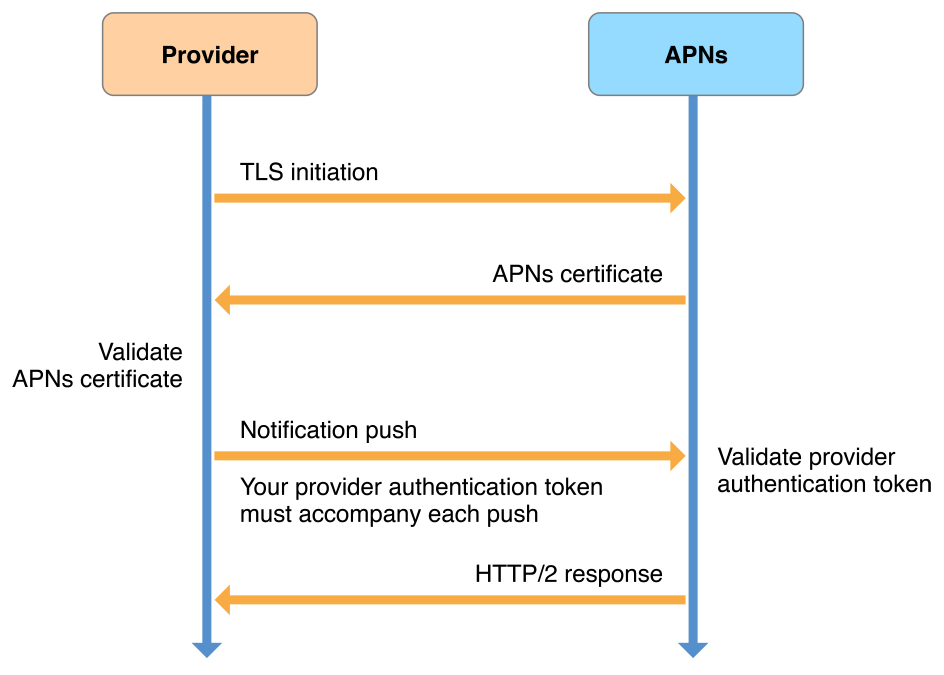
服务器向客户端发送推送的过程:

每个请求中都有设备令牌,APNs通过设备令牌去识别设备和APP,每次运行APP,都会向服务器发送设备令牌,服务器再使用设备令牌发送推送,只有当推送设置改变时设备令牌才会被改变 ,只有APNs 可以解码设备令牌.
服务器与APNS 连接过程:
信鸽 使用流程:
1、配置真机调试证书, 推送测试证书 (度娘·······)
2、注册iOS推送
 float sysVer = [[[UIDevice currentDevice] systemVersion] floatValue];

    if(sysVer < 8){

        [[UIApplication sharedApplication] registerForRemoteNotificationTypes:(UIRemoteNotificationTypeAlert | UIRemoteNotificationTypeBadge | UIRemoteNotificationTypeSound)];

    }else{

#if __IPHONE_OS_VERSION_MAX_ALLOWED >= _IPHONE80_

        UIMutableUserNotificationCategory *categorys = [[UIMutableUserNotificationCategory alloc] init];

        UIUserNotificationSettings *userSettings = [UIUserNotificationSettings settingsForTypes:UIUserNotificationTypeBadge|UIUserNotificationTypeSound|UIUserNotificationTypeAlert

                                                                                     categories:[NSSet setWithObject:categorys]];

        [[UIApplication sharedApplication] registerUserNotificationSettings:userSettings];

        [[UIApplication sharedApplication] registerForRemoteNotifications];

#endif

    }
3、注册设备信息(deviceToken)
- (void)application:(UIApplication *)application didRegisterForRemoteNotificationsWithDeviceToken:(NSData *)deviceToken {

   //注册设备

NSString * deviceTokenStr = [XGPush registerDevice: deviceToken];

   //打印获取的deviceToken的字符串

NSLog(@"deviceTokenStr is %@",deviceTokenStr);

}
3、注册信鸽
[XGPush startApp:@“10086” appKey:@"key"]; //设置账户[XGPush setAccount:@"123456"];
//推送统计- (void)application:(UIApplication*)application didReceiveRemoteNotification:(NSDictionary*)userInfo
{ [XGPush handleReceiveNotification:userInfo];}
iOS(本地通知与远程通知)的更多相关文章
- ios开发——实用技术OC-Swift篇&本地通知与远程通知详解
本地通知与远程通知详解 一:本地通知 Local Notification的作用 Local Notification(本地通知) :是根据本机状态做出的通知行为,因此,凡是仅需依赖本机状态即可判 ...
- iOS10以前的本地通知和远程通知
一.简介 分为本地推送和远程推送2种.可以在应用没有打开甚至手机锁屏情况下给用户以提示.它们都需要注册,注册后系统会弹出提示框(如下图)提示用户是否同意,如果同意则正常使用:如果用户不同意则下次打开程 ...
- iOS 远程通知(Remote Notification)和本地通知(Local Notification)
ios通知分为远程通知和本地通知,远程通知需要连接网络,本地通知是不需要的,不管用户是打开应用还是关闭应用,我们的通知都会发出,并被客户端收到 我们使用远程通知主要是随时更新最新的数据给用户,使用本地 ...
- iOS Notification – 远程通知
本文讲解iOS的远程通知的基本使用,主要包括远程通知的类型,处理远程通知的场景,以及远程通知相关证书的配置等等. 一.APNs简介 APNs是苹果公司提供的远程通知的服务器,当App处于后台或者没有运 ...
- (七十三)iOS本地推送通知的实现
iOS的推送通知分为本地推送和网络推送两种,如果App处于挂起状态,是可以发送本地通知的,如果已经被杀掉,则只有定时通知可以被执行,而类似于QQ的那种网络消息推送就无法实现了,因为App的网络模块在被 ...
- iOS: 本地通知的前后变化(iOS10)
一.介绍 通知和推送是应用程序中很重要的组成部分.本地通知可以为应用程序注册一些定时任务,例如闹钟.定时提醒等.远程推送则更强大,提供了一种通过服务端主动推送消息到客户端的方式,服务端可以更加灵活地 ...
- IOS本地通知
发送通知: UILocalNotification *newNotification = [[UILocalNotification alloc] init]; if (newNotifica ...
- IOS本地通知:UILocalNotification使用记录
第一次接触IOS的本地通知的使用,看到别人写的一个比较详细的记录,自己整理过来,方便以后再次使用和拓展: 1.创建一个本地通知,添加到系统: // 初始化本地通知对象 UILocalNotificat ...
- IOS 本地通知 UILocalNotification
IOS 本地通知 UILocalNotification [本文章第四部分中的代码逻辑来自网上的借鉴,并非我自己原创] 大概一个月前,我开始跟着做IOS项目了.学习C++,了解Objective-C, ...
随机推荐
- Tab切换
代码 <!DOCTYPE html> <html lang="en"><head> <meta charset="UTF-8&q ...
- servlet filter和springMVC拦截器的区别
参考 http://blog.csdn.net/ggibenben1314/article/details/45341855
- NOIP复赛
[代码为王] http://www.cnblogs.com/codeisking [洛谷] http://www.luogu.org/ NOIP2015 金币 扫雷游戏 求和 推销员 枚举 数学 优先 ...
- 两种流行Spring定时器配置:Java的Timer类和OpenSymphony的Quartz
1.Java Timer定时 首先继承java.util.TimerTask类实现run方法 import java.util.TimerTask; public class EmailReportT ...
- 【转】apache DateFormatUtils 与 DateUtils 的使用
在Apache Commons项目的Lang里面,有两个类:DateUtils和DateFormatUtils,专门用于处理时间日期转换.它们在 org.apache.commons.lang.tim ...
- Linux系统安全保护措施
1.系统安全记录文件 操作系统内部的记录文件是检测是否有网络入侵的重要线索.如果系统是直接连接到Internet的,且发现有很多人对系统做telnet/FTP登录尝试,可以运行“#more/var/s ...
- ActivityGroup、TabHost之子页面不刷新——getLocalActivityManager() 以及intent.setFlags(Intent.FLAG_ACTIVITY_CLEAR_TOP)用法
TabHost继承自ActivityGroup,以下不再单独列出. ActivityGroup在第一次创建的时候会完整的执行子Activity或子view的生命周期,但在从其他子activity或子v ...
- jeecg 扩展封装查询条件 时间段查询
使用jeecg框架开发的小伙伴们知道,添加查询条件,通常是我们加一个配置(query="true")就可以将该字段设置为查询条件.简单方便.但是这样的配置查询条件仅适用于输入框输入 ...
- 洛谷P3370 【模板】字符串哈希
P3370 [模板]字符串哈希 143通过 483提交 题目提供者HansBug 标签 难度普及- 提交 讨论 题解 最新讨论 看不出来,这题哪里是哈希了- 题目描述 如题,给定N个字符串(第i个 ...
- leetcode 190
190. Reverse Bits Reverse bits of a given 32 bits unsigned integer. For example, given input 4326159 ...