
ListActivity的使用
Android中经常用到列表,ListActivity是实现列表的一种好方法。
使用ListActivity的方法,首先定义布局文件:
<?xml version="1.0" encoding="utf-8"?>

<LinearLayout xmlns:android="http://schemas.android.com/apk/res/android"

    android:layout_width="match_parent"

    android:layout_height="match_parent"

    android:orientation="vertical" >

    <LinearLayout

        android:layout_width="fill_parent"

        android:layout_height="match_parent"

        android:layout_weight="5" >

        <TextView

            android:id="@+id/textView1"

            style="@style/my_style"

            android:layout_width="match_parent"

            android:layout_height="fill_parent"

            android:layout_weight="4" />

        <TextView

            android:id="@+id/textView2"

            style="@style/my_style"

            android:layout_width="match_parent"

            android:layout_height="fill_parent"

            android:layout_gravity="center_vertical|center_horizontal"

            android:layout_weight="1"

            android:gravity="center_vertical|center_horizontal"

            android:text="应用名称" />

        <TextView

            android:id="@+id/textView3"

            android:layout_width="match_parent"

            android:layout_height="fill_parent"

            android:layout_weight="4"

            android:gravity="center_vertical|center_horizontal"

            android:text="是否系统应用" />

    </LinearLayout>

    <ListView

        android:id="@id/android:list"

        android:layout_width="fill_parent"

        android:layout_height="match_parent"

        android:layout_weight="1" >

    </ListView>

    <Button

        android:id="@+id/btn_apk"

        style="@style/my_style"

        android:layout_width="fill_parent"

        android:layout_height="match_parent"

        android:layout_weight="5"

        android:text="卸载" />

</LinearLayout>
其中,最关键的就是ListView控件。
然后,再用一个布局文件定义列表中的每一行:
<?xml version="1.0" encoding="utf-8"?>

<LinearLayout xmlns:android="http://schemas.android.com/apk/res/android"

    android:layout_width="match_parent"

    android:layout_height="match_parent"

    android:orientation="horizontal" >

    <CheckBox

        android:id="@+id/chk_apk"

        android:layout_width="match_parent"

        android:layout_height="fill_parent"

        android:layout_weight="4" />

    <TextView

        android:id="@+id/txt_item_name"

        style="@style/my_style"

        android:layout_width="match_parent"

        android:layout_height="fill_parent"

        android:layout_weight="1"

        android:text="TextView" />

    <TextView

        android:id="@+id/txt_item_flag"

        style="@style/my_style"

        android:layout_width="match_parent"

        android:layout_height="fill_parent"

        android:layout_weight="4"

        android:text="TextView" />

</LinearLayout>
最后,在类文件中使用SimpleAdapter类把列表显示出来。
package com.hzhi.sysinfor;

import java.util.ArrayList;

import java.util.HashMap;

import java.util.List;

import java.util.Map;

import android.app.ListActivity;

import android.content.Context;

import android.content.pm.PackageInfo;

import android.content.pm.PackageItemInfo;

import android.content.pm.PackageManager;

import android.os.Bundle;

import android.widget.SimpleAdapter;

public class apk extends ListActivity{

	Context mCtx;

	SimpleAdapter my_adaptor;

	protected void onCreate(Bundle savedInstanceState){

        super.onCreate(savedInstanceState);

        setContentView(R.layout.activity_list_apk);

        my_adaptor = new SimpleAdapter(this,

                get_data(),

                R.layout.list_item_apk,

                new String[]{"name", "flag"},

                new int[]{R.id.txt_item_name, R.id.txt_item_flag});

            setListAdapter(my_adaptor);

            mCtx = MainActivity.mContext;

	}

}
其中get_data()返回一个List<Map<String,String>>,R.layout.activity_list_apk是定义整个列表的布局文件,R.layout.list_item_apk是定义列表中每一行的布局文件。
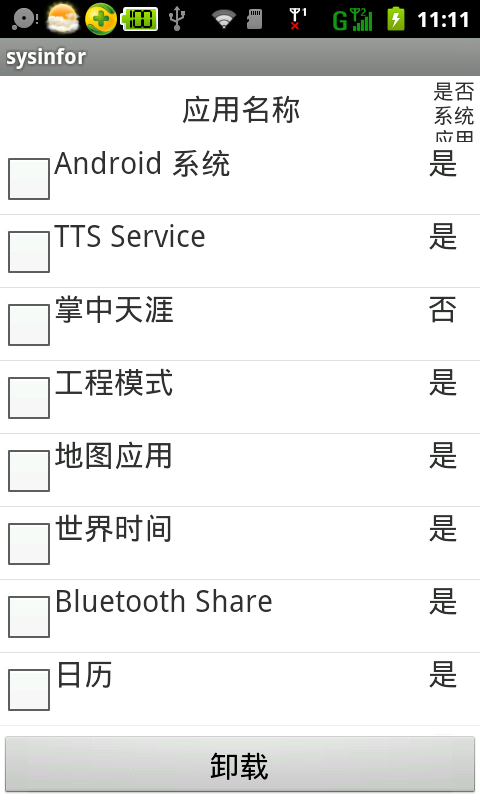
运行的结果:
ListActivity的使用的更多相关文章
- ListActivity的CheckBox点击事件
在一个ListActivity中,可能有很多行,如何在某个动作(如点击某个按钮)时判断哪些行的CheckBox被选中了,哪些行的CheckBox没有被选中,这是一个需要解决的问题. 首先,需要让Bas ...
- 在ListActivity中显示图标
在ListActivity中显示图标,好像并不复杂,实现起来却不轻松. 首先,定义列表中的每一行,这里不是用xml文件定义,而是用一个类定义,CheckBox.ImageView.TextView等控 ...
- android ListView详解继承ListActivity
[转]http://www.cnblogs.com/allin/archive/2010/05/11/1732200.html 在android开发中ListView是比较常用的组件,它以列表的形式展 ...
- Activity中与ListActivity中使用listview区别
Activity中与ListActivity中使用listview区别 一.Activity中与ListActivity中使用listview区别(本身没多大区别,只是ListActivity在lis ...
- Android ListView ListActivity PreferenceActivity背景变黑的问题ZT
Android ListView ListActivity PreferenceActivity背景变黑的问题 ListView在滚动时背景会变暗甚至变黑,这个要从Listview的效果说起,默认的L ...
- android学习笔记12——ListView、ListActivity
ListView.ListActivity ==> ListView以垂直列表的形式显示所有列表项. 创建ListView的方式: 1.直接使用ListView创建 2.Activity继承Li ...
- 通过ListActivity使用ListView布局方法
先简单的介绍一下ListActivity ListActivity是一个专门显示ListView的Activity类,它内置了ListView对象,只要我们设置了数据源,就会自动地显示出来.ListA ...
- Android 自学之列表视图ListView和ListActivity
ListView是手机系统中使用非常广泛的一种组件,它以垂直列表的形式显示所有列表项. 创建ListView有两种方式: 直接使用ListView创建. 让Activity继承ListActivity ...
- AdapterView及其子类之二:使用ListActivity及ArrayAdapter创建列表
见归档项目ListActivityDemo.zip. 基本步骤如下: 1.创建一个TextView,用于指定每一个ListView的格式 <?xml version="1.0" ...
随机推荐
- jmx server 和jmx client
启动jmx server 和jmx client,通过jconsole进入jmx server 然后通过其中远程进程,进入jmx client: 发现,两者可用的tab页不同, MBean的数量类型也 ...
- 缓存篇(Cache)~第一回 使用static静态成员实现服务器端缓存(导航面包屑)
返回目录 今天写缓存篇的第一篇文章,在写完目录后,得到了一些朋友的关注,这给我之后的写作带来了无穷的力量,在这里,感谢那几位伙伴,哈哈! 书归正传,今天我带来一个Static静态成员的缓存,其实它也不 ...
- NodeMCU初探
对于ESP8266模块,早就想知道如何用其脚本语言, 自己先用的这个模块测试的 首先是先下载需要用到的工具和固件 链接:http://pan.baidu.com/s/1dF5NZ3N 密码:bziq ...
- javascript_core_10之继承与数组API
1.现有两对象间的继承:Object.setPrototypeOf(child,father): 2.基于现有父对象创建子对象:var child=Object.create(father,{新属性} ...
- Java 集合 — ArrayList
ArrayList ArrayList是基于数组实现的List 是有序的 每次添加之前判断是否进行扩容 不是线程安全的. 构造方法 // 空数组 private static final Object ...
- Ionic 入门
什么是lonic 简单来说lonic就是一款HTML5移动端应用开发框架,通过配合AngularJS和Cordova/PhoneGap可以开发一款移动端app,值得注意的是它创建的app是混合移动应用 ...
- Linux:文件权限
Linux:文件权限 1.文件权限 ☆文件所有者 ☆用户组 ☆其他人 ☆ROOT 说明: Linux系统中默认所有系统上的账号与一般身份用户,还有那个root的相关信息记录在/etc/passwd文件 ...
- 增强学习(五)----- 时间差分学习(Q learning, Sarsa learning)
接下来我们回顾一下动态规划算法(DP)和蒙特卡罗方法(MC)的特点,对于动态规划算法有如下特性: 需要环境模型,即状态转移概率\(P_{sa}\) 状态值函数的估计是自举的(bootstrapping ...
- jQuery & CSS 制作金属质感的选择按钮
如果能把 CSS 运用好,我们创作出好的交互和效果的可能性大大增加.这篇文章中,我想与大家分享一组结合 jQuery & CSS 制作的充满金属质感的选择框效果,绝对是超级精美的效果. 在线演 ...
- 从重置input file标签中看jQuery的 .val() 和 .attr(“value”) 区别
背景: 在清空input file标签选中值时,分别用了以下方法,发现有的对有的错: [√]$("#file")[0].value = ""; [√]$(&qu ...