
著名ERP厂商的SSO单点登录解决方案介绍一
SSO英文全称Single Sign On,单点登录。SSO是在多个应用系统中,用户只需要登录一次就可以访问所有相互信任的应用系统。它包括可以将这次主要的登录映射到其他应用中用于同一个用户的登录的机制。认证系统的主要功能是将用户的登录信息和用户信息库相比较,对用户进行登录认证;认证成功后,认证系统应该生成统一的认证标志(ticket),返还给用户。它是比较流行的企业业务整合的解决方案之一。
企业应用集成(EAI, Enterprise Application Integration)。企业应用集成可以在不同层面上进行:例如在数据存储层面上的“数据大集中”,在传输层面上的“通用数据交换平台”,在应用层面上的“业务流程整合”,和用户界面上的“通用企业门户”等等。事实上,还有一个层面上的集成变得越来越重要,那就是“身份认证”的整合,也就是“单点登录。
在信息安全管理中,访问控制(Access Controls)环绕四个过程:Identification;Authentication;Authorization;Accountability。单点登录(Single Sign On)属于Authorization授权系统,除单点登录外还包括:Lightweight Directory Access Protocol 和 Authorization ticket。
我们介绍一下 SAP SSO Single Sign-On 单点登录
SAP portfolio
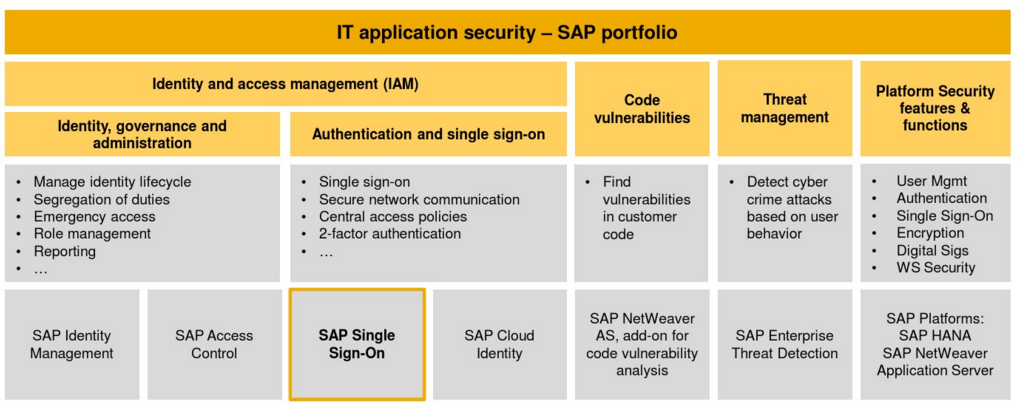
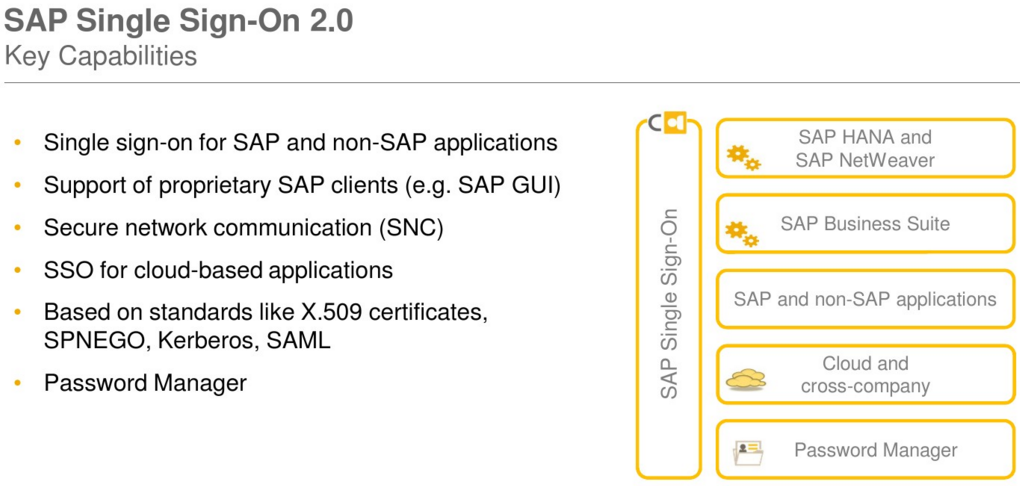
SAP Single Sign-On provides simple, secure access to IT applications for business users. It offers advanced security
capabilities to protect your company data and business applications.
Simple and secure access
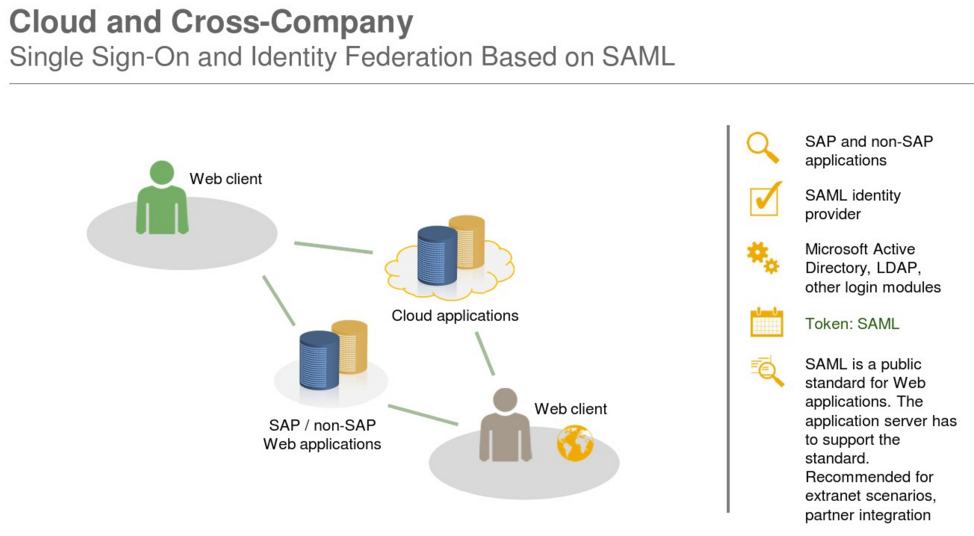
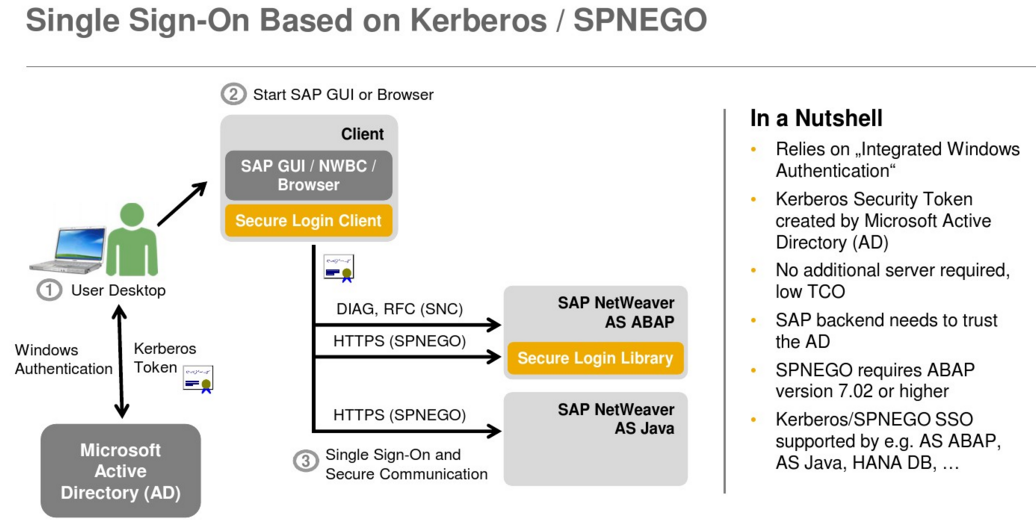
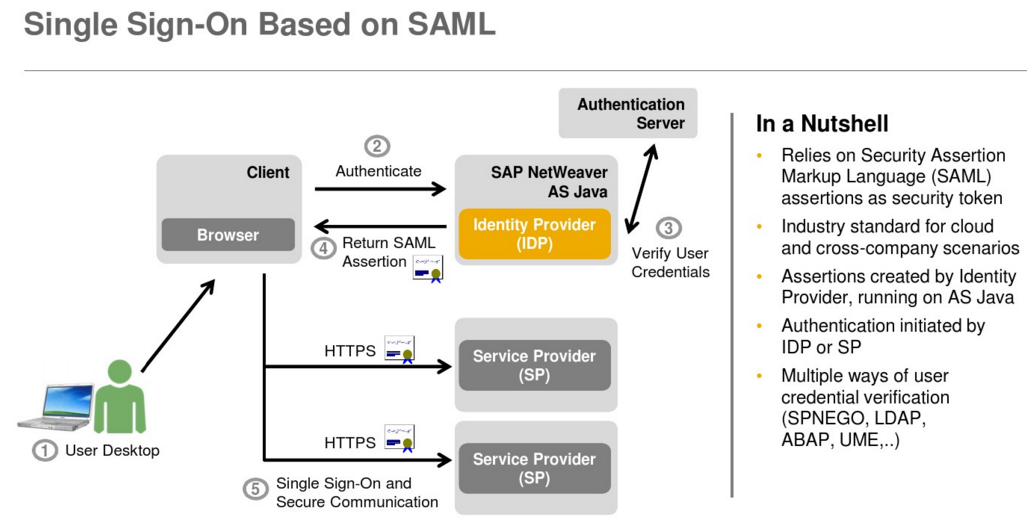
Single sign-on for native SAP clients and web applications
Single sign-on for mobile devices
Support for cloud and on-premise landscapes
Secure data communication
Encryption of data communication for SAP GUI
Digital signatures
FIPS 140-2 certification of security functions
Advanced security capabilities
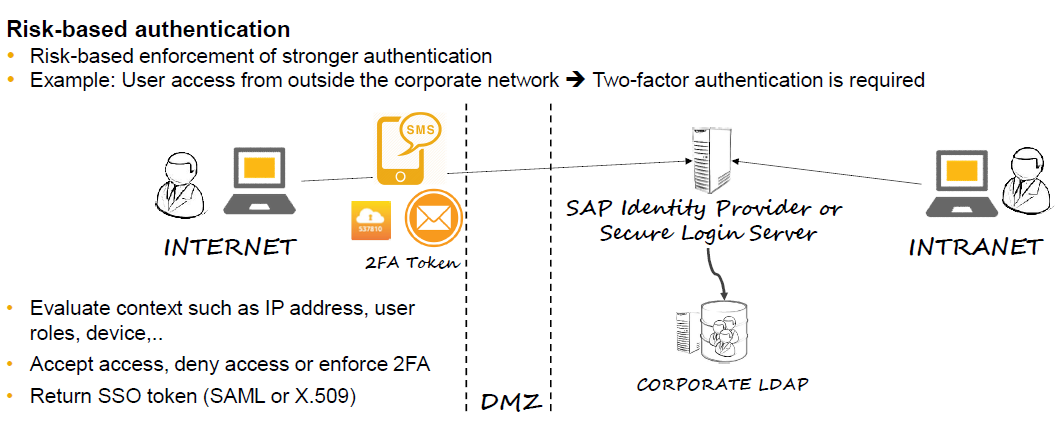
Two-factor authentication
Risk-based authentication using access policies
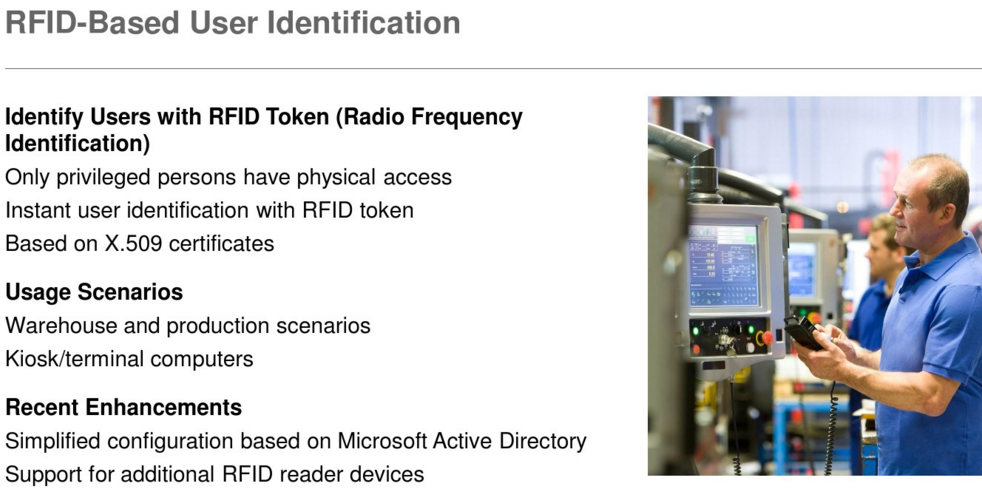
RFID-based authentication
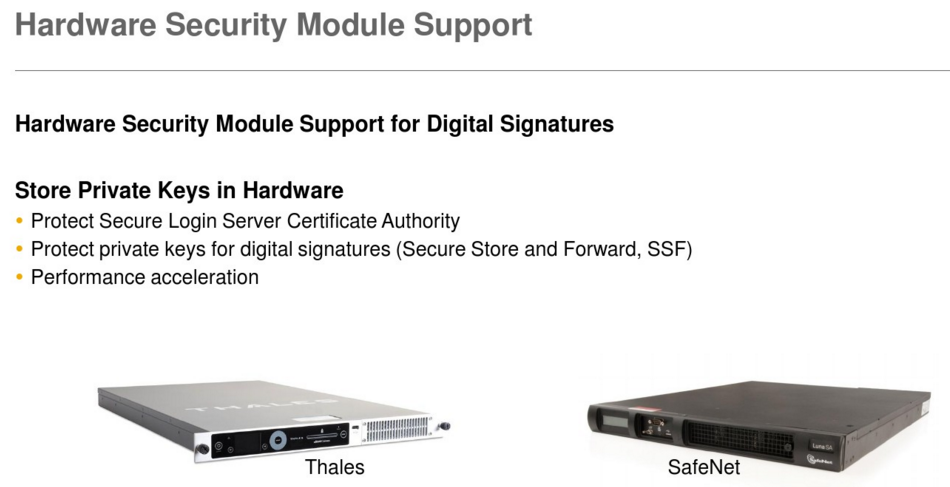
Hardware security module support
Two-Factor Authentication
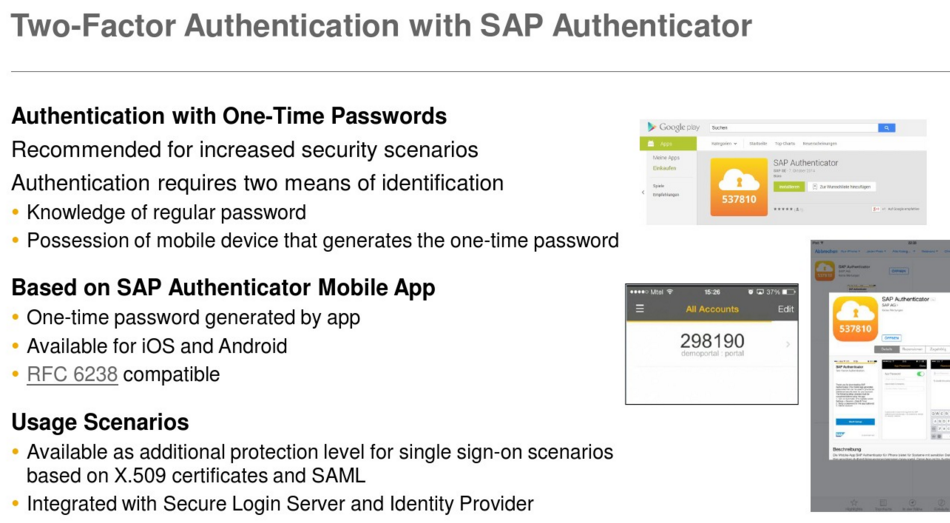
With two-factor authentication you can implement a strong form of authentication for access to corporate resources – for example, for especially critical systems or securing access from outside the company. SAP Single Sign-On 2.0 supports two-factor authentication via time-based one-time passwords (TOTP) generated by the SAP Authenticator mobile app. Alternatively, out-of-band transport of tokens, including one-time passwords sent via SMS or email or RSA/RADIUS, are supported.
Risk-Based Authentication
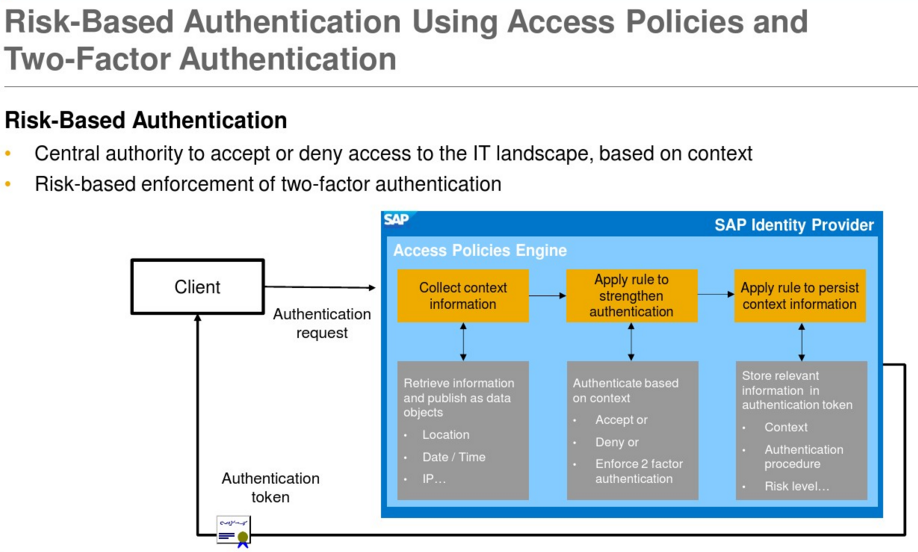
SAP Single Sign-On 2.0 (since SP5) offers risk-based authentication. This means that an authentication process can dynamically adapt to the context of an individual authentication request based on custom-defined access policies. First, you check the context information of an authentication attempt. This could be the IP address of the client, location, date/time, device information, or user attributes such as groups, for example. Secondly, based on this context information you then make a dynamic decision on whether you accept or deny access, or alternatively enforce two-factor authentication in case the context indicates a higher risk. You could even reduce the privileges of the person accessing the backend system, thus limiting the business functionality available to this user.
RFID-Based Identification
For scenarios where users need quick access to a system to perform short tasks, you can use fast user identification via radio-frequency identification (RFID). The user is identified via an RFID token, such as a company batch card. RFID authentication is ideally suited to warehouse and production scenarios with dedicated kiosk PCs for authentication.
Digital Signatures
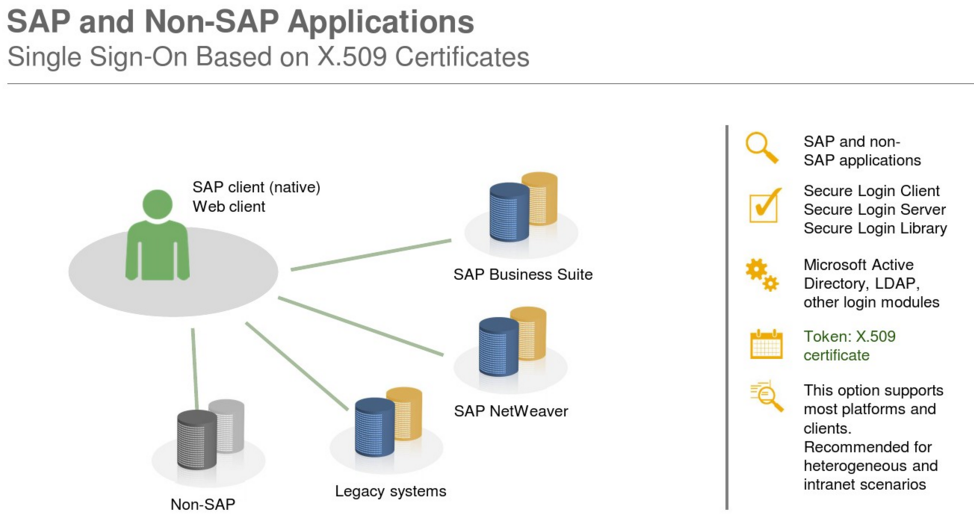
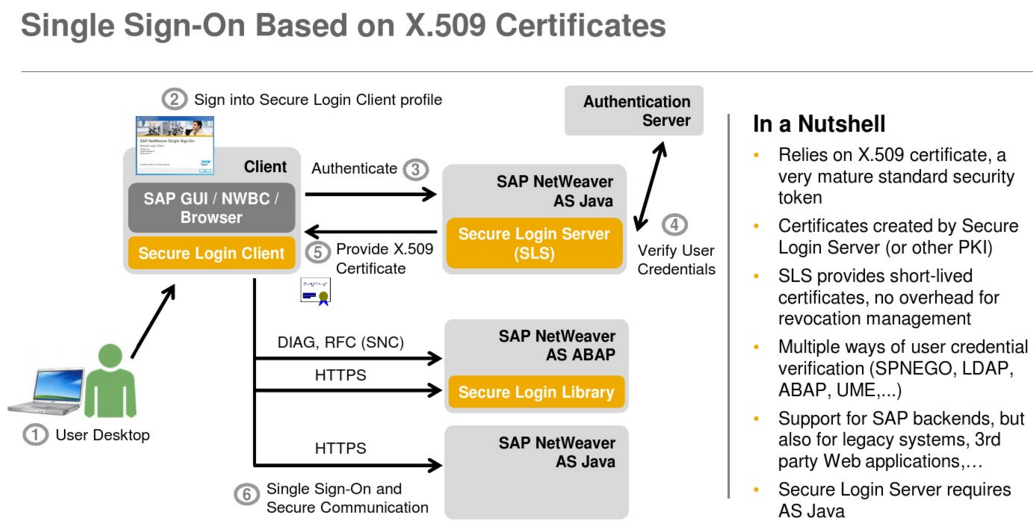
Digital signatures uniquely identify the signer, protect the integrity of the data, and provide the means for a binding signature that cannot be denied afterwards. SAP Single Sign-On supports digital signing using the Secure Store and Forward (SSF) interface. The Secure Login Client for SAP GUI can use X.509 certificates for digital signatures in an SAP environment. Server-side digital signatures are supported by the SAP Common Cryptographic Library. In addition, SAP Single Sign-On includes support for server-side digital signatures via hardware security modules, offering increased security and performance.
Certificate Lifecycle Management for ABAP Application Servers
SAP Single Sign-On 2.0 (since SP6) supports automated renewal of X.509 certificates for SAP NetWeaver Application Server ABAP using Secure Login Server. This reduces manual efforts and prevents downtime.
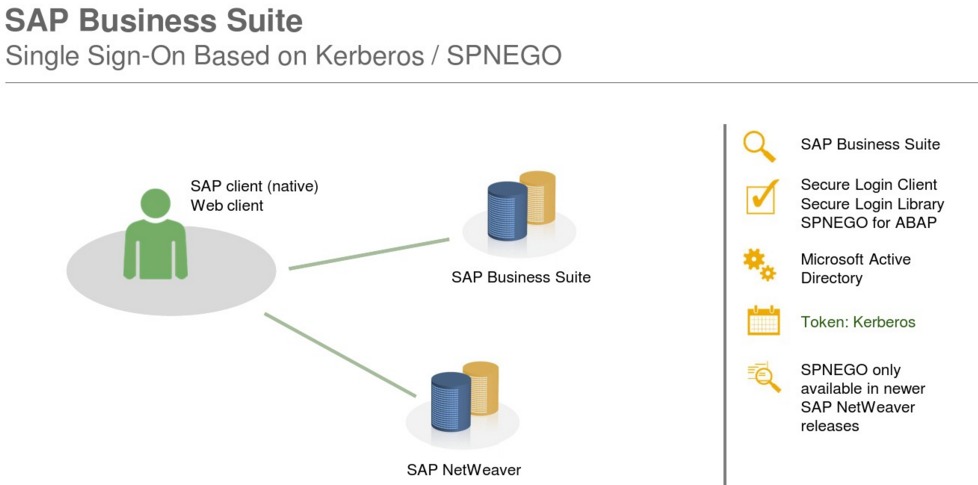
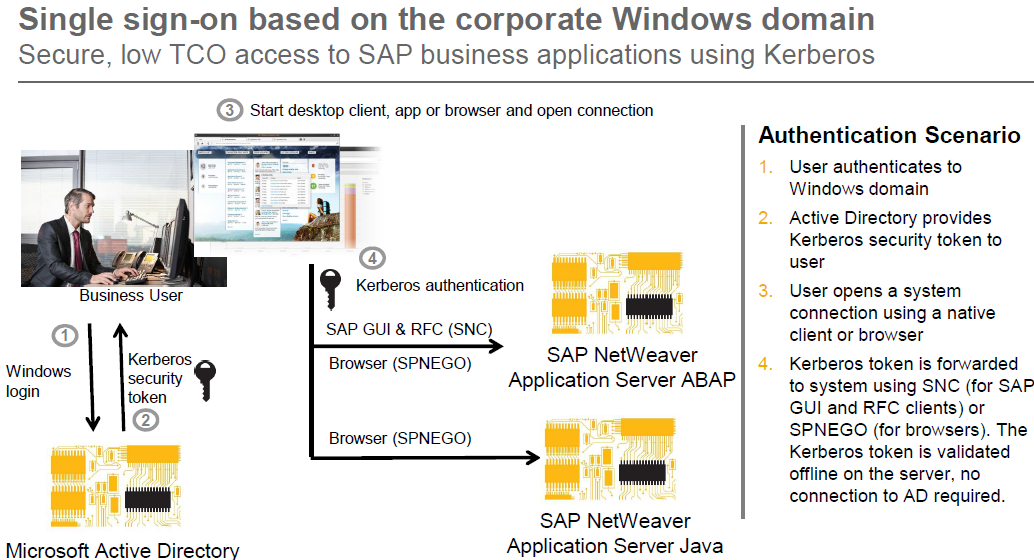
Mobile SSO with SAP Single Sign-On
The SAP Single Sign-On solution brings simplicity for your end-users by eliminating the need for multiple passwords and user IDs. In addition, you can lower the risks of unsecured login information, reduce help desk calls, and help ensure the confidentiality and security of personal and company data. In order to meet evolving security demands, you can extend your single sign-on solution even further and offer your end-users “mobile single sign-on”. Your mobile users will have only one password to remember, less typing of complicated user IDs and passwords, and more time for actual work!
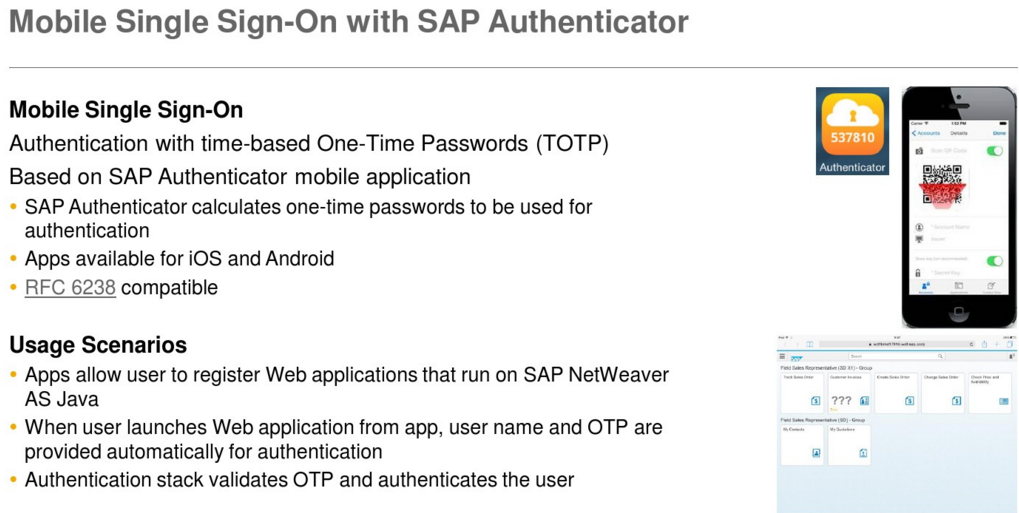
SAP Single Sign-On 2.0 (since SP4) supports single sign-on from mobile devices, offering both a simple and secure solution for mobile access to your corporate business processes. The solution is based on time-based one-time passwords (TOTP) generated by the SAP Authenticator mobile app. The SAP Authenticator mobile app is available for both iOS and Android, and supports the IETF standard RFC 6238.
We assume that the user already started the SAP Authenticator application earlier in same day and now he wants to start using one of his bookmarked web applications, for example SAP Mobile Portal.
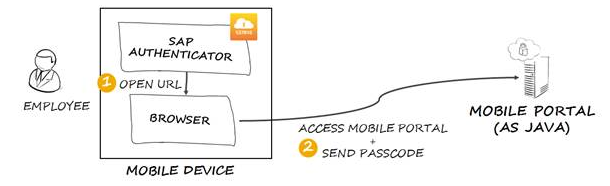
When the user clicks on the Mobile Portal bookmark, the SAP Authenticator generates a new passcode and creates a URL (for example https://portal_host/irj/portal?j_username=[username]&j_passcode=[passcode]), providing in the URL the UserName and the Passcode necessary for authentication. Then SAP Authenticator sends the URL to the browser and the browser opens the requested resource. The user sees only the authentication result when the requested resource appears.
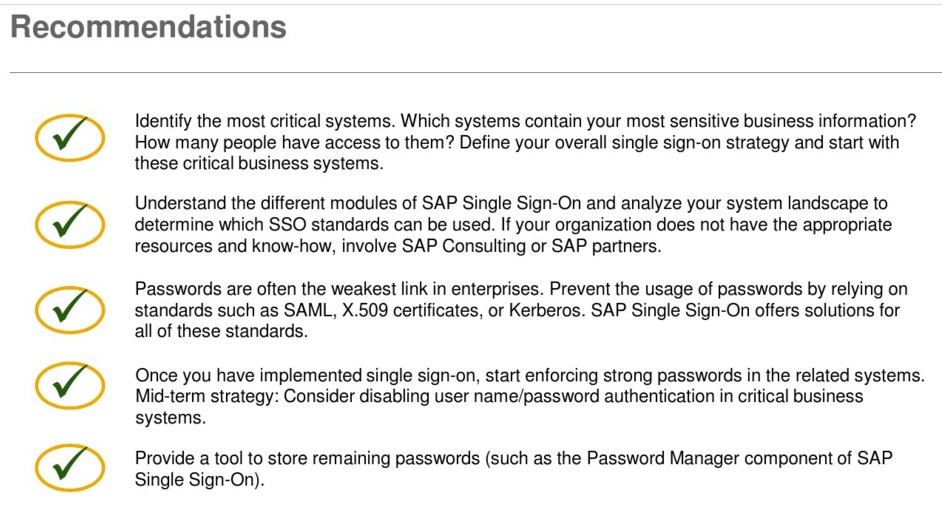
Significant performance increase on all major platforms
• RSA, AES, SHA-2
• Perfect Forward Secrecy for TLS
• Ephemeral key agreement
• Elliptic curve Diffie-Hellman key exchange
• Elliptic curves P-224, P-256, P-384, P-521
• TLS 1.2 cipher suites in Galois Counter Mode (GCM)
• New command “sapgenpse tlsinfo” to help configure
cipher suite profile parameters for TLS
--------------------------------------------------------------------------------------------------------------------------------------------------------------------------------------------------------------------------------------
希望对您公司企业信息化IT架构与管理有帮助。 其它您可能感兴趣的文章:
软件项目风险管理介绍
企业项目化管理介绍
智能企业与信息化之一
由企业家基本素质想到的
敏捷软件质量保证的方法与实践
构建高效的研发与自动化运维
IT运维监控解决方案介绍
IT持续集成之质量管理
人才公司环境与企业文化
企业绩效管理系统之平衡记分卡
企业文化、团队文化与知识共享
高效能的团队建设
餐饮连锁公司IT信息化解决方案一
如有想了解更多软件研发 , 系统 IT集成 , 企业信息化,项目管理,企业管理 等资讯,请关注我的微信订阅号:

作者:Petter Liu
出处:http://www.cnblogs.com/wintersun/
本文版权归作者和博客园共有,欢迎转载,但未经作者同意必须保留此段声明,且在文章页面明显位置给出原文连接,否则保留追究法律责任的权利。
该文章也同时发布在我的独立博客中-Petter Liu Blog。
著名ERP厂商的SSO单点登录解决方案介绍一的更多相关文章
- CAS SSO单点登录框架介绍
1.了解单点登录 SSO 主要特点是: SSO 应用之间使用 Web 协议(如 HTTPS) ,并且只有一个登录入口. SSO 的体系中有下面三种角色: 1) User(多个) 2) Web 应用( ...
- SSO单点登录解决方案[转载]
1 什么是单点登陆 单点登录(Single Sign On),简称为 SSO,是目前比较流行的企业业务整合的解决方案之一.SSO的定义是在多个应用系统中,用户只需要登录一次就可以访问所有相互 ...
- SSO 单点登录解决方案
转自:http://www.blogjava.net/Jack2007/archive/2014/03/11/191795.html 1 什么是单点登陆 单点登录(Single Sign O ...
- sso单点登录解决方案收集
本文来自:http://blog.csdn.net/huwei2003/article/details/6038017 我的想法是使用集中验证方式,多个站点集中Passport验证. 主站:Passp ...
- SSO单点登录Spring-Security & CAS使用手册
1.1概述 1.1.1单点登录介绍 单点登录(Single Sign On , 简称 SSO )是目前比较流行的服务于企业业务整合的解决方案之一, SSO 使得在多个应用系统中,用户只需要登录一次就可 ...
- CAS实现SSO单点登录原理
1. CAS 简介 1.1. What is CAS ? CAS ( Central Authentication Service ) 是 Yale 大学发起的一个企业级的.开源的项目,旨 ...
- 学习CAS实现SSO单点登录
学习CAS实现SSO单点登录 网上找了几篇比较详细的教程,在这记录一下: 原理: CAS实现SSO单点登录原理 教程: 1.CAS实现单点登录(SSO)经典完整教程 2.SSO之CAS单点登录实例演示 ...
- CAS实现SSO单点登录原理(转)
1. CAS 简介 1.1. What is CAS ? CAS ( Central Authentication Service ) 是 Yale 大学发起的一个企业级的.开源的项目,旨 ...
- SSO(单点登录)与旅游年卡
SSO(单点登录)与旅游年卡 SSO英文全称Single Sign On,单点登录.SSO是在多个应用系统中,用户只需要登录一次就可以访问所有相互信任的应用系统.它包括可以将这次主要的登录映射到其他应 ...
随机推荐
- [虾扯蛋] android界面框架-Window
从纯sdk及framwork的角度看,android中界面框架相关的类型有:Window,WindowManager,View等.下面就以这几个类为出发点来概览下安卓开发的"界面架构&quo ...
- $.type 怎么精确判断对象类型的 --(源码学习2)
目标: var a = [1,2,3]; console.log(typeof a); //->object console.log($.type(a)); //->ar ...
- mybatis plugins实现项目【全局】读写分离
在之前的文章中讲述过数据库主从同步和通过注解来为部分方法切换数据源实现读写分离 注解实现读写分离: http://www.cnblogs.com/xiaochangwei/p/4961807.html ...
- Linux碎碎念
在学习Linux过程中,有许多有用的小技巧.如果放在纸质的笔记本上,平时查阅会相当不方便.现在以一种“碎碎念”的方式,汇集整理在此,目前还不是很多,但随着学习.工作的深入,后续会陆陆续续添加更多的小技 ...
- AJAX 大全
本章内容: 简介 伪 AJAX 原生 AJAX XmlHttpRequest 的属性.方法.跨浏览器支持 jQuery AJAX 常用方法 跨域 AJAX JsonP CORS 简单请求.复制请求.请 ...
- 通过微信小程序看前端
前言 2016年9月22日凌晨,微信官方通过“微信公开课”公众号发布了关于微信小程序(微信应用号)的内测通知.整个朋友圈瞬间便像炸开了锅似的,各种揣测.介绍性文章在一夜里诞生.而真正收到内测邀请的公众 ...
- NSURLSession详解
导语 现在NSURLConnection在开发中会使用的越来越少,iOS9已经将NSURLConnection废弃,现在最低版本一般适配iOS7,所以也可以使用. NSURLConnection相对于 ...
- 基于jQuery左右滑动切换特效 附源码
分享一款基于脚jQuery左右滑动切换特效.这是一款鼠标点击左右箭头按钮图片滚动切换,鼠标移到图片上显示透明边框特效. 效果图如下: 废话不多说,代码奉上! html代码: <div ...
- SQL Server存储过程
创建于2016-12-24 16:12:19 存储过程 概念: 1.存储过程是在数据库管理系统中保存的.预先编译的.能实现某种功能的SQL程序,它是数据库应用中运用比较广泛的 一种数据对象. 2.存储 ...
- linux中kvm的安装及快照管理
一.kvm的安装及状态查看 1.安装软件 yum -y install kvm virt-manager libvirt2.启动libvirtd 报错,升级device-mapper-libs yum ...