
使用electron-packager electron-builder electron-updater 打包vue项目,支持在线更新
1.如何用electron-packager electron-builder打包vue项目,打包成桌面程序。
步骤一、
执行npm run build 打包你的vue项目。
打包成功后,生成dist打包后的文件。
在dist打开命令行, 安装electron-packager electron-builder
安装命令 npm install electron-packager npm install electron-builder
在dist中新增main.js文件,其中内容包括
const {app, BrowserWindow,globalShortcut,ipcMain} =require('electron')

let win;

let windowConfig = {

  fullscreen:true,

  width:800,

  height:600

};

const  {autoUpdater}=require('electron-updater');

function createWindow(){

  win = new BrowserWindow(windowConfig);

  win.loadURL(`file://${__dirname}/index.html`);

  app.setApplicationMenu(null);//关闭菜单栏

  // 注册一个 'CommandOrControl+X' 的全局快捷键

  globalShortcut.register('CommandOrControl+Alt+K', () => {

    win.webContents.openDevTools();  //开启调试工具

  });

  win.on('close',() => {

    //回收BrowserWindow对象

    win = null;

  });

  win.on('resize',() => {

    win.reload();

  })

}

app.on('ready',createWindow);

app.on('window-all-closed',() => {

  app.quit();

});

app.on('activate',() => {

  if(win == null){

    createWindow();

  }

});

// 检测更新,在你想要检查更新的时候执行,renderer事件触发后的操作自行编写

!function updateHandle() {

  let message = {

    error: '检查更新出错',

    checking: '正在检查更新……',

    updateAva: '检测到新版本,正在下载……',

    updateNotAva: '现在使用的就是最新版本,不用更新',

  };

  const uploadUrl = "更新包所在的服务器地址"; // 下载地址,不加后面的**.exe

  autoUpdater.setFeedURL(uploadUrl);

  autoUpdater.on('error', function (error) {

    console.log(autoUpdater.error);

    sendUpdateMessage(message.error)

  });

  autoUpdater.on('checking-for-update', function () {

    sendUpdateMessage(message.checking)

  });

  autoUpdater.on('update-available', function (info) {

    sendUpdateMessage(message.updateAva)

  });

  autoUpdater.on('update-not-available', function (info) {

    sendUpdateMessage(message.updateNotAva)

  });

  // 更新下载进度事件

  autoUpdater.on('download-progress', function (progressObj) {

    win.webContents.send('downloadProgress', progressObj)

  });

  autoUpdater.on('update-downloaded', function (event, releaseNotes, releaseName, releaseDate, updateUrl, quitAndUpdate) {

    ipcMain.on('isUpdateNow', (e, arg) => {

      //some code here to handle event

      autoUpdater.quitAndInstall();

    });

    win.webContents.send('isUpdateNow')

  });

  ipcMain.on("checkForUpdate",()=>{

    //执行自动更新检查

    autoUpdater.checkForUpdates();

  })

}();

// 通过main进程发送事件给renderer进程,提示更新信息

function sendUpdateMessage(text) {

  win.webContents.send('message', text)

}
在dist文件夹下新增package.json文件,其中包括内容为
{

  "name": "名称",

  "productName": "项目名称",

  "author": "作者",

  "version": "1.1.1",//版本

  "main": "main.js",

  "description": "项目描述",

  "scripts": {

    "pack": "electron-builder --dir",

    "dist": "electron-builder",

    "postinstall": "electron-builder install-app-deps"

  },

  "build": {

    "electronVersion": "1.8.4",

    "win": {

      "requestedExecutionLevel": "highestAvailable",

      "target": [

        {

          "target": "nsis",

          "arch": [

            "x64"

          ]

        }

      ]

    },

    "appId": "项目的id,唯一id",

    "artifactName": "名称-${version}-${arch}.${ext}",

    "nsis": {

      "artifactName": "名称-${version}-${arch}.${ext}"

    },

    "publish": [

      {

        "provider": "generic",

        "url": "服务器最新安装包的位置"

      }

    ]

  },

  "dependencies": {

    "core-js": "^2.4.1",

    "electron-updater": "^2.22.1",

    "fs-extra": "^4.0.1",

    "install.js": "^1.0.1",

    "moment": "^2.18.1",

    "moment-es6": "^1.0.0"

  }

}
在你的vue项目里面App.vue生命周期里面新增如下代码:这是自动检测更新
mounted: function () {

      if (window.require) {

        let ipc = window.require('electron').ipcRenderer;

        ipc.send("checkForUpdate");

        ipc.on("message", (event, text) => {

          this.tips = text;

          console.log('message1',this.tips)

        });

        ipc.on("downloadProgress", (event, progressObj)=> {

          this.downloadPercent = progressObj.percent || 0;

          console.log('message2',this.downloadPercent)

        });

        ipc.on("isUpdateNow", () => {

          ipc.send("isUpdateNow");

        });

      }

    },
一切准备就绪之后在终端里面执行命令: electron-builder
成功之后会生成一个安装包及版本文件
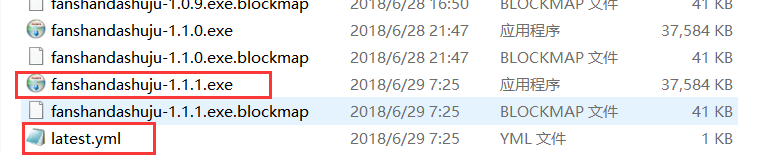
双击exe程序安装之后就在桌面有快捷图标就可以使用了,
如果你的程序有更新,一点要把你的安装包及latest.yml放到你刚刚在package.json里面更新文件在服务器的位置。
"publish": [

      {

        "provider": "generic",

        "url": "http:/xxxx.com/download/"

      }

    ]
download的文件下面,
注意有个坑:
http:/xxxx.com/download/latest.yml一定要能访问到并且在浏览器里面可以输出里面的内容,否则更新程序会失败。
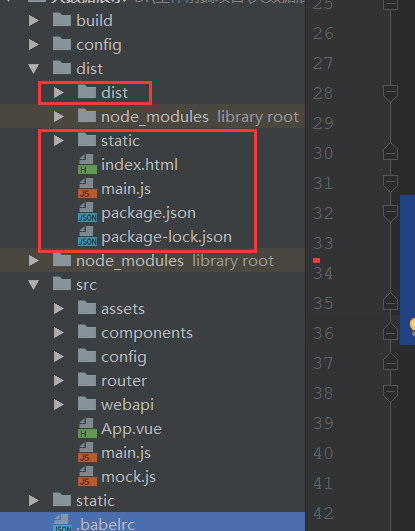
文件目录如下:
使用electron-packager electron-builder electron-updater 打包vue项目,支持在线更新的更多相关文章
- electron打包vue项目
electron是什么 Electron是由Github开发,用HTML,CSS和JavaScript来构建跨平台桌面应用程序的一个开源库. Electron通过将Chromium和Node.js合并 ...
- 使用Cordova打包Vue项目
因为公司项目要求, 原本的vue移动端项目, 现在要求能使用定位, 调用摄像头等功能, 并且开发成混合APP. 一个小白的孤军奋战史, 记录一下, 以备后用.... 第一步: 安装cordova 在命 ...
- 教你用Cordova打包Vue项目
现在国内越来越多的开发者使用Vue开发混合app,但是当大家开发完成过后才发现不知道该怎么将Vue项目打包成app. 据我现在的了解打包Vue项目目前流行的就是使用weex和cordova.weex是 ...
- webpack打包vue项目之后生成的dist文件该怎么启动运行
亲测,webpack打包vue项目之后生成的dist文件可以部署到 express 服务器上运行. 我的vue项目结构如下: 1. 进入该vue项目目录,打开git bash,执行:npm run b ...
- nw打包vue项目 安装包
接着上篇nw打包vue项目exe中: copy /b nw.exe+dome.nw dome.exe 出现了dome.exe文件之后,要是打算打包成为安装包,网上推荐的是Inno Setup Comp ...
- docker 运行jenkins及vue项目与springboot项目(三.jenkins的使用及自动打包vue项目)
docker 运行jenkins及vue项目与springboot项目: 一.安装docker 二.docker运行jenkins为自动打包运行做准备 三.jenkins的使用及自动打包vue项目 四 ...
- Cordova打包vue项目生成Apk (解决cordova build android抛出的zip问题)
最近对vue前端框架情有独钟.但研究了一下怎么把vue项目打包成android apk来玩玩. 首先讲一下创建vue2.x项目.其实在之前的文章中都有写过,有兴趣的同学可以去看看.http://www ...
- 用HBuilderX 打包 vue 项目 为 App 的步骤
首先打包你的 vue 项目 生成 dist 文件夹,教程请移步 https://www.cnblogs.com/taohuaya/p/10256670.html 看完上面的教程,请确保 你是 将: ...
- 使用HBuilderX实现打包vue项目成app
一.准备开发工具 开发工具:HBuilderX 官网地址:http://www.dcloud.io (标准版需要自己安装插件,app开发版已经把app开发常用的插件安装好了,开箱即用,建议使用开发版) ...
随机推荐
- Docker中配置国内镜像
1. 为什么要为docker配置国内镜像 在正常情况下,docker有一个默认连接的国外官方镜像,在国外的网友访问该官方镜像自然不成问题,但是国内毕竟不是国外,由于国情不同,中国的网络访问国外官方 ...
- LogHelp 日记分天记录,只记30天日记
using System; using System.Collections.Generic; using System.IO; using System.Linq; using System.Tex ...
- linux Xinetd服务简介
http://www.chuanke.com/course/72351180839190528______.html 1.什么是xinetdextended internet daemonxinetd ...
- linux 使用中括号进行条件判断
格式 “#”代表空格,不可缺少 [# param1#op# param2 #] 这种带比较操作符的形式,op左右必须使用空格隔开. 如 [# “3”==”2” #] 这种缺少空格的写法会得到结 ...
- Ansible 系列之 Inventory 资源清单介绍
一.Inventory 库存清单文件 1.Inventory 作用 Ansible 可以在同一时间针对多个系统设施进行管理工作.它通过选择Ansible 资源清单文件中列出的系统,该清单文件默认是在/ ...
- js 各种距离
网页可见区域宽 document.body.clientWidth 网页可见区域高 document.body.clientHeight 网页可见区域宽(包括边线的宽) document.b ...
- Microsoft Office Professional Plus 2013全套
Microsoft Office Professional Plus 2013全套产品,全激活版本 包括Access Word Excel Powerpoint Publisher Skyd ...
- Mysql 索引概论
Mysql性能下降原因 JOIN连接过多 ,索引失效(单值,复合), 查询SQL过水, explian 语法分析SQL性能 https://blog.csdn.net/b1303110335/arti ...
- 基于HALCON的双目立体视觉系统实现
双目立体视觉是机器视觉的一种重要形式,它是基于视差原理并由多幅图像获取物体三维几何信息的方法.双目立体视觉系统一般由双摄像机从不同角度同时获得被测物的两幅数字图像,或由单摄像机在不同时刻从不同角度获得 ...
- sqlserver: 使用While 示例
declare @i intset @i = 1999while(@i<2009)begin declare @sql varchar(8000) set @sql = 'update d ...