
使用electron-packager electron-builder electron-updater 打包vue项目,支持在线更新
1.如何用electron-packager electron-builder打包vue项目,打包成桌面程序。
步骤一、
执行npm run build 打包你的vue项目。
打包成功后,生成dist打包后的文件。
在dist打开命令行, 安装electron-packager electron-builder
安装命令 npm install electron-packager npm install electron-builder
在dist中新增main.js文件,其中内容包括
const {app, BrowserWindow,globalShortcut,ipcMain} =require('electron')

let win;

let windowConfig = {

  fullscreen:true,

  width:800,

  height:600

};

const  {autoUpdater}=require('electron-updater');

function createWindow(){

  win = new BrowserWindow(windowConfig);

  win.loadURL(`file://${__dirname}/index.html`);

  app.setApplicationMenu(null);//关闭菜单栏

  // 注册一个 'CommandOrControl+X' 的全局快捷键

  globalShortcut.register('CommandOrControl+Alt+K', () => {

    win.webContents.openDevTools();  //开启调试工具

  });

  win.on('close',() => {

    //回收BrowserWindow对象

    win = null;

  });

  win.on('resize',() => {

    win.reload();

  })

}

app.on('ready',createWindow);

app.on('window-all-closed',() => {

  app.quit();

});

app.on('activate',() => {

  if(win == null){

    createWindow();

  }

});

// 检测更新,在你想要检查更新的时候执行,renderer事件触发后的操作自行编写

!function updateHandle() {

  let message = {

    error: '检查更新出错',

    checking: '正在检查更新……',

    updateAva: '检测到新版本,正在下载……',

    updateNotAva: '现在使用的就是最新版本,不用更新',

  };

  const uploadUrl = "更新包所在的服务器地址"; // 下载地址,不加后面的**.exe

  autoUpdater.setFeedURL(uploadUrl);

  autoUpdater.on('error', function (error) {

    console.log(autoUpdater.error);

    sendUpdateMessage(message.error)

  });

  autoUpdater.on('checking-for-update', function () {

    sendUpdateMessage(message.checking)

  });

  autoUpdater.on('update-available', function (info) {

    sendUpdateMessage(message.updateAva)

  });

  autoUpdater.on('update-not-available', function (info) {

    sendUpdateMessage(message.updateNotAva)

  });

  // 更新下载进度事件

  autoUpdater.on('download-progress', function (progressObj) {

    win.webContents.send('downloadProgress', progressObj)

  });

  autoUpdater.on('update-downloaded', function (event, releaseNotes, releaseName, releaseDate, updateUrl, quitAndUpdate) {

    ipcMain.on('isUpdateNow', (e, arg) => {

      //some code here to handle event

      autoUpdater.quitAndInstall();

    });

    win.webContents.send('isUpdateNow')

  });

  ipcMain.on("checkForUpdate",()=>{

    //执行自动更新检查

    autoUpdater.checkForUpdates();

  })

}();

// 通过main进程发送事件给renderer进程,提示更新信息

function sendUpdateMessage(text) {

  win.webContents.send('message', text)

}
在dist文件夹下新增package.json文件,其中包括内容为
{

  "name": "名称",

  "productName": "项目名称",

  "author": "作者",

  "version": "1.1.1",//版本

  "main": "main.js",

  "description": "项目描述",

  "scripts": {

    "pack": "electron-builder --dir",

    "dist": "electron-builder",

    "postinstall": "electron-builder install-app-deps"

  },

  "build": {

    "electronVersion": "1.8.4",

    "win": {

      "requestedExecutionLevel": "highestAvailable",

      "target": [

        {

          "target": "nsis",

          "arch": [

            "x64"

          ]

        }

      ]

    },

    "appId": "项目的id,唯一id",

    "artifactName": "名称-${version}-${arch}.${ext}",

    "nsis": {

      "artifactName": "名称-${version}-${arch}.${ext}"

    },

    "publish": [

      {

        "provider": "generic",

        "url": "服务器最新安装包的位置"

      }

    ]

  },

  "dependencies": {

    "core-js": "^2.4.1",

    "electron-updater": "^2.22.1",

    "fs-extra": "^4.0.1",

    "install.js": "^1.0.1",

    "moment": "^2.18.1",

    "moment-es6": "^1.0.0"

  }

}
在你的vue项目里面App.vue生命周期里面新增如下代码:这是自动检测更新
mounted: function () {

      if (window.require) {

        let ipc = window.require('electron').ipcRenderer;

        ipc.send("checkForUpdate");

        ipc.on("message", (event, text) => {

          this.tips = text;

          console.log('message1',this.tips)

        });

        ipc.on("downloadProgress", (event, progressObj)=> {

          this.downloadPercent = progressObj.percent || 0;

          console.log('message2',this.downloadPercent)

        });

        ipc.on("isUpdateNow", () => {

          ipc.send("isUpdateNow");

        });

      }

    },
一切准备就绪之后在终端里面执行命令: electron-builder
成功之后会生成一个安装包及版本文件
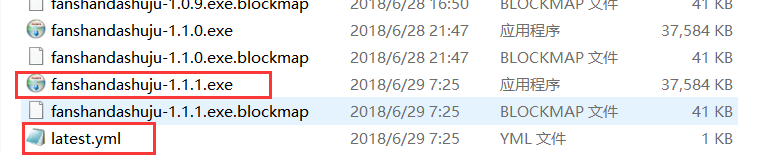
双击exe程序安装之后就在桌面有快捷图标就可以使用了,
如果你的程序有更新,一点要把你的安装包及latest.yml放到你刚刚在package.json里面更新文件在服务器的位置。
"publish": [

      {

        "provider": "generic",

        "url": "http:/xxxx.com/download/"

      }

    ]
download的文件下面,
注意有个坑:
http:/xxxx.com/download/latest.yml一定要能访问到并且在浏览器里面可以输出里面的内容,否则更新程序会失败。
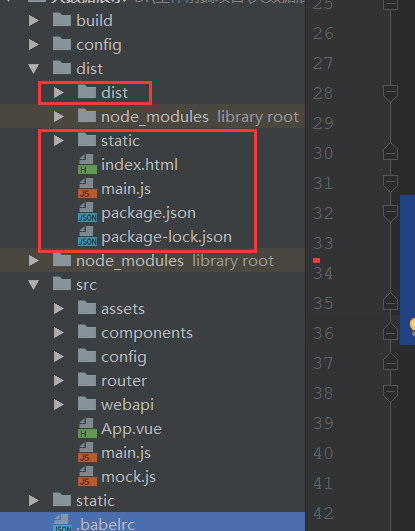
文件目录如下:
使用electron-packager electron-builder electron-updater 打包vue项目,支持在线更新的更多相关文章
- electron打包vue项目
electron是什么 Electron是由Github开发,用HTML,CSS和JavaScript来构建跨平台桌面应用程序的一个开源库. Electron通过将Chromium和Node.js合并 ...
- 使用Cordova打包Vue项目
因为公司项目要求, 原本的vue移动端项目, 现在要求能使用定位, 调用摄像头等功能, 并且开发成混合APP. 一个小白的孤军奋战史, 记录一下, 以备后用.... 第一步: 安装cordova 在命 ...
- 教你用Cordova打包Vue项目
现在国内越来越多的开发者使用Vue开发混合app,但是当大家开发完成过后才发现不知道该怎么将Vue项目打包成app. 据我现在的了解打包Vue项目目前流行的就是使用weex和cordova.weex是 ...
- webpack打包vue项目之后生成的dist文件该怎么启动运行
亲测,webpack打包vue项目之后生成的dist文件可以部署到 express 服务器上运行. 我的vue项目结构如下: 1. 进入该vue项目目录,打开git bash,执行:npm run b ...
- nw打包vue项目 安装包
接着上篇nw打包vue项目exe中: copy /b nw.exe+dome.nw dome.exe 出现了dome.exe文件之后,要是打算打包成为安装包,网上推荐的是Inno Setup Comp ...
- docker 运行jenkins及vue项目与springboot项目(三.jenkins的使用及自动打包vue项目)
docker 运行jenkins及vue项目与springboot项目: 一.安装docker 二.docker运行jenkins为自动打包运行做准备 三.jenkins的使用及自动打包vue项目 四 ...
- Cordova打包vue项目生成Apk (解决cordova build android抛出的zip问题)
最近对vue前端框架情有独钟.但研究了一下怎么把vue项目打包成android apk来玩玩. 首先讲一下创建vue2.x项目.其实在之前的文章中都有写过,有兴趣的同学可以去看看.http://www ...
- 用HBuilderX 打包 vue 项目 为 App 的步骤
首先打包你的 vue 项目 生成 dist 文件夹,教程请移步 https://www.cnblogs.com/taohuaya/p/10256670.html 看完上面的教程,请确保 你是 将: ...
- 使用HBuilderX实现打包vue项目成app
一.准备开发工具 开发工具:HBuilderX 官网地址:http://www.dcloud.io (标准版需要自己安装插件,app开发版已经把app开发常用的插件安装好了,开箱即用,建议使用开发版) ...
随机推荐
- (判断)window.open()窗口被关闭后执行事件
$(function() { // start ready var $article_share=$('#body .article').find('li.share'); // $article_s ...
- 【linux】mkdir -p命令
如果要创建目录A并创建目录A的子目录B,没有用-p的情况下是mkdir 2次 如果用-p 可以直接创建2个目录 (迭代创建).mkdir -p 目录A/子目录B就可以
- 【monkeyrunner】monkeyrunner 实例
import time import os import re from com.android.monkeyrunner import MonkeyRunner as mr from com.and ...
- List of LTE networks
https://en.wikipedia.org/wiki/List_of_LTE_networks
- Eclipse中配置Maven build打包
Eclipse中配置Maven build打包 clean package
- win10开启开发人员模式
工具: win10 方法如下: 1.在Windows10系统桌面,点击开始菜单,然后在弹出窗口中选择“设置”菜单项 2.在打开的设置窗口中,选择“更新和安全”图标,并点击打开更新和安全窗口 3.在打开 ...
- django-常用过滤器
django常用过滤器 add :字符串相加,数字相加,列表相加,如果失败,将会返回一个空字符串. default:提供一个默认值,在这个值被django认为是False的时候使用.比如:空字符串.N ...
- zmq消息订阅
一个需求,用户预约了手机超时没有使用,要通知到预约的用户“设备超时”. 我本来是自己这一端计时然后超时后推送通知的. 但是上海测说他那边计时,然后释放手机.我这边只要订阅他那边的消息就好了. 外部的应 ...
- leetcode28
public class Solution { public int StrStr(string haystack, string needle) { return haystack.IndexOf( ...
- LUA ipairs遍历的问题
t = { 1, 2, 3, nil, 4,} for k, v in ipairs(t) doprint(k, v)end print("------------------------- ...