
Web Api HelpPage
为了方面APP开发人员,服务端的接口都应当提供详尽的API说明。但每次有修改,既要维护代码,又要维护文档,一旦开发进度紧张,很容易导致代码与文档不一致。
Web API有一个Help Page插件,可以很方便的根据代码及注释自动生成相关API说明页面。
Help Page安装步骤及扩展(以VS2015为例):
右键点击WebAPI项目的引用,选择"管理NuGet程序包"
在搜索框中输入 helppage进行搜索,结果如下图:
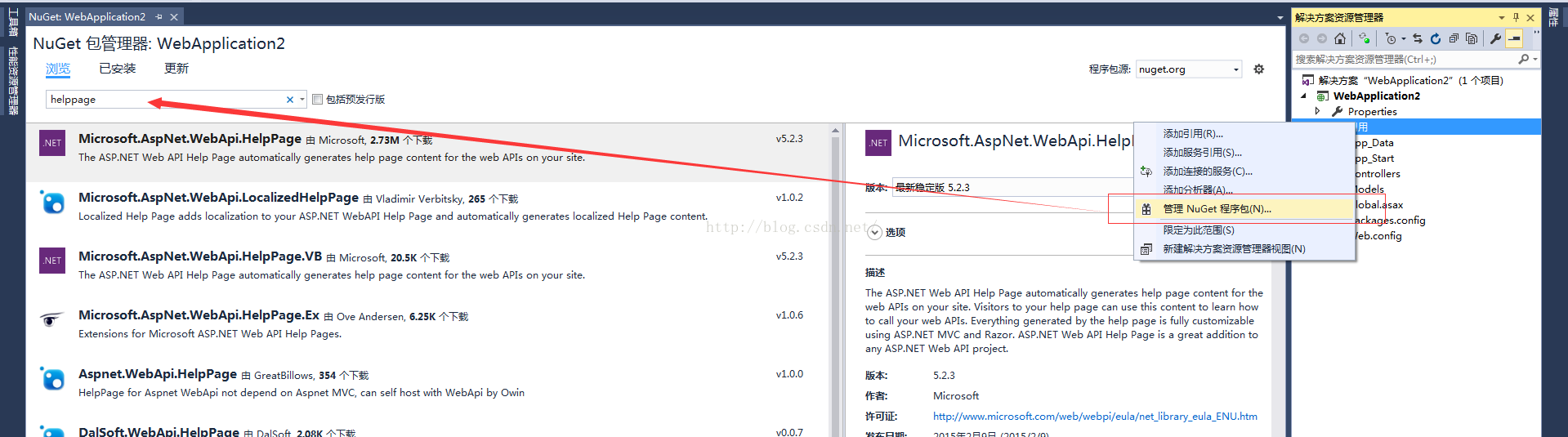
然后在右侧边栏点击安装按钮即可进行插件安装了。
安装完成后,你会发现项目下多了不少文件:
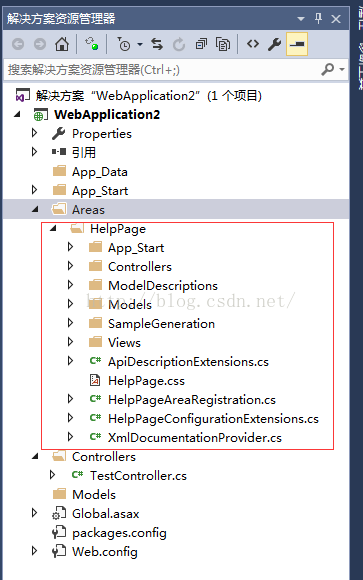
接下来,我们对Areas/HelpPage/App_Start/HelpPageConfig.cs进行改造。
改造前,我们需要先了解下HelpPageConfig.cs,其中的Register方法是用于注册Help Page页面需要展示的API的文档的。默认情况下,该方法只支持单个文档导入,所以我们需要扩展下。
我们创建一个可多文件注册的类:
using System;

using System.Linq;

using System.Reflection;

using System.Web.Http.Controllers;

using System.Web.Http.Description;

using WebApplication2.Areas.HelpPage.ModelDescriptions;

namespace WebApplication2.Areas.HelpPage.App_Start

{

    public class MultiXmlDocumentationProvider : IDocumentationProvider, IModelDocumentationProvider

    {

        private readonly XmlDocumentationProvider[] Providers;

        public MultiXmlDocumentationProvider(params string[] paths)

        {

            this.Providers = paths.Select(p => new XmlDocumentationProvider(p)).ToArray();

        }

        public string GetDocumentation(MemberInfo subject)

        {

            return this.GetFirstMatch(p => p.GetDocumentation(subject));

        }

        public string GetDocumentation(Type subject)

        {

            return this.GetFirstMatch(p => p.GetDocumentation(subject));

        }

        public string GetDocumentation(HttpControllerDescriptor subject)

        {

            return this.GetFirstMatch(p => p.GetDocumentation(subject));

        }

        public string GetDocumentation(HttpActionDescriptor subject)

        {

            return this.GetFirstMatch(p => p.GetDocumentation(subject));

        }

        public string GetDocumentation(HttpParameterDescriptor subject)

        {

            return this.GetFirstMatch(p => p.GetDocumentation(subject));

        }

        public string GetResponseDocumentation(HttpActionDescriptor subject)

        {

            return this.GetFirstMatch(p => p.GetDocumentation(subject));

        }

        private string GetFirstMatch(Func<XmlDocumentationProvider, string> expr)

        {

            return this.Providers

                .Select(expr)

                .FirstOrDefault(p => !String.IsNullOrWhiteSpace(p));

        }

    }

}
然后重写HelpPageConfig.cs文件中的代码如下:
using System.Diagnostics.CodeAnalysis;

using System.Web;

using System.Web.Http;

using WebApplication2.Areas.HelpPage.App_Start;

namespace WebApplication2.Areas.HelpPage

{

    public static class HelpPageConfig

    {

        [SuppressMessage("Microsoft.Globalization", "CA1303:Do not pass literals as localized parameters",

            MessageId = "WebApplication2.Areas.HelpPage.TextSample.#ctor(System.String)",

            Justification = "End users may choose to merge this string with existing localized resources.")]

        [SuppressMessage("Microsoft.Naming", "CA2204:Literals should be spelled correctly",

            MessageId = "bsonspec",

            Justification = "Part of a URI.")]

        public static void Register(HttpConfiguration config)

        {

            config.SetDocumentationProvider(new MultiXmlDocumentationProvider(

                HttpContext.Current.Server.MapPath("~/bin/WebApplication2.XML")));

        }

    }

}
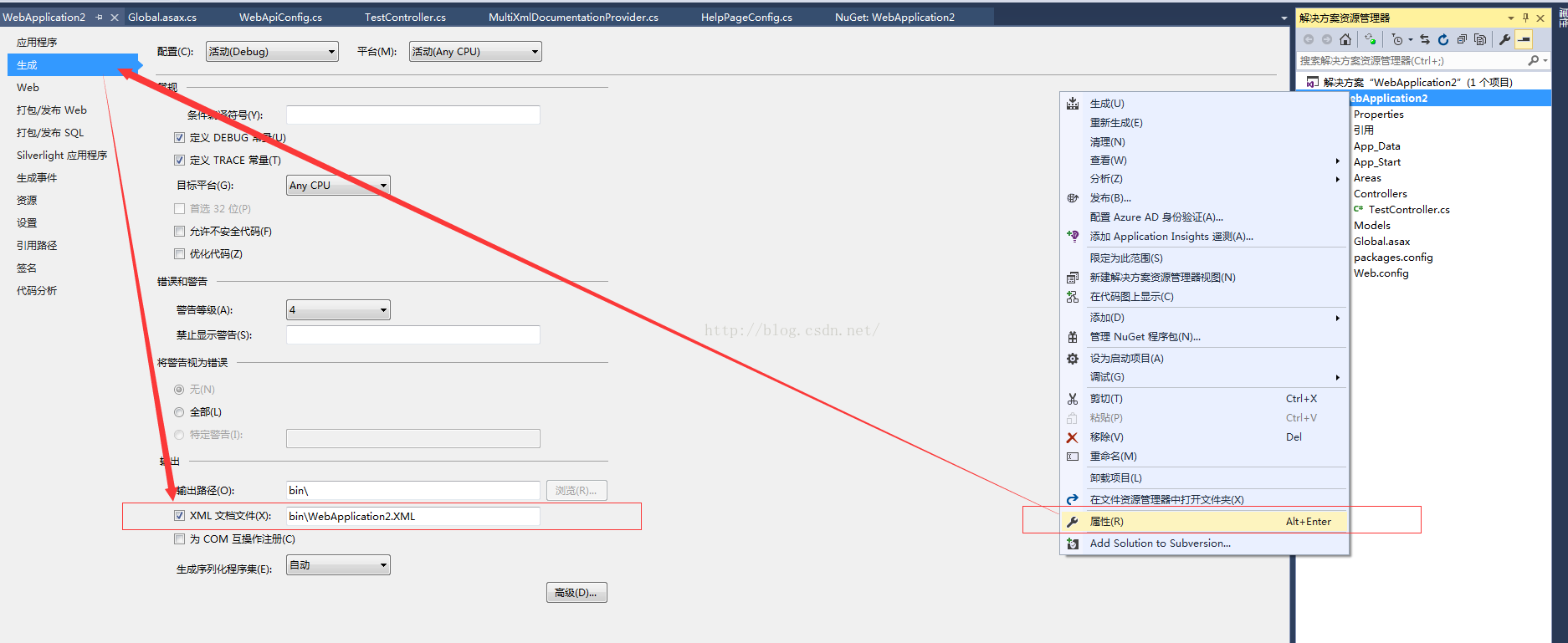
这里要注意下WebApplication2.XML,这个文件是需要我们对相关项目属性进行设置下的,让其生成相关xml文件。
然后我们来创建一个Controller用于测试。
using System.Web.Http;

namespace WebApplication2.Controllers

{

    /// <summary>

    /// 测试响应对象

    /// </summary>

    public struct TestResponse {

        /// <summary>

        /// 姓名

        /// </summary>

       public string Name;

        /// <summary>

        /// 年龄

        /// </summary>

        public int Age;

    }

    /// <summary>

    /// 测试

    /// </summary>

    public class TestController : ApiController

    {

        /// <summary>

        /// 测试接口

        /// </summary>

        /// <returns></returns>

        [HttpPost]

        [Route("api/300/1000")]

        public TestResponse JustTest()

        {

            return new TestResponse() { Name = "测试员", Age =  };

        }

    }

}
因为创建的是Web API项目,所以这里还要修改下Global.asax,注册Area。
using System.Web.Http;

using System.Web.Mvc;

namespace WebApplication2

{

    public class WebApiApplication : System.Web.HttpApplication

    {

        protected void Application_Start()

        {

            AreaRegistration.RegisterAllAreas();

            GlobalConfiguration.Configure(WebApiConfig.Register);

        }

    }

}

原文地址: https://blog.csdn.net/sqqyq/article/details/52708613#
Web Api HelpPage的更多相关文章
- 关于ASP.NET Web Api的HelpPage文档注释问题
关于ASP.NET Web Api的HelpPage文档注释问题 以前我用微软的HelpPage来自动生成的webAPI帮助文档.在使用了一段时间后发现只能显示Controller上面写的注释文档内容 ...
- Web API使用记录系列(二)HelpPage优化与WebApiTestClient
继续使用记录的第二节,HelpPage的优化与测试工具WebApiTestClient的使用. 之前没怎么整理博客,都是记录一下笔记,真正好好整理发现没想像的那么简单.不管怎么说还是培养下写博客的习惯 ...
- 我这么玩Web Api(一):帮助页面或用户手册(Microsoft and Swashbuckle Help Page)
前言 你需要为客户编写Api调用手册?你需要测试你的Api接口?你需要和前端进行接口对接?那么这篇文章应该可以帮到你.本文将介绍创建Web Api 帮助文档页面的两种方式,Microsoft Help ...
- asp.net web api 的版本升级到 2.2的记录
asp.net web api 的版本 升级到 2.2的记录 asp.net web api 2.2相比1.0提升了不少 而且其中最重要的就是有了在线文档的自动字段注释的功能 再也不用写详细的字段说明 ...
- Web API返回JSON数据
对Web API新手来说,不要忽略了ApiController 在web API中,方法的返回值如果是实体的话实际上是自动返回JSON数据的例如: 他的返回值就是这样的: { "Conten ...
- web api Route属性定义
ASP.NET Web API路由,简单来说,就是把客户端请求映射到对应的Action上的过程.在"ASP.NET Web API实践系列03,路由模版, 路由惯例, 路由设置"一 ...
- Web API 自动生成帮助文档并使用Web API Test Client 测试
之前在项目中有用到webapi对外提供接口,发现在项目中有根据webapi的方法和注释自动生成帮助文档,还可以测试webapi方法,功能很是强大,现拿出来与大家分享一下. 先看一下生成的webapi文 ...
- 为 ASP.NET Web API 创建帮助页面(转载)
转载地址:http://www.asp.net/web-api/overview/creating-web-apis/creating-api-help-pages 当创建web API 时,经常要创 ...
- asp.net web api 测试帮助页面建立并测试
asp.net web api 测试帮助页面建立并测试 现在使用WEB API来开发,越来越流行. 在开发过程中的测试调试,可以使用Fiddler等工具来帮助测试外,还有: 在asp.net 中有种方 ...
随机推荐
- SSM(Spring+SpringMVC+Mybatis)+Mysql 框架整合搭建流程以及其间注意事项
复习SSM框架,太久没用自己手动撘一个,发现自己还是有很多地方忘记了和没注意的事项... 首先,直接给出总流程: 零.引jar包 1.引包(或者写maven.pom) 一.数据库部分 设计数据库各表结 ...
- vue 2.5.14以上版本render函数不支持返回字符串
vue 2.5.14以上版本render函数不再支持直接返回字符串,必须返回数组或vnode节点,如果返回字符串的话,渲染为空.详情可见源码. function createFunctionalCom ...
- Java Redis的Pipeline管道,批量操作,节省大量网络往返时间 & Redis批量读写(hmset&hgetall) 使用Pipeline
一般情况下,大家使用redis去put/get都是先拿到一个jedis实例,然后操作,然后释放连接:这种模式是 请求-响应,请求-响应 这种模式,下一次请求必须得等第一次请求响应回来之后才可以,因为r ...
- bzoj1257: [CQOI2007]余数之和 整除分块
题意:给出正整数n和k,计算j(n, k)=k mod 1 + k mod 2 + k mod 3 + - + k mod n的值其中k mod i表示k除以i的余数.例如j(5, 3)=3 mod ...
- 部署到VM的虚拟机提示“未连接到网络”
以下可以看到网络图标为叉叉
- strtol 笔记
今天看了一下网上关于这个函数的解释,根据文章大意记录一下 strtol 是将字符串转换为long int的一个函数 strtol(const char* nptr, char **endptr, in ...
- <NET CLR via c# 第4版>笔记 第9章 参数
9.1 可选参数和命名参数 class Program { private static int s_n = 0; private static void M(int x = 9, string s ...
- Java例子
1. 本章学习总结 今天主要学习了三个知识点 封装 继承 多态 2. 书面作业 Q1. java HelloWorld命令中,HelloWorld这个参数是什么含义? 今天学了一个重要的命令javac ...
- Django——ContentType(与多个表建立外键关系)及ContentType-signals的使用
一.ContentType 在django中,有一个记录了项目中所有model元数据的表,就是ContentType,表中一条记录对应着一个存在的model,所以可以通过一个ContentType表的 ...
- 360插件化Replugin爬坑之路
前言 继上次爬完了热修复的坑位,中途爬了各种各样的坑.今天我们来说说插件化Replugin的坑位.Replugin刚出的时候我就看过了.第一次看的时候可能心态不好.没看懂= =第二次重头在看,发现蛮简 ...