
在Asp.Net MVC 中配置 Serilog
Serilog 是一种非常简便记录log 的处理方式,使用Serilog可以生成本地的text文件, 也可以通过 Seq 来在Web界面中查看具体的log内容。
接下来就简单的介绍一下在Asp.Net MVC中如何配置是Serilog 生效:
1):下载并且安装Seq,具体的下载URL 为 【http://getseq.net/Download】,安装到默认的路径之后,实际上时候启动了一个Win Service,并且监听的端口号默认为 5341.
安装的最后一步截图如下:
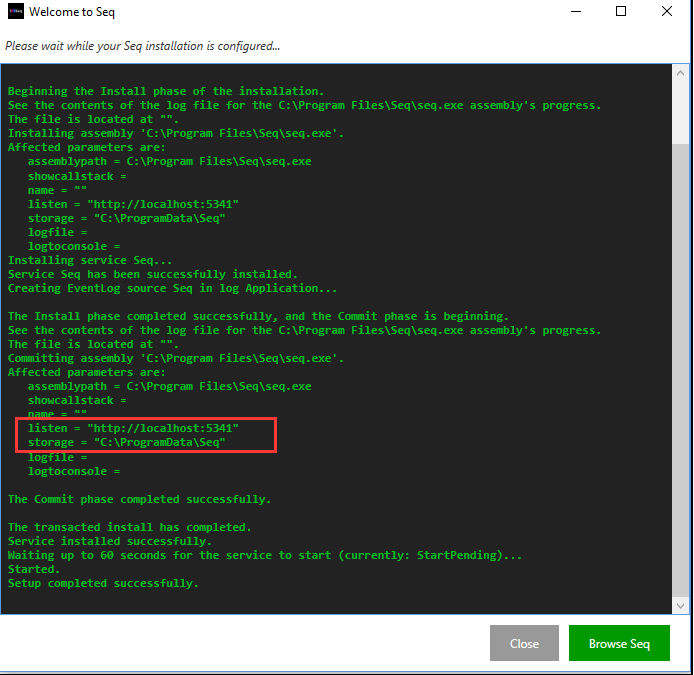
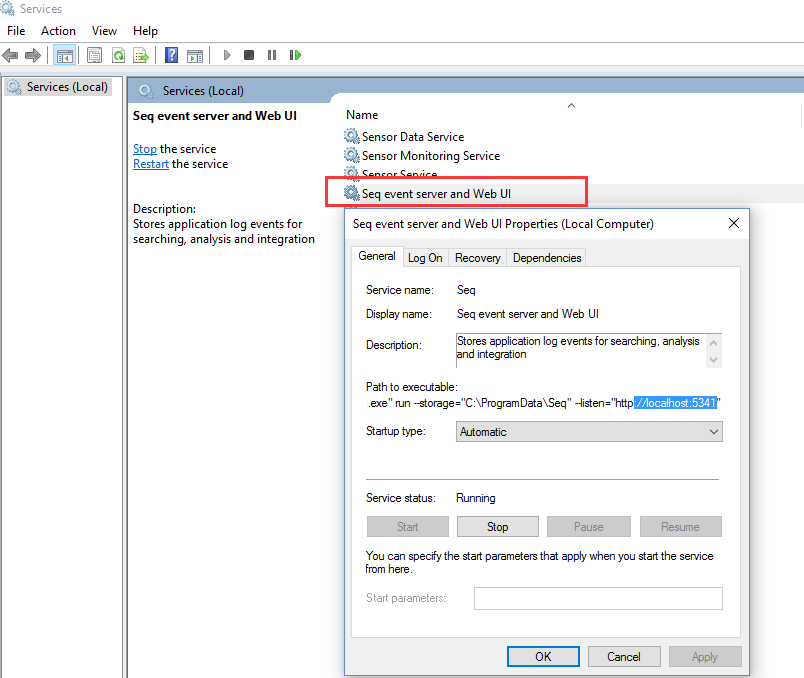
然后我们到Service列表中可以找到对应的Service, 如下图所示:
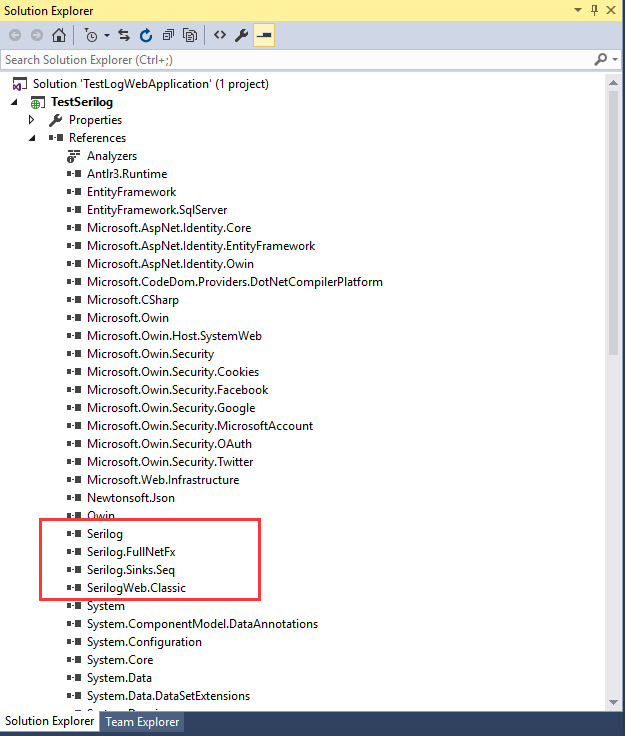
2):创建一个Asp.Net MVC 5的一个工程, 然后通过 Nuget 下载并且安装 对应的 package,如下图所示
3):在 App_Start 文件夹下创建一个 class 叫做 SerilogConfig.cs , 代码如下所示
using Serilog;

using SerilogWeb.Classic.Enrichers;

using System;

using System.Collections.Generic;

using System.Configuration;

using System.IO;

using System.Linq;

using System.Reflection;

using System.Web;

using System.Web.Hosting;

namespace TestSerilog.App_Start

{

    public class SerilogConfig

    {

        public static ILogger CreateLogger()

        {

            var logpath = HostingEnvironment.MapPath("~");

            var config = new LoggerConfiguration()

                .Enrich.WithMachineName()

                .Enrich.WithProperty("ApplicationName", AssemblyTitle)

                .Enrich.With<HttpRequestClientHostIPEnricher>()

                .Enrich.With<HttpRequestRawUrlEnricher>()

                .Enrich.With<HttpRequestIdEnricher>()

                .Enrich.With<UserNameEnricher>()

                //.Enrich.WithProperty("RuntimeVersion", Environment.Version)

                // this ensures that calls to LogContext.PushProperty will cause the logger to be enriched

                .Enrich.FromLogContext()

                .MinimumLevel.Verbose()

                .WriteTo.Seq(ConfigurationManager.AppSettings["SeqServer"], apiKey: ConfigurationManager.AppSettings["SeqApiKey"])

                .WriteTo.RollingFile(Path.Combine(logpath, "Logs\\EricSunTestLog-{Date}.log"), retainedFileCountLimit: null, outputTemplate: "{Timestamp:yyyy-MM-dd HH:mm:ss.fff zzz} [{Level}] {SourceContext} - ({MachineName}|{HttpRequestId}|{UserName}) {Message}{NewLine}{Exception}");

            return config.CreateLogger();

        }

        public static string AssemblyTitle

        {

            get

            {

                var attributes = typeof(SerilogConfig).Assembly.GetCustomAttributes(typeof(AssemblyTitleAttribute), false);

                if (attributes.Length > )

                {

                    var titleAttribute = (AssemblyTitleAttribute)attributes[];

                    if (titleAttribute.Title.Length > )

                        return titleAttribute.Title;

                }

                return Path.GetFileNameWithoutExtension(Assembly.GetEntryAssembly().CodeBase);

            }

        }

    }

}
4):在 Web.config 中添加补全所用到的 appSettings
  <appSettings>

    <add key="SeqServer" value="http://localhost:5341/" />

    <add key="SeqApiKey" value="" />

  </appSettings>
5):在 Startup.cs 中添加如下代码完成注册
using Microsoft.Owin;

using Owin;

using Serilog;

using TestSerilog.App_Start;

[assembly: OwinStartupAttribute(typeof(TestSerilog.Startup))]

namespace TestSerilog

{

    public partial class Startup

    {

        public void Configuration(IAppBuilder app)

        {

            ConfigureAuth(app);

            Log.Logger = SerilogConfig.CreateLogger();

        }

    }

}
6): 在 HomeController 中的 Index Action 中添加如下代码,测试对应的Debug,Information,Warning 和 Error 方法
using Serilog;

using System;

using System.Collections.Generic;

using System.Linq;

using System.Web;

using System.Web.Mvc;

namespace TestSerilog.Controllers

{

    public class HomeController : Controller

    {

        private ILogger _logger = Log.Logger;

        public ActionResult Index()

        {

            _logger.Debug("This is index -- debug.");

            _logger.Information("This is index -- information.");

            _logger.Warning("This is index -- warning.");

            _logger.Error("This is index -- error.");

            return View();

        }

        public ActionResult About()

        {

            ViewBag.Message = "Your application description page.";

            return View();

        }

        public ActionResult Contact()

        {

            ViewBag.Message = "Your contact page.";

            return View();

        }

    }

}
7):直接 VS 2015 运行之后, 再去 http://localhost:5341/#/events 中观察对应的 log 记录, 如下截图
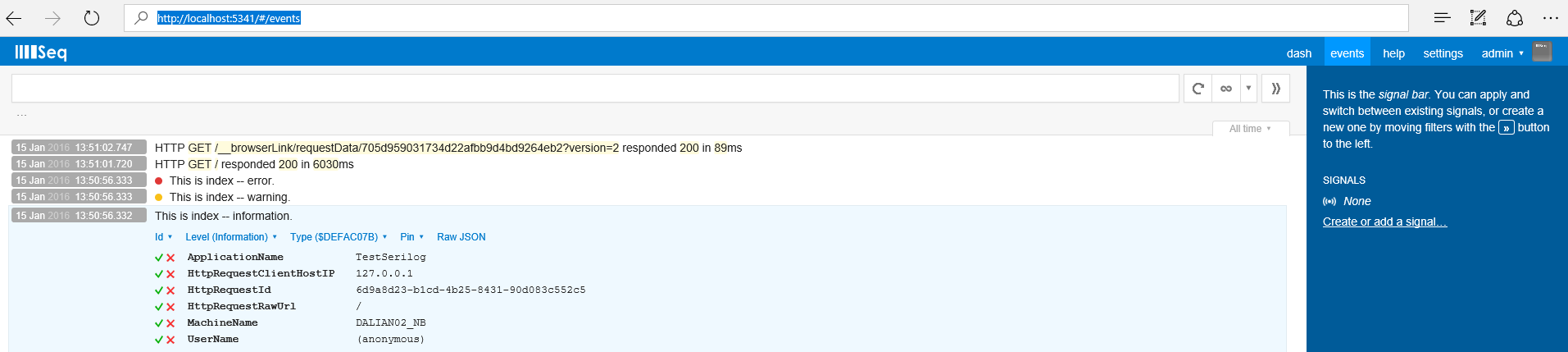
这样简单的配置 Serilog 就完成了, 同时我们也可以到 C:\ProgramData\Seq\Logs 目录中找到 Log 的文本文件。
更多内容请看如下链接:
http://serilog.net/
https://github.com/serilog/serilog
在Asp.Net MVC 中配置 Serilog的更多相关文章
- asp.net mvc中配置路由默认值(Area中)
public class RouteConfig { ] { "Best.Site.Areas.BestPalace" }; public static void Register ...
- 在ASP.Net MVC 中,如何在Global.asax中配置一个指向Area内部的默认Route
ASP.Net MVC 中配置Route的时候可以设置一个默认的Route. 比如我要在输入http://localhost的时候默认进入http://localhost/home/index.可以在 ...
- ASP.NET MVC 学习笔记-7.自定义配置信息 ASP.NET MVC 学习笔记-6.异步控制器 ASP.NET MVC 学习笔记-5.Controller与View的数据传递 ASP.NET MVC 学习笔记-4.ASP.NET MVC中Ajax的应用 ASP.NET MVC 学习笔记-3.面向对象设计原则
ASP.NET MVC 学习笔记-7.自定义配置信息 ASP.NET程序中的web.config文件中,在appSettings这个配置节中能够保存一些配置,比如, 1 <appSettin ...
- 如何在 ASP.NET MVC 中集成 AngularJS(2)
在如何在 ASP.NET MVC 中集成 AngularJS(1)中,我们介绍了 ASP.NET MVC 捆绑和压缩.应用程序版本自动刷新和工程构建等内容. 下面介绍如何在 ASP.NET MVC 中 ...
- 在 ASP.NET MVC 中充分利用 WebGrid (microsoft 官方示例)
在 ASP.NET MVC 中充分利用 WebGrid https://msdn.microsoft.com/zh-cn/magazine/hh288075.aspx Stuart Leeks 下载代 ...
- ASP.NET MVC中的错误处理
ASP.NET MVC中的错误的错误处理跨越了两个主要领域:程序异常和路由异常的处理.前者是关于在控制器和视图中捕获错误的;而后者更多是有关重定向和HTTP错误的. 1.在WebConfig中把过滤器 ...
- 如何在 ASP.NET MVC 中集成 AngularJS(1)
介绍 当涉及到计算机软件的开发时,我想运用所有的最新技术.例如,前端使用最新的 JavaScript 技术,服务器端使用最新的基于 REST 的 Web API 服务.另外,还有最新的数据库技术.最新 ...
- ASP.NET MVC 中应用Windows服务以及Webservice服务开发分布式定时器
ASP.NET MVC 中应用Windows服务以及Webservice服务开发分布式定时器一:闲谈一下:1.现在任务跟踪管理系统已经开发快要结束了,抽一点时间来写一下,想一想自己就有成就感啊!! ...
- KindEditor上传本地图片在ASP.NET MVC的配置
http://www.cnblogs.com/upupto/archive/2010/08/24/1807202.html 本文解决KindEditor上传本地图片在ASP.NET MVC中的配置. ...
随机推荐
- gprs/gsm 在linux下的应用
之前有篇随笔整理了一种在裸机下用状态机+超时的机制来操作gprs/gsm,linux下就不需要了,本身有完善的调度机制,在等待的流程中直接sleep就行了. 下面是飞凌OK6410下的 demo, 其 ...
- 【Redis安装学习】
1.Redis 中文官网地址:http://www.redis.net.cn/download/ 这里只是简单的安装了下.具体的官网有详细的介绍和安装:跳转 如何安装 下载,解压,编译: $ wget ...
- tomcat用root权限也起不来
昨晚把服务器弄的启动不了了,先来还原一下作案现场, 错误操作过程:替换classes目录下的某个目录,比如com,由于替换了classes文件,所以需要重启tomcat,在bin目录下执行sh sta ...
- JSP内置对象之request对象【学习笔记】
request对象是JSP中重要的对象,每个request对象封装着一次用户的请求,并且所有的请求参数都被封装在request对象中,因此request对象是获取请求参数的重要途径. 一.获取请求头与 ...
- frame和bounds
- frame 是一个以**父视图**为坐标系的位置- bounds 是一个以**自身**为坐标系的位置- 如果改变了bounds 那么会影响子控件的显示位置
- C++ 之namespace常见用法
一.背景 需要使用Visual studio的C++,此篇对namespace的常用用法做个记录. 二.正文 namespace通常用来给类或者函数做个区间定义,以使编译器能准确定位到适合的类或者函数 ...
- 测试基础:Bug管理那些事_20160910
1.bug由来 虫子爬进主机引起继电器短路,导致机器故障.真正的缺陷是:主机散热孔少装了块金属丝,这样才能防止虫子爬到主机. 2.什么是bug? bug是缺陷的一种表现形式,而一个缺陷是可以引发多种b ...
- Qt - 错误总结 - QObject::connect: Cannot queue arguments of type 'PVCI_CAN_OBJ' (Make sure 'PVCI_CAN_OBJ' is registered using qRegisterMetaType().)
背景:一个线程通过signal-slot发送PVCI_CAN_OBJ类型的值到主线程中, 错误提示: QObject::connect: Cannot queue arguments of type ...
- 常用ADO.NET操作ACCESS数据库
using System; using System.Collections.Generic; using System.Text; using System.Data;// using System ...
- 不一样的dynamic解析json 万能方法
写过javascript的人都知道js解析json 1:(JSON) 字符串转换为对象. var str = '{"name":"lsw","hobb ...