
【angular5项目积累总结】表单复杂校验
view
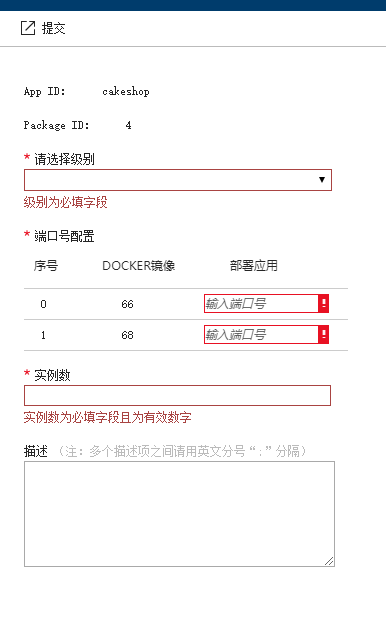
code
form.css
:host {

    display: flex;

    width: 100%;

    height:100%;

    border-left:1px solid #ccc;

}

.invalid-box {

    border: 1px solid #a94442;

}

.invalid-error-tip {

    color: #a94442;

}

.select-box {

    width:308px;

    height: 22px;

}

label {

    line-height:20px;

}

.note {

    color:#bbb;

    font-size:12px;

}

.small-input {

    width: 80%;

    height: 19px;

    line-height: 19px;

}

.small-input :-moz-placeholder,

.small-input :-ms-input-placeholder,

.small-input ::-webkit-input-placeholder {

    line-height: 10px;

    font-size: 10px;

}

.sm-textBox-wrapper {

    width: 80%;

}

.sm-textBox-wrapper [placeholder] {

    text-overflow: ellipsis;

    font-style: italic;

}

.sm-textBox-wrapper .azc-input {

    box-sizing: border-box;

    font-size: 12px;

    outline:;

    width: 100%;

}

.error-input {

    border-color: #e81123 !important;

    border-style: solid;

    border-width: 1px;

}

.edit-input-wrapper {

    display: inline-block;

    float: left;

}

.error-icon {

    height: 19px;

    width: 10px;

    line-height: 19px;

}

.tootip-balloon-w {

    width: 115px;

}

.fxc-grid2.fxc-grid-sorting a.fxc-sortable {

    height:35px;

}
form.html
<panel-component [menuItems]="menuItems" headerTitle="创建部署" initWidth="400px" (closeEvent)="onClose()">
<form style="margin:25px; width: 90%;height: 100%;overflow-x: hidden;" #dpyForm="ngForm">
<div style="width:90%;padding:5px 3px; font-size:12px;">
<div style="padding-top:4px;">
<label>App ID:</label>
<span>{{currApp.name}}</span>
</div>
</div>
<div style="width:90%;padding:5px 3px; font-size:12px;">
<div style="padding-top:4px;">
<label>Package ID:</label>
<span>{{currPkg.version}}</span>
</div>
</div>
<div style="width:90%;padding:5px 3px; font-size:12px;">
<div class="azc-required-anchor" style="float:left;padding-top:4px;">
<svg xmlns="http://www.w3.org/2000/svg" class=" fxs-portal-svg" role="presentation" aria-hidden="true" viewBox="0 0 6 6" focusable="false" xmlns:NS1="" NS1:xmlns:svg="http://www.w3.org/2000/svg">
<g>
<path class="msportalfx-svg-c22" d="M 3.543 2.352 l 2.08 -0.716 L 6 2.687 l -2.076 0.675 L 5.21 5.158 l -0.942 0.676 l -1.242 -1.867 l -1.264 1.867 l -0.97 -0.676 l 1.305 -1.796 L 0 2.687 L 0.38 1.63 l 2.058 0.743 V 0.233 h 1.105 v 2.119 Z" />
</g>
</svg>
</div>
<div style="width:200px;float:left;padding-top:4px;">
<label>请选择级别</label>
</div>
<div style="width:90%">
<select (change)="onValid(null)" class="select-box" [(ngModel)]="currDpy.Level" required name="Level" #level="ngModel" [ngClass]="{'invalid-box': (level.invalid && (level.dirty || level.touched))||showLevelError}">
<option *ngFor="let level of lstLevel" [value]='level.Key'>{{level.Value}}</option>
</select>
<div *ngIf="(level.invalid && (level.dirty || level.touched))||showLevelError" class="invalid-error-tip">
级别为必填字段
</div>
</div>
</div>
<div style="width:90%;padding:5px 3px; font-size:12px;">
<div class="azc-required-anchor" style="float:left;padding-top:4px;">
<svg xmlns="http://www.w3.org/2000/svg" class=" fxs-portal-svg" role="presentation" aria-hidden="true" viewBox="0 0 6 6" focusable="false" xmlns:NS1="" NS1:xmlns:svg="http://www.w3.org/2000/svg">
<g>
<path class="msportalfx-svg-c22" d="M 3.543 2.352 l 2.08 -0.716 L 6 2.687 l -2.076 0.675 L 5.21 5.158 l -0.942 0.676 l -1.242 -1.867 l -1.264 1.867 l -0.97 -0.676 l 1.305 -1.796 L 0 2.687 L 0.38 1.63 l 2.058 0.743 V 0.233 h 1.105 v 2.119 Z" />
</g>
</svg>
</div>
<div style="width:200px;float:left;padding-top:4px;">
<label>端口号配置</label>
</div>
<div style="width:100%">
<!--列表信息-->
<div class="ext-hubs-browse-grid fxc-base fxs-grid-focus fxc-grid-sorting fxc-grid-scrolling fxc-grid-resizing fxs-grid-selection fxc-grid-contextMenu fxc-grid-grouping fxc-grid2 azc-control fxc-grid-verticalScroll" style="width: 100%;">
<div class="fxc-grid-container azc-br-muted">
<div class="fxc-grid-tableContainer azc-br-muted" style="padding-top: 42px;">
<div class="fxc-grid-tableScrollContainer azc-br-muted">
<table class="fxc-grid-tableHeader fxs-grid-multiselection" data-grid-activation="true">
<thead>
<tr>
<th class="fxc-grid-sorting-header fxc-grid-column-header " style="width: 21%;">
<div class="fxc-grid-header-wrapper">
<a aria-sort="none" class="fxc-sortable fxc-none">
<span class="fxc-grid-headerlabel">序号</span>
</a>
<div class="fxc-grid-resizableColumn-handle">
<div class="fxc-grid-resizableColumn-handle-line azc-bg-muted">
</div>
</div>
</div>
</th>
<th class="fxc-grid-sorting-header fxc-grid-column-header ">
<div class="fxc-grid-header-wrapper">
<a aria-sort="none" class="fxc-sortable fxc-none">
<span class="fxc-grid-headerlabel">Docker镜像</span>
</a>
<div class="fxc-grid-resizableColumn-handle">
<div class="fxc-grid-resizableColumn-handle-line azc-bg-muted">
</div>
</div>
</div>
</th>
<th class="fxc-grid-sorting-header fxc-grid-column-header ">
<div class="fxc-grid-header-wrapper">
<a aria-sort="none" class="fxc-sortable fxc-none">
<span class="fxc-grid-headerlabel">部署应用</span>
</a>
<div class="fxc-grid-resizableColumn-handle">
<div class="fxc-grid-resizableColumn-handle-line azc-bg-muted">
</div>
</div>
</div>
</th>
</tr>
</thead>
</table>
<div class="fxc-grid-tableContent" style="position: relative; overflow-x: hidden;" >
<table class="fxc-grid-full fxs-grid-multiselection" data-grid-activation="true">
<tbody class="fxc-grid-groupdata ">
<tr class="fxc-grid-row fxs-portal-focus fxs-portal-hover" *ngFor="let port of lstPorts;let i = index">
<td class="fxc-grid-cell azc-br-muted" style="width:10%">
<span class="fxc-grid-cellContent fxs-ellipsis">
<span class="msportalfx-gridcolumn-assetsvg-text">{{i}}</span>
</span>
</td>
<td class="fxc-grid-cell azc-br-muted" style="width:12%;">
<span class="fxc-grid-cellContent fxs-ellipsis">
<span class="msportalfx-gridcolumn-assetsvg-text">{{port.docker}}</span>
</span>
</td>
<td class="fxc-grid-cell azc-br-muted" style="width:20%;">
<div class="sm-textBox-wrapper" tabindex="-1">
<div class="edit-input-wrapper">
<input [(ngModel)]="port.app" (blur)="onValid(i)" (keyup)="onValid(i)" class="azc-input small-input" min="1" pattern="^[1-9]+[0-9]*$" maxlength="5" name="Ports" required type="number" placeholder="输入端口号" tabindex="0" [ngClass]="{'error-input': !port.valid}">
</div>
<div *ngIf="!port.valid" class="fxc-base azc-control azc-dockedballoon azc-dockedballoon-validation azc-bg-default fxs-bg-error error-icon" (mouseenter)="toggleBalloonTip($event,true)" (mouseleave)="toggleBalloonTip($event,false)">
<div class="azc-dockedballoon-anchor">
<span>
<svg height="100%" width="100%" aria-hidden="true" role="presentation" focusable="false">
<use xmlns:xlink="http://www.w3.org/1999/xlink" xlink:href="#FxSymbol0-063"></use>
</svg>
</span>
</div>
</div>
</div>
</td>
</tr>
</tbody>
</table> </div>
</div> </div> </div>
<div [ngClass]="{'azc-balloon-hidden':!isShowBalloon}" class="azc-dockedballoon-balloon azc-dockedballoon-validation azc-bg-default fxc-base azc-control azc-balloon azc-balloon-forcedisplayblock azc-balloon-position-alternate azc-balloon-box-top tootip-balloon-w" [ngStyle]="{'top.px': balloonTop,'left.px': balloonLeft}">
<div class="azc-br-muted-80-10 azc-balloon-pointer"></div>
<div class="azc-bg-muted-80-10 fxs-text-white azc-balloon-content"><div class="azc-balloon-text">此字段为必填项且长度不超过5位的正整数</div></div>
</div>
</div> </div>
</div>
<div style="width:90%;padding:5px 3px; font-size:12px;">
<div class="azc-required-anchor" style="float:left;padding-top:4px;">
<svg xmlns="http://www.w3.org/2000/svg" class=" fxs-portal-svg" role="presentation" aria-hidden="true" viewBox="0 0 6 6" focusable="false" xmlns:NS1="" NS1:xmlns:svg="http://www.w3.org/2000/svg">
<g>
<path class="msportalfx-svg-c22" d="M 3.543 2.352 l 2.08 -0.716 L 6 2.687 l -2.076 0.675 L 5.21 5.158 l -0.942 0.676 l -1.242 -1.867 l -1.264 1.867 l -0.97 -0.676 l 1.305 -1.796 L 0 2.687 L 0.38 1.63 l 2.058 0.743 V 0.233 h 1.105 v 2.119 Z" />
</g>
</svg>
</div>
<div style="width:200px;float:left;padding-top:4px;">
<label>实例数</label>
</div>
<div style="width:90%">
<input type="number" min="1" pattern="^[1-9]+[0-9]*$" maxlength="5" (keyup)="onValid(null)" class="azc-input" style="width:305px;" [(ngModel)]="currDpy.InstanceCount" name="InstanceCount" [ngClass]="{'invalid-box': (instanceCount.invalid && (instanceCount.dirty || instanceCount.touched))||showInsCountError}" required #instanceCount="ngModel" />
<div *ngIf="(instanceCount.invalid && (instanceCount.dirty || instanceCount.touched))|| showInsCountError" class="invalid-error-tip">
实例数为必填字段且为有效数字
</div>
</div>
</div>
<div style="width:90%;padding:5px 3px; font-size:12px;">
<div style="width:100%;float:left;padding-top:4px;">
<label>描述</label>
<span class="note">(注:多个描述项之间请用英文分号“;”分隔)</span>
</div>
<div style="width:90%">
<textarea class="azc-input" style="width:305px;height:100px" [(ngModel)]="currDpy.Description" name="Description"></textarea>
</div>
</div>
</form>
</panel-component>
<router-outlet></router-outlet>
form.ts
import { Component, ViewChild} from '@angular/core';

import { Router, ActivatedRoute, Params } from '@angular/router';

import { AppStoreService } from '../service/appStoreService';

import { CommonService } from '../../providers/commonService';

@Component({

    selector: 'deploy-page',

    templateUrl: './deploy.html',

    styleUrls: ['./deploy.css']

})

export class DeployPage {

    @ViewChild('dpyForm') dpyForm;

    constructor(

        private router: Router,

        private actRouter: ActivatedRoute,

        private appStoreService: AppStoreService,

        private comService: CommonService) {

    }

    currDpy: any = {

        AppId: "",

        PackageId:"",

        Level:"",

        Description: "",

        InstanceCount: "",

        Ports:""

    };

    id: string;

    pkgId: any;

    currApp: any = {

        id: '',

        name:''

    };

    currPkg: any = {

        id: '',

        version:''

    };

    lstPorts: any = [];

    lstLevel: {} = [

        {

            "Key": 0,

            "Value": "高"

        },

        {

            "Key": 1,

            "Value": "中"

        },

        {

            "Key": 2,

            "Value": "低"

        }

    ];

    showLevelError: boolean;

    showInsCountError: boolean;

    isShowBalloon: boolean = false;

    balloonTop: any;

    balloonLeft: any;

    parentUrl: string;

    menuItems: any = [

        { title: "提交", icon: "#FxSymbol0-001", event: this.onSaveDpyInfo.bind(this) }

    ]

    ngOnInit(): void {

        this.actRouter.params.subscribe((params: Params) => {

            this.id = params["id"];

            this.pkgId = params["pkgId"];

        });

        this.appStoreService.GetPkgOne(this.pkgId, (rtv) => {

            this.currPkg = rtv;

            rtv.ports.split(',').forEach(p => {

                this.lstPorts.push({ 'docker':p,'app':'','valid':true});

            });

        });

        this.appStoreService.GetAppOne(this.id, (rtv) => {

            this.currApp = rtv;

        });

        this.parentUrl = "/webAppStore/" + this.id + "/version";

    }

    onClose() {

        this.router.navigate([this.parentUrl, { id: this.id, pkgId: this.pkgId }]);

    }

    onValid(index: any) {

        this.showLevelError = this.currDpy.Level ? false : true;

        if (this.currDpy.InstanceCount && /^[1-9][0-9]{0,4}$/.test(this.currDpy.InstanceCount)) {

            this.showInsCountError = false;

        } else {

            this.showInsCountError = true;

        }

        if (index && this.lstPorts[index]) {

            this.validPort(this.lstPorts[index])

        } else {

            this.lstPorts.map(p => this.validPort(p))

        }

    }

    validPort(port: any) {

        port.app && /^[1-9][0-9]{0,4}$/.test(port.app) ? port.valid = true : port.valid = false;

    }

    onSaveDpyInfo() {

        this.onValid(null);

        let emptyItem = this.lstPorts.find(item => { return !item.app || item.valid == false });

        if (this.dpyForm.form.valid && !emptyItem && this.showLevelError == false && this.showInsCountError == false) {

            this.currDpy.AppId = this.currApp.id;

            this.currDpy.PackageId = this.currPkg.id;

            this.lstPorts.forEach(p => delete p.valid);

            this.currDpy.Ports = JSON.stringify(this.lstPorts);

            this.appStoreService.SaveAppDpyInfo(this.currDpy, () => {

                var notifyBody = { action: 'refreshWebDpy', pkgId: this.pkgId};

                this.comService.notifyOther(notifyBody);

                this.router.navigate([this.parentUrl, { id: this.id, pkgId: this.pkgId }]);

            });

        }

    }

    toggleBalloonTip(event: any, isShow: boolean) {

        this.isShowBalloon = isShow;

        if (event) {

            this.balloonLeft = event.pageX - 110;

            this.balloonTop = event.pageY - 100;

            event.stopPropagation();

        }

    }

}
【angular5项目积累总结】表单复杂校验的更多相关文章
- form表单提交校验
<form id="myForm" action="http://www.365mini.com" method="post"> ...
- Element Ui使用技巧——Form表单的校验规则rules详细说明
Element UI中对Form表单验证的使用介绍: Form 组件提供了表单验证的功能,只需要通过 rules 属性传入约定的验证规则,并将 Form-Item的 prop 属性设置为需校验的字段名 ...
- vue中的表单异步校验方法封装
在vue项目的开发中,表单的验证必不可少,在开发的过程中,用的是vue+iview的一套,我们知道iview的表单验证是基于async-validator,对于async-validator不熟悉的可 ...
- JS表单前台校验模板
表单校验是几乎所有WEB应用都会用到的,这里提供一种用原生JavaScript的简单前台校验 <form id="registerForm" action="&qu ...
- 表单 - Validatebox - 表单参数校验
$("input[name='username']").validatebox({ required: true,//必填 validType:'email'//要求用户名必须是一 ...
- 使用JavaScript 实现注册表单的校验
说明:在点击提交时进行表单校验,具体要求如下: 1)用户名为3~16个字符,且不能包含”@”和”#”字符: 2)密码和校验密码必须一致,且长度在8个字符到16个字符: 3)兴趣爱好至少选择一项: 4) ...
- js form表单的校验
if(!$("#form").validate().form()){ return false;} <元素 class="required">< ...
- 【angular5项目积累总结】消息订阅服务
code import { Injectable } from '@angular/core'; import { Subject } from 'rxjs/Subject'; @Injectable ...
- JavaScript:使用JavaScript 实现注册表单的校验
说明:在点击提交时进行表单校验,具体要求如下: 1)用户名为3~16个字符,且不能包含”@”和”#”字符: 2)密码和校验密码必须一致,且长度在8个字符到16个字符: 3)兴趣爱好至少选择一项: 4) ...
- Maven web项目(简单的表单提交) 搭建(eclipse)
我们将会搭建一个,基于Maven管理的,具有简单的表单提交功能的web项目,使用DAO--service--WEB三层结构,服务器使用Tomcat 1 项目基本结构的搭建 左上角File---> ...
随机推荐
- django drf 权限permission
https://www.django-rest-framework.org/api-guide/permissions/#custom-permissions from django.shortcut ...
- python中的函数(基础)
1.什么是函数 函数是指将一组数据的集合通过一个名字(函数名)封装起来,要想执行这个函数,只需调用函数名即可 (函数就是对功能或者动作的封装) 2.函数的语法和定义 def 函数名() 函数体 调用: ...
- 黄包车比赛 python学习
将性别进行编码: https://github.com/Bifzivkar/Boutique-Travel-Services-Predict/blob/master/feature/2_feature ...
- 第八届蓝桥杯JavaB---承压计算
标题:承压计算 X星球的高科技实验室中整齐地堆放着某批珍贵金属原料. 每块金属原料的外形.尺寸完全一致,但重量不同. 金属材料被严格地堆放成金字塔形. 7 5 8 7 8 8 9 2 7 2 8 1 ...
- LOJ#6360. 复燃「恋之埋火」(最小圆覆盖+高斯消元)
题面 传送门 题解 不难发现最小圆覆盖的随机增量法复杂度还是正确的 所以现在唯一的问题就是给定若干个点如何求一个\(m\)维的圆 其实就是这一题 //minamoto #include<bits ...
- 【表单验证】基于jQuery的高度灵活的表单验证(无UI)
表单验证是前端开发过程中常见的一个需求,产品需求.业务逻辑的不同,表单验证的方式方法也有所区别.而最重要的是我们要清楚,表单验证的核心原则是--错误信息提示准确,并且尽可能少的打扰/干扰用户的输入和体 ...
- scrapy入门例子
使用爬取http://quotes.toscrape.com/内容,网站内容很简单 一. 使用scrapy创建项目 scrapy startproject myscrapy1 scrapy gensp ...
- jdk命令行工具(一)
1.概述 熟悉java开发的人应该都知道在jdk的bin目录下有许多的工具,这些工具主要用于监视虚拟机和故障处理.这些故障处理工具被Sun公司称作为“礼物”附赠给JDK的使用者,并在软件的使用说明中把 ...
- 利用atimicInteger cas的特性实现一个锁
利用atimicInteger cas的特性实现一个锁 主要是使用的是 atomicIntegerAPI 的compareAndSet()方法,让线程不在阻塞,获取不到直接失败. 我们先定义一个异常类 ...
- SCOI2019 游记
写在前面 其实冬令营之后就有一些想说的内容,由于心情原因没有写出来.PKUWC 失误频频,唯一可能还有点价值的就是 Day2T3 计算几何推了 76 分出来.NOIWC 更是无心再谈,感觉是被提答送走 ...