
Upgrading WebLogic Application Environments --官方文档
http://docs.oracle.com/cd/E13179_01/common/docs92/upgrade/dirstruct.html
WebLogic Domain Directory Structure Enhancements
As of 9.0, WebLogic Server offers the following enhancements to the structure of the WebLogic domain directory:
- To improve configuration management and promote XML file validation, WebLogic Server supports the specification of domain configuration data in multiple files, including
config.xml, in the newdomain_name/configdirectory. (Heredomain_namespecifies the domain directory.) In previous releases, theconfig.xmlfile was the repository for all configuration information. Now, new subdirectories ofconfigmaintain configuration modules for diagnostic, JDBC, JMS, Node Manager, and security subsystems. Each configuration file adheres to an XML Schema definition. - Startup and shutdown scripts are maintained in the
domain_name/bindirectory. In previous releases, they were stored in the root directory of the domain.
In addition to the structural enhancements to the domain directory, WebLogic Server supports new utilities for managing changes to server configuration. These new tools enable you to implement a secure, predictable means for distributing configuration changes in a domain. For more information, see "Managing Configuration Changes" in Understanding Domain Configuration at http://download.oracle.com/docs/cd/E13222_01/wls/docs92/domain_config/changes.html.
For more details about the WebLogic Server 9.x domain directory structure, see "Domain Configuration Files" in Understanding Domain Configuration at http://download.oracle.com/docs/cd/E13222_01/wls/docs92/domain_config/config_files.html.
Figure C-1 compares the domain directory structures for WebLogic Server 9.x and WebLogic Server 8.1.
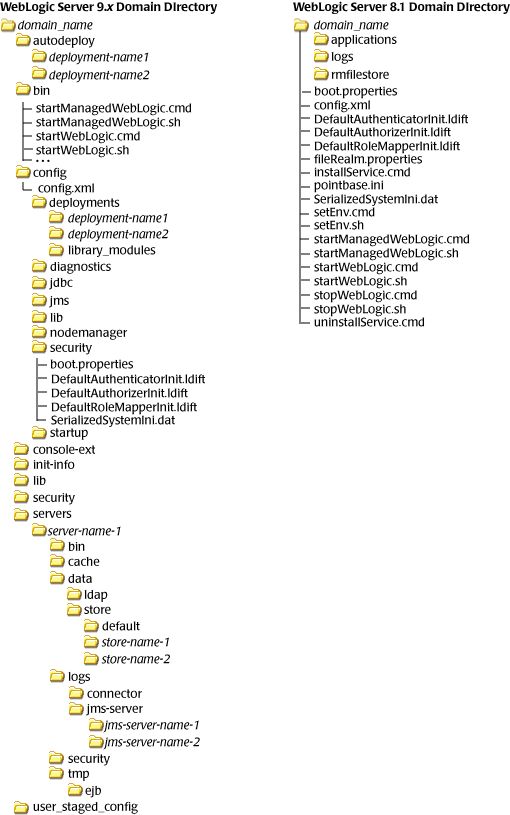
The following sections describe the domain directory structures for WebLogic Server 8.1, 7.0, and 6.1.
WebLogic Server 8.1 Domain Directory Structure
In WebLogic Server 8.1 environments, the domain directory structure created by the Configuration Wizard contains:
- A domain root directory with the same name as the domain, such as
mydomainorpetstore. This directory contains the following:
config.xmlfile for the domain- Scripts used to start server instances and establish the environment
- Subdirectory for storing applications for the domain, typically named
applications.
When you start a server instance in a domain for the first time, WebLogic Server creates the following subdirectories in the domain directory:
- Files containing security information
logsdirectory for storing domain-level logs- For each server running in the domain, a directory for storing server logs and HTTP access logs
For more details about the WebLogic Server 8.1 domain directory structure, see "Overview of WebLogic Server Domains" in Configuring and Managing WebLogic Server at http://download.oracle.com/docs/cd/E13222_01/wls/docs81/adminguide/overview_domain.html. For a summary of the directory structure contents for the default configuration templates, see "Template Reference" in Creating and Configuring WebLogic Domains Using the Configuration Wizard at http://download.oracle.com/docs/cd/E13196_01/platform/docs81/confgwiz/tempref.html.
WebLogic Server 7.0 Domain Directory Structure
In WebLogic Server 7.0 environments, the root of the domain directory structure is a directory with the same name as the domain, such as mydomain or petstore. This directory should contain the following:
config.xmlfile for the domain- Scripts you use to start server instances and establish your environment
- For storing applications for the domain, a directory, typically named
applications.
When you start a server instance in a domain for the first time, WebLogic Server creates the following subdirectories in the domain directory:
datadirectory for storing security informationlogsdirectory for storing domain-level logs- For each server running in the domain, a
server_namedirectory for storing server-level logs tempdirectory for storing temporary files
The following sample tree shows where the directories are created in a domain directory called mydomain.
For more information about the WebLogic Server 7.0 domain directory structure, see "Domain Directories Structure" in "Domain Restrictions" in "Overview of WebLogic Server Domains" in Creating and Configuring WebLogic Server Domains at http://download.oracle.com/docs/cd/E13222_01/wls/docs70/admin_domain/overview.html.
WebLogic Server 6.1 Domain Directory Structure
In WebLogic Server 6.1 environments, the configuration information for all of the WebLogic administrative domains resides in the configuration repository, which is located, in turn, in the WL_HOME/config directory. Specifically, config contains a configuration subdirectory for each domain. The name of each domain-specific subdirectory must match the name of the domain.
The domain directory structure contains a root directory with the same name as the domain, such as mydomain or petstore. This directory should contain the following:
config.xmlfile for the domain- Scripts you use to start server instances and establish your environment
- For storing applications for the domain, a subdirectory, typically named
applications logsdirectory for storing domain-level logs
For more information about the WebLogic Server 6.1 domain directory structure, see "Creating a New Domain" in "Overview of WebLogic Server Management" in WebLogic Server Administration Guide at http://download.oracle.com/docs/cd/E13222_01/wls/docs61/adminguide/overview.html.
Upgrading WebLogic Application Environments --官方文档的更多相关文章
- hbase官方文档(转)
FROM:http://www.just4e.com/hbase.html Apache HBase™ 参考指南 HBase 官方文档中文版 Copyright © 2012 Apache Soft ...
- HBase官方文档
HBase官方文档 目录 序 1. 入门 1.1. 介绍 1.2. 快速开始 2. Apache HBase (TM)配置 2.1. 基础条件 2.2. HBase 运行模式: 独立和分布式 2.3. ...
- Spring 4 官方文档学习(十一)Web MVC 框架之配置Spring MVC
内容列表: 启用MVC Java config 或 MVC XML namespace 修改已提供的配置 类型转换和格式化 校验 拦截器 内容协商 View Controllers View Reso ...
- Spring Cloud官方文档中文版-客户端负载均衡:Ribbon
官方文档地址为:http://cloud.spring.io/spring-cloud-static/Dalston.SR2/#_spring_cloud_netflix 文中例子我做了一些测试在:h ...
- Spring 4 官方文档学习(十四)WebSocket支持
个人提示:如果需要用到页面推送,高频且要低延迟,WebSocket无疑是最佳选择.否则还是轮询和long polling吧. 做了一个小demo放在码云上,有兴趣的可以看一下,简单易懂:websock ...
- Spark SQL 官方文档-中文翻译
Spark SQL 官方文档-中文翻译 Spark版本:Spark 1.5.2 转载请注明出处:http://www.cnblogs.com/BYRans/ 1 概述(Overview) 2 Data ...
- Spring 4 官方文档学习(十二)View技术
关键词:view technology.template.template engine.markup.内容较多,按需查用即可. 介绍 Thymeleaf Groovy Markup Template ...
- Spring 4 官方文档学习(十一)Web MVC 框架之异常处理
1.HandlerExceptionResolver Spring HandlerExceptionResolver的实现们会处理controller执行过程中发送的unexpected except ...
- Google Android官方文档进程与线程(Processes and Threads)翻译
android的多线程在开发中已经有使用过了,想再系统地学习一下,找到了android的官方文档,介绍进程与线程的介绍,试着翻译一下. 原文地址:http://developer.android.co ...
随机推荐
- XML--修改XML数据
DECLARE @xmlDoc XMLset @xmlDoc='<root> <book id="0001"> <title>C# Progra ...
- Jenkins HA高可用参考
商用版Jenkins(CloudBee)提供HA插件,开源版本可以借助etcd服务发现+心跳脚本+sync的方式实现高可用.
- asp.net Frameset框架集的嵌套使用
<%@ Page Language="C#" AutoEventWireup="true" CodeBehind="Frame.aspx.cs& ...
- JS中移除非数字,最多保留一位小数
//去除非数字 var clearNoNum = function (item) { if (item!=null && item!=undefined) { //先把非数字的都替换掉 ...
- 在.net中创建Access数据库
static void Main(string[] args) { //环境要求 //安装 access 2003, //引用com组件:Microsoft ADO Ext. 2.8 for DDL ...
- 「BZOJ4318」OSU!
题目链接 戳我 \(Solution\) 我们考虑每增加一个\(1\)会对答案有什么影响: \[E((x+1)^3)-E(x^3)=E(3x^2+3x+1)=3E(x^2)+3E(x)+1\] 所以我 ...
- 八.linux系统文件属性知识
1.文件属性权限是12位,现在只看9位,其中每3个一组,为:属主权限.属组权限.其他权限,其中r可读,w可写,x可执行,如图: 2.文件属性之软硬链接 linux系统中有两种链接,为硬链接(ln) ...
- 2018 OCP 052最新题库及答案-4
4.For which requirement should you configure shared servers? A) accommodating an increasing number o ...
- centos7安装nginx(自定义安装文件夹)
一.安装所需要的依赖软件 1.gcc:nginx编译依赖gcc环境 #yum install gcc-c++ 2.pcre:(Perl Compatible Regular Expressions)是 ...
- guzzle 简单使用记录
用 guzzle 发送一个包含指定请求头,请求体的 post 请求,并获取指定内容: <?php include_once "guzzle.phar"; use Guzzle ...