
原生JS实现随机点名项目
核心思想
- 随机产生规定范围内的整数,然后再产生相同范围内的整数,两者相同时,则暂停。
所用知识
- Math.random() * num: 产生从0到num的随机数
- Math.floor(): 向下取整
- 简单的DOM操作等
技术扩展
- 扩展人数
- 添加停止键等
效果
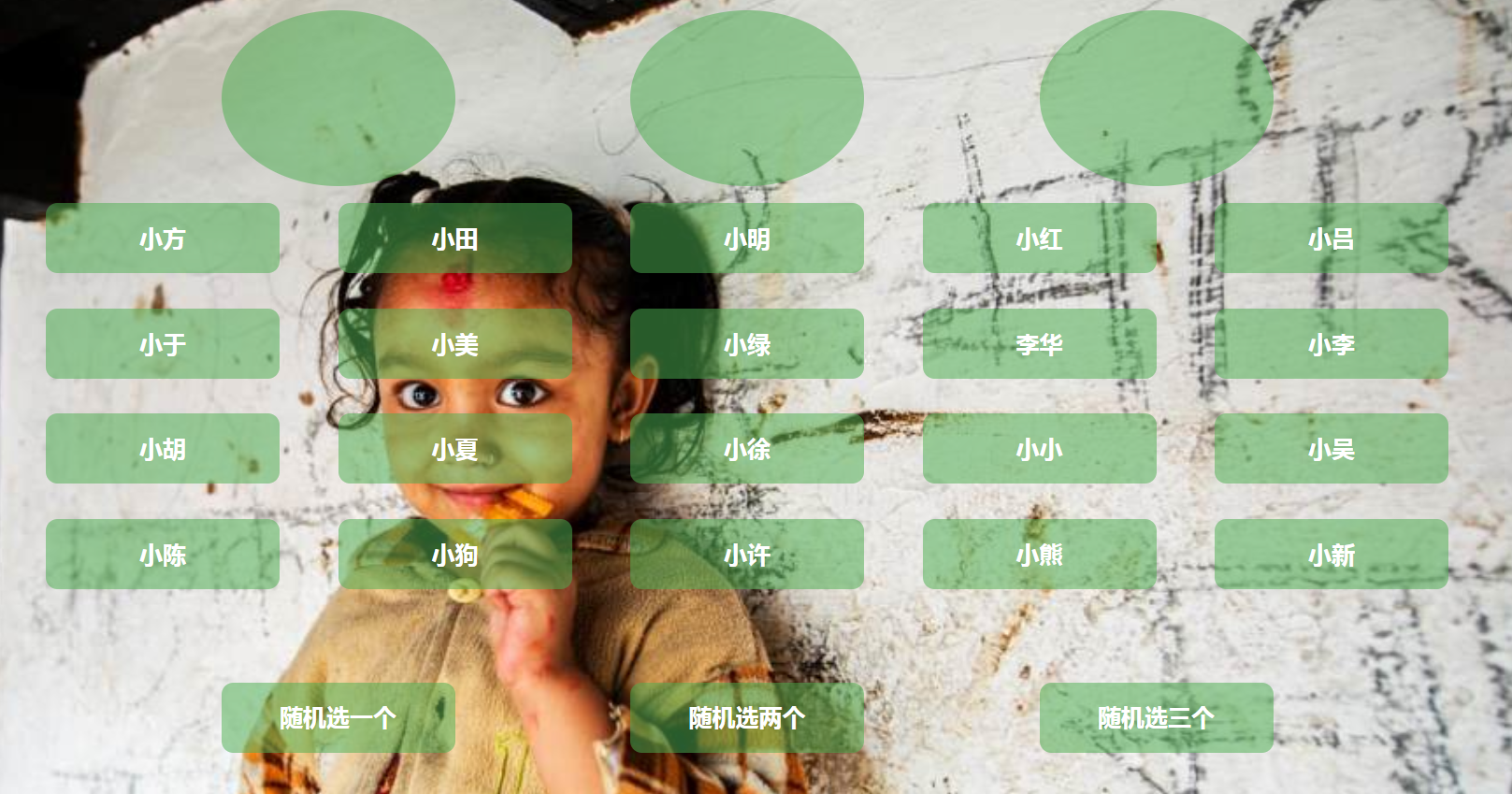
代码如下
- html:
    <div class="container">

        <section class="demo">

            <ul>

                <li></li>

                <li></li>

                <li></li>

            </ul>

        </section>

        <section class="students"><ul></ul></section>

        <section class="buttonList">

            <ul>

                <li><button type="button">随机选一个</button></li>

                <li><button type="button">随机选两个</button></li>

                <li><button type="button">随机选三个</button></li>

            </ul>

        </section>

    </div>
- css:
    <style type="text/css">

        * {

            margin: 0;

            padding: 0;

        }

        ul {

            list-style: none;

        }

        body {

            width: 100%;

            height: 100%;

            background: url("images/bg.jpg") no-repeat;

            background-size: cover;

        }

        button {

            border: none;

            background-color: transparent;

            color: #fff;

            font-size: 20px;

        }

        .container {

            width: 1200px;

            height: 700px;

            margin: 10px auto;

        }

        .container .demo, .container .buttonList {

            width: inherit;

            height: 25%;

        }

        .container .students {

            width: inherit;

            height: 50%;

        }

        .container .students li {

            margin-right: 50px;

            margin-bottom: 30px;

            text-align: center;

            border-radius: 10px;

            font-size: 20px;

            font-weight: bold;

        }

        .container .students li:nth-child(5n) {

            margin-right: 0;

        }

        .container .buttonList li button {

            float: left;

            width: 200px;

            height: 60px;

            background-color: #4caf5085;

            margin-right: 150px;

            text-align: center;

            line-height: 60px;

            border-radius: 10px;

            margin-top: 50px;

            font-weight: bold;

        }

        .container .buttonList li button:hover {

            background-color: #4caf50;

        }

        .container .buttonList li:nth-child(1) {

            margin-left: 150px;

        }

        .container .demo li {

            width: 200px;

            height: 150px;

            background-color: #4caf5085;

            float: left;

            margin-right: 150px;

            border-radius: 50%;

            margin-top: 10px;

            line-height: 150px;

            font-weight: bold;

            color: #fff;

            font-size: 60px;

            text-align: center;

        }

        .container .demo li:first-child {

            margin-left: 150px;

        }

    </style>
- javascript:
<script type="text/javascript">

        var stuArray = ["小方", "小田", "小明", "小红", "小吕", "小于", "小美", "小绿", "李华", "小李", "小胡",

            "小夏", "小徐", "小小", "小吴", "小陈", "小狗", "小许", "小熊", "小新"];

        var stuList = document.querySelector(".students").querySelector("ul");

        var buttonList = document.querySelectorAll("button");

        var demoList = document.querySelector(".demo").querySelectorAll("li");

        for (var i = 0; i < stuArray.length; i++) {

            var li = document.createElement("li");

            stuList.appendChild(li);

            li.innerHTML = stuArray[i];

            li.style.cssFloat = "left";

            li.style.width = 200 + "px";

            li.style.height = 60 + "px";

            li.style.backgroundColor = "#4caf5085";

            li.style.color = "#fff";

            li.style.lineHeight = 60 + "px";

        }

        var stuArrayList = stuList.querySelectorAll("li");

        function chooseOne () {

            for (var i = 0; i < stuArrayList.length; i++) {

                stuArrayList[i].style.background = "#4caf5085";

            }

            for (var i = 0; i < demoList.length; i++) {

                demoList[i].innerHTML = "";

            }

            var interId = setInterval(function () {

                var x = Math.floor(Math.random() * stuArray.length);

                stuArrayList[x].style.backgroundColor = "green";

                demoList[1].innerHTML = stuArrayList[x].innerHTML;

                var timeId = setTimeout(function () {

                    stuArrayList[x].style.backgroundColor = "#4caf5085";

                }, 100);

                var y = Math.floor(Math.random() * stuArray.length);

                if (y == x) {

                    clearTimeout(timeId);

                    clearInterval(interId);

                    stuArrayList[y].style.backgroundColor = "green";

                }

            }, 100);

        }

        function chooseTwo () {

            for (var i = 0; i < stuArrayList.length; i++) {

                stuArrayList[i].style.background = "#4caf5085";

            }

            for (var i = 0; i < demoList.length; i++) {

                demoList[i].innerHTML = "";

            }

            var interId = setInterval(function () {

                do {

                    var x1 = Math.floor(Math.random() * stuArray.length);

                    var x2 = Math.floor(Math.random() * stuArray.length);

                } while (x1 == x2);

                stuArrayList[x1].style.backgroundColor = "green";

                stuArrayList[x2].style.backgroundColor = "green";

                demoList[0].innerHTML = stuArrayList[x1].innerHTML;

                demoList[2].innerHTML = stuArrayList[x2].innerHTML;

                var timeId = setTimeout(function () {

                    stuArrayList[x1].style.backgroundColor = "#4caf5085";

                    stuArrayList[x2].style.backgroundColor = "#4caf5085";

                }, 100);

                var y1 = Math.floor(Math.random() * stuArray.length);

                var y2 = Math.floor(Math.random() * stuArray.length);

                if ((y1 == x1 && y2 == x2) || (y1 == x2 && y2 == x1)) {

                    clearTimeout(timeId);

                    clearInterval(interId);

                    stuArrayList[x1].style.backgroundColor = "green";

                    stuArrayList[x2].style.backgroundColor = "green";

                }

            }, 100);

        }

        function chooseThree () {

            for (var i = 0; i < stuArrayList.length; i++) {

                stuArrayList[i].style.background = "#4caf5085";

            }

            for (var i = 0; i < demoList.length; i++) {

                demoList[i].innerHTML = "";

            }

            var interId = setInterval(function () {

                do {

                    var x1 = Math.floor(Math.random() * stuArray.length);

                    var x2 = Math.floor(Math.random() * stuArray.length);

                    var x3 = Math.floor(Math.random() * stuArray.length);

                } while (x1 == x2 || x2 == x3 || x1 == x3);

                stuArrayList[x1].style.backgroundColor = "green";

                stuArrayList[x2].style.backgroundColor = "green";

                stuArrayList[x3].style.backgroundColor = "green";

                demoList[0].innerHTML = stuArrayList[x1].innerHTML;

                demoList[1].innerHTML = stuArrayList[x2].innerHTML;

                demoList[2].innerHTML = stuArrayList[x3].innerHTML;

                var timeId = setTimeout(function () {

                    stuArrayList[x1].style.backgroundColor = "#4caf5085";

                    stuArrayList[x2].style.backgroundColor = "#4caf5085";

                    stuArrayList[x3].style.backgroundColor = "#4caf5085";

                }, 100);

                var y1 = Math.floor(Math.random() * stuArray.length);

                var y2 = Math.floor(Math.random() * stuArray.length);

                var y3 = Math.floor(Math.random() * stuArray.length);

                if ((x1 == y1 && x2 == y2) || (x1 == y2 && x2 == y1)) {

                    clearTimeout(timeId);

                    clearInterval(interId);

                    stuArrayList[x1].style.backgroundColor = "green";

                    stuArrayList[x2].style.backgroundColor = "green";

                    stuArrayList[x3].style.backgroundColor = "green";

                }

            }, 100);

        }

        buttonList[0].addEventListener("click", function () {chooseOne()}, false);

        buttonList[1].addEventListener("click", function () {chooseTwo()}, false);

        buttonList[2].addEventListener("click", function () {chooseThree()}, false);
原生JS实现随机点名项目的更多相关文章
- 使用原生js 获取用户访问项目的浏览器类型
想要获取浏览器的类型很简单,网上提供了很多方法,但是看过之后,都是根据浏览器内核来判断是ie,谷歌,火狐,opeara的, 所以不能进一步判断在国内使用的主流浏览器类型,比如360,百度,搜狐浏览器等 ...
- 原生JS实现简易随机点名功能
定时器的工作原理,这里将用引用How JavaScript Timers Work中的例子来解释定时器的工作原理,该图为一个简单版的原理图.· 上图中,左侧数字代表时间,单位毫秒:左侧文字代表某一个操 ...
- 原生js实现简单的随机点名系统
<!DOCTYPE html> <html lang="en"> <head> <meta charset="UTF-8 ...
- 记一次数据、逻辑、视图分离的原生JS项目实践
一切的开始源于这篇文章:一句话理解Vue核心内容. 在文章中,作者给出了这样一个思考: 假设现在有一个这样的需求,有一张图片,在被点击时,可以记录下被点击的次数. 这看起来很简单吧, 按照上面提到到开 ...
- js - 面向对象 - 小案例:轮播图、随机点名、选项卡、鼠标拖拽
面向对象 对象 : (黑盒子)不了解内部结构, 知道表面的各种操作. 面向对象 : 不了解原理的情况下 会使用功能 . 面向对象是一种通用思想,并非编程中能用,任何事情都能用. 编程语言的面向对象的特 ...
- js随机点名
定时器案例. <!-- Author: XiaoWen Create a file: 2016-12-08 12:27:32 Last modified: 2016-12-08 12:51:59 ...
- js随机点名系统
<!DOCTYPE html> <html lang="en"> <head> <meta charset="UTF-8&quo ...
- JS: 随机点名程序与万年历
随机点名程序 document.write(Math.random()); var stu = ["张三", "王五", "张二", &qu ...
- Ajax进阶之原生js与跨域jsonp
什么是Ajax? 两个数求和: 用Jquery和数据用json格式 viws函数: from django.shortcuts import render,HttpResponse # Create ...
随机推荐
- 学习blus老师js(6)--js运动基础
运动基础 一.匀速运动 运动框架 在开始运动时,关闭已有定时器 把运动和停止隔开(if/else) <!DOCTYPE HTML> <html> <head> &l ...
- php ini_set更改php.ini配置,通过它修改php.in达到php上传文件大小限制是不行的,除非修改.htaccess文件
PHP ini_set() 无效的原因:如题:我租的是虚拟主机,php.ini里的upload_max_filesize是默认的2M,要直接修改php.ini文件是不可能的.我如果想上传超过2M的怎么 ...
- LIS系列总结
此篇博客总结常见的LIS模型变形的解法. ------------------------------------------------------------------- 〇.LIS的$O(Nl ...
- 一.jQuery源码解析之总体架构
(function (window, undefined) { //构建jQuery对象 var document = window.document, navigator = window.navi ...
- user_add示例
#!/usr/bin/python3# -*- coding: utf-8 -*-# @Time : 2018/5/28 16:51# @File : use_test_add.py 数据 ...
- Ubuntu 升级内核版本
查看当前内核版本 sch01ar@ubuntu:~$ uname -r Ubuntu 内核地址:https://kernel.ubuntu.com/~kernel-ppa/mainline/ 打开这个 ...
- 几种查询方法(lambda Linq Enumerable静态类方式)
1.需要一个数据源类: using System; using System.Collections.Generic; namespace Linq { public class Student { ...
- MYSQL, REDIS 等数据库的介绍
MySQL: 数据库概述 MySql安装和基本管理 MySQl创建用户和授权 初始mysql语句 库的操作 表的操作 数据类型 数据类型(2) 完整性约束 外键的变种 三种关系 数据的增删改 单表查询 ...
- Java常用的转义字符
以下为常用的转义字符对照表: 字母前面加上捺斜线"\"来表示常见的那些不能显示的ASCII字符.称为转义字符.如\0,\t,\n等,就称为转义字符. 转义字符 意义 ASCII码值 ...
- GridEh排序
添加pas文件 EhLibADO.pas EhLibCDS.pas EhLibFireDAC.pas 支持FireDAC 设置GridEh的属性 DBGridEh1->SortLocal = t ...