
C#通过反射执行C#dll所有函数
C# 反射(Reflection)
反射指程序可以访问、检测和修改它本身状态或行为的一种能力。
程序集包含模块,而模块包含类型,类型又包含成员。反射则提供了封装程序集、模块和类型的对象。
您可以使用反射动态地创建类型的实例,将类型绑定到现有对象,或从现有对象中获取类型。然后,可以调用类型的方法或访问其字段和属性。
优缺点
优点:
- 1、反射提高了程序的灵活性和扩展性。
- 2、降低耦合性,提高自适应能力。
- 3、它允许程序创建和控制任何类的对象,无需提前硬编码目标类。
缺点:
- 1、性能问题:使用反射基本上是一种解释操作,用于字段和方法接入时要远慢于直接代码。因此反射机制主要应用在对灵活性和拓展性要求很高的系统框架上,普通程序不建议使用。
- 2、使用反射会模糊程序内部逻辑;程序员希望在源代码中看到程序的逻辑,反射却绕过了源代码的技术,因而会带来维护的问题,反射代码比相应的直接代码更复杂。
以上来自菜鸟教程解释
假如我需要让代码自动识别并执行dll里面所有的方法,这个时候就可以用到c#反射;
1.先用C#写个简单的UI,效果图如下:
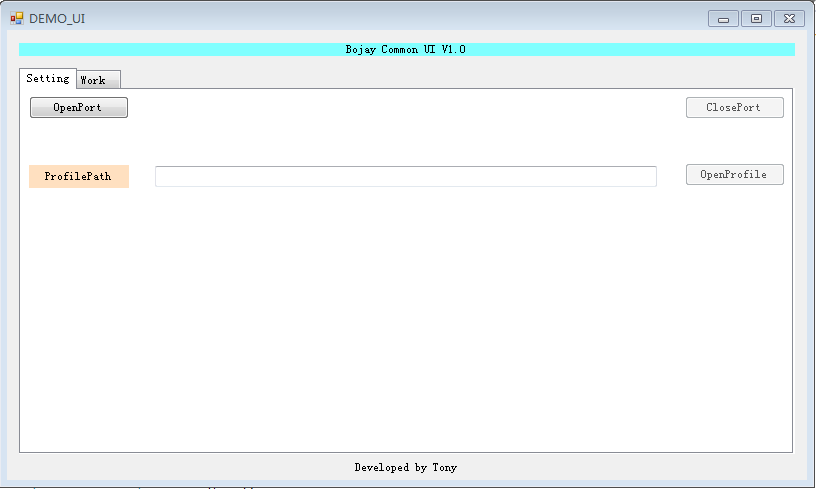

代码部分
using System;

using System.Collections.Generic;

using System.ComponentModel;

using System.Data;

using System.Drawing;

using System.Linq;

using System.Text;

using System.Threading.Tasks;

using System.Windows.Forms;

using System.IO;

using System.Reflection;

using System.Reflection.Emit;

using System.Text.RegularExpressions;

using System.Threading;

namespace BojayUI

{

    public partial class Form1 : Form

    {

        public Form1()

        {

            InitializeComponent();

        }

        private void buttonOpenPort_Click(object sender, EventArgs e)

        {

            this.buttonClosePort.Enabled = true;

            this.buttonOpenPort.Enabled = false;

            this.buttonOpenProfile.Enabled = true;

            //this.buttonBojay.Enabled = true;

            MessageBox.Show("OpenPort finish!");

        }

        private void buttonClosePort_Click(object sender, EventArgs e)

        {

            this.buttonClosePort.Enabled = false;

            this.buttonOpenPort.Enabled = true;

            this.buttonOpenProfile.Enabled = false;

            //this.buttonBojay.Enabled = false;

            MessageBox.Show("ClosePort finish!");

        }

        private void buttonOpenFile_Click(object sender, EventArgs e)

        {

            OpenProfileDialog.InitialDirectory = "C:\\";

            OpenProfileDialog.Filter = "Dynamic Link Library (*.dll)|*.dll|Text Document (*.txt)|*.txt|Comma-Separated Values (*.csv)|*.csv|All files (*.*)|*.*";

            if (this.OpenProfileDialog.ShowDialog() == DialogResult.OK)

            {

                this.textBoxProfilePath.Text = OpenProfileDialog.FileName;

                //save the file……

                //system.io.streamreader sr = new system.io.streamreader(openfiledialog1.filename);

                //this.textbox1.text = sr.readtoend();

                //sr.close();

            }

        }

        private void textBoxProfilePath_TextChanged(object sender, EventArgs e)

        {

        }

        private void button_start_Click(object sender, EventArgs e)

        {

            //******************执行所有类所有函数**************************//

            string path = this.textBoxProfilePath.Text;

            //string path = @"C:\Users\bojay\Desktop\ClassLibrary1\ClassLibrary1\bin\x86\Debug\ClassLibrary1.dll";

            //加载dll文件

            Assembly asm = Assembly.LoadFile(path);

            //正则表达式匹配

            string pattern = @"\w*\.";

            Match match = Regex.Match(path, pattern);

            //string[] StrArray_dll = path.Split(new string[] { "\\" }, StringSplitOptions.None);

            //string StrArray_namespace = StrArray_dll[StrArray_dll.Length - 1];

            //string[] String_class = StrArray_namespace.Split(new string[] { ".dl" }, StringSplitOptions.None);

            Type[] T = asm.GetTypes();

            for (int i = ; i < T.Length; i++)

            {

                //********************c#****************************

                //Type type_1 = asm.GetType(T[i].Name);

                //string final_str = String_class[0] + "." + T[i].Name;

                string namespace_class = match.Value + T[i].Name;

                //获取类

                Type type = asm.GetType(namespace_class);

                //创建该类的实例

                object obj = Activator.CreateInstance(type);

                MethodInfo[] methods = type.GetMethods();

                try

                {

                    //c#:method.Length-4

                    //c++:method.Length-5

                    for (int index = ; index < methods.Length - ; index++)

                    {

                        MethodInfo mf = type.GetMethod(methods[index].Name);

                        mf.Invoke(obj, null);

                        //**************dll--function return value and parameters***************//

                        //object result = mf.Invoke(obj, null);

                        //Console.WriteLine(result);

                        //ParameterInfo[] para = me.GetParameters();

                    }

                }

                catch (Exception ex)

                {

                    throw ex;

                }

            }

            //****************************************************************//

            //****************************************************************//

            Type temp_type = asm.GetType(match.Value + T[].Name);

            object temp_obj = Activator.CreateInstance(temp_type);

            //FieldInfo[] pi = temp_type.GetFields();

            //get min

            FieldInfo Minlimit = temp_type.GetField("Minlimit");

            string str_min = Minlimit.GetValue(temp_obj).ToString();

            //get max

            FieldInfo Maxlimit = temp_type.GetField("Maxlimit");

            string str_max = Maxlimit.GetValue(temp_obj).ToString();

            //scope

            this.label_dll1scop.Text = str_min + " < X < " + str_max;

            //get target data

            string line;

            using (StreamReader sr = new StreamReader("common.txt"))

            {

                if ((line = sr.ReadLine()) != null)

                {

                    this.label_dll1Data.Text = line;

                }

            }

            int MIN = Convert.ToInt32(str_min);

            int MAX = Convert.ToInt32(str_max);

            int Target = Convert.ToInt32(line);

            if (MIN < Target && Target < MAX)

            {

                this.label_dll1Result.BackColor = Color.Green;

                this.label_dll1Result.Text = "PASS";

            }

            else

            {

                this.label_dll1Result.BackColor = Color.Red;

                this.label_dll1Result.Text = "Fail";

            }

            //this.label_dll1scop.Text = "1.0 < X < 100.0";

            //this.label_dll1Data.Text = "9.0";

            //this.label_dll1Result.BackColor = Color.Green;

            //this.label_dll1Result.Text = "PASS";

            //Console.ReadKey();

        }

    }

}
Form1.cs
namespace BojayUI

{

    partial class Form1

    {

        /// <summary>

        /// Required designer variable.

        /// </summary>

        private System.ComponentModel.IContainer components = null;

        /// <summary>

        /// Clean up any resources being used.

        /// </summary>

        /// <param name="disposing">true if managed resources should be disposed; otherwise, false.</param>

        protected override void Dispose(bool disposing)

        {

            if (disposing && (components != null))

            {

                components.Dispose();

            }

            base.Dispose(disposing);

        }

        #region Windows Form Designer generated code

        /// <summary>

        /// Required method for Designer support - do not modify

        /// the contents of this method with the code editor.

        /// </summary>

        private void InitializeComponent()

        {

            this.tabControl1 = new System.Windows.Forms.TabControl();

            this.tabPage1 = new System.Windows.Forms.TabPage();

            this.buttonOpenProfile = new System.Windows.Forms.Button();

            this.textBoxProfilePath = new System.Windows.Forms.TextBox();

            this.labelProfilePath = new System.Windows.Forms.Label();

            this.buttonClosePort = new System.Windows.Forms.Button();

            this.buttonOpenPort = new System.Windows.Forms.Button();

            this.tabPage2 = new System.Windows.Forms.TabPage();

            this.button_start = new System.Windows.Forms.Button();

            this.label_dll1scop = new System.Windows.Forms.Label();

            this.label_dll1Data = new System.Windows.Forms.Label();

            this.label_dll1Result = new System.Windows.Forms.Label();

            this.label_dll1 = new System.Windows.Forms.Label();

            this.label1 = new System.Windows.Forms.Label();

            this.label2 = new System.Windows.Forms.Label();

            this.OpenProfileDialog = new System.Windows.Forms.OpenFileDialog();

            this.tabControl1.SuspendLayout();

            this.tabPage1.SuspendLayout();

            this.tabPage2.SuspendLayout();

            this.SuspendLayout();

            //

            // tabControl1

            //

            this.tabControl1.Controls.Add(this.tabPage1);

            this.tabControl1.Controls.Add(this.tabPage2);

            this.tabControl1.Location = new System.Drawing.Point(, );

            this.tabControl1.Name = "tabControl1";

            this.tabControl1.SelectedIndex = ;

            this.tabControl1.Size = new System.Drawing.Size(, );

            this.tabControl1.TabIndex = ;

            //

            // tabPage1

            //

            this.tabPage1.Controls.Add(this.buttonOpenProfile);

            this.tabPage1.Controls.Add(this.textBoxProfilePath);

            this.tabPage1.Controls.Add(this.labelProfilePath);

            this.tabPage1.Controls.Add(this.buttonClosePort);

            this.tabPage1.Controls.Add(this.buttonOpenPort);

            this.tabPage1.Location = new System.Drawing.Point(, );

            this.tabPage1.Name = "tabPage1";

            this.tabPage1.Padding = new System.Windows.Forms.Padding();

            this.tabPage1.Size = new System.Drawing.Size(, );

            this.tabPage1.TabIndex = ;

            this.tabPage1.Text = "Setting";

            this.tabPage1.UseVisualStyleBackColor = true;

            //

            // buttonOpenProfile

            //

            this.buttonOpenProfile.Enabled = false;

            this.buttonOpenProfile.Location = new System.Drawing.Point(, );

            this.buttonOpenProfile.Name = "buttonOpenProfile";

            this.buttonOpenProfile.Size = new System.Drawing.Size(, );

            this.buttonOpenProfile.TabIndex = ;

            this.buttonOpenProfile.Text = "OpenProfile";

            this.buttonOpenProfile.UseVisualStyleBackColor = true;

            this.buttonOpenProfile.Click += new System.EventHandler(this.buttonOpenFile_Click);

            //

            // textBoxProfilePath

            //

            this.textBoxProfilePath.Location = new System.Drawing.Point(, );

            this.textBoxProfilePath.Name = "textBoxProfilePath";

            this.textBoxProfilePath.Size = new System.Drawing.Size(, );

            this.textBoxProfilePath.TabIndex = ;

            this.textBoxProfilePath.TextChanged += new System.EventHandler(this.textBoxProfilePath_TextChanged);

            //

            // labelProfilePath

            //

            this.labelProfilePath.BackColor = System.Drawing.Color.FromArgb(((int)(((byte)()))), ((int)(((byte)()))), ((int)(((byte)()))));

            this.labelProfilePath.Location = new System.Drawing.Point(, );

            this.labelProfilePath.Name = "labelProfilePath";

            this.labelProfilePath.Size = new System.Drawing.Size(, );

            this.labelProfilePath.TabIndex = ;

            this.labelProfilePath.Text = "ProfilePath";

            this.labelProfilePath.TextAlign = System.Drawing.ContentAlignment.MiddleCenter;

            //

            // buttonClosePort

            //

            this.buttonClosePort.Enabled = false;

            this.buttonClosePort.Location = new System.Drawing.Point(, );

            this.buttonClosePort.Name = "buttonClosePort";

            this.buttonClosePort.Size = new System.Drawing.Size(, );

            this.buttonClosePort.TabIndex = ;

            this.buttonClosePort.Text = "ClosePort";

            this.buttonClosePort.UseVisualStyleBackColor = true;

            this.buttonClosePort.Click += new System.EventHandler(this.buttonClosePort_Click);

            //

            // buttonOpenPort

            //

            this.buttonOpenPort.Location = new System.Drawing.Point(, );

            this.buttonOpenPort.Name = "buttonOpenPort";

            this.buttonOpenPort.Size = new System.Drawing.Size(, );

            this.buttonOpenPort.TabIndex = ;

            this.buttonOpenPort.Text = "OpenPort";

            this.buttonOpenPort.UseVisualStyleBackColor = true;

            this.buttonOpenPort.Click += new System.EventHandler(this.buttonOpenPort_Click);

            //

            // tabPage2

            //

            this.tabPage2.Controls.Add(this.button_start);

            this.tabPage2.Controls.Add(this.label_dll1scop);

            this.tabPage2.Controls.Add(this.label_dll1Data);

            this.tabPage2.Controls.Add(this.label_dll1Result);

            this.tabPage2.Controls.Add(this.label_dll1);

            this.tabPage2.Location = new System.Drawing.Point(, );

            this.tabPage2.Name = "tabPage2";

            this.tabPage2.Padding = new System.Windows.Forms.Padding();

            this.tabPage2.Size = new System.Drawing.Size(, );

            this.tabPage2.TabIndex = ;

            this.tabPage2.Text = "Work";

            this.tabPage2.UseVisualStyleBackColor = true;

            //

            // button_start

            //

            this.button_start.Location = new System.Drawing.Point(, );

            this.button_start.Name = "button_start";

            this.button_start.Size = new System.Drawing.Size(, );

            this.button_start.TabIndex = ;

            this.button_start.Text = "Start";

            this.button_start.UseVisualStyleBackColor = true;

            this.button_start.Click += new System.EventHandler(this.button_start_Click);

            //

            // label_dll1scop

            //

            this.label_dll1scop.BackColor = System.Drawing.Color.Silver;

            this.label_dll1scop.Location = new System.Drawing.Point(, );

            this.label_dll1scop.Name = "label_dll1scop";

            this.label_dll1scop.Size = new System.Drawing.Size(, );

            this.label_dll1scop.TabIndex = ;

            this.label_dll1scop.TextAlign = System.Drawing.ContentAlignment.MiddleCenter;

            //

            // label_dll1Data

            //

            this.label_dll1Data.BackColor = System.Drawing.Color.Silver;

            this.label_dll1Data.Location = new System.Drawing.Point(, );

            this.label_dll1Data.Name = "label_dll1Data";

            this.label_dll1Data.Size = new System.Drawing.Size(, );

            this.label_dll1Data.TabIndex = ;

            this.label_dll1Data.TextAlign = System.Drawing.ContentAlignment.MiddleCenter;

            //

            // label_dll1Result

            //

            this.label_dll1Result.BackColor = System.Drawing.Color.Silver;

            this.label_dll1Result.Location = new System.Drawing.Point(, );

            this.label_dll1Result.Name = "label_dll1Result";

            this.label_dll1Result.Size = new System.Drawing.Size(, );

            this.label_dll1Result.TabIndex = ;

            this.label_dll1Result.TextAlign = System.Drawing.ContentAlignment.MiddleCenter;

            //

            // label_dll1

            //

            this.label_dll1.BackColor = System.Drawing.Color.Silver;

            this.label_dll1.Location = new System.Drawing.Point(, );

            this.label_dll1.Name = "label_dll1";

            this.label_dll1.Size = new System.Drawing.Size(, );

            this.label_dll1.TabIndex = ;

            this.label_dll1.Text = "GetValue_FromDll1Text";

            this.label_dll1.TextAlign = System.Drawing.ContentAlignment.MiddleCenter;

            //

            // label1

            //

            this.label1.BackColor = System.Drawing.Color.FromArgb(((int)(((byte)()))), ((int)(((byte)()))), ((int)(((byte)()))));

            this.label1.Location = new System.Drawing.Point(, );

            this.label1.Name = "label1";

            this.label1.Size = new System.Drawing.Size(, );

            this.label1.TabIndex = ;

            this.label1.Text = "Bojay Common UI V1.0";

            this.label1.TextAlign = System.Drawing.ContentAlignment.MiddleCenter;

            //

            // label2

            //

            this.label2.Location = new System.Drawing.Point(, );

            this.label2.Name = "label2";

            this.label2.Size = new System.Drawing.Size(, );

            this.label2.TabIndex = ;

            this.label2.Text = "Developed by Tony";

            this.label2.TextAlign = System.Drawing.ContentAlignment.MiddleCenter;

            //

            // OpenProfileDialog

            //

            this.OpenProfileDialog.FileName = "OpenProfileDialog";

            //

            // Form1

            //

            this.AutoScaleDimensions = new System.Drawing.SizeF(6F, 12F);

            this.AutoScaleMode = System.Windows.Forms.AutoScaleMode.Font;

            this.AutoValidate = System.Windows.Forms.AutoValidate.Disable;

            this.ClientSize = new System.Drawing.Size(, );

            this.Controls.Add(this.label2);

            this.Controls.Add(this.label1);

            this.Controls.Add(this.tabControl1);

            this.Name = "Form1";

            this.Text = "DEMO_UI";

            this.tabControl1.ResumeLayout(false);

            this.tabPage1.ResumeLayout(false);

            this.tabPage1.PerformLayout();

            this.tabPage2.ResumeLayout(false);

            this.ResumeLayout(false);

        }

        #endregion

        private System.Windows.Forms.TabControl tabControl1;

        private System.Windows.Forms.TabPage tabPage1;

        private System.Windows.Forms.TabPage tabPage2;

        private System.Windows.Forms.Label label1;

        private System.Windows.Forms.Label label2;

        private System.Windows.Forms.Button buttonOpenPort;

        private System.Windows.Forms.Button buttonClosePort;

        private System.Windows.Forms.Button buttonOpenProfile;

        private System.Windows.Forms.TextBox textBoxProfilePath;

        private System.Windows.Forms.Label labelProfilePath;

        private System.Windows.Forms.OpenFileDialog OpenProfileDialog;

        private System.Windows.Forms.Label label_dll1;

        private System.Windows.Forms.Label label_dll1scop;

        private System.Windows.Forms.Label label_dll1Data;

        private System.Windows.Forms.Label label_dll1Result;

        private System.Windows.Forms.Button button_start;

    }

}
From1.Designer.cs
using System;

using System.Collections.Generic;

using System.Linq;

using System.Threading.Tasks;

using System.Windows.Forms;

namespace BojayUI

{

    static class Program

    {

        /// <summary>

        /// The main entry point for the application.

        /// </summary>

        [STAThread]

        static void Main()

        {

            Application.EnableVisualStyles();

            Application.SetCompatibleTextRenderingDefault(false);

            Application.Run(new Form1());

        }

    }

}
Program.cs
2.C#写个dll
using System;

using System.Collections.Generic;

using System.Linq;

using System.Text;

using System.Threading.Tasks;

using System.IO;

namespace ClassLibrary1

{

    public class Common

    {

        public int Maxlimit = ;

        public int Minlimit = ;

        public int common = ;

    }

    public class Class1:Common

    {

        public void WriteFile()

        {

            int temp = this.common+;

            using (StreamWriter sw = new StreamWriter("common.txt"))

            {

                sw.WriteLine(temp);

            }

        }

    }

}
ClassLibrary1
3.运行UI,加载dll路径

4.执行dll所有类里面的所有方法和属性
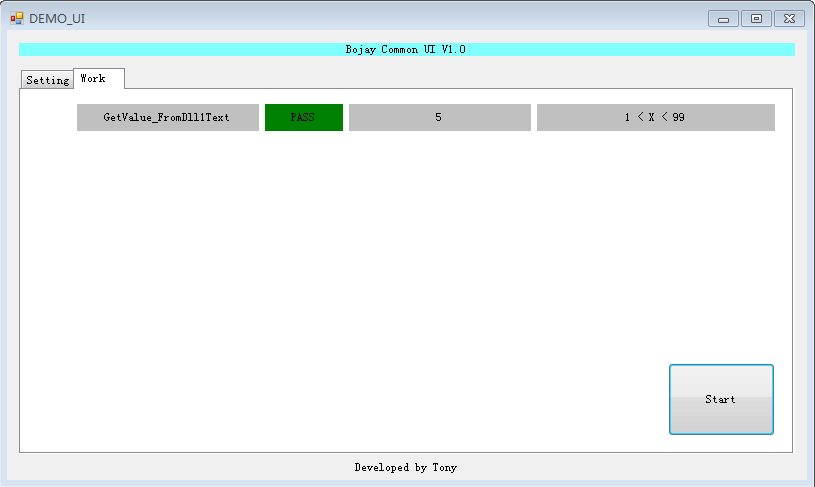
5.结果pass,说明该dll里面的函数功能运行结果达到我们的要求;当然啦,这个dll里面只是简单的通过文件写读,将某个目标值进行判断而已,而且我们还需要定义某个公用的类Common,及对应公用属性Maxlimit、Minlimit、common
总结:
<1>dll的C#代码里的namespace命名空间必须和dll文件名一致,因为我们进行匹配的时候只是匹配dll文件名;当然,我们也可以有更好的方法,例如将dll命名空间保持不变,这样我们还不需要对dll路径进行解析
<2>解析字符串的方式可以用正则,也可以用split等较为通俗简便的方法,但可能步骤会稍微多点,建议能用正则还是用正则
<3>dll是用C#写的,可以考虑能否写个.net 平台的C++dll
C#通过反射执行C#dll所有函数的更多相关文章
- C# 遍历DLL导出函数
C#如何去遍历一个由C++或E语言编写的本地DLL导出函数呢 不过在这里我建议对PE一无所知的人 你或许应先补补这方面的知识,我不知道为什么PE方面的 应用在C#中怎么这么少,我查阅过相关 C#的知识 ...
- C#反射调用其它DLL的委托事件 传值
C#反射调用其它DLL的委托事件 传值在插件式开发.我们要调用其它插件或模块的委托事件时.那么我们需要通过反射. 复制代码namespace Module2{ /// <summary> ...
- DLL导出函数和类的定义区别 __declspec(dllexport)
DLL导出函数和类的定义区别 __declspec(dllexport) 是有区别的, 请看 : //定义头文件的使用方,是导出还是导入 #if defined(_DLL_API) #ifndef D ...
- 【转】easyui $.message.alert 点击右上角的关闭按钮时,不执行定义的回调函数
今天發現這個問題 easyui $.message.alert 点击右上角的关闭按钮时,不执行定义的回调函数
- AFX_MANAGE_STATE(AfxGetStaticModuleState())DLL导出函数包含MFC资源
AFX_MANAGE_STATE(AfxGetStaticModuleState()) 先看一个例子: .创建一个动态链接到MFC DLL的规则DLL,其内部包含一个对话框资源.指定该对话框ID如下: ...
- dll 导出函数名的那些事
dll 导出函数名的那些事 关键字: VC++ DLL 导出函数 经常使用VC6的Dependency或者是Depends工具查看DLL导出函数的名字,会发现有DLL导出函数的名字有时大不相同,导 ...
- 动态加载JS文件,并根据JS文件的加载状态来执行自己的回调函数
动态加载JS文件,并根据JS文件的加载状态来执行自己的回调函数, 在很多场景下,我们需要在动态加载JS文件的时候,根据加载的状态来进行后续的操作,需要在JS加载成功后,执行另一方法,这个方法是依托在加 ...
- 关于执行ST_Geometry的st_centroid函数时报ORA-28579错误的问题
环境 SDE版本:10./10.2/10.2.1/10.2.2 Oracle版本:11g R2 11.2.0.1 Windows版本:Windows Server 2008 R2 问题描述及原因 以全 ...
- PDOstament对象执行execute()函数,只要是sql语句正确都是返回true
[PDO对象操作数据库] PDOstament对象执行execute()函数,只要是sql语句正确都是返回true. 问题: 想要PDO对象实现更改一条记录, 并修改是否成功要返回信息给用户. 上我的 ...
随机推荐
- xcconfig
[xcconfig] 1.When you can use a .xcconfig file? Use .xcconfig files if you find yourself changing th ...
- 服务器上如何再另外添加一个E盘
我的电脑按右键,选择管理..然后在左边选择磁盘管理,然后对着C盘或者D盘按右键,选择压缩卷,等一下下,就会出现个框框让你选择压缩多少,然后多了一个可用空间,再把它分成一个分区就OK拉 步骤:对可用空间 ...
- 整理Javascript基础数据和引用数据复制值的问题
Javascript数据分为两大类:1.基础类型(原始类型数据) 2.引用类型.他们的存储方式是不同的 基础类型的数据存储是保存在栈内存中的: 例如: var a=1; var b=a; var a= ...
- FCLK、HCLK、PCLK
一,PLL S3C2440 CPU主频可达400MHz,开发板上的外接晶振为12M,通过时钟控制逻辑的PLL(phase locked loop,锁相环电路)来倍频这个系统时钟.2440有两个P ...
- 莫队算法详解和c实现
解析和实现 摘要: 莫队算法是一个对于区间.树或其他结构离线(在线)维护的算法,此算法基于一些基本算法,例如暴力维护,树状数组,分块,最小曼哈顿距离生成树,对其进行揉合从而产生的一个简单 ...
- java文件的读写程序代码
package textopen; import java.io.File; import java.io.FileNotFoundException; import java.io.FileOutp ...
- 声音处理(Cool Edit)
平直化处理 上升半音
- Shell编程-02-Shell变量
目录 什么是Shell变量 变量类型 环境变量初始化及其对应文件的生效顺序 什么是Shell变量 在初等数学数学方程式中,我们会经常碰到类似于这样的方程式:y=x+1 ,等号左右两边的x和y称 ...
- 解决同一程序在并行同时调用时,出现资源等待错误-使用DBMS_LOCK.sleep
解决同一程序被并行同时调用时,出现资源等待错误问题. 使用DBMS_LOCK.sleep (10); PROCEDURE prc_lock_test(v_engine_id in varchar, v ...
- 由于没有公钥,无法验证下列签名 Ubuntu
问题:执行 apt-get update 时错误 W: GPG 错误:https://apt.dockerproject.org ubuntu-trusty InRelease: 由于没有公钥,无法验 ...