
tensorflow中协调器 tf.train.Coordinator 和入队线程启动器 tf.train.start_queue_runners
TensorFlow的Session对象是支持多线程的,可以在同一个会话(Session)中创建多个线程,并行执行。在Session中的所有线程都必须能被同步终止,异常必须能被正确捕获并报告,会话终止的时候, 队列必须能被正确地关闭。
TensorFlow提供了两个类来实现对Session中多线程的管理:tf.Coordinator和 tf.QueueRunner,这两个类往往一起使用。
Coordinator类用来管理在Session中的多个线程,可以用来同时停止多个工作线程并且向那个在等待所有工作线程终止的程序报告异常,该线程捕获到这个异常之后就会终止所有线程。使用 tf.train.Coordinator()来创建一个线程管理器(协调器)对象。
QueueRunner类用来启动tensor的入队线程,可以用来启动多个工作线程同时将多个tensor(训练数据)推送入文件名称队列中,具体执行函数是 tf.train.start_queue_runners , 只有调用 tf.train.start_queue_runners 之后,才会真正把tensor推入内存序列中,供计算单元调用,否则会由于内存序列为空,数据流图会处于一直等待状态。
tf中的数据读取机制如下图:
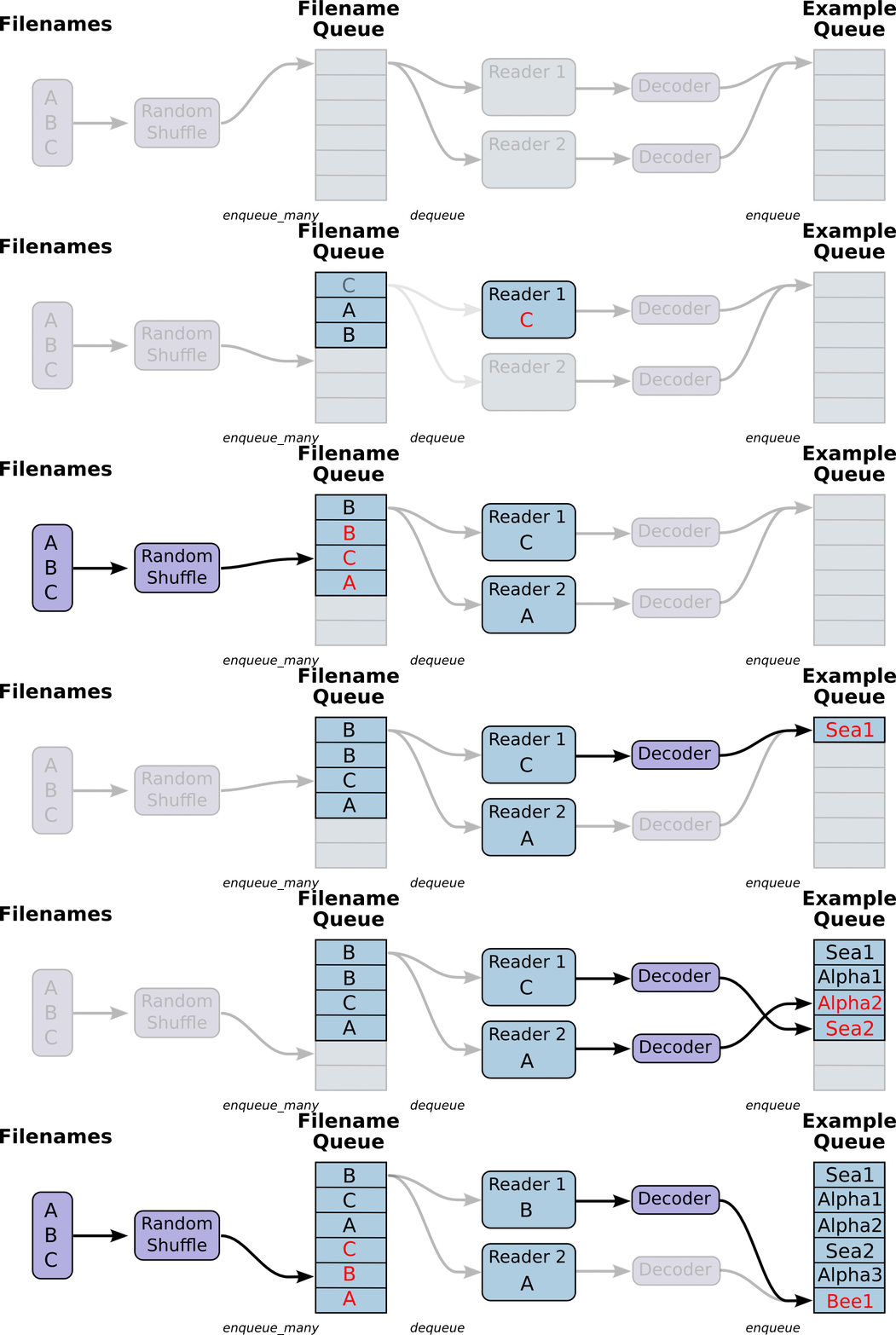
- 调用 tf.train.slice_input_producer,从 本地文件里抽取tensor,准备放入Filename Queue(文件名队列)中;
- 调用 tf.train.batch,从文件名队列中提取tensor,使用单个或多个线程,准备放入文件队列;
- 调用 tf.train.Coordinator() 来创建一个线程协调器,用来管理之后在Session中启动的所有线程;
- 调用tf.train.start_queue_runners, 启动入队线程,由多个或单个线程,按照设定规则,把文件读入Filename Queue中。函数返回线程ID的列表,一般情况下,系统有多少个核,就会启动多少个入队线程(入队具体使用多少个线程在tf.train.batch中定义);
- 文件从 Filename Queue中读入内存队列的操作不用手动执行,由tf自动完成;
- 调用sess.run 来启动数据出列和执行计算;
- 使用 coord.should_stop()来查询是否应该终止所有线程,当文件队列(queue)中的所有文件都已经读取出列的时候,会抛出一个 OutofRangeError 的异常,这时候就应该停止Sesson中的所有线程了;
- 使用coord.request_stop()来发出终止所有线程的命令,使用coord.join(threads)把线程加入主线程,等待threads结束。
以上对列(Queue)和 协调器(Coordinator)操作示例:
# -*- coding:utf-8 -*-

import tensorflow as tf

import numpy as np

# 样本个数

sample_num=5

# 设置迭代次数

epoch_num = 2

# 设置一个批次中包含样本个数

batch_size = 3

# 计算每一轮epoch中含有的batch个数

batch_total = int(sample_num/batch_size)+1

# 生成4个数据和标签

def generate_data(sample_num=sample_num):

    labels = np.asarray(range(0, sample_num))

    images = np.random.random([sample_num, 224, 224, 3])

    print('image size {},label size :{}'.format(images.shape, labels.shape))

    return images,labels

def get_batch_data(batch_size=batch_size):

    images, label = generate_data()

    # 数据类型转换为tf.float32

    images = tf.cast(images, tf.float32)

    label = tf.cast(label, tf.int32)

    #从tensor列表中按顺序或随机抽取一个tensor准备放入文件名称队列

    input_queue = tf.train.slice_input_producer([images, label], num_epochs=epoch_num, shuffle=False)

    #从文件名称队列中读取文件准备放入文件队列

    image_batch, label_batch = tf.train.batch(input_queue, batch_size=batch_size, num_threads=2, capacity=64, allow_smaller_final_batch=False)

    return image_batch, label_batch

image_batch, label_batch = get_batch_data(batch_size=batch_size)

with tf.Session() as sess:

    # 先执行初始化工作

    sess.run(tf.global_variables_initializer())

    sess.run(tf.local_variables_initializer())

    # 开启一个协调器

    coord = tf.train.Coordinator()

    # 使用start_queue_runners 启动队列填充

    threads = tf.train.start_queue_runners(sess, coord)

    try:

        while not coord.should_stop():

            print '************'

            # 获取每一个batch中batch_size个样本和标签

            image_batch_v, label_batch_v = sess.run([image_batch, label_batch])

            print(image_batch_v.shape, label_batch_v)

    except tf.errors.OutOfRangeError:  #如果读取到文件队列末尾会抛出此异常

        print("done! now lets kill all the threads……")

    finally:

        # 协调器coord发出所有线程终止信号

        coord.request_stop()

        print('all threads are asked to stop!')

    coord.join(threads) #把开启的线程加入主线程,等待threads结束

    print('all threads are stopped!')
输出:
************

((3, 224, 224, 3), array([0, 1, 2], dtype=int32))

************

((3, 224, 224, 3), array([3, 4, 0], dtype=int32))

************

((3, 224, 224, 3), array([1, 2, 3], dtype=int32))

************

done! now lets kill all the threads……

all threads are asked to stop!

all threads are stopped!
以上程序在 tf.train.slice_input_producer 函数中设置了 num_epochs 的数量, 所以在文件队列末尾有结束标志,读到这个结束标志的时候抛出 OutofRangeError 异常,就可以结束各个线程了。
如果不设置 num_epochs 的数量,则文件队列是无限循环的,没有结束标志,程序会一直执行下去。
tensorflow中协调器 tf.train.Coordinator 和入队线程启动器 tf.train.start_queue_runners的更多相关文章
- tensorflow|tf.train.slice_input_producer|tf.train.Coordinator|tf.train.start_queue_runners
#### ''' tf.train.slice_input_producer :定义样本放入文件名队列的方式[迭代次数,是否乱序],但此时文件名队列还没有真正写入数据 slice_input_prod ...
- tfsenflow队列|tf.train.slice_input_producer|tf.train.Coordinator|tf.train.start_queue_runners
#### ''' tf.train.slice_input_producer :定义样本放入文件名队列的方式[迭代次数,是否乱序],但此时文件名队列还没有真正写入数据 slice_input_pr ...
- TensorFlow中的显存管理器——BFC Allocator
背景 作者:DeepLearningStack,阿里巴巴算法工程师,开源TensorFlow Contributor] 使用GPU训练时,一次训练任务无论是模型参数还是中间结果都需要占用大量显存.为了 ...
- 深度学习原理与框架-Tfrecord数据集的读取与训练(代码) 1.tf.train.batch(获取batch图片) 2.tf.image.resize_image_with_crop_or_pad(图片压缩) 3.tf.train.per_image_stand..(图片标准化) 4.tf.train.string_input_producer(字符串入队列) 5.tf.TFRecord(读
1.tf.train.batch(image, batch_size=batch_size, num_threads=1) # 获取一个batch的数据 参数说明:image表示输入图片,batch_ ...
- TensorFlow中数据读取—如何载入样本
考虑到要是自己去做一个项目,那么第一步是如何把数据导入到代码中,何种形式呢?是否需要做预处理?官网中给的实例mnist,数据导入都是写好的模块,那么自己的数据呢? 一.从文件中读取数据(CSV文件.二 ...
- tensorflow中数据批次划分示例教程
1.简介 将数据划分成若干批次的数据,使用的函数主要有: tf.train.slice_input_producer(tensor_list,shuffle=True,seed=None,capaci ...
- 深度学习原理与框架-Tfrecord数据集的制作 1.tf.train.Examples(数据转换为二进制) 3.tf.image.encode_jpeg(解码图片加码成jpeg) 4.tf.train.Coordinator(构建多线程通道) 5.threading.Thread(建立单线程) 6.tf.python_io.TFR(TFR读入器)
1. 配套使用: tf.train.Examples将数据转换为二进制,提升IO效率和方便管理 对于int类型 : tf.train.Examples(features=tf.train.Featur ...
- tensorflow中 tf.train.slice_input_producer 和 tf.train.batch 函数(转)
tensorflow数据读取机制 tensorflow中为了充分利用GPU,减少GPU等待数据的空闲时间,使用了两个线程分别执行数据读入和数据计算. 具体来说就是使用一个线程源源不断的将硬盘中的图片数 ...
- tensorflow中 tf.train.slice_input_producer 和 tf.train.batch 函数
tensorflow数据读取机制 tensorflow中为了充分利用GPU,减少GPU等待数据的空闲时间,使用了两个线程分别执行数据读入和数据计算. 具体来说就是使用一个线程源源不断的将硬盘中的图片数 ...
随机推荐
- python 面向对象编程学习总结
面向对象是个抽象的东西,概念比较多,下面会一一介绍. 一.类和实例 类(Class)和实例(Instance)是面向对象最重要的概念. 类是指抽象出的模板.实例则是根据类创建出来的具体的“对象”,每个 ...
- 新版samba安装过程
yum install samba samba-client samba-swat cp -p /etc/samba/smb.conf /etc/samba/smb.conf.orig /bin ...
- bzoj1630 / bzoj2023 [Usaco2005 Nov]Ant Counting 数蚂蚁
Description 有一天,贝茜无聊地坐在蚂蚁洞前看蚂蚁们进进出出地搬运食物.很快贝茜发现有些蚂蚁长得几乎一模一样,于是她认为那些蚂蚁是兄弟,也就是说它们是同一个家族里的成员.她也发现整个 ...
- Linux的crontab
如果要让unix系统重复,定期做一件事,我们就会用到crontab. 实质上真正去执行每一个重复任务的是cron,cron是的unix家族的一个后台常驻程序,cron是由cron文件来驱动的,cron ...
- elasticsearch的服务器响应异常及解决策略(转)
详述: 1 _riverStatus Import_fail 问题描述: 发现有个索引的数据同步不完整,在 http://192.168.1.17:9200/_plugin/head/ 在browse ...
- Xcode7.2与iOS9之坑 (持续更新)
GitHub地址 前几天升级OS X EI Capitan 10.11.1, 以及Xcode7.1,正好赶上公司新产品上线,要做iOS9的适配,遇到各种坑,各种查资料,随之记录总结一下遇到的坑. 先说 ...
- linux find/grep 与cat联合使用
find ./ -name file_name.txt | xargs cat >> file_name.txt
- nginx.conf 配置详解
目录 pid user error_log worker_connections include http server nginx主配置文件中的内容 pid 主线程id的存储位置. # cat /u ...
- Tornado教程目录
第一章:引言 第二章:表单和模板 第三章:模板扩展 第四章:数据库 第五章:异步Web服务 第六章:编写安全应用 第七章:外部服务认证 第八章:部署Tornado
- Java中的String和StringBuffer
在任何编程语言中,字符串都是我们编写程序时不可避免要用到的常用的数据类型之一. 对于Java初学者而言,当谈到String和StringBuffer的区别时,通常都会有些困惑. 而要弄清楚两者之间的区 ...