
创建展开行明细编辑表单的 CRUD 应用
http://www.runoob.com/jeasyui/jeasyui-app-crud3.html
jQuery EasyUI 应用 - 创建展开行明细编辑表单的 CRUD 应用
当切换数据网格视图(datagrid view)到 'detailview',用户可以展开一行来显示一些行的明细在行下面。这个功能允许您为防止在明细行面板(panel)中的编辑表单(form)提供 一些合适的布局(layout)。在本教程中,我们使用数据网格(datagrid)组件来减小编辑表单(form)所占据空间。
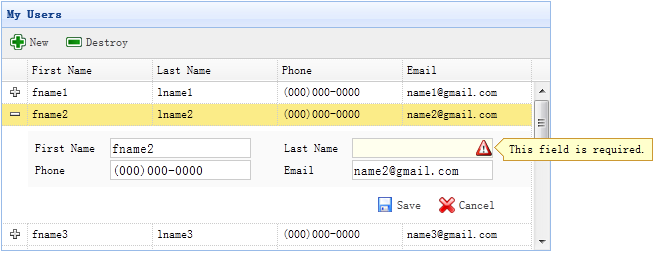
步骤 1:在 HTML 标签中定义数据网格(DataGrid)
<table id="dg" title="My Users" style="width:550px;height:250px" url="get_users.php" toolbar="#toolbar" fitColumns="true" singleSelect="true"> <thead> <tr> <th field="firstname" width="50">First Name</th> <th field="lastname" width="50">Last Name</th> <th field="phone" width="50">Phone</th> <th field="email" width="50">Email</th> </tr> </thead> </table> <div id="toolbar"> <a href="#" class="easyui-linkbutton" iconCls="icon-add" plain="true" onclick="newItem()">New</a> <a href="#" class="easyui-linkbutton" iconCls="icon-remove" plain="true" onclick="destroyItem()">Destroy</a> </div>
步骤 2:为数据网格(DataGrid)应用明细视图
$('#dg').datagrid({ view: detailview, detailFormatter:function(index,row){ return '<div class="ddv"></div>'; }, onExpandRow: function(index,row){ var ddv = $(this).datagrid('getRowDetail',index).find('div.ddv'); ddv.panel({ border:false, cache:true, href:'show_form.php?index='+index, onLoad:function(){ $('#dg').datagrid('fixDetailRowHeight',index); $('#dg').datagrid('selectRow',index); $('#dg').datagrid('getRowDetail',index).find('form').form('load',row); } }); $('#dg').datagrid('fixDetailRowHeight',index); } });
为了为数据网格(DataGrid)应用明细视图,在 html 页面头部引入 'datagrid-detailview.js' 文件。
我们使用 'detailFormatter' 函数来生成行明细内容。 在这种情况下,我们返回一个用于放置编辑表单(form)的空的 <div>。 当用户点击行展开按钮('+')时,'onExpandRow' 事件将被触发,我们将通过 ajax 加载编辑表单(form)。 调用 'getRowDetail' 方法来得到行明细容器,所以我们能查找到行明细面板(panel)。 在行明细中创建面板(panel),加载从 'show_form.php' 返回的编辑表单(form)。
步骤 3:创建编辑表单(Form)
编辑表单(form)是从服务器加载的。
<form method="post"> <table class="dv-table" style="width:100%;background:#fafafa;padding:5px;margin-top:5px;"> <tr> <td>First Name</td> <td><input name="firstname" class="easyui-validatebox" required="true"></input></td> <td>Last Name</td> <td><input name="lastname" class="easyui-validatebox" required="true"></input></td> </tr> <tr> <td>Phone</td> <td><input name="phone"></input></td> <td>Email</td> <td><input name="email" class="easyui-validatebox" validType="email"></input></td> </tr> </table> <div style="padding:5px 0;text-align:right;padding-right:30px"> <a href="#" class="easyui-linkbutton" iconCls="icon-save" plain="true" onclick="saveItem(<?php echo $_REQUEST['index'];?>)">Save</a> <a href="#" class="easyui-linkbutton" iconCls="icon-cancel" plain="true" onclick="cancelItem(<?php echo $_REQUEST['index'];?>)">Cancel</a> </div> </form>
步骤 4:保存或取消编辑
调用 'saveItem' 函数来保存一个用户或者调用 'cancelItem' 函数来取消编辑。
function saveItem(index){ var row = $('#dg').datagrid('getRows')[index]; var url = row.isNewRecord ? 'save_user.php' : 'update_user.php?id='+row.id; $('#dg').datagrid('getRowDetail',index).find('form').form('submit',{ url: url, onSubmit: function(){ return $(this).form('validate'); }, success: function(data){ data = eval('('+data+')'); data.isNewRecord = false; $('#dg').datagrid('collapseRow',index); $('#dg').datagrid('updateRow',{ index: index, row: data }); } }); }
决定要回传哪一个 URL,然后查找表单(form)对象,并调用 'submit' 方法来提交表单(form)数据。当保存数据成功时,折叠并更新行数据。
function cancelItem(index){ var row = $('#dg').datagrid('getRows')[index]; if (row.isNewRecord){ $('#dg').datagrid('deleteRow',index); } else { $('#dg').datagrid('collapseRow',index); } }
当取消编辑动作时,如果该行是新行而且还没有保存,直接删除该行,否则折叠该行。
下载 jQuery EasyUI 实例
创建展开行明细编辑表单的 CRUD 应用的更多相关文章
- 【jQuery EasyUI系列】 创建展开行明细编辑表单的CRUD应用
当切换数据网络格局(datagrid view)到detailview,用户可以展开一行来显示一些行的明细在行下面,这个功能允许您为防止在明细行面板中的编辑表单提供一些合适的布局. 步骤1.在HTML ...
- 3、easyUI-创建 CRUD可创建展开行明细编辑dataGrid(表格)
同样在上一节中讲到可以编辑的表格,现在讲一般用到的最后一个datagrid(表格)相关的展开明细可编辑的表格: 第三中表格主要应用场景在:列出表格信息,然后点击可以查看详细信息(此处是全部可以编辑,可 ...
- ASP.NET MVC 音乐商店 - 5. 通过支架创建编辑表单
在上一章,我们已经从数据库获取数据,然后显示出来,这一章,我们将允许编辑数据. 创建 StoreManagerController 控制器 我们将要创建称为 StoreManager 的控制器,对于这 ...
- C# Winform 通过FlowLayoutPanel及自定义的编辑控件,实现快速构建C/S版的编辑表单页面
个人理解,开发应用程序的目的,不论是B/S或是C/S结构类型,无非就是实现可供用户进行查.增.改.删,其中查询用到最多,开发设计的场景也最为复杂,包括但不限于:表格记录查询.报表查询.导出文件查询等等 ...
- Winform 通过FlowLayoutPanel及自定义的编辑控件,实现快速构建C/S版的编辑表单页面 z
http://www.cnblogs.com/zuowj/p/4504130.html 不论是B/S或是C/S结构类型,无非就是实现可供用户进行查.增.改.删,其中查询用到最多,开发设计的场景 也最为 ...
- [Swift通天遁地]二、表格表单-(9)快速创建一个美观强大的表单
★★★★★★★★★★★★★★★★★★★★★★★★★★★★★★★★★★★★★★★★➤微信公众号:山青咏芝(shanqingyongzhi)➤博客园地址:山青咏芝(https://www.cnblogs. ...
- 怎样利用WordPress创建自己定义注冊表单插件
来源:http://www.ido321.com/1031.html 原文:Creating a Custom WordPress Registration Form Plugin 译文:创建一个定制 ...
- ASP.NET Core Razor 编辑表单 - ASP.NET Core 基础教程 - 简单教程,简单编程
原文:ASP.NET Core Razor 编辑表单 - ASP.NET Core 基础教程 - 简单教程,简单编程 ASP.NET Core Razor 编辑表单 上一章节我们介绍了标签助手和 HT ...
- windev中编辑表单确认按钮的code规范建议
编辑表单的确认操作,是一个常规操作,根据过往经验,建议按以下规范代码来撸.案例如下所示(主子表保存): //填报规范:必填项目 IF COMBO_招聘职位 = "" OR COMB ...
随机推荐
- [C/C++] 深拷贝和浅拷贝
·默认拷贝构造函数可以完成对象的数据成员值简单地复制-----浅拷贝 ·对象的数据资源是由指针指示的堆时,默认拷贝构造函数仅作指针值的复制,需要显式定义拷贝构造函数-----深拷贝 首先定义几个点: ...
- TCP/IP Note3
TCP/IP协议 TCP/IP是不同的通信协议的大集合. 协议族:TCP/IP是基于TCP和IP这两个最初的协议之上的不同的通信协议的大集合. 1. TCP - 传输控制协议 TCP用于从应用程序到网 ...
- 【BZOJ4325】NOIP2015 斗地主 搜索+贪心
这个东西考试的时候一眼以为状压就压炸了考试又了一下午.....最后我打出来发现后几个点10min都过不去,我大概算了一下,可能是吧.......最后一脸懵逼的我去怂了正解,我们发现只要确定了顺子就可以 ...
- CentOs7 minimal安装后没有ifconfig命令解决方法
没有ifconfig命令目前我了解两个原因: 1./sbin/ifconfig 可以执行,但是ifconfig无法执行.这个解决的时候只需要将/sbin 添加到PATH下就可以了. 2.系统未安装if ...
- CSS中的text-shadow。
text-shadow(文字投影),box-shadow(容器投影),border-radius(圆角)这三个属性估计以后用的比较多,记录 一下.目前不支持IE系列(不过可以使用其他方法实现,下文有详 ...
- 最短路径算法 SP
dijkstra求最短路径长度 dijkstra求最短路并记录路径 #include<stdio.h> #include<string.h> #include<stack ...
- 膨胀、腐蚀、开、闭(matlab实现)
膨胀.腐蚀.开.闭运算是数学形态学最基本的变换. 本文主要针对二值图像的形态学 膨胀:把二值图像各1像素连接成分的边界扩大一层(填充边缘或0像素内部的孔): B=[0 1 0 1 1 1 ...
- eclipse怎样快速的给代码段添加try catch
打开要进行异常处理的java代码页面. 选中要添加try..catch的代码段,然后点击鼠标右键,选择[Sourround With]选项. 然后选择[Try/Catch Block]或者[6 try ...
- 【CF1027E】Inverse Coloring(DP)
题意:给出一个n*n的矩阵,要求在每个位置涂上黑/白色, 要求满足:任意相邻的两行,其颜色要么完全相同,要么完全相反 任意相邻的两列,其颜色也要么相同要么完全相反 且这个矩形中,不存在任意一个大小大于 ...
- 标签 JLable 类
标签JLable上可以添加图像,当鼠标停留在标签上时,可以显示一段提示文字. package first; import javax.swing.*; import java.awt.*; impor ...