
SpringBoot使用PageHelper进行分页
因为SpringBoot就是为了实现没有配置文件,因此之前手动在Mybatis中配置的PageHelper现在需要重新配置,而且配置方式与之前的SSM框架中还是有点点区别。
首先需要在pom文件中加入
<dependency>

    <groupId>com.github.pagehelper</groupId>

    <artifactId>pagehelper-spring-boot-starter</artifactId>

    <version>0.1.0</version>

</dependency>
然后在SpringBoot的配置文件application.yml中加入如下配置:
pagehelper:

    helperDialect: sqlserver

    reasonable: true

    supportMethodsArguments: true

    pageSizeZero: true

    params: count=countSql
目前Pagehelper插件支持Oracle,Mysql,MariaDB,SQLite,Hsqldb,PostgreSQL六种数据库分页,不同数据库只需要修改helperDialect就行。
java代码中的使用如下:
  PageHelper.startPage(page, rows);

  List<Map> list = testService.find();

  PageInfo<Map> pageInfo = new PageInfo<>(list);
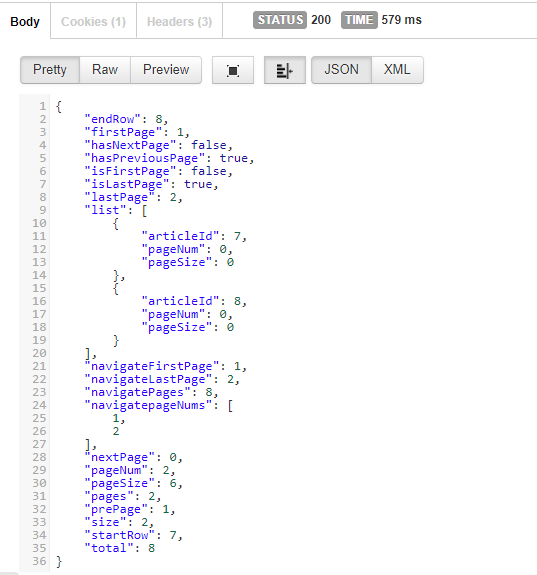
第一行是设置页数和每页显示几条,插件会自动对接下来的sql语句加上分页方式。PageInfo中是分页的一些信息,包括总页数,当前页,总数据等。
访问数据库采用mybatis框架
1.添加pom文件依赖
<!-- spring mvc支持 -->

<dependency>

    <groupId>org.springframework.boot</groupId>

    <artifactId>spring-boot-starter-web</artifactId>

</dependency>

<!-- springboot整合mybatis -->

<dependency>

    <groupId>org.mybatis.spring.boot</groupId>

    <artifactId>mybatis-spring-boot-starter</artifactId>

    <version>1.3.1</version>

</dependency>

<!-- springboot分页插件 -->

<dependency>

    <groupId>com.github.pagehelper</groupId>

    <artifactId>pagehelper-spring-boot-starter</artifactId>

    <version>1.2.2</version>

</dependency>

<!-- 阿里巴巴druid数据库连接池 -->

<dependency>

    <groupId>com.alibaba</groupId>

    <artifactId>druid</artifactId>

    <version>1.1.3</version>

</dependency>

<!-- mysql驱动 -->

<dependency>

    <groupId>mysql</groupId>

    <artifactId>mysql-connector-java</artifactId>

</dependency>
2.配置application.yml
# 与mybatis整合

mybatis:

  config-location: classpath:mybatis.xml

  mapper-locations:

  - classpath:mapper/*.xml

# 分页配置

pagehelper:

  helper-dialect: mysql

  reasonable: true

  support-methods-arguments: true

  params: count=countSql
3.service层中使用插件
package com.ahut.serviceImpl;

import java.util.List;

import javax.servlet.ServletContext;

import org.springframework.beans.factory.annotation.Autowired;

import org.springframework.stereotype.Service;

import org.springframework.transaction.annotation.Transactional;

import org.springframework.web.context.ContextLoader;

import com.ahut.entity.GoodsType;

import com.ahut.mapper.GoodsTypeMapper;

import com.ahut.service.GoodsTypeService;

import com.github.pagehelper.PageHelper;

/**

 *

 * @ClassName: GoodsTypeServiceImpl

 * @Description: 商品类型业务逻辑处理

 * @author cheng

 * @date 2017年7月17日 上午10:04:31

 */

@Service

@Transactional(rollbackFor = { RuntimeException.class, Exception.class })

public class GoodsTypeServiceImpl implements GoodsTypeService {

    // 数据访问

    @Autowired

    private GoodsTypeMapper typeDao;

    /**

     *

     * @Title: getList

     * @Description: 从数据库中获取所有商品类型列表

     * @param pageNum 当前页

     * @param pageSize 当前页面展示数目

     * @return

     * @throws Exception

     */

    public List<GoodsType> getList(int pageNum, int pageSize) throws Exception {

        //使用分页插件,核心代码就这一行

        PageHelper.startPage(pageNum, pageSize);

        // 获取

        List<GoodsType> typeList = typeDao.getList();

        return typeList;

    }

}
4.controller层代码
package com.ahut.action;

import java.util.List;

import org.springframework.beans.factory.annotation.Autowired;

import org.springframework.web.bind.annotation.RequestMapping;

import org.springframework.web.bind.annotation.RestController;

import com.ahut.entity.GoodsType;

import com.ahut.service.GoodsTypeService;

/**

 *

 * @ClassName: GoodsTypeAction

 * @Description: 商品类型控制层

 * @author cheng

 * @date 2017年7月17日 上午11:09:47

 */

@RestController // 等价于@Controller+@ResponseBody

public class GoodsTypeAction {

    // 业务逻辑

    @Autowired

    private GoodsTypeService typeService;

    /**

     *

     * @Title: getGoodsTypeList

     * @Description: 获取商品类型列表

     * @return

     * @throws Exception

     */

    @RequestMapping(value = "/getGoodsTypeList")

    public List<GoodsType> getGoodsTypeList(int pageNum, int pageSize) throws Exception {

        // 调用业务逻辑,返回数据

        return typeService.getList(pageNum,pageSize);

    }

}
5.测试
已知我数据库中有九条数据:
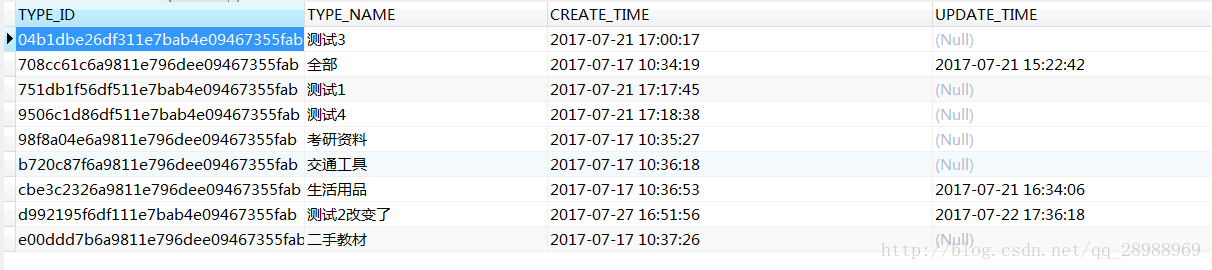
正常情况:
1.显示第一页或者第二页数据
请求url:
http://localhost:8080/getGoodsTypeList?pageNum=1&pageSize=4- 1
返回数据:
[

    {

        "typeId": "708cc61c6a9811e796dee09467355fab",

        "typeName": "全部",

        "createTime": 1500258859000,

        "updateTime": 1500621762000

    },

    {

        "typeId": "98f8a04e6a9811e796dee09467355fab",

        "typeName": "考研资料",

        "createTime": 1500258927000,

        "updateTime": null

    },

    {

        "typeId": "b720c87f6a9811e796dee09467355fab",

        "typeName": "交通工具",

        "createTime": 1500258978000,

        "updateTime": null

    },

    {

        "typeId": "cbe3c2326a9811e796dee09467355fab",

        "typeName": "生活用品",

        "createTime": 1500259013000,

        "updateTime": 1500626046000

    }

]
2.显示最后一页
请求url:
http://localhost:8080/getGoodsTypeList?pageNum=3&pageSize=4- 1
返回数据:
[

    {

        "typeId": "d992195f6df111e7bab4e09467355fab",

        "typeName": "测试2改变了",

        "createTime": 1501145516000,

        "updateTime": 1500716178000

    }

]
不正常情况:
1.显示的页数小于第一页(显示第一页数据)
pageNumber <= 0
请求url:
http://localhost:8080/getGoodsTypeList?pageNum=0&pageSize=4- 1
返回数据:
[

    {

        "typeId": "708cc61c6a9811e796dee09467355fab",

        "typeName": "全部",

        "createTime": 1500258859000,

        "updateTime": 1500621762000

    },

    {

        "typeId": "98f8a04e6a9811e796dee09467355fab",

        "typeName": "考研资料",

        "createTime": 1500258927000,

        "updateTime": null

    },

    {

        "typeId": "b720c87f6a9811e796dee09467355fab",

        "typeName": "交通工具",

        "createTime": 1500258978000,

        "updateTime": null

    },

    {

        "typeId": "cbe3c2326a9811e796dee09467355fab",

        "typeName": "生活用品",

        "createTime": 1500259013000,

        "updateTime": 1500626046000

    }

]
结论:当请求页数小于第一页时,显示第一页数据
2.显示的页数大于最后一页(显示最后一页数据)
pageNum > 最后一页
请求url:
http://localhost:8080/getGoodsTypeList?pageNum=4&pageSize=4- 1
返回数据:
[

    {

        "typeId": "d992195f6df111e7bab4e09467355fab",

        "typeName": "测试2改变了",

        "createTime": 1501145516000,

        "updateTime": 1500716178000

    }
Springboot整合pagehelper分页
一、添加依赖
在pom中添加依赖
        <dependency>

            <groupId>com.github.pagehelper</groupId>

            <artifactId>pagehelper-spring-boot-starter</artifactId>

            <version>1.2.2</version>

        </dependency>
二、使用
网络上很多文章都会说需要在application.properties进行配置
其实完全不需要,默认的设置就已经满足大部分需要了
直接使用即可

@RequestMapping(value = "getApps.do")

public String getApps(Apps apps) {

    PageHelper.startPage(apps.getPageNum(), apps.getPageSize());

    ArrayList<Apps> appsList = appsService.getApps(apps);

    PageInfo<Apps> appsPageInfo = new PageInfo<>(appsList);

    return JSON.toJSONString(appsPageInfo);

}
PageHelper.startPage(需要显示的第几个页面,每个页面显示的数量);
下一行紧跟查询语句,不可以写其他的,否则没有效果。
PageHelper.startPage(apps.getPageNum(), apps.getPageSize());

ArrayList<Apps> appsList = appsService.getApps(apps);
这样只起到了分页效果,对总页面数之类的没有详细信息

如果对页面数量等有需求,则需要加上下面这行
PageInfo<T> appsPageInfo = new PageInfo<>(appsList);
这样就满足了全部的分页要求
SpringBoot使用PageHelper进行分页的更多相关文章
- SpringBoot+Mybatis+PageHelper实现分页
SpringBoot+Mybatis+PageHelper实现分页 mybatis自己没有分页功能,我们可以通过PageHelper工具来实现分页,非常简单方便 第一步:添加依赖 <depend ...
- spring-boot + mybatis +pagehelper 使用分页
转自:https://segmentfault.com/a/1190000015668715?utm_medium=referral&utm_source=tuicool 最近自己搭建一个sp ...
- SpringBoot+Mybatis+PageHelper简化分页实现
前言 经过一段时间的测试和修改PageHelper插件逐渐走到了让我觉得靠谱的时候,它功能的就是简化分页的实现,让分页不需要麻烦的多写很多重复的代码. 已经加入我的github模版中:https:// ...
- Springboot 使用pageHelper实现分页查询
本文链接:https://blog.csdn.net/qq_35387940/article/details/91530234
- SpringBoot整合Mybatis关于分页查询的方法
最近公司在用到SpringBoot整合Mybatis时当web端页面数据增多时需要使用分页查询以方便来展示数据.本人对分页查询进行了一些步骤的总结,希望能够帮助到有需要的博友.如有更好的方式,也希望评 ...
- Spring boot入门(三):SpringBoot集成结合AdminLTE(Freemarker),利用generate自动生成代码,利用DataTable和PageHelper进行分页显示
关于SpringBoot和PageHelper,前篇博客已经介绍过Spring boot入门(二):Spring boot集成MySql,Mybatis和PageHelper插件,前篇博客大致讲述了S ...
- springboot+thymeleaf+pageHelper带条件分页查询
html层 <div> <a class="num"><b th:text="'共 '+ ${result.resultMap['pages ...
- SpringBoot集成MyBatis的分页插件 PageHelper
首先说说MyBatis框架的PageHelper插件吧,它是一个非常好用的分页插件,通常我们的项目中如果集成了MyBatis的话,几乎都会用到它,因为分页的业务逻辑说复杂也不复杂,但是有插件我们何乐而 ...
- spring-boot | 整合通用Mabatis 分页插件PageHelper
Mybatis通用Mapper介绍 Mybatis 通用 Mapper 极其方便的使用 Mybatis 单表的增删改查,支持单表操作,不支持通用的多表联合查询 优点: 通用 Mapper 可以极大的方 ...
随机推荐
- vi和vim的基本介绍
所有的 Linux 系统都会内建 vi 文本编辑器. Vim 具有程序编辑的能力,可以看做是Vi的增强版本,可以主动的以字体颜色辨别语法的正确性,方便程序设计.代码补完.编译及错误跳转等方便编程的 ...
- android中的Touch研究
android中的事件类型分为按键事件和屏幕触摸事件,Touch事件是屏幕触摸事件的基础事件,有必要对它进行深入的了解. 一个最简单的屏幕触摸动作触发了一系列Touch事件:ACTION_DOWN-& ...
- Java入门系列-08-选择结构
这篇文章为你搞懂2个问题 if-else选择结构的使用? switch 的使用? 前面我们学习的代码都是直上直下的执行,还不会"拐弯",这篇文章带大家来看一下会"拐弯&q ...
- Cookie的创建、读取、删除
创建Cookie: HttpCookie cookie = new HttpCookie(COOKIE_NAME_FOR_USER);cookie.Expires = DateTime.Now.Ad ...
- plsql 连接 虚拟机Linux下的Oracle数据库 失败
plsql 连接 虚拟机Linux下的Oracle数据库 失败2017年09月09日 09:10:23 守望dfdfdf 阅读数:187 标签: oraclelinux 更多个人分类: 工具 软件编辑 ...
- Java进程内缓存
今天和同事聊到了缓存,在Java中实现进程缓存.这里主要思想是,用一个map做缓存.缓存有个生存时间,过期就删除缓存.这里可以考虑两种删除策略,一种是起一个线程,定期删除过期的key.第二个是,剔除模 ...
- 引爆你的Javascript代码进化 (转)
转自 海玉的博客 方才在程序里看到一段JS代码,写法极为高明,私心想着若是其按照规范来写,定可培养对这门语言的理解,对JS编程能力提高必是极好的.说人话:丫代码写的太乱,看的窝火! 最近闲暇无事,准备 ...
- gsap
TweenMax借助于css,轻量级的js库 下面是简单的demo <!DOCTYPE html> <html lang="en"> <head> ...
- Easy deployment
Use simple ssh and shell scripts to deploy, upgrade, rollback and reconfigure linux servers. https:/ ...
- Android 多个activity之间的共享数据
最近打算做一个时间助手,一个service监听课表信息.课表信息可以通过另外的activity来设置,所以这里就涉及到了数据的同步问题.我设置后的信息必须同步到监听的信息去. 在java中我们用全局变 ...