
Python日志模块logging简介
日志处理是项目的必备功能,配置合理的日志,可以帮助我们了解系统的运行状况、定位位置,辅助数据分析技术,还可以挖掘出一些额外的系统信息。
本文介绍Python内置的日志处理模块logging的常见用法。
1,日志等级
日志是分等级的,这点不难理解,任何信息都有轻重缓急之分,通过分级,我们可以方便的对日志进行刷选过滤,提高分析效率。
简单说,日志有以下等级:
DEBUG,INFO,WARNING,ERROR,CRITICAL
其重要性依次增强。一般的,这五个等级就足够我们日常使用了。
2,日志格式
日志本质上记录某一事件的发生,那么它应当包括但不限于以下信息:
事件等级,发生时间,地点(代码位置),错误信息

3,logging模块的四大组件
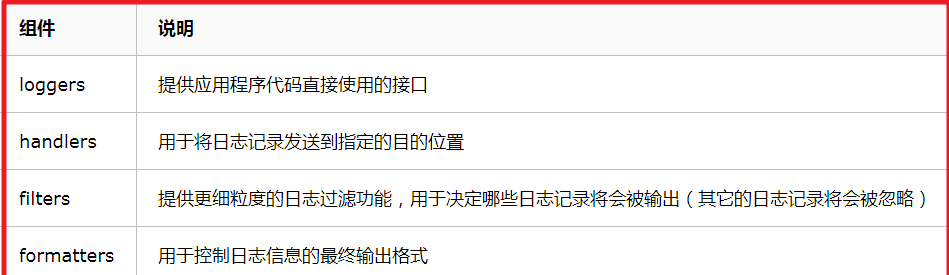
通过这四大组件,我们便可以自由配置自己的日志格式。
4,案例展示
在实际应用中,一般会按照时间或者预置的大小对日志进行定期备份和分割,我们下面就按照这两点分别进行介绍:
4-1,按照预置的文件大小配置日志,并自动分割备份
代码:
 #!/usr/bin/env python

 # -*- coding: utf-8 -*-

 import logging

 import logging.handlers

 import os

 def get_logger():

     log_path = "./logs"

     if not os.path.isdir(log_path):

         os.mkdir(log_path)

         os.chmod(log_path, 0777)

     all_log = log_path + os.path.sep + "all.log"

     error_log = log_path + os.path.sep + "error.log"

     if not os.path.isfile(all_log):

         os.mknod(all_log)

         os.chmod(all_log, 0777)

     if not os.path.isfile(error_log):

         os.mknod(error_log)

         os.chmod(error_log, 0777)

     log_format = logging.Formatter("%(asctime)s - %(levelname)s - %(message)s")

     # get logger object

     my_logger = logging.getLogger("my_logger")

     my_logger.setLevel(logging.DEBUG)

     # auto split log file by interval specified(every minute), record debug message and above.

     rf_handler = logging.handlers.TimedRotatingFileHandler(all_log, when='M', interval=1, backupCount=3)

     rf_handler.setLevel(logging.DEBUG)

     rf_handler.setFormatter(log_format)

     # don't split log file, only record error message and above.

     f_handler = logging.FileHandler(error_log)

     f_handler.setLevel(logging.ERROR)

     f_handler.setFormatter(log_format)

     my_logger.addHandler(rf_handler)

     my_logger.addHandler(f_handler)

     return my_logger

 def test():

     msg = {"debug": "This is a debug log",

            "info": "This is a info log",

            "warning": "This is a warning log",

            "error": "This is a error log",

            "critical": "This is a critical log"}

     for k, v in msg.items():

         if k == "debug":

             logger.debug(v)

         elif k == "info":

             logger.info(v)

         elif k == "warning":

             logger.warning(v)

         elif k == "error":

             logger.error(v)

         elif k == "critical":

             logger.critical(v)

 if __name__ == '__main__':

     index = 1

     logger = get_logger()

     while True:

         test()

         print(index)

         index = index + 1
实际效果:
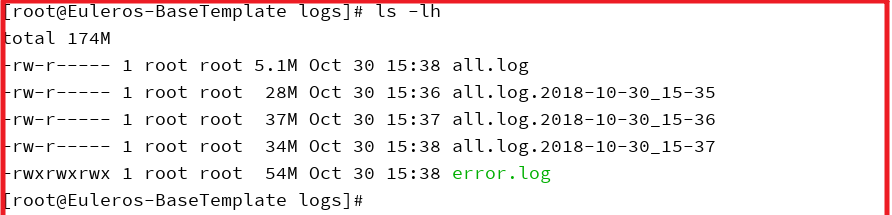
all.log保存最新的日志,历史副本按照时间后缀进行保存,最多留存三个。
4-2,按照预置的文件大小配置日志,并自动分割备份
代码:
 #!/usr/bin/env python

 # -*- coding: utf-8 -*-

 import logging

 from logging.handlers import RotatingFileHandler

 import os

 def test():

     msg = {"debug": "This is a debug log",

            "info": "This is a info log",

            "warning": "This is a warning log",

            "error": "This is a error log",

            "critical": "This is a critical log"}

     for k, v in msg.items():

         if k == "debug":

             logger.debug(v)

         elif k == "info":

             logger.info(v)

         elif k == "warning":

             logger.warning(v)

         elif k == "error":

             logger.error(v)

         elif k == "critical":

             logger.critical(v)

 def get_logger():

     dir_path = "./logs"

     file_name = "rotating_log"

     if not os.path.isdir(dir_path):

         os.mkdir(dir_path)

         os.chmod(dir_path, 0777)

     file_path = dir_path + "/" + file_name

     if not os.path.isfile(file_path):

         os.mknod(file_path)

         os.chmod(file_path, 0777)

     my_logger = logging.getLogger("rotating_log")

     my_logger.setLevel(level=logging.INFO)

     # auto split log file at max size of 4MB

     r_handler = RotatingFileHandler(file_path, maxBytes=4*1024*1024, backupCount=3)

     r_handler.setLevel(logging.INFO)

     formatter = logging.Formatter('%(asctime)s - %(name)s - %(levelname)s - %(message)s')

     r_handler.setFormatter(formatter)

     my_logger.addHandler(r_handler)

     return my_logger

 if __name__ == '__main__':

     logger = get_logger()

     index = 1

     while True:

         test()

         print(index)

         index = index + 1
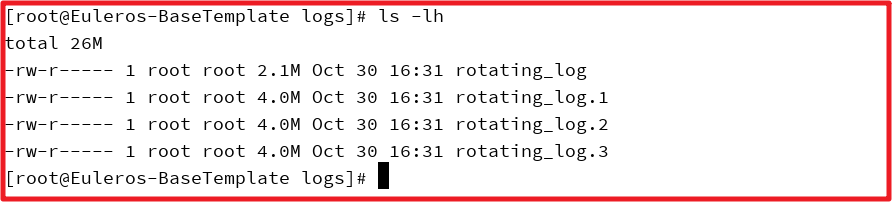
最终效果:
Python日志模块logging简介的更多相关文章
- python日志模块logging
python日志模块logging 1. 基础用法 python提供了一个标准的日志接口,就是logging模块.日志级别有DEBUG.INFO.WARNING.ERROR.CRITICAL五种( ...
- 【python】【logging】python日志模块logging常用功能
logging模块:应用程序的灵活事件日志系统,可以打印并自定义日志内容 logging.getLogger 创建一个log对象 >>> log1=logging.getLogger ...
- Python 日志模块logging
logging模块: logging是一个日志记录模块,可以记录我们日常的操作. logging日志文件写入默认是gbk编码格式的,所以在查看时需要使用gbk的解码方式打开. logging日志等级: ...
- Python日志模块logging用法
1.日志级别 日志一共分成5个等级,从低到高分别是:DEBUG INFO WARNING ERROR CRITICAL. DEBUG:详细的信息,通常只出现在诊断问题上 INFO:确认一切按预期运行 ...
- python日志模块logging学习
介绍 Python本身带有logging模块,其默认支持直接输出到控制台(屏幕),或者通过配置输出到文件中.同时支持TCP.HTTP.GET/POST.SMTP.Socket等协议,将日志信息发送到网 ...
- Python 日志模块 logging通过配置文件方式使用
vim logger_config.ini[loggers]keys=root,infoLogger,errorlogger [logger_root]level=DEBUGhandlers=info ...
- Python日志模块logging&JSON
日志模块的用法 json部分 先开一段测试代码:注意 str可以直接处理字典 eval可以直接将字符串转成字典的形式 dic={'key1':'value1','key2':'value2'} ...
- 『无为则无心』Python日志 — 64、Python日志模块logging介绍
目录 1.日志的作用 2.为什么需要写日志 3.Python中的日志处理 (1)logging模块介绍 (2)logging模块的四大组件 (3)logging日志级别 1.日志的作用 从事与软件相关 ...
- python日志模块---logging
1.将日志打印到屏幕 import logging logging.debug('This is debug message---by liu-ke') logging.info('This is i ...
随机推荐
- Cocos2d-x 学习笔记(10) ActionInstant
1.概述 ActionInstant的子类都是立即完成的动作,即一帧就完成了,不像ActionInterval的子类动作需要定义动作总时间. Action类的继承关系图: 2.具体 ActionIns ...
- 细谈Mysql事务
文章原创于公众号:程序猿周先森.本平台不定时更新,喜欢我的文章,欢迎关注我的微信公众号. 上一篇着重谈到了MySQL锁的概念,里面谈到了事务的概念,其实大部分开发者对于事务肯定不陌生,事务的概念其实就 ...
- Halcon一日一练:创建AOI
AOI:Area Of Interesting.感兴趣区域,即你要处理的区域. 一般情况,一整张图像,我们需要对局部进行操作,我们会选择一个我们需要处理的区域,对其进行处理,其他区域进行屏蔽.这个区域 ...
- opencv::像素重映射
像素重映射(cv::remap) 简单点说就是把输入图像中各个像素按照一定的规则映射到另外一张图像的对应位置上去,形成一张新的图像. Remap( InputArray src, // 输入图像 Ou ...
- nginx::配置https/反向代理
vim /etc/nginx/nginx.conf user nginx; worker_processes ; error_log /var/log/nginx/error.log warn; pi ...
- Vulnhub靶场渗透练习(四) Acid
利用namp 先进行扫描获取ip nmap 192.168.18.* 获取ip 没发现80端口 主机存活 猜测可以是个2000以后的端口 nmap -p1-65533 192.168.18.14 ...
- 1.在ubuntu中软件安装在哪里?
ubuntu下安装软件有四种方式: 1.通过deb格式的离线软件包安装 sudo dpkg -i xxx.deb # 安装包,安装程序 -i: install sudo dpkg -r packa ...
- MyBatisCodeHelper-Pro插件破解
MyBatisCodeHelper-Pro: MyBatisCodeHelper-Pro是IDEA下的一个插件,功能类似mybatis plugin. 但是是收费的,我们可以对他进行破解 转载出处:h ...
- 个人记账app(一)需求设计
时间如流水,只能流去不流回. 学历代表你的过去,能力代表你的现在,学习能力代表你的将来. 学无止境,精益求精. 一.开发背景 Android应用市场记账的app那么多,我为什么还要再开发一个呢?重复造 ...
- C#操作sql server
C#操作sqlserver跟操作其他数据没有太大差别,但是又一些细节要注意一下. 在安装sqlserver时不要选择默认实例,如果是则需要更改设置,还有远程连接要去连接服务中设置一下,如端口1433等 ...