
Eureka实战-2【构建Multi Zone Eureka Server】
工程pom中公共依赖
<properties>

        <project.build.sourceEncoding>UTF-8</project.build.sourceEncoding>

        <project.reporting.outputEncoding>UTF-8</project.reporting.outputEncoding>

        <java.version>1.8</java.version>

        <spring-cloud.version>Finchley.RELEASE</spring-cloud.version>

</properties>

<dependencyManagement>

        <dependencies>

            <dependency>

                <groupId>org.springframework.cloud</groupId>

                <artifactId>spring-cloud-dependencies</artifactId>

                <version>${spring-cloud.version}</version>

                <type>pom</type>

                <scope>import</scope>

            </dependency>

        </dependencies>

</dependencyManagement>
1、Eureka Server工程
启动4个实例,配置两个zone,即zone1、zone2,每个zone都要2个eureka server实例,这个2个zone配置在同一个region上,即region-east。
1.1、eureka-server工程pom文件:
<!--加上文章头部的公共依赖-->

<dependencies>

        <dependency>

            <groupId>org.springframework.cloud</groupId>

            <artifactId>spring-cloud-starter-netflix-eureka-server</artifactId>

        </dependency>

</dependencies>

<build>

      <plugins>

            <plugin>

                <groupId>org.springframework.boot</groupId>

                <artifactId>spring-boot-maven-plugin</artifactId>

            </plugin>

      </plugins>

</build>
1.2、eureka-server工程启动类
import org.springframework.boot.SpringApplication;

import org.springframework.boot.autoconfigure.SpringBootApplication;

import org.springframework.cloud.netflix.eureka.server.EnableEurekaServer;

@SpringBootApplication

@EnableEurekaServer

public class EurekaServerApplication {

    public static void main(String[] args) {

        SpringApplication.run(EurekaServerApplication.class, args);

    }

}
1.3、eureka-server工程配置文件,路径:eureka-server\src\main\resources\,分别有5个文件:application-zone1a.yml,application-zone1b.yml,application-zone2a.yml,application-zone2b.yml,application.yml
application-zone1a.yml:
server:

  port: 8761

spring:

  application:

    name: eureka-server

eureka:

  instance:

    hostname: localhost

    preferIpAddress: true

    metadataMap.zone: zone1

  client:

    register-with-eureka: true

    fetch-registry: true

    region: region-east

    service-url:

      zone1: http://localhost:8761/eureka/,http://localhost:8762/eureka/

      zone2: http://localhost:8763/eureka/,http://localhost:8764/eureka/

    availability-zones:

      region-east: zone1,zone2

  server:

      waitTimeInMsWhenSyncEmpty: 0

      enableSelfPreservation: false
application-zone1b.yml
server:

  port: 8762

spring:

  application:

    name: eureka-server

eureka:

  instance:

    hostname: localhost

    preferIpAddress: true

    metadataMap.zone: zone1

  client:

    register-with-eureka: true

    fetch-registry: true

    region: region-east

    service-url:

      zone1: http://localhost:8761/eureka/,http://localhost:8762/eureka/

      zone2: http://localhost:8763/eureka/,http://localhost:8764/eureka/

    availability-zones:

      region-east: zone1,zone2

  server:

      waitTimeInMsWhenSyncEmpty: 0

      enableSelfPreservation: false
application-zone2a.yml
server:

  port: 8763

spring:

  application:

    name: eureka-server

eureka:

  instance:

    hostname: localhost

    preferIpAddress: true

    metadataMap.zone: zone2

  client:

    register-with-eureka: true

    fetch-registry: true

    region: region-east

    service-url:

      zone1: http://localhost:8761/eureka/,http://localhost:8762/eureka/

      zone2: http://localhost:8763/eureka/,http://localhost:8764/eureka/

    availability-zones:

      region-east: zone1,zone2

  server:

      waitTimeInMsWhenSyncEmpty: 0

      enableSelfPreservation: false
application-zone2b.yml
server:

  port: 8764

spring:

  application:

    name: eureka-server

eureka:

  instance:

    hostname: localhost

    preferIpAddress: true

    metadataMap.zone: zone2

  client:

    register-with-eureka: true

    fetch-registry: true

    region: region-east

    service-url:

      zone1: http://localhost:8761/eureka/,http://localhost:8762/eureka/

      zone2: http://localhost:8763/eureka/,http://localhost:8764/eureka/

    availability-zones:

      region-east: zone1,zone2

  server:

      waitTimeInMsWhenSyncEmpty: 0

      enableSelfPreservation: false
application.yml
eureka:

  server:

    use-read-only-response-cache: false

    response-cache-auto-expiration-in-seconds: 10

management:

  endpoints:

    web:

      exposure:

        include: '*'
从上面的4个配置文件可以看出,我们通过eureka.instance.metadataMap.zone设置了每个实例所属的zone,接下来使用这4个配置启动4个eureka server实例:
//启动命令
mvn spring-boot:run -Dspring.profiles.active=zone1a

mvn spring-boot:run -Dspring.profiles.active=zone1b

mvn spring-boot:run -Dspring.profiles.active=zone2a

mvn spring-boot:run -Dspring.profiles.active=zone2b
2、Eureka Client工程
这里配置2个eureka clent,分别属于zone1和zone2。
2.1、eureka-client工程pom文件
<!--加上文章头部公共配置-->

<dependencies>

        <dependency>

            <groupId>org.springframework.cloud</groupId>

            <artifactId>spring-cloud-starter-netflix-eureka-client</artifactId>

        </dependency>

</dependencies>

<build>

      <plugins>

            <plugin>

                <groupId>org.springframework.boot</groupId>

                <artifactId>spring-boot-maven-plugin</artifactId>

            </plugin>

      </plugins>

</build>
2.1、eureka-client工程启动类
import org.springframework.boot.SpringApplication;

import org.springframework.boot.autoconfigure.SpringBootApplication;

import org.springframework.cloud.client.discovery.EnableDiscoveryClient;

@SpringBootApplication

@EnableDiscoveryClient

public class EurekaClientApplication {

    public static void main(String[] args) {

        SpringApplication.run(EurekaClientApplication.class, args);

    }

}
2.2、eureka-client工程配置文件,路径:eureka-client\src\main\resources\,共3个文件:application.yml,application-zone1.yml,application-zone2.yml
application.yml:
#这里暴露所有的endpoints,便于后面验证
management:

  endpoints:

    web:

      exposure:

        include: '*'
application-zone1.yml:
server:

  port: 8081

spring:

  application:

    name: client

eureka:

  instance:

    metadataMap.zone: zone1

  client:

    register-with-eureka: true

    fetch-registry: true

    region: region-east

    service-url:

      zone1: http://localhost:8761/eureka/,http://localhost:8762/eureka/

      zone2: http://localhost:8763/eureka/,http://localhost:8764/eureka/

    availability-zones:

      region-east: zone1,zone2
application-zone2.yml:
server:

  port: 8082

spring:

  application:

    name: client

eureka:

  instance:

    metadataMap.zone: zone2

  client:

    register-with-eureka: true

    fetch-registry: true

    region: region-east

    service-url:

      zone1: http://localhost:8761/eureka/,http://localhost:8762/eureka/

      zone2: http://localhost:8763/eureka/,http://localhost:8764/eureka/

    availability-zones:

      region-east: zone1,zone2
2.3、启动eureka client,执行命令,启动2个实例:
mvn spring-boot:run -Dspring.profiles.active=zone1

mvn spring-boot:run -Dspring.profiles.active=zone2
3、Zuul Gateway工程
这里新建一个zuul网关工程,来演示metadataMap的zone属性中ZoneAffinity特性。
3.1、zuul gateway工程,pom文件:
<!--加上文章头部的公共依赖-->

<dependencies>

        <dependency>

            <groupId>org.springframework.cloud</groupId>

            <artifactId>spring-cloud-starter-netflix-zuul</artifactId>

        </dependency>

        <dependency>

            <groupId>org.springframework.cloud</groupId>

            <artifactId>spring-cloud-starter-netflix-eureka-client</artifactId>

        </dependency>

</dependencies>

<build>

      <plugins>

            <plugin>

                <groupId>org.springframework.boot</groupId>

                <artifactId>spring-boot-maven-plugin</artifactId>

            </plugin>

      </plugins>

</build>
3.2、zuul gateway工程启动类:
import org.springframework.boot.SpringApplication;

import org.springframework.boot.autoconfigure.SpringBootApplication;

import org.springframework.cloud.client.discovery.EnableDiscoveryClient;

import org.springframework.cloud.netflix.zuul.EnableZuulProxy;

@SpringBootApplication

@EnableDiscoveryClient

@EnableZuulProxy

public class ZuulGatewayApplication {

    public static void main(String[] args) {

        SpringApplication.run(ZuulGatewayApplication.class, args);

    }

}
3.3、zuul gateway工程配置文件,路径:zuul-gateway\src\main\resources\,一共3个文件:application.yml,application-zone1.yml,application-zone2.yml
application.yml:
spring:

  application:

    name: zuul-gateway

management:

  endpoints:

    web:

      exposure:

        include: '*'
application-zone1.yml:
server:

  port: 10001

eureka:

  instance:

    metadataMap.zone: zone1

  client:

    register-with-eureka: true

    fetch-registry: true

    region: region-east

    service-url:

      zone1: http://localhost:8761/eureka/,http://localhost:8762/eureka/

      zone2: http://localhost:8763/eureka/,http://localhost:8764/eureka/

    availability-zones:

      region-east: zone1,zone2
application-zone2.yml:
server:

  port: 10002

eureka:

  instance:

    metadataMap.zone: zone2

  client:

    register-with-eureka: true

    fetch-registry: true

    region: region-east

    service-url:

      zone1: http://localhost:8761/eureka/,http://localhost:8762/eureka/

      zone2: http://localhost:8763/eureka/,http://localhost:8764/eureka/

    availability-zones:

      region-east: zone1,zone2
3.4、启动zuul gateway工程,一共2个实例,执行命令:
mvn spring-boot:run -Dspring.profiles.active=zone1

mvn spring-boot:run -Dspring.profiles.active=zone2
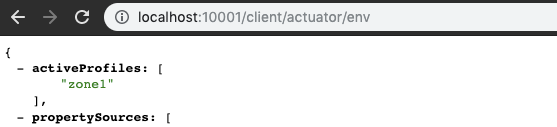
验证ZoneAffinity,访问:localhost:10001/client/actuator/env,结果:
访问:localhost:10002/client/actuator/env,结果:

可以看出请求网关/client/actuator/env,访问的是eureka client实例的/actuator/env接口,处于zone1的Gateway返回的activeProfiles为zone1,处于zone2的Gateway返回的activeProfiles是zone2。
Eureka实战-2【构建Multi Zone Eureka Server】的更多相关文章
- spring boot 2.0.3+spring cloud (Finchley)1、搭建服务注册和发现组件Eureka 以及构建高可用Eureka Server集群
一 .搭建Eureka 编写Eureka Server 由于有多个spring boot项目,采用maven多module的结构,项目结构如下: 新建一个maven主工程,在主maven的pom文件中 ...
- 【SpringCloud Eureka源码】从Eureka Client发起注册请求到Eureka Server处理的整个服务注册过程(下)
目录 一.Spring Cloud Eureka Server自动配置及初始化 @EnableEurekaServer EurekaServerAutoConfiguration - 注册服务自动配置 ...
- Eureka实战-4【开启http basic权限认证】
在我们实际生产环境中,都需要考虑到一个安全问题,比如用户登录,又或者是eureka server,它对外暴露的有自己的rest API,如果没有安全认证,也就意味着别人可以通过rest API随意修改 ...
- SpringCloud系列四:Eureka 服务发现框架(定义 Eureka 服务端、Eureka 服务信息、Eureka 发现管理、Eureka 安全配置、Eureka-HA(高可用) 机制、Eureka 服务打包部署)
1.概念:Eureka 服务发现框架 2.具体内容 对于服务发现框架可以简单的理解为服务的注册以及使用操作步骤,例如:在 ZooKeeper 组件,这个组件里面已经明确的描述了一个服务的注册以及发现操 ...
- SpringCloud02 Eureka知识点、Eureka服务端和客户端的创建、Eureka服务端集群、Eureka客户端向集群的Eureka服务端注册
1 Eureka知识点 按照功能划分: Eureka由Eureka服务端和Eureka客户端组成 按照角色划分: Eureka由Eureka Server.Service Provider.Servi ...
- Storm 实战:构建大数据实时计算
Storm 实战:构建大数据实时计算(阿里巴巴集团技术丛书,大数据丛书.大型互联网公司大数据实时处理干货分享!来自淘宝一线技术团队的丰富实践,快速掌握Storm技术精髓!) 阿里巴巴集团数据平台事业部 ...
- [原创].NET 分布式架构开发实战之四 构建从理想和实现之间的桥梁(前篇)
原文:[原创].NET 分布式架构开发实战之四 构建从理想和实现之间的桥梁(前篇) .NET 分布式架构开发实战之四 构建从理想和实现之间的桥梁(前篇) 前言:上一篇文章讲述了一些实现DAL的理论,本 ...
- List多个字段标识过滤 IIS发布.net core mvc web站点 ASP.NET Core 实战:构建带有版本控制的 API 接口 ASP.NET Core 实战:使用 ASP.NET Core Web API 和 Vue.js 搭建前后端分离项目 Using AutoFac
List多个字段标识过滤 class Program{ public static void Main(string[] args) { List<T> list = new List& ...
- [转] Akka实战:构建REST风格的微服务
[From] http://www.yangbajing.me/2015/11/27/akka%E5%AE%9E%E6%88%98%EF%BC%9A%E6%9E%84%E5%BB%BArest%E9% ...
随机推荐
- javaScript 基础知识汇总(四)
1.对象 概念:对象可以通过花括号{...} 和其中包含一些可选的属性来创建. 属性时一个键值对,键是一个字符串,值可以是任何类型. 对象的创建 let user = new Object(); // ...
- [企业微信通知系列]Jenkins发布后自动通知
一.前言 最近使用Jenkins进行自动化部署,但是部署后,并没有相应的通知,虽然有邮件发送通知,但是发现邮件会受限于接收方的接收设置,导致不能及时看到相关的发布内容.而由于公司使用的是企业微信,因此 ...
- P1073 最优贸易 建立分层图 + spfa
P1073 最优贸易:https://www.luogu.org/problemnew/show/P1073 题意: 有n个城市,每个城市对A商品有不同的定价,问从1号城市走到n号城市可以最多赚多少差 ...
- HZNU 2019 Summer training 6 -CodeForces - 622
A - Infinite Sequence CodeForces - 622A 题目大意:给你一个这样的数列1,1,2,1,2,3,1,2,3,4,1,2,3,4,5....就是从1~n排列(n++ ...
- C#开发BIMFACE系列22 服务端API之获取模型数据7:获取多个模型的楼层信息
系列目录 [已更新最新开发文章,点击查看详细] 在<C#开发BIMFACE系列21 服务端API之获取模型数据6:获取单模型的楼层信息>中介绍获取单个模型的所有楼层信息.某些场景下 ...
- 分析spring4和spring5日志中的不同
日志在工作中起到关键作用,我们经常使用它来打印关键信息,方便分析,或者是输出错误信息,用于bug排查,spring中同样使用了日志进行信息的输出,但是spring4和spring5之间的日志又有些不同 ...
- 阿里社招Java面试题总结——面试官分享
面试题 1.Java中的内存溢出是如何造成的 2.gc的概念,如果A和B对象循环引用,是否可以被GC? 3.Error.Exception和RuntimeException的区别,作用又是什么? 4. ...
- vue基础技术点列表(一)
一. vue编写需要注意的细节1.vue初始化实例时使用首字母大写,在添加全局配置时也要首字母大写(如添加组件Vue.component("",{template:"&q ...
- 更改mac电脑图片默认存储位置
1.创建存储位置screenshot 2.打开terminal 3.defaults write com.apple.screencapture location ~/Desktop/screensh ...
- Elasticsearch之更新
public class UpdateElasticAPI { private static RestClient restClient; static { restClient=RestClient ...