
SUSE Ceph 快速部署 - Storage6
学习 SUSE Storage 系列文章
(1)SUSE Storage6 实验环境搭建详细步骤 - Win10 + VMware WorkStation
(2)SUSE Linux Enterprise 15 SP1 系统安装
(4)SUSE Ceph 增加节点、减少节点、 删除OSD磁盘等操作 - Storage6
(5)深入理解 DeepSea 和 Salt 部署工具 - Storage6
一、安装环境描述
整个环境采用VMware workstation搭建,一共5台虚拟机,所有虚拟机安装SLES15SP1系统,其中一台安装apache作为仓库使用,剩余4台用于搭建Storage6集群。
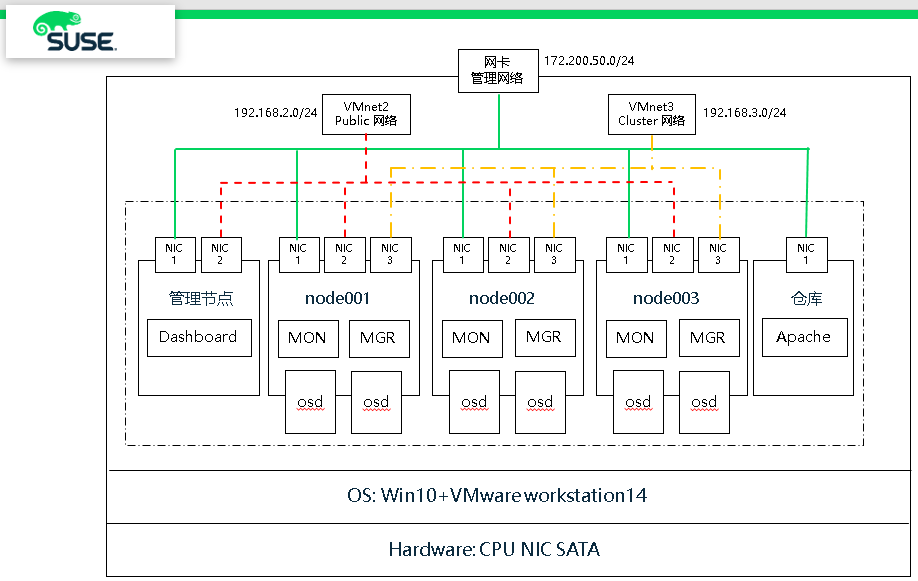 (1)硬件环境:
- 笔记本一台,CPU、内存和磁盘空间足够
- 笔记本上建立一块环回接口用于分布式存储管理网络
(2)软件环境:
- 笔记本安装 Win10 操作系统
- 虚拟环境:VMware Workstation 14 Pro
使用VMnet2和VMnet3 作为分布式存储 public和cluster网络
- 虚拟机操作系统:SLES15SP1 企业版操作系统
1、网络
主机名      public网络       管理网络         集群网络        描述

smt                       172.200.50.19                   SUSE仓库

admin     192.168.2.39    172.200.50.39   192.168.3.39    管理主机

node001   192.168.2.41    172.200.50.41   192.168.3.41    MON

node002   192.168.2.42    172.200.50.42   192.168.3.42    MON

node003   192.168.2.43    172.200.50.43   192.168.3.43    MON
2、磁盘
每个节点系统有2块 OSD 盘和1块 NVME 磁盘
 # lsblk

 NAME            MAJ:MIN RM  SIZE RO TYPE MOUNTPOINT

 sda               :       20G   disk              # 操作系统盘

 ├─sda1            :        1G   part /boot

 └─sda2            :       19G   part

   ├─vgoo-lvroot :       17G   lvm  /

   └─vgoo-lvswap :        2G   lvm  [SWAP]

 sdb               :      10G   disk              # osd 数据盘

 sdc               :      10G   disk              # osd 数据盘

 nvme0n1         :       20G   disk              # wal db
二、操作系统初始化安装
1、临时IP地址设置
 ip link set eth0 up

 ip addr add 172.200.50.50/ dev eth0
连接上了设置永久地址
yast lan list
yast lan edit id=0 ip=192.168.2.40 netmask=255.255.255.0
2、设置bash环境变量和别名
# vim /root/.bash_profile

alias cd..='cd ..'

alias dir='ls -l'

alias egrep='egrep --color=auto'

alias fgrep='fgrep --color=auto'

alias grep='grep --color=auto'

alias l='ls -alF'

alias la='ls -la'

alias ll='ls -l'

alias ls-l='ls -l'
3、配置after.local文件
touch /etc/init.d/after.local

chmod  /etc/init.d/after.local
复制该内容进去
#! /bin/sh

#

# Copyright (c)  SuSE LINUX Products GmbH, Germany.  All rights reserved.

#

# Author: Werner Fink,

#

# /etc/init.d/after.local

#

# script with local commands to be executed from init after all scripts

# of a runlevel have been executed.

#

# Here you should add things, that should happen directly after

# runlevel has been reached.

#
4、仓库配置(所有节点和admin)
## Pool

zypper ar http://172.200.50.19/repo/SUSE/Products/SLE-Product-SLES/15-SP1/x86_64/product/    SLE-Product-SLES15-SP1-Pool

zypper ar http://172.200.50.19/repo/SUSE/Products/SLE-Module-Basesystem/15-SP1/x86_64/product/ SLE-Module-Basesystem-SLES15-SP1-Pool

zypper ar http://172.200.50.19/repo/SUSE/Products/SLE-Module-Server-Applications/15-SP1/x86_64/product/ SLE-Module-Server-Applications-SLES15-SP1-Pool

zypper ar http://172.200.50.19/repo/SUSE/Products/SLE-Module-Legacy/15-SP1/x86_64/product/  SLE-Module-Legacy-SLES15-SP1-Pool

zypper ar  http://172.200.50.19/repo/SUSE/Products/Storage/6/x86_64/product/ SUSE-Enterprise-Storage-6-Pool

## Update

zypper ar http://172.200.50.19/repo/SUSE/Updates/SLE-Product-SLES/15-SP1/x86_64/update/ SLE-Product-SLES15-SP1-Updates

zypper ar http://172.200.50.19/repo/SUSE/Updates/SLE-Module-Basesystem/15-SP1/x86_64/update/  SLE-Module-Basesystem-SLES15-SP1-Upadates

zypper ar http://172.200.50.19/repo/SUSE/Updates/SLE-Module-Server-Applications/15-SP1/x86_64/update/ SLE-Module-Server-Applications-SLES15-SP1-Upadates

zypper ar http://172.200.50.19/repo/SUSE/Updates/SLE-Module-Legacy/15-SP1/x86_64/update/ SLE-Module-Legacy-SLES15-SP1-Updates

zypper ar http://172.200.50.19/repo/SUSE/Updates/Storage/6/x86_64/update/ SUSE-Enterprise-Storage-6-Updates
# zypper lr

#  | Alias                                              | Name

---+----------------------------------------------------+----------------------------------------------------

 1 | SLE-Module-Basesystem-SLES15-SP1-Pool              | SLE-Module-Basesystem-SLES15-SP1-Pool

 2 | SLE-Module-Basesystem-SLES15-SP1-Upadates          | SLE-Module-Basesystem-SLES15-SP1-Upadates

 3 | SLE-Module-Legacy-SLES15-SP1-Pool                  | SLE-Module-Legacy-SLES15-SP1-Pool

 4 | SLE-Module-Legacy-SLES15-SP1-Updates               | SLE-Module-Legacy-SLES15-SP1-Updates

 5 | SLE-Module-Server-Applications-SLES15-SP1-Pool     | SLE-Module-Server-Applications-SLES15-SP1-Pool

 6 | SLE-Module-Server-Applications-SLES15-SP1-Upadates | SLE-Module-Server-Applications-SLES15-SP1-Upadates

 7 | SLE-Product-SLES15-SP1-Pool                        | SLE-Product-SLES15-SP1-Pool

 8 | SLE-Product-SLES15-SP1-Updates                     | SLE-Product-SLES15-SP1-Updates

 9 | SUSE-Enterprise-Storage-6-Pool                     | SUSE-Enterprise-Storage-6-Pool

10 | SUSE-Enterprise-Storage-6-Updates                  | SUSE-Enterprise-Storage-6-Updates
5、安装基本软件 (所有节点和admin)
zypper in -y -t pattern yast2_basis base

zypper in -y net-tools vim man sudo tuned irqbalance

zypper in -y ethtool rsyslog iputils less supportutils-plugin-ses

zypper in -y net-tools-deprecated tree wget
6、关闭IPV6 (所有节点和admin)
# vim /etc/sysctl.conf

net.ipv6.conf.all.disable_ipv6 =                  # 关闭 IPV6

net.ipv6.conf.default.disable_ipv6 =

net.ipv6.conf.lo.disable_ipv6 =

vm.min_free_kbytes =                        # 128GB的RAM,系统预留2GB

kernel.pid_max =                            # 线程数设置最大
执行生效
# sysctl -p
7、调整网络优化参数 (所有节点和admin)
# tuned-adm profile throughput-performance

# tuned-adm active

# systemctl start tuned.service

# systemctl enable tuned.service
8、编辑hosts文件 (所有节点和admin)
# vim /etc/hosts

192.168.2.39    admin.example.com admin

192.168.2.40    node001.example.com node001

192.168.2.41    node002.example.com node002

192.168.2.42    node003.example.com node003
9、执行更新操作系统,并重启 (所有节点和admin)
# zypper ref

# zypper -n update

# reboot
三、安装Storage6集群
1、安装 salt(admin节点)
zypper -n in deepsea

systemctl restart salt-master.service

systemctl enable salt-master.service

systemctl status salt-master.service
osd节点 和 admin节点
zypper -n in salt-minion

sed -i '17i\master: 192.168.2.39' /etc/salt/minion

systemctl restart salt-minion.service

systemctl enable salt-minion.service

systemctl status salt-minion.service
接受所有请求(admin节点)
salt-key

salt-key --accept-all

salt-key

salt '*' test.ping
2、Admin节点,配置NTP服务
如果没有ntp服务器,默认以admin节点为ntp server
Admin节点:
# vim /etc/chrony.conf

# Sync to local clock        # 添加本地时钟源

server 127.0.0.1

allow 127.0.0.0/

allow 192.168.2.0/

allow 172.200.50.0/

local stratum
systemctl restart chronyd.service

systemctl enable chronyd.service

systemctl status chronyd.service
# chronyc sources

 Number of sources =

MS Name/IP address         Stratum Poll Reach LastRx Last sample

===============================================================================

^* 127.127.1.0                               +1461ns[+3422ns] +/-  166us

# chronyc -n sources -v
3、修改组(admin节点)
cp -p /srv/pillar/ceph/deepsea_minions.sls /tmp/

sed -i "4c # deepsea_minions: 'G@deepsea:*'" /srv/pillar/ceph/deepsea_minions.sls

sed -i "6c deepsea_minions: '*'" /srv/pillar/ceph/deepsea_minions.sls
4、远程连接终端监控(admin节点)
该程序监控提供一个详细的,实时的可视化操作行为,当在执行运行salt-run state.orch时,监控执行期间运行了什么
# deepsea monitor
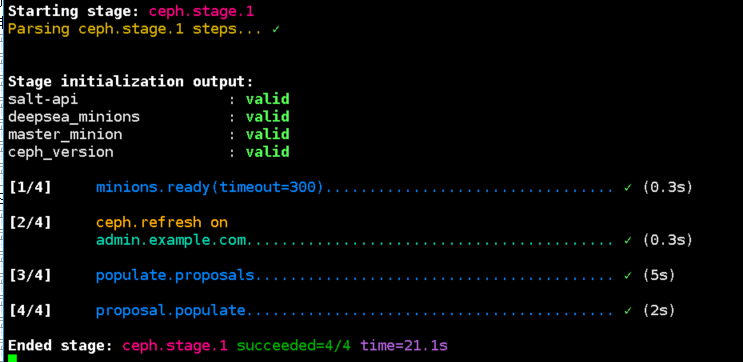
5、更新补丁,并收集硬件信息(admin节点)
salt-run state.orch ceph.stage.

salt-run state.orch ceph.stage.
报错信息可忽略
No minions matched the target. No command was sent, no jid was assigned.

No minions matched the target. No command was sent, no jid was assigned.

[ERROR   ] Exception during resolving address: [Errno ] Host name lookup failure

[ERROR   ] Exception during resolving address: [Errno ] Host name lookup failure

[WARNING ] /usr/lib/python3./site-packages/salt/grains/core.py:: DeprecationWarning: This server_id is

computed nor by Adler32 neither by CRC32. Please use "server_id_use_crc" option and define algorithm youprefer (

default "Adler32"). The server_id will be computed withAdler32 by default.
GitHub
SUSE Ceph 快速部署 - Storage6的更多相关文章
- 分布式文件系统ceph快速部署
架构图 配置ceph-deploy节点 管理节点配置ceph yum源 vim /etc/yum.repos.d/ceph.repo [ceph-noarch] name=Ceph noarch pa ...
- SUSE Ceph 增加节点、减少节点、 删除OSD磁盘等操作 - Storage6
一.测试环境描述 之前我们已快速部署好一套Ceph集群(3节点),现要测试在现有集群中在线方式增加节点 如下表中可以看到增加节点node004具体配置 主机名 Public网络 管理网络 集群网络 说 ...
- Centos7下使用Ceph-deploy快速部署Ceph分布式存储-操作记录
之前已详细介绍了Ceph分布式存储基础知识,下面简单记录下Centos7使用Ceph-deploy快速部署Ceph环境: 1)基本环境 192.168.10.220 ceph-admin(ceph-d ...
- Centos7下使用Ceph-deploy快速部署Ceph分布式存储-操作记录(转)
之前已详细介绍了Ceph分布式存储基础知识,下面简单记录下Centos7使用Ceph-deploy快速部署Ceph环境:1)基本环境 1 2 3 4 5 6 7 8 9 10 11 12 13 14 ...
- Ubuntu CEPH快速安装
一.CEPH简介 不管你是想为云平台提供Ceph 对象存储和/或 Ceph 块设备,还是想部署一个 Ceph 文件系统或者把 Ceph 作为他用,所有 Ceph 存储集群的部署都始于部署一个个 Cep ...
- 使用kubeadm快速部署一套K8S集群
一.Kubernetes概述 1.1 Kubernetes是什么 Kubernetes是Google在2014年开源的一个容器集群管理系统,Kubernetes简称K8S. K8S用于容器化应用程序的 ...
- Linux上oracle精简版客户端快速部署
RHEL6 + Oracle 11g客户端快速部署 需求:只是用到客户端的sqlplus, sqlldr功能. 方案:用精简版实现客户端的快速部署 1.上传oracle精简版客户端到服务器/tmp目录 ...
- 2.快速部署MySQL主从复制
1.快速部署MySQL主从复制 [root@mysql ~]# mysql -uroot -p123456 -S /data/3307/mysql.sock -e "show slave ...
- 如何利用脚本实现MySQL的快速部署以及一机多实例的部署
MySQL有三个版本:二进制,源码包,RPM. 下面讲讲二进制包的安装过程 下载地址: http://dev.mysql.com/downloads/mysql/ 选择Linux-Generic 我这 ...
随机推荐
- 《阿里巴巴Java开发手册1.4.0》阅读总结与心得(五)
笔者作为一名有数年工作经验的Java程序员,仔细研读了这份手册,觉得其是一份不可多得的好材料.阿里巴巴在发布时所说,“阿里巴巴集团推出的<阿里巴巴Java开发手册(正式版)>是阿里巴巴近万 ...
- PHP工程师学Python数据类型
一.背景 继上篇文章比较了PHP与Python语法之后,这周又学习了Python数据类型,准备从通过这篇文章给自己进行一些总结,也给其他读者一些参考. 二.内容概要 字符串(str) 列表(list) ...
- Storm 系列(七)—— Storm 集成 Redis 详解
一.简介 Storm-Redis 提供了 Storm 与 Redis 的集成支持,你只需要引入对应的依赖即可使用: <dependency> <groupId>org.apac ...
- CF #541 E. String Multiplication
题意: 给定一系列字符串,每次都是后一个字符串和前面的融合,这个融合操作就是原来的串分成独立的,然后把新串插入到这些空格中.问最后,最长的相同连续的长度. 思路: 这道题可以贪心的来,我们压缩状态,记 ...
- P1251 餐巾计划问题 费用流
https://www.luogu.org/problemnew/show/P1251 题意 有一家酒店,酒店每天需要ri张桌布,桌布可以现买,p元.可以通过快洗店,等m天,f元.可以通过慢洗店,等n ...
- Ryuji doesn't want to study 2018徐州icpc网络赛 树状数组
Ryuji is not a good student, and he doesn't want to study. But there are n books he should learn, ea ...
- lightoj 1158 - Anagram Division(记忆化搜索+状压)
题目链接:http://www.lightoj.com/volume_showproblem.php?problem=1158 题解:这题看起来就像是记忆搜索,由于s很少最多就10位所以可以考虑用状压 ...
- POJ 2643 Election map
POJ 2643 Election 第一次写博客,想通过写博客记录自己的ACM历程,也想解释下英文题目,写些自己的理解.也可以让自己以后找题目更加方便点嘛.ElectionTime Limit: 10 ...
- HDU 5451 Best Solver 数论 快速幂 2015沈阳icpc
Best Solver Time Limit: 1500/1000 MS (Java/Others) Memory Limit: 65535/102400 K (Java/Others)Tota ...
- 一起来聊一下 JavaScript 的用途和那些特性
JavaScript 简介 我们一起来聊一下 JavaScript,用它能做什么,它有哪些特性,以及一些跟它配合使用的技术. 什么是 JavaScript? JavaScript 最初的目的是为了&q ...