
netcore中使用grpc
简介
grpc是由google公司开发的一个高性能、开源和通用的RPC框架,采用HTTP/2通信。
1.gRPC的传输使用http/2支持双向流。
2.支持多语言,例如java、go、php、net、node等多种语言.
3.gRPC支持多平台
4.性能好,效率高
1.HTTP/2
HTTP/2 提供了连接多路复用、双向流、服务器推送、请求优先级、首部压缩等机制。可以节省带宽、降低TCP链接次数、节省CPU,帮助移动设备延长电池寿命等。gRPC 的协议设计上使用了HTTP2 现有的语义,请求和响应的数据使用HTTP Body 发送,其他的控制信息则用Header 表示。
使用
以下演示基于netcore2.2进行创建运行
运行前准备
因为netcore不会生成依赖包,所以需要先新建一个net framework的类库程序把需要用到的文件下载来
1.新建net framework程序并且安装grpc.tools
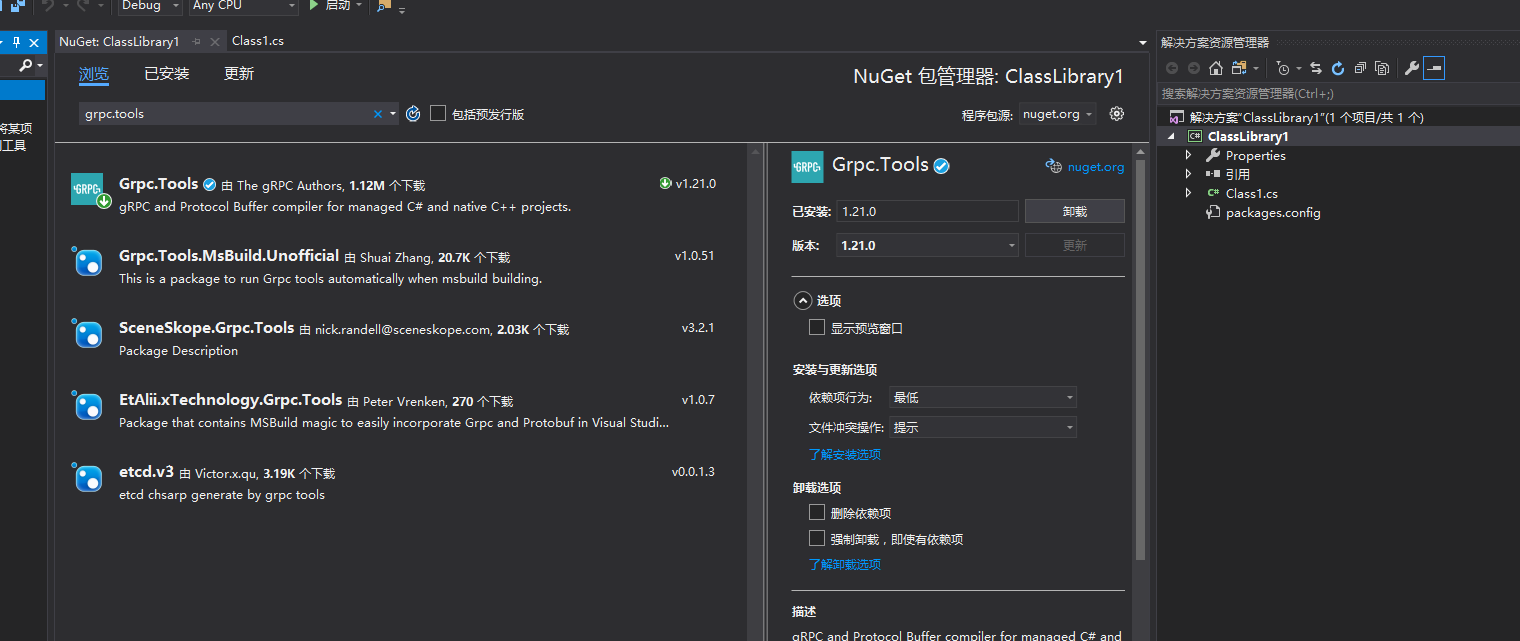
2.安装成功之后项目文件夹里会生成一个packages文件,在这里找到我们所需要的工具(x86还64请根据自己电脑自行选择)

1.环境准备
- GrpcClient 命令行程序
- GrpcLibray 类库程序
- GrpcServer 命令行程序
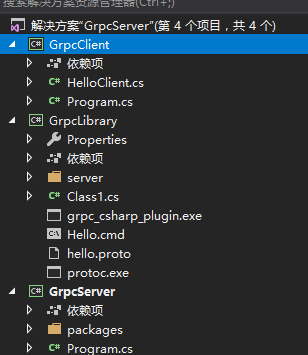
2.安装项目依赖
GrpcClient和GrpcLibray和GrpcServer 都需要安装通用的插件
install-package Grpc

install-package Goole.Protobuf
3.在GrpcLibray程序当中把前面我们用netframework添加的exe文件添加到该项目当中
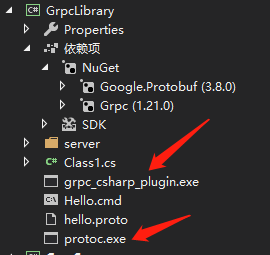
4.添加命令行用来生成供其他程序调用的代码(hello.cmd)
protoc -I . --csharp_out ./server --grpc_out ./server --plugin=protoc-gen-grpc=grpc_csharp_plugin.exe hello.proto
5.编写接口服务(hello.proto)
syntax = "proto3";

package GrpcLibrary;

service HelloService{

rpc GetSum(GetMsgNumRequest) returns (GetMsgSumReply){};

rpc test(GetLotID)returns(GetLotAll){};

}

message GetMsgNumRequest {  int32 Num1 = ;  int32 Num2 = ;}

message GetMsgSumReply {  int32 Sum = ;}

message GetLotID{int32 Num1=;string s=;}

message GetLotAll{

enum Lists{

  mes=;

  wip=;

  eap=;

  dcs=;

}

Lists t=;

repeated UserList user=;

}

message UserList{

 string userName=;

 string pwd=;

}
6.在GrpcServer当中引用GrpcLibrary,并且重写定义的方法
using Grpc.Core;

using GrpcLibrary;

using System;

using System.Collections.Generic;

using System.Text;

using System.Threading.Tasks;

namespace GrpcServer

{

    class Program

    {

      public  class GrpcImpl : HelloService.HelloServiceBase

        {

            public override async Task<GetMsgSumReply> GetSum(GetMsgNumRequest request, ServerCallContext context)

            {

                var result = new GetMsgSumReply();

                result.Sum = request.Num1 + request.Num2;

                return result;

            }

            public override async Task<GetLotAll> test(GetLotID request, ServerCallContext context)

            {

                var result = new GetLotAll();

                string s = "这里一共有:";

                if (request.Num1 == )

                {

                    s += "1个字符";

                }

                s += request.S;

                UserList userList = new UserList();

                userList.UserName = "张三";

                result.User.Add(userList);

                List<UserList> userLists = new List<UserList>();

                result.User.AddRange(userLists);

                result.T = GetLotAll.Types.Lists.Wip;

                return result;

            }

        }

        private static Server _server;

        static void Main(string[] args)

        {

            _server = new Server {

                Services = {HelloService.BindService(new GrpcImpl()) },

                Ports = { new ServerPort("localhost",,ServerCredentials.Insecure)}

            };

            _server.Start();

            Console.WriteLine("grpc ServerListening On Port 8088");

            Console.WriteLine("任意键退出...");

            Console.ReadKey();

            _server?.ShutdownAsync().Wait();

        }

    }

}
7.grpcClient客户端也需要引用GrpcLibrary
using Grpc.Core;

using GrpcLibrary;

using System;

using System.Collections.Generic;

using System.Text;

namespace GrpcClient

{

    public static class HelloClient

    {

        private static Channel _channel;

        private static HelloService.HelloServiceClient _client;

        static HelloClient()

        {

            _channel = new Channel("localhost:8088",ChannelCredentials.Insecure);

            _client = new HelloService.HelloServiceClient(_channel);

        }

        public static GetMsgSumReply getSum(int num1, int num2)

        {

            return _client.GetSum(new GetMsgNumRequest { Num1=num1,Num2=num2});

        }

        public static GetLotAll GetLotAll(int num1, string s)

        {

            return _client.test(new GetLotID { Num1 = num1, S = s });

        }

    }

}
8.客户端调用
using GrpcLibrary;

using System;

namespace GrpcClient

{

    class Program

    {

        static void Main(string[] args)

        {

            GetMsgSumReply helloMsg = HelloClient.getSum(,) ;

            GetLotAll getLotAll = HelloClient.GetLotAll(, "我是老哈哈哈哈");

            Console.WriteLine("grpc Client Call GetSum():" + helloMsg.Sum);

            string user = string.Empty;

            foreach (var item in getLotAll.User)

            {

                user += item;

            }

            Console.WriteLine("grpc Client Call GetLotAll():" + user);

            Console.WriteLine("任意键退出...");

            Console.ReadKey();

        }

    }

}
运行如下图所示,先运行服务器端,在运行客户端

源码地址:https://github.com/zhengyazhao/grpc.git
netcore中使用grpc的更多相关文章
- .NetCore中的日志(2)集成第三方日志工具
.NetCore中的日志(2)集成第三方日志工具 0x00 在.NetCore的Logging组件中集成NLog 上一篇讨论了.NetCore中日志框架的结构,这一篇讨论一下.NetCore的Logg ...
- .NetCore中的日志(1)日志组件解析
.NetCore中的日志(1)日志组件解析 0x00 问题的产生 日志记录功能在开发中很常用,可以记录程序运行的细节,也可以记录用户的行为.在之前开发时我一般都是用自己写的小工具来记录日志,输出目标包 ...
- C#中使用gRPC
C#中使用gRPC 我的这几篇文章都是使用gRPC的example,不是直接编译example,而是新建一个项目,从添加依赖,编译example代码,执行example.这样做可以为我们创建自己的项目 ...
- 初识google多语言通信框架gRPC系列(三)C#中使用gRPC
我的这几篇文章都是使用gRPC的example,不是直接编译example,而是新建一个项目,从添加依赖,编译example代码,执行example.这样做可以为我们创建自己的项目提供借鉴.如果对gR ...
- 初识google多语言通信框架gRPC系列(四)C++中使用gRPC
我的这几篇文章都是使用gRPC的example,不是直接编译example,而是新建一个项目,从添加依赖,编译example代码,执行example.这样做可以为我们创建自己的项目提供借鉴.如果对gR ...
- AutoMapper在asp.netcore中的使用
# AutoMapper在asp.netcore中的使用 automapper 是.net 项目中针对模型之间转换映射的一个很好用的工具,不仅提高了开发的效率还使代码更加简洁,当然也是开源的,htt ...
- netcore中的缓存介绍
Cache(缓存)是优化web应用的常用方法,缓存存放在服务端的内存中,被所有用户共享.由于Cache存放在服务器的内存中,所以用户获取缓存资源的速度远比从服务器硬盘中获取快,但是从资源占有的角度考虑 ...
- 在netcore中如何注入同一个接口的多个实现
netcore中自带了Ioc框架,这也影响了我们的编码习惯,以前都是静态类或者直接new对象,现在有了Ioc框架的支持,我们也不必守旧,应当使用起来,接受这种对象管理方式.使用过java的同仁,都习惯 ...
- .NetCore中EFCore的使用整理(二)-关联表查询
EF常用处理关联加载的方式有3中:延迟加载(Lazy Loading).贪婪加载 (Eager Loading)以及显示加载. 一.EF Core 1.1 1.当前的版本,还不支持延迟加载(Lazy ...
随机推荐
- Linux 资源监控整体分析-TOP
一.top 第一行,任务队列信息,同 uptime 命令的执行结果 系统时间:15:23:10 运行时间:up 236 day,4min, 当前登录用户: 2个 user 负载均衡(uptime) ...
- CSS学习笔记-2D转换模块
2D转换模块: 1.旋转 1.1格式: transform:rotate(45deg); 1.2含义: 表示旋转多少度 ...
- 去掉烦人的“!=null"(判空语句)
文章首发于公众号 松花皮蛋的黑板报 作者就职于京东,在稳定性保障.敏捷开发.高级JAVA.微服务架构有深入的理解 为了避免空指针调用,我们经常会看到这样的语句 if (someobject != nu ...
- springboot进入html
话不多说,转载 https://blog.csdn.net/sinat_33889619/article/details/78339042 这个博客写的真好
- Data Management Technology(1) -- Introduction
1.Database concepts (1)Data & Information Information Is any kind of event that affects the stat ...
- Hadoop HA 架构
为什么要用集群? 企业里面,多台机器 伪分布式 每一个角色都是一个进程 HDFS: NN SNN DN YARN: RM NM 大数据所有组件, 都是主从架构 master-slave HDFS读写请 ...
- appium+robotframework+python连接真机定位不到元素的问题处理
这几天遇到了一个比较奇怪的问题,使用RF框架进行自动化测试的时候定位不到部分元素 并且这个元素的是有id的,更换了xpath定位也行不通,冥思苦想,加上谷歌百度,终于解决了 解决步骤如下: 1.定位问 ...
- linux kernel下输入输出console如何实现【转】
转自:https://blog.csdn.net/skyflying2012/article/details/41078349 最近工作在调试usb虚拟串口,让其作为kernel启动的调试串口,以及u ...
- Acwing 14. 不修改数组找出重复的数字
题目地址 https://www.acwing.com/problem/content/description/15/ 来源:剑指Offer 给定一个长度为 n+1n+1 的数组nums,数组中所有 ...
- flask--数据库迁移之连环踩坑记
flask数据库迁移命令: python manage.py db init python manage.py db migrate python manage.py db upgrade 1.报错: ...