
java图形界面 计算器实现
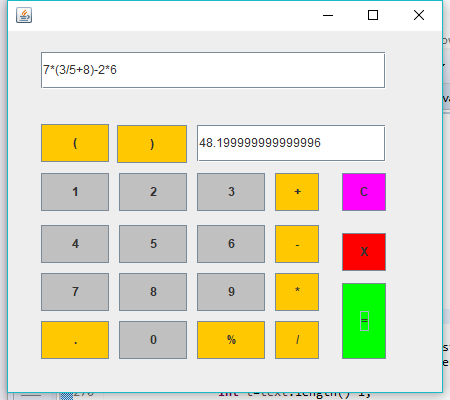
编写程序实现一个简单计算器的基本功能,具体可以模仿Windows附件中的计算器或模拟常见的实物计算器。
package beizi;

import java.awt.EventQueue;

import javax.swing.JFrame;

import javax.script.ScriptEngine;

import javax.script.ScriptEngineManager;

import javax.swing.JButton;

import java.awt.event.ActionListener;

import java.awt.event.ActionEvent;

import javax.swing.JTextArea;

import javax.swing.JTextPane;

import javax.swing.JLabel;

import javax.swing.JOptionPane;

import java.awt.TextArea;

import java.awt.Color;

import javax.swing.JTextField;

public class cal {

	private JFrame frame;

	private JTextField textField;

	private JTextField textField_1;

	/**

	 * Launch the application.

	 */

	public static void main(String[] args) {

		EventQueue.invokeLater(new Runnable() {

			public void run() {

				try {

					cal window = new cal();

					window.frame.setVisible(true);

				} catch (Exception e) {

					e.printStackTrace();

				}

			}

		});

	}

	/**

	 * Create the application.

	 */

	public cal() {

		initialize();

//		calResult();

	}

	/**

	 * Initialize the contents of the frame.

	 */

 	private void initialize() {

		frame = new JFrame();

		frame.setBounds(100, 100, 450, 400);

		frame.setDefaultCloseOperation(JFrame.EXIT_ON_CLOSE);

		frame.getContentPane().setLayout(null);

		JButton btnNewButton = new JButton("1");

		btnNewButton.setBackground(Color.LIGHT_GRAY);

		btnNewButton.addActionListener(new ActionListener() {

			public void actionPerformed(ActionEvent arg0) {

				String text=textField.getText();

				textField.setText(text+"1");

			}

		});

		btnNewButton.setBounds(33, 142, 68, 38);

		frame.getContentPane().add(btnNewButton);

		JButton button = new JButton("4");

		button.addActionListener(new ActionListener() {

			public void actionPerformed(ActionEvent arg0) {

				String text=textField.getText();

				textField.setText(text+"4");

			}

		});

		button.setBackground(Color.LIGHT_GRAY);

		button.setBounds(33, 194, 68, 38);

		frame.getContentPane().add(button);

		JButton button_1 = new JButton("7");

		button_1.addActionListener(new ActionListener() {

			public void actionPerformed(ActionEvent arg0) {

				String text=textField.getText();

				textField.setText(text+"7");

			}

		});

		button_1.setBackground(Color.LIGHT_GRAY);

		button_1.setBounds(33, 242, 68, 38);

		frame.getContentPane().add(button_1);

		JButton button_2 = new JButton("2");

		button_2.addActionListener(new ActionListener() {

			public void actionPerformed(ActionEvent arg0) {

				String text=textField.getText();

				textField.setText(text+"2");

			}

		});

		button_2.setBackground(Color.LIGHT_GRAY);

		button_2.setBounds(111, 142, 68, 38);

		frame.getContentPane().add(button_2);

		JButton button_3 = new JButton("5");

		button_3.addActionListener(new ActionListener() {

			public void actionPerformed(ActionEvent arg0) {

				String text=textField.getText();

				textField.setText(text+"5");

			}

		});

		button_3.setBackground(Color.LIGHT_GRAY);

		button_3.setBounds(111, 194, 68, 38);

		frame.getContentPane().add(button_3);

		JButton button_4 = new JButton("8");

		button_4.addActionListener(new ActionListener() {

			public void actionPerformed(ActionEvent arg0) {

				String text=textField.getText();

				textField.setText(text+"8");

			}

		});

		button_4.setBackground(Color.LIGHT_GRAY);

		button_4.setBounds(111, 242, 68, 38);

		frame.getContentPane().add(button_4);

		JButton button_5 = new JButton("3");

		button_5.addActionListener(new ActionListener() {

			public void actionPerformed(ActionEvent arg0) {

				String text=textField.getText();

				textField.setText(text+"3");

			}

		});

		button_5.setBackground(Color.LIGHT_GRAY);

		button_5.setBounds(189, 142, 68, 38);

		frame.getContentPane().add(button_5);

		JButton button_6 = new JButton("6");

		button_6.addActionListener(new ActionListener() {

			public void actionPerformed(ActionEvent arg0) {

				String text=textField.getText();

				textField.setText(text+"6");

			}

		});

		button_6.setBackground(Color.LIGHT_GRAY);

		button_6.setBounds(189, 194, 68, 38);

		frame.getContentPane().add(button_6);

		JButton button_7 = new JButton("9");

		button_7.addActionListener(new ActionListener() {

			public void actionPerformed(ActionEvent arg0) {

				String text=textField.getText();

				textField.setText(text+"9");

			}

		});

		button_7.setBackground(Color.LIGHT_GRAY);

		button_7.setBounds(189, 242, 68, 38);

		frame.getContentPane().add(button_7);

		JButton button_8 = new JButton("0");

		button_8.addActionListener(new ActionListener() {

			public void actionPerformed(ActionEvent arg0) {

				String text=textField.getText();

				textField.setText(text+"0");

			}

		});

		button_8.setBackground(Color.LIGHT_GRAY);

		button_8.setBounds(111, 290, 68, 38);

		frame.getContentPane().add(button_8);

		JButton button_9 = new JButton("(");

		button_9.setBackground(Color.ORANGE);

		button_9.addActionListener(new ActionListener() {

			public void actionPerformed(ActionEvent arg0) {

				String text=textField.getText();

				textField.setText(text+"(");

			}

		});

		button_9.setBounds(33, 93, 68, 38);

		frame.getContentPane().add(button_9);

		JButton button_10 = new JButton(")");

		button_10.setBackground(Color.ORANGE);

		button_10.addActionListener(new ActionListener() {

			public void actionPerformed(ActionEvent arg0) {

				String text=textField.getText();

				textField.setText(text+")");

			}

		});

		button_10.setBounds(109, 94, 70, 38);

		frame.getContentPane().add(button_10);

		JButton button_11 = new JButton("+");

		button_11.setBackground(Color.ORANGE);

		button_11.addActionListener(new ActionListener() {

			public void actionPerformed(ActionEvent arg0) {

				String text=textField.getText();

				textField.setText(text+"+");

			}

		});

		button_11.setBounds(267, 142, 44, 38);

		frame.getContentPane().add(button_11);

		JButton button_12 = new JButton("-");

		button_12.setBackground(Color.ORANGE);

		button_12.addActionListener(new ActionListener() {

			public void actionPerformed(ActionEvent arg0) {

				String text=textField.getText();

				textField.setText(text+"-");

			}

		});

		button_12.setBounds(267, 194, 44, 38);

		frame.getContentPane().add(button_12);

		JButton button_13 = new JButton("*");

		button_13.setBackground(Color.ORANGE);

		button_13.addActionListener(new ActionListener() {

			public void actionPerformed(ActionEvent arg0) {

				String text=textField.getText();

				textField.setText(text+"*");

			}

		});

		button_13.setBounds(267, 242, 44, 38);

		frame.getContentPane().add(button_13);

		JButton button_14 = new JButton("/");

		button_14.setBackground(Color.ORANGE);

		button_14.addActionListener(new ActionListener() {

			public void actionPerformed(ActionEvent arg0) {

				String text=textField.getText();

				textField.setText(text+"/");

			}

		});

		button_14.setBounds(267, 290, 44, 38);

		frame.getContentPane().add(button_14);

		JButton button_15 = new JButton("=");

		button_15.setBackground(Color.GREEN);

		button_15.addActionListener(new ActionListener() {

			public void actionPerformed(ActionEvent arg0) {

				ScriptEngine js = new ScriptEngineManager().getEngineByName("JavaScript");//将字符串公式转换为计算公式

				String formula=textField.getText();

				try {

					textField_1.setText(js.eval(formula).toString());

//					textField_1.set

				}catch(Exception e) {

				}

			}

		});

		button_15.setBounds(334, 252, 44, 76);

		frame.getContentPane().add(button_15);

		textField = new JTextField();

		textField.setBounds(33, 21, 345, 37);

		frame.getContentPane().add(textField);

		textField.setColumns(10);

		textField_1 = new JTextField();

		textField_1.setBackground(Color.WHITE);

		textField_1.setBounds(189, 94, 189, 37);

		frame.getContentPane().add(textField_1);

		textField_1.setColumns(10);

		JButton button_16 = new JButton("C");

		button_16.setBackground(Color.MAGENTA);

		button_16.addActionListener(new ActionListener() {

			public void actionPerformed(ActionEvent arg0) {

				String text=textField.getText();

				int t=text.length()-1;

				if(t<0) {

					JOptionPane.showMessageDialog(null, "已经没有了((");

				}

				else {

					text=text.substring(0, t);

					textField.setText(text);

				}

			}

		});

		button_16.setBounds(334, 142, 44, 38);

		frame.getContentPane().add(button_16);

		JButton button_17 = new JButton("X");

		button_17.setBackground(Color.RED);

		button_17.addActionListener(new ActionListener() {

			public void actionPerformed(ActionEvent arg0) {

				textField.setText("");

				textField_1.setText("");

			}

		});

		button_17.setBounds(334, 202, 44, 38);

		frame.getContentPane().add(button_17);

		JButton button_18 = new JButton(".");

		button_18.addActionListener(new ActionListener() {

			public void actionPerformed(ActionEvent arg0) {

				String text=textField.getText();

				textField.setText(text+".");

			}

		});

		button_18.setBackground(Color.ORANGE);

		button_18.setBounds(33, 290, 68, 38);

		frame.getContentPane().add(button_18);

		JButton button_19 = new JButton("%");

		button_19.addActionListener(new ActionListener() {

			public void actionPerformed(ActionEvent arg0) {

				String text=textField.getText();

				textField.setText(text+"%");

			}

		});

		button_19.setBackground(Color.ORANGE);

		button_19.setBounds(189, 290, 68, 38);

		frame.getContentPane().add(button_19);

	}

}
大概的效果,Java初学者,,代码重复严重,以后改,,,
java图形界面 计算器实现的更多相关文章
- 【计项02组01号】Java版图形界面计算器
Java版图形界面计算器1.0版本 项目分析[1.0] 组成部分 代码结构 (1)窗口的创建 在<JDK 核心 API>中我们提到,创建一个窗口需要使用 JFrame 类.在本实验中,我们 ...
- Java图形界面学习---------简易登录界面
/** * @author Administrator * Java图形界面学习---------简易登录界面 * date:2015/10/31 */ import java.awt.BorderL ...
- Java 图形界面开发--图文并茂建立学生管理系统
(尊重劳动成果,转载请注明出处:http://blog.csdn.net/qq_25827845/article/details/50932501 冷血之心的博客) 图形用户界面(Graphics U ...
- Java图形界面GUI
Java图形界面GUI 设置窗体JFrame对象 package com.Aha.Best; import javax.swing.ImageIcon; import javax.swing.JFra ...
- Java第5次实验提纲(Java图形界面编程)
1. Swing与NetBeans 使用NetBeans编写简单界面.见GUI实验参考文件中的0.第06次实验(图形程序设计.事件处理与Swing).doc 题目1: Swing用户界面组件与事件处理 ...
- Java第05次实验提纲(Java图形界面编程)
1. Swing与NetBeans 使用NetBeans编写简单界面.见GUI实验参考文件中的0.第06次实验(图形程序设计.事件处理与Swing).doc 题目1: Swing用户界面组件与事件处理 ...
- java 图形界面 Socket编程
一.使用图形界面实现客户端服务器端的通信: 上代码: 服务器端代码: package cn.MyNET; import java.io.*; import java.net.*; import jav ...
- java 图形界面
1.创建一个窗口框架 /** * java 用户界面框架 * 2016/5/10 */ package org.windows; import javax.swing.*; public class ...
- JAVA 图形界面开发基础详解
与C的win32一样,JAVA也有自己的图形界面开发,将在此篇博客中对基础部分进行讲解. 1.Java提供的图形界面类有哪些? Java提供了两套图形界面 (1)AWT组建(基础) AWT组件是jdk ...
随机推荐
- Linux系统学习 十一、DHCP服务器—相关文件、配置文件、服务器配置
2.DHCP服务器相关文件 安装SHCP服务器 yum install dhcp 对应的端口 端口号: ipv4 udp67.udp68(不推荐改端口) ipv6 udp546.udp547(暂时还没 ...
- PhpSpreadsheet的简单使用
由于PHPExcel已经不再维护,PhpSpreadsheet是PHPExcel的下一个版本.PhpSpreadsheet是一个用纯PHP编写的库,并引入了命名空间,PSR规范等.这里简单介绍下Php ...
- 你真的会用搜索吗?—— google 搜索技巧
鄙人用了那么多年 google ,却只会简单的空格. 虽然空格已经很强大了.google 对此做了非常多的优化,原则是让你只用最基础的输入搭配空格就能达到跟下面介绍的方法几乎一样的效果,但是还有知道一 ...
- Python深拷贝与浅拷贝区别
可变类型 如list.dict等类型,改变容器内的值,容器地址不变. 不可变类型 如元组.字符串,原则上不可改变值.如果要改变对象的值,是将对象指向的地址改变了 浅拷贝 对于可变对象来说,开辟新的内存 ...
- mysql分布式
一,复制,对数据进行备份,实现搞可用,提高吞吐量,实现高性能. 1,主从架构 2,多主架构 3,主主从从 4,主备 (实际用得多) 二,分片/分库分表 () 1,垂直拆分 1,垂直分表 2,垂直分库 ...
- PHP实现微信提现功能
提现必须得用双向证书.所以大家一定要在微信的商户平台找到相应的地方去设置.因为做这个提现已经有一段时间了.所以设置微信商户平台的那几个地方没有图的情况.也说不清楚.下次再做提现的时候.给大家分享如何设 ...
- Java 并发编程 | 线程池详解
原文: https://chenmingyu.top/concurrent-threadpool/ 线程池 线程池用来处理异步任务或者并发执行的任务 优点: 重复利用已创建的线程,减少创建和销毁线程造 ...
- ASP.NET MVC IOC依赖注入之Autofac系列(二)- WebForm当中应用
上一章主要介绍了Autofac在MVC当中的具体应用,本章将继续简单的介绍下Autofac在普通的WebForm当中的使用. PS:目前本人还不知道WebForm页面的构造函数要如何注入,以下在Web ...
- PHP mysqli_stmt_bind_param MySQLi 函数
定义和用法 mysqli_stmt_bind_param - 将变量绑定到准备好的语句作为参数 版本支持 PHP4 PHP5 PHP7 不支持 支持 支持 语法 mysqli_stmt_bind_pa ...
- 网络协议 15 - P2P 协议
大家说起种子,应该都知道是用来下载资源的.那么资源下载都有哪些方式?种子下载又有什么优势呢? 下载电影的两种方式 第一种是通过 HTTP 进行下载.这种方式,有过经历的人应该体会到,当下载文件 ...