
Winform的控件以及DataGridView的一般使用
先上学习测试的一些截图
1:获取多个控件上面的值(checkbox,combobox,textbox,radiobutton)
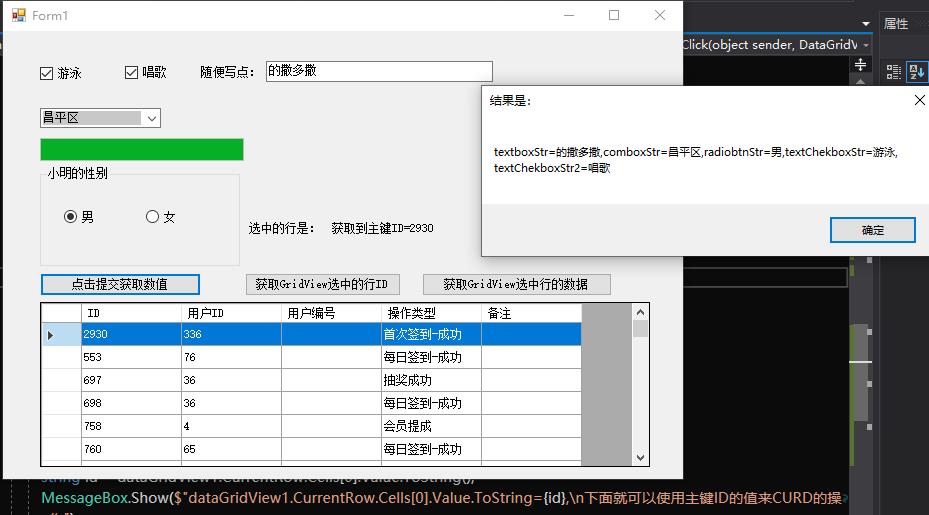
2:获取到选择行的主键ID的value,方便我们进一步CURD
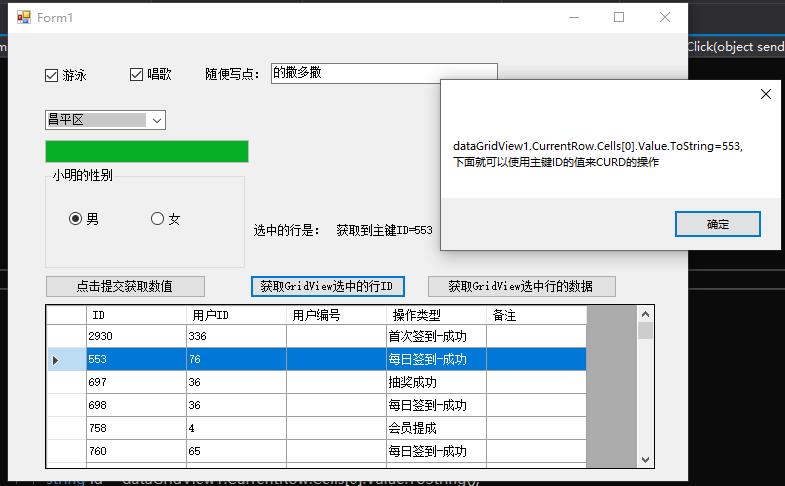
3:获取选择一行的数据以及一行是多少列

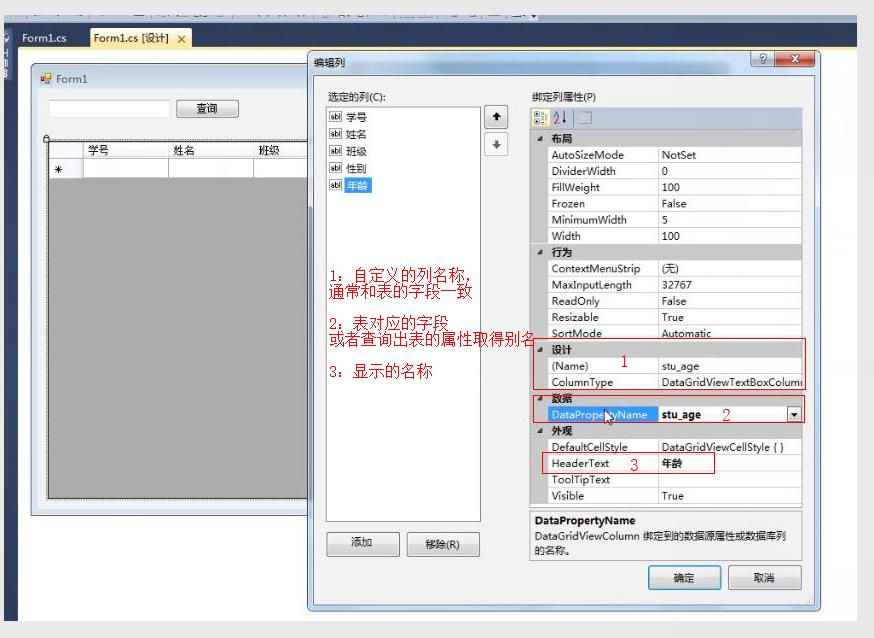
4:绑定显示自定义的列头名称
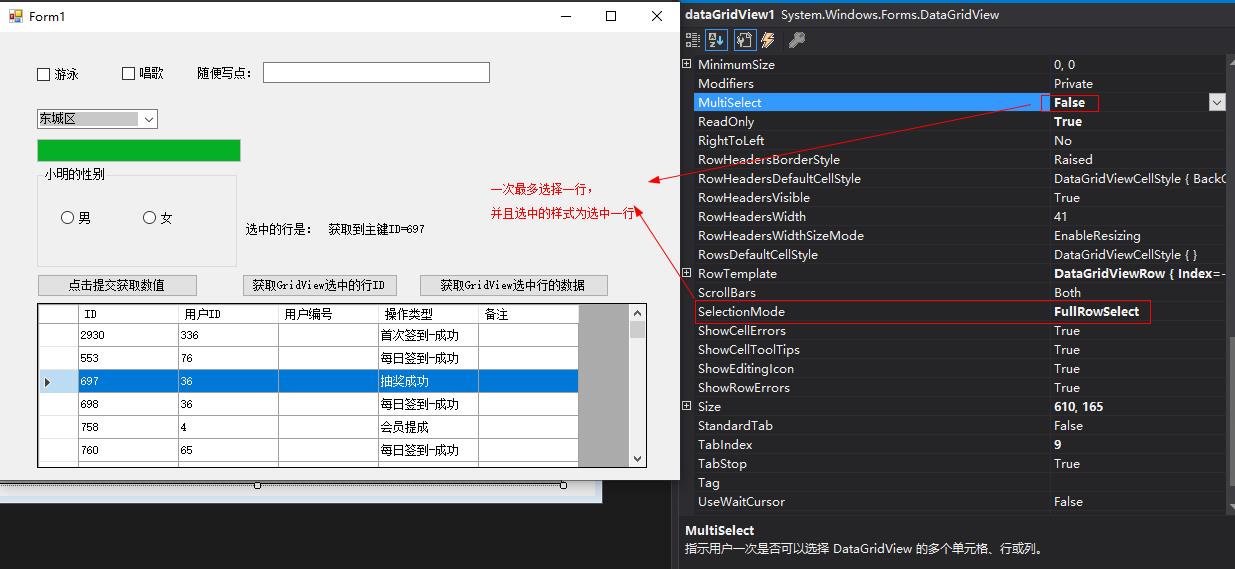
5:选中一行的属性设置操作
6:全部代码
 using System;

 using System.Text;

 using System.Windows.Forms;

 namespace WindowsFormsDemo

 {

     using System.Configuration;

     using System.Data;

     using System.Data.SqlClient;

     public partial class Form1 : Form

     {

         private static readonly string connectionstr = ConfigurationManager.ConnectionStrings["hydb"].ConnectionString;

         public Form1()

         {

             InitializeComponent();

         }

         private void Form1_Load(object sender, EventArgs e)

         {

             // TODO: 这行代码将数据加载到表“huayaDBDataSet.K_City”中。您可以根据需要移动或删除它。

             this.k_CityTableAdapter.Fill(this.huayaDBDataSet.K_City);

             BingDataGridview();

         }

         private void BingDataGridview()

         {

             using (SqlConnection conn = new SqlConnection(connectionstr))

             {

                 conn.Open();

                 using (SqlDataAdapter ad = new SqlDataAdapter("select ID,userID,userno ,Optext,Remark from F_OperateLog", conn))

                 {

                     using (DataSet set = new DataSet())

                     {

                         ad.Fill(set);

                         this.dataGridView1.DataSource = set.Tables[].DefaultView;//绑定数据

                         dataGridView1.MultiSelect = false;//单选

                         dataGridView1.Rows[].Selected=true;//默认第二行为选中的状态

                     }

                 }

             }

         }

         private void dataGridView1_CellClick(object sender, DataGridViewCellEventArgs e)

         {

             string id = dataGridView1.CurrentRow.Cells[].Value.ToString();

             if (!string.IsNullOrEmpty(id))

             {

                 // MessageBox.Show($"获取到主键ID={id}");

                 labshowid.Text = $"获取到主键ID={id}";

             }

         }

         /// <summary>

         /// 获取选中行的key ID

         /// </summary>

         /// <param name="sender"></param>

         /// <param name="e"></param>

         private void BtnSelectID_Click(object sender, EventArgs e)

         {

             string id = dataGridView1.CurrentRow.Cells[].Value.ToString();

             MessageBox.Show($"dataGridView1.CurrentRow.Cells[0].Value.ToString={id},\n下面就可以使用主键ID的值来CURD的操作");

         }

         /// <summary>

         /// 获取选中行的所有数据

         /// </summary>

         /// <param name="sender"></param>

         /// <param name="e"></param>

         private void BtnSelectRowData_Click(object sender, EventArgs e)

         {

             int rowIndex = dataGridView1.CurrentRow.Index;//选中当前行的索引

             int cellCount = dataGridView1.GetCellCount(DataGridViewElementStates.Selected);//获取一行的列有多少个

             StringBuilder sb = new StringBuilder();

             for (int i = ; i < cellCount; i++)

             {

                 sb.Append(dataGridView1.CurrentRow.Cells[i].Value.ToString() + ",");

             }

             MessageBox.Show(sb.ToString().TrimEnd(',')+ ",\n\ncellCount=" + cellCount+ ",rowIndex=" + rowIndex);

         }

         private void BtnProStart_Click(object sender, EventArgs e)

         {

             for (int i = ; i < ; i++)

             {

                 this.progressBar1.Value = (int)(((i + ) / 100.0) * );

                 Application.DoEvents();

                 int miao = new Random().Next(, );

                 System.Threading.Thread.Sleep(miao * );

             }

             MessageBox.Show("数据加载成功!", "请稍后", MessageBoxButtons.YesNo, MessageBoxIcon.Asterisk);

         }

         private void BtnSubmit_Click(object sender, EventArgs e)

         {

             string textboxStr = this.texboxStr.Text;

             string comboxStr = this.comboBox1.Text;

             string radiobtnStr = this.radioButton1.Checked == true ? "男" : "女";

             string textChekboxStr = string.IsNullOrEmpty(this.checkBox1.Text) == true ? "" : this.checkBox1.Text;

             string textChekboxStr2 = string.IsNullOrEmpty(this.checkBox2.Text) == true ? "" : this.checkBox2.Text;

             string msg = $"textboxStr={textboxStr},comboxStr={comboxStr},radiobtnStr={radiobtnStr},textChekboxStr={ textChekboxStr},textChekboxStr2={textChekboxStr2}";

             MessageBox.Show(msg, "结果是:");

         }

     }

 }
Winform的控件以及DataGridView的一般使用的更多相关文章
- winform 分页控件
http://www.cnblogs.com/liuyunsheng/p/4853387.html http://www.cnblogs.com/wuhuacong/archive/2011/07/0 ...
- winform基础控件总结
转自:http://www.cnblogs.com/top5/archive/2010/04/29/1724039.html 基础 - 常用控件 C# WinForm开发系列 - CheckBox/B ...
- [原创][开源]SunnyUI.Net, C# .Net WinForm开源控件库、工具类库、扩展类库、多页面开发框架
SunnyUI.Net, 基于 C# .Net WinForm 开源控件库.工具类库.扩展类库.多页面开发框架 Blog: https://www.cnblogs.com/yhuse Gitee: h ...
- 在DevExpress程序中使用Winform分页控件直接录入数据并保存
一般情况下,我们都倾向于使用一个组织比较好的独立界面来录入或者展示相关的数据,这样处理比较规范,也方便显示比较复杂的数据.不过在一些情况下,我们也可能需要直接在GridView表格上直接录入或者修改数 ...
- winform窗体控件(全)
回顾跟补充下除了昨天那常用6个其他的winform窗体控件作用 1:Button:按钮 (1)AutoSize:如果是True的情况下,内容将会撑开:False的话会另起一行 (2)Enabled: ...
- winform基本控件----按钮
这次来引用一个我们上课时候老师给的一个实验内容,来说一下winform程序设计中的按钮控件的使用.下面是我们老师给的实验内容. 实验目的: 掌握Winform的开发环境. 掌握窗体的创建和基本方法. ...
- WinForm给控件加入hint文字
本文代码主要是参考别人的,仅为个人记录,方面后续使用~ 效果图: 主要代码在一个Win32Utility类中,代码如下: public static class Win32Utility { [Dll ...
- C# WinForm实现控件拖动实例介绍
主要是设计控件的MouseDown.MouseLeave.MouseMove事件.一步步来吧:1.定义一个枚举类型,描述光标状态 private enum EnumMousePointPosition ...
- Winform DevExpress控件库(一) DevExpress控件库的安装与新建第一个DevExpress项目
前言:因为这段时间要接触到DevExpress控件库,而我本身甚至对winform的控件都了解甚少,所以处在学习中,写下博客主要是为了方便后期的回顾,当然也可以给一些新人第一次接触时做为学习的参考,以 ...
随机推荐
- 软件设计之基于Java的连连看小游戏(二)——游戏基础界面的制作及事件的添加
上次完成到游戏首页的制作,今天完成了游戏基础界面的制作以及事件的简单添加.由于功能尚未完全实现,因此游戏界面的菜单列表只是简单地添加了一下,其余菜单列表以及倒计时等在后续的制作中逐一完善. 1.首先在 ...
- Java性能 -- Lock优化
Lock / synchronized Lock锁的基本操作是通过乐观锁实现的,由于Lock锁也会在阻塞时被挂起,依然属于悲观锁 synchronized Lock 实现方式 JVM层实现 Jav ...
- STC15控制数码管 38译码器
共阳极数码管举例 #define MAIN_Fosc 27000000L //定义主时钟 #include "STC15Fxxxx.H" #define uchar unsigne ...
- WebSocket实现Java后台消息推送
1.什么是WebSocket WebSocket协议是基于TCP的一种新的网络协议.它实现了浏览器与服务器全双工(full-duplex)通信——允许服务器主动发送信息给客户端. 2.实现原理 在实现 ...
- [N久以前发布的文章]php 获取yahoo股票csv数据并封闭成为接口输出json数据
思路 先从yahoo接口获取数据,再定义接口,转化成为json输出.只供卡通网(kt5.cn)使用 stock.php 接口处理代码 <?php header("Content-Typ ...
- SparkSql 整合 Hive
SparkSql整合Hive 需要Hive的元数据,hive的元数据存储在Mysql里,sparkSql替换了yarn,不需要启动yarn,需要启动hdfs 首先你得有hive,然后你得有spark, ...
- PHP 自动加载
回顾 开始的时候, 如果想在一个php文件中使用其它文件的类或方法, 需要通过include/require方法将文件包含进来. 这种方法的缺点也很明显: 如果需要引入很多文件, 就需要很多的incl ...
- 2.Python爬虫入门_requests
#2019-11-23 #requests的api使用非常简单 import requests import time if __name__=='__main__': # get请求 url_get ...
- 剑指Offer-3.从尾到头打印链表(C++/Java)
题目: 输入一个链表,按链表从尾到头的顺序返回一个ArrayList. 分析: 很简单的一道题,其实也就是从尾到头打印链表,题目要求返回ArrayList,其实也就是一个数组. 可以将链表中的元素全部 ...
- 历届试题 青蛙跳杯子-(bfs)
题目:http://lx.lanqiao.cn/problem.page?gpid=T448 题意:有两个字符串例如*WWBB和WWBB*,*每次能往左或右跳1-3步,与原位置的字符交换,问最少步数跳 ...