
WinForm给控件加入hint文字
本文代码主要是参考别人的,仅为个人记录,方面后续使用~
效果图:
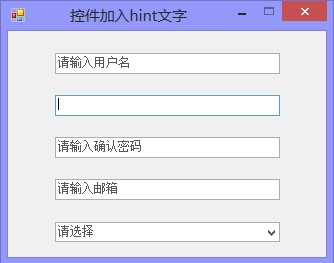
主要代码在一个Win32Utility类中,代码如下:
    public static class Win32Utility

    {

        [DllImport("user32.dll", CharSet = CharSet.Auto)]

        private static extern Int32 SendMessage(IntPtr hWnd, int msg, int wParam, [MarshalAs(UnmanagedType.LPWStr)] string lParam);

        [DllImport("user32.dll")]

        private static extern bool SendMessage(IntPtr hwnd, int msg, int wParam, StringBuilder lParam);

        [DllImport("user32.dll")]

        private static extern bool GetComboBoxInfo(IntPtr hwnd, ref COMBOBOXINFO pcbi);

        [StructLayout(LayoutKind.Sequential)]

        private struct COMBOBOXINFO

        {

            public int cbSize;

            public RECT rcItem;

            public RECT rcButton;

            public IntPtr stateButton;

            public IntPtr hwndCombo;

            public IntPtr hwndItem;

            public IntPtr hwndList;

        }

        [StructLayout(LayoutKind.Sequential)]

        private struct RECT

        {

            public int left;

            public int top;

            public int right;

            public int bottom;

        }

        private const int EM_SETCUEBANNER = 0x1501;

        private const int EM_GETCUEBANNER = 0x1502;

        //本文地址:http://www.cnblogs.com/Interkey/p/HintText.html

        public static void SetCueText(Control control, string text)

        {

            if (control is ComboBox)

            {

                COMBOBOXINFO info = GetComboBoxInfo(control);

                SendMessage(info.hwndItem, EM_SETCUEBANNER, , text);

            }

            else

            {

                SendMessage(control.Handle, EM_SETCUEBANNER, , text);

            }

        }

        private static COMBOBOXINFO GetComboBoxInfo(Control control)

        {

            COMBOBOXINFO info = new COMBOBOXINFO();

            //a combobox is made up of three controls, a button, a list and textbox;

            //we want the textbox

            info.cbSize = Marshal.SizeOf(info);

            GetComboBoxInfo(control.Handle, ref info);

            return info;

        }

        public static string GetCueText(Control control)

        {

            StringBuilder builder = new StringBuilder();

            if (control is ComboBox)

            {

                COMBOBOXINFO info = new COMBOBOXINFO();

                //a combobox is made up of two controls, a list and textbox;

                //we want the textbox

                info.cbSize = Marshal.SizeOf(info);

                GetComboBoxInfo(control.Handle, ref info);

                SendMessage(info.hwndItem, EM_GETCUEBANNER, , builder);

            }

            else

            {

                SendMessage(control.Handle, EM_GETCUEBANNER, , builder);

            }

            return builder.ToString();

        }

    }
本文地址:http://www.cnblogs.com/Interkey/p/HintText.html
使用时,如以下代码即可,只不过仅限在少数控件上(主要用在TextBox上,当然也可以用在ComboBox上,不过有限制)
        Win32Utility.SetCueText(this.tb_UserName, "请输入用户名");

        Win32Utility.SetCueText(this.tb_Password, "请输入密码");

        Win32Utility.SetCueText(this.tb_ConfigPassword, "请输入确认密码");

        Win32Utility.SetCueText(this.tb_Email, "请输入邮箱");

        //Win32Utility.SetCueText(this.richTextBox1, "123456");//设置其他控件无效

        //this.comboBox1.DropDownStyle = ComboBoxStyle.DropDownList;//在这种样式下无效

        Win32Utility.SetCueText(this.comboBox1, "请选择");
以上即可实现效果,不过在此提供了相应代码下载;
本文参考了以下文章:
C#/WinForm给控件加入hint文字
C# TextBox with Outlook 2007-style prompt
WinForm给控件加入hint文字的更多相关文章
- CSharpGL(26)在opengl中实现控件布局/渲染文字
CSharpGL(26)在opengl中实现控件布局/渲染文字 效果图 如图所示,可以将文字.坐标轴固定在窗口的一角. 下载 CSharpGL已在GitHub开源,欢迎对OpenGL有兴趣的同学加入( ...
- winform窗体控件(全)
回顾跟补充下除了昨天那常用6个其他的winform窗体控件作用 1:Button:按钮 (1)AutoSize:如果是True的情况下,内容将会撑开:False的话会另起一行 (2)Enabled: ...
- winform基本控件----按钮
这次来引用一个我们上课时候老师给的一个实验内容,来说一下winform程序设计中的按钮控件的使用.下面是我们老师给的实验内容. 实验目的: 掌握Winform的开发环境. 掌握窗体的创建和基本方法. ...
- DevExpress Winform 常用控件
Ø 前言 DevExpress 控件的功能比较强大,是全球知名控件开发公司,对于开发 B/S 或 C/S 都非常出色,可以实现很炫且功能强大的效果. DevExpress Winform 常用控件是 ...
- 在DevExpress程序中使用Winform分页控件直接录入数据并保存
一般情况下,我们都倾向于使用一个组织比较好的独立界面来录入或者展示相关的数据,这样处理比较规范,也方便显示比较复杂的数据.不过在一些情况下,我们也可能需要直接在GridView表格上直接录入或者修改数 ...
- C#实现WinForm DataGridView控件支持叠加数据绑定
我们都知道WinForm DataGridView控件支持数据绑定,使用方法很简单,只需将DataSource属性指定到相应的数据源即可,但需注意数据源必须支持IListSource类型,这里说的是支 ...
- 在Image控件中绘制文字
//Canvas 在Image控件中绘制文字 procedure TForm1.Button1Click(Sender: TObject);begin image1.Canvas.Font.Size ...
- C# WinForm实现控件拖动实例介绍
主要是设计控件的MouseDown.MouseLeave.MouseMove事件.一步步来吧:1.定义一个枚举类型,描述光标状态 private enum EnumMousePointPosition ...
- Winform DevExpress控件库(一) DevExpress控件库的安装与新建第一个DevExpress项目
前言:因为这段时间要接触到DevExpress控件库,而我本身甚至对winform的控件都了解甚少,所以处在学习中,写下博客主要是为了方便后期的回顾,当然也可以给一些新人第一次接触时做为学习的参考,以 ...
随机推荐
- Windows 64位 安装Oracle instantclient 官方绿色版和PL/SQL Developer 总结
原文: http://blog.csdn.net/kimsoft/article/details/8751267 操作系统:Windows 7 64位旗舰 要求,安装PL/SQL Developer用 ...
- CentOS安装keepalived
Haproxy.Keepalived双主高可用负载均衡 1.安装keepalived yum install keepalived -y
- C#利用NOPI处理Excel的代码
using System; using System.Data; using System.IO; using System.Text; using System.Web; using NPOI.HP ...
- SVN: bdb: BDB1538 Program version 5.3 doesn't match environment version 4.7
Q:bdb: BDB1538 Program version 5.3 doesn't match environment version 4.7 A: svnadmin recover /var/wh ...
- 在linux下挂载、卸载U盘
首先你得保证你的U盘的格式是fat格式. 先进入/mnt/目录新建一个usb目录 cd /mnt/ mkidr usb 先fdisk -l,然后插上U盘,fdisk -l 查看是否有新的硬盘添加上来了 ...
- 转 mv 管道符
需求:想列出指定的内容并将其转移到新的目录中 通过使用mv和管道符有几种方法, 1.file=`ls pattern`;mv $file newdir 2.ls pattern|xargs -i mv ...
- sencha touch api 使用指南
本文主要讲解如何使用sencha touch的api以及如何查看api中官方示例源码 前期准备 1.sdk 下载地址:http://www.sencha.com/products/touch/down ...
- Legolas工业自动化平台案例 —— 水源地自动化监控系统
天津港爆炸事件后,除了安置群众.追究事故责任外,人们最关心的莫过于爆炸污染物对于周边环境的影响,其中最重要的一块就是饮用水的安全.所幸的是,水源的安全监测是实实在在有据可依的.环保单位和供水企业在建设 ...
- React JS 基础知识17条
1. 基础实例 <!DOCTYPE html> <html> <head> <script src="../build/react.js" ...
- main函数读取jar包外部的配置文件properties
首先,Java的main方法有个初始化入参args,如下所示: public static void main(String[] args) {} 然后,在linux下执行jar包引入外部配置文件的命 ...