
spring boot整合mybatis框架及增删改查(jsp视图)
工具:idea、SQLyog
版本:springboot1.5.9版本、mysql5.1.62
第一步:新建项目
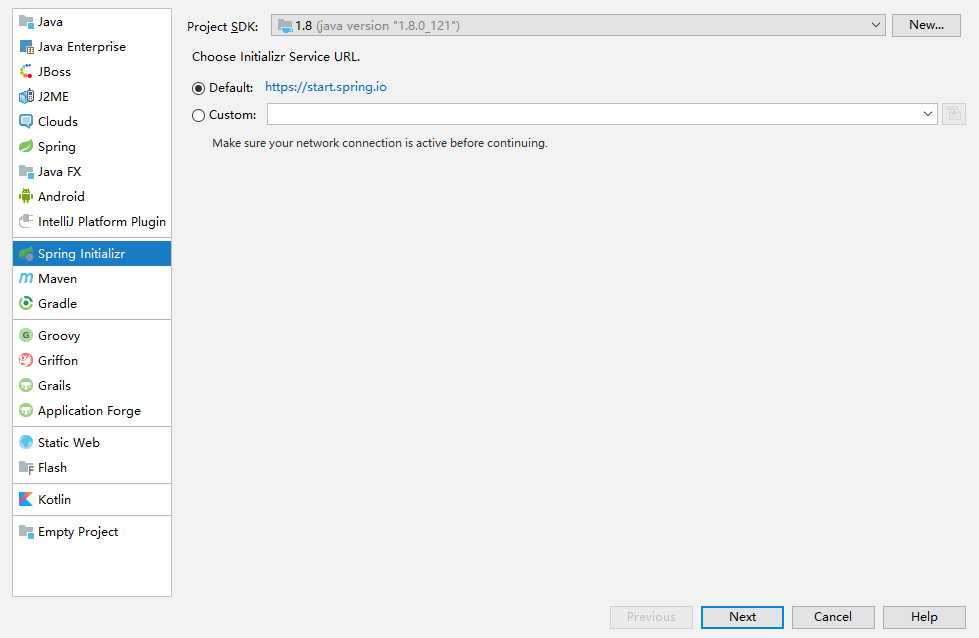
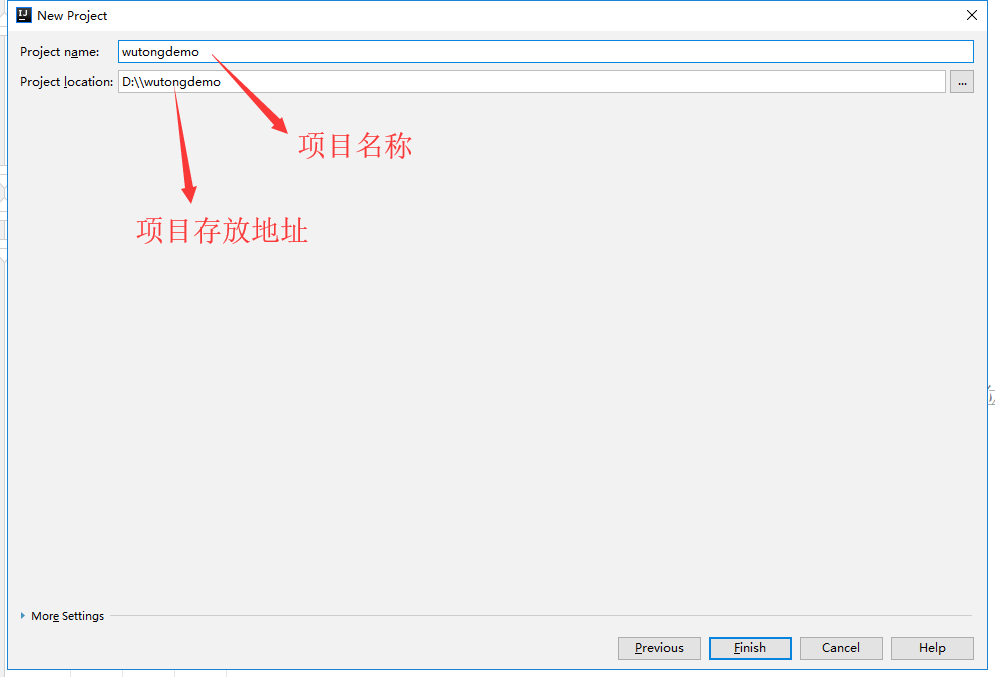
第二步:整合依赖(pom.xml)
     <dependencies>

         <dependency>

             <groupId>org.springframework.boot</groupId>

             <artifactId>spring-boot-starter-web</artifactId>

         </dependency>

         <dependency>

             <groupId>org.springframework.boot</groupId>

             <artifactId>spring-boot-starter-test</artifactId>

             <scope>test</scope>

         </dependency>

         <!--启动热部署的依赖 -->

         <dependency>

             <groupId>org.springframework.boot</groupId>

             <artifactId>spring-boot-devtools</artifactId>

             <version>1.3.0.RELEASE</version>

             <optional>true</optional>

         </dependency>

         <!-- 支持视图解析器-->

         <!-- https://mvnrepository.com/artifact/org.apache.tomcat.embed/tomcat-embed-jasper -->

         <dependency>

             <groupId>org.apache.tomcat.embed</groupId>

             <artifactId>tomcat-embed-jasper</artifactId>

             <scope>provided</scope>

         </dependency>

         <!-- 整合mybatis

               jdbc  mysql的驱动 mybatis和springboot整合依赖  pagehelper依赖

         -->

         <dependency>

             <groupId>org.springframework.boot</groupId>

             <artifactId>spring-boot-starter-jdbc</artifactId>

         </dependency>

         <dependency>

             <groupId>mysql</groupId>

             <artifactId>mysql-connector-java</artifactId>

         </dependency>

         <dependency>

             <groupId>org.mybatis.spring.boot</groupId>

             <artifactId>mybatis-spring-boot-starter</artifactId>

             <version>1.3.0</version>

         </dependency>

         <!-- 后端分页依赖-->

         <dependency>

             <groupId>com.github.pagehelper</groupId>

             <artifactId>pagehelper-spring-boot-starter</artifactId>

             <version>1.1.1</version>

         </dependency>

         <dependency>

             <groupId>org.apache.commons</groupId>

             <artifactId>commons-lang3</artifactId>

             <version>3.4</version>

         </dependency>

         <dependency>

             <groupId>org.aspectj</groupId>

             <artifactId>aspectjweaver</artifactId>

             <version>1.8.4</version>

         </dependency>

         <!-- json包 -->

         <dependency>

             <groupId>net.sf.json-lib</groupId>

             <artifactId>json-lib</artifactId>

             <version>2.4</version>

             <classifier>jdk15</classifier>

         </dependency>

         <dependency>

             <groupId>commons-beanutils</groupId>

             <artifactId>commons-beanutils</artifactId>

             <version>1.9.3</version>

         </dependency>

         <!--文件上传 -->

         <!-- https://mvnrepository.com/artifact/commons-fileupload/commons-fileupload -->

         <dependency>

             <groupId>commons-fileupload</groupId>

             <artifactId>commons-fileupload</artifactId>

             <version>1.3.1</version>

         </dependency>

         <!-- https://mvnrepository.com/artifact/commons-io/commons-io -->

         <dependency>

             <groupId>commons-io</groupId>

             <artifactId>commons-io</artifactId>

             <version>2.4</version>

         </dependency>

         <!-- https://mvnrepository.com/artifact/javax.servlet/javax.servlet-api -->

         <dependency>

             <groupId>javax.servlet</groupId>

             <artifactId>javax.servlet-api</artifactId>

             <version>4.0.1</version>

             <scope>provided</scope>

         </dependency>

         <dependency>

             <groupId>javax.servlet</groupId>

             <artifactId>jstl</artifactId>

             <version>1.2</version>

         </dependency>

         <!-- https://mvnrepository.com/artifact/taglibs/standard -->

         <dependency>

             <groupId>taglibs</groupId>

             <artifactId>standard</artifactId>

             <version>1.1.2</version>

         </dependency>

     </dependencies>
第三步:配置application.properties文件
server.port=8086

#编码格式

web.encoding=UTF-8

#热部署自动

spring.devtools.restart.enabled=true

#静态资源

spring.mvc.static-path-pattern=/static/**

#视图解析器

spring.mvc.view.prefix=/

spring.mvc.view.suffix=.jsp

#数据源

spring.datasource.driver-class-name=com.mysql.jdbc.Driver

spring.datasource.url=jdbc:mysql://localhost:3306/wutongvip?characterEncoding=utf-8

spring.datasource.username=root

spring.datasource.password=root

#配置mybatis

#mybatis映射文件路径 路径一定要对应好 如放在static下,classpath:static/mapping/*.xml

mybatis.mapper-locations=classpath:mapping/*.xml

#设置pojo别名

mybatis.type-aliases-package=com.buba.nusmanager.pojo

#驼峰映射开关

mybatis.configuration.map-underscore-to-camel-case=true

#pagerHelper分页配置

#数据库方言

#pagehelper.dialect=mysql

#分页合理的 pagerNum<1时 查询结果为为pageNum=1

pagehelper.reasonable=true

#支持从方法的参数中获取页码信息

pagehelper.support-methods-arguments=true

#默认值0

pagehelper.page-size-zero=true

#请求是所带的参数

pagehelper.params==count=countsql

#打印mybatis的sql语句

logging.level.com.example.wutongdemo.maper=debug

logging.file=springboot.log

#解决图片上传问题

picurl=D:/imgs/

spring.resources.static-locations=classpath:/META-INF/resources/,classpath:/resources/, classpath:/static/, classpath:/public/,file:D:/imgs/
CommodityMaper.xml:
<?xml version="1.0" encoding="UTF-8" ?>

<!DOCTYPE mapper

PUBLIC "-//mybatis.org//DTD Mapper 3.0//EN"

"http://mybatis.org/dtd/mybatis-3-mapper.dtd">

<mapper namespace="com.example.wutongdemo.maper.CommodityMaper">

    <select id="findAllCommodity" resultType="com.example.wutongdemo.pojo.Commodity">

        SELECT * FROM `user`

    </select>

</mapper>
第四步:项目整体架构图

第五步:测试运行
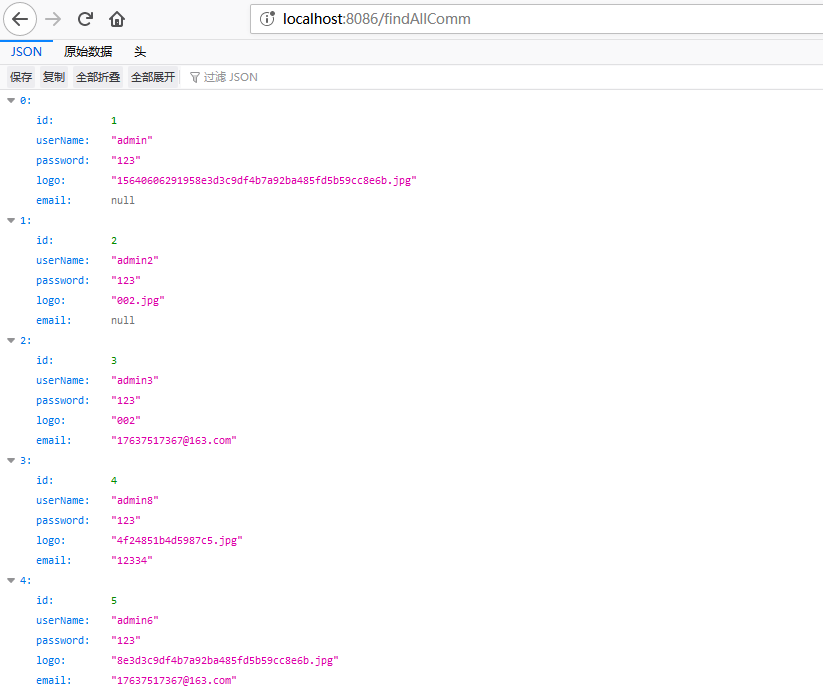
注意事项:
- mapper层加入@Repository注解,service实现类加入@Service注解;
- maper.xml文件要和application.properties文件路径对应,maper.xml的namespace属性等于maper层接口绝对路径;
- spring boot项目启动类上加入@MapperScan("maper层全路径")。
以上总结希望可以帮到大家,有什么问题及时反馈。
spring boot整合mybatis框架及增删改查(jsp视图)的更多相关文章
- Spring Boot 使用Mybatis注解开发增删改查
使用逆向工程是遇到的错误 错误描述 org.apache.ibatis.binding.BindingException: Invalid bound statement (not found): c ...
- Spring Boot 知识笔记(整合Mybatis续-补充增删改查)
续上篇,补充数据库增删改查的其他场景. 一.Mapper中添加其他场景操作 package net.Eleven.demo.Mapper; import net.Eleven.demo.domain. ...
- 初识Mybatis框架,实现增删改查等操作(动态拼接和动态修改)
此第一次接触Mybatis框架确实是有点不适应,特别是刚从Hibernate框架转转型过来,那么为什么要使用Mybatis框架,Mybatis框架和Hibernate框架又有什么异同呢? 这个问题在我 ...
- 初识Mybatis框架,实现增删改查等操作
此第一次接触Mybatis框架确实是有点不适应,特别是刚从Hibernate框架转转型过来,那么为什么要使用Mybatis框架,Mybatis框架和Hibernate框架又有什么异同呢? 这个问题在我 ...
- spring boot web开发 简单的增删改查和spring boot 自带的Junit测试 案例
创建 web项目 配置pom.xml文件 ------相当于jar包 配置application.yml -----配置文件(spring数据库连接.server服务.logging日志等) 创建 ...
- 上手spring boot项目(三)之spring boot整合mybatis进行增删改查
使用mybatis框架进行增删改查大致有两种基础方式,一种扩展方式.两种基础方式分别是使用xml映射文件和使用方法注解.扩展方式是使用mybatis-plus的方式,其用法类似于spring-data ...
- ssm 框架实现增删改查CRUD操作(Spring + SpringMVC + Mybatis 实现增删改查)
ssm 框架实现增删改查 SpringBoot 项目整合 一.项目准备 1.1 ssm 框架环境搭建 1.2 项目结构图如下 1.3 数据表结构图如下 1.4 运行结果 二.项目实现 1. Emplo ...
- Spring Boot整合Mybatis并完成CRUD操作
MyBatis 是一款优秀的持久层框架,被各大互联网公司使用,本文使用Spring Boot整合Mybatis,并完成CRUD操作. 为什么要使用Mybatis?我们需要掌握Mybatis吗? 说的官 ...
- Spring Boot整合Mybatis完成级联一对多CRUD操作
在关系型数据库中,随处可见表之间的连接,对级联的表进行增删改查也是程序员必备的基础技能.关于Spring Boot整合Mybatis在之前已经详细写过,不熟悉的可以回顾Spring Boot整合Myb ...
随机推荐
- SPC 数据分析工具
趁着公司在做QMS软件,自己实现一个简易版,类似minitab的工具. 环境:.net framework 4.0 目前提供功能: 数据存储,载入 计量型控制图:单值移动极差图.均值极差图.均值标准差 ...
- Java初中级程序员面试题宝典
Java基础部分 &与&&区别? &和&&都是逻辑运算符,都是判断两边同时真则为真,否则为假:但是&&当第一个条件不成之后,后面的条件都 ...
- web设计_3_可伸缩的导航栏
1. HTML5构建一个选项卡,需要<nav>标签包围一个无序列表,也可以添加role属性告诉辅助设备(如屏幕阅读器)这个元素所扮演的角色. 绝对不要基于图片的导航,对搜索引擎不友好,更新 ...
- ORM详解
讲解对象:ORM详解 作者:融水公子 rsgz 1 前言:开发流程正常只有简单的几步 0.1 配置数据库 0.2 定义模型 0.3 迁移文件 0.4 执行迁移生成数据表 0.5 使用模型类增删改查 2 ...
- 【iOS】获取项目名和版本号
iOS 开发中,有时候需要获取项目名和版本号,示例代码如下: -(void)getProjectNameAndVersion{ appName = [[[NSBundle mainBundle] in ...
- 接口测试时遇到 java 代码加密请求数据,用 python 的我该怎么办?
前言 自动化测试应用越来越多了,尤其是接口自动化测试. 在接口测试数据传递方面,很多公司都会选择对请求数据进行加密处理. 而目前为主,大部分公司的产品都是java语言实现的.所以加密处理也是java实 ...
- 隐马尔科夫模型HMM介绍
马尔科夫链是描述状态转换的随机过程,该过程具备“无记忆”的性质:即当前时刻$t$的状态$s_t$的概率分布只由前一时刻$t-1$的状态$s_{t-1}$决定,与时间序列中$t-1$时刻之前的状态无关. ...
- RocketMQ中NameServer的启动
在RocketMQ中,使用NamesrvStartup作为启动类 主函数作为其启动的入口: public static void main(String[] args) { main0(args); ...
- Maven打包jar-打包jar时引入第三方jar
- 什么是https?http升级为https需要什么?
一.什么是https? https是一种加密传输协议,网站使用https后可以避免敏感信息被第三方获取.https加密协议=SSL / TLS+http协议,也就是说,在传统的http协议上加上SSL ...