
Unity3D 获得GameObject组件的方法
Unity3D 获得GameObject组件的方法有几种,这里进行说明一下:
组件:
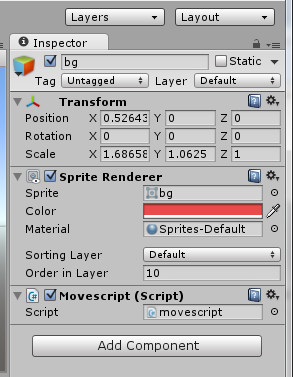
要获得这些组件,进行操作的话,绑定一个Movescipt 的C#组件,里面的获取方法为
    void Update () {

        Debug.LogError("sprite=" + gameObject.GetComponent<SpriteRenderer>().sprite);

        Debug.LogError("sortingOrder=" + gameObject.GetComponent<SpriteRenderer>().sortingOrder);

        Debug.LogError("color=" + gameObject.GetComponent<SpriteRenderer>().color);

        Debug.LogError("position=" + gameObject.GetComponent<Transform>().position);

        Debug.LogError("rotation=" + gameObject.GetComponent<Transform>().rotation);

        Debug.LogError("localScale=" + gameObject.GetComponent<Transform>().localScale);

        Debug.LogError("position=" + gameObject.transform.position);

        Debug.LogError("rotation=" + gameObject.transform.rotation);

        Debug.LogError("localScale=" + gameObject.transform.localScale);

    }
这样通过获得组件GetComponent<>方法,能够获得一些需要的属性。
需要说明一下,
GetComponent<Transform>() 和 gameObject.transform 都能够获得组件的形态对象,只是写法不同罢了,推荐第一张写法,后面的方法估计以后也就是会废弃。

获得同一对象下面的其他组件也是同样的方法。
当要获得游戏对象下面的字对象的时候,用
shootscript shoot= gameObject.GetComponentInChildren<shootscript>();
就可以得到子对象,也可以用集合的方式得到子对象的集合,进行操作,反之,可以从子对象得到父对象
movescript ms = gameObject.GetComponentInParent<movescript>();
当然,能够拿到子对象或者父对象的组件了,也可以顺带得到该对象,对该对象进行处理了
        GameObject move =    gameObject.GetComponentInParent<movescript>().gameObject;

        Debug.LogError("prant -----move  = " + move.transform.position);
当两个游戏对象是平级的时候,如果要获得另一个游戏对象的属性
Find 是获得的对象名字
        Test2 test2 = GameObject.Find("1wwww").GetComponent<Test2>();

        test2.SayTest2();
FindGameObjectWithTag 是获得的游戏对象的Tag,这个是可以自己去定义的,同时,当然可以进行获得到一个集合了
Test2 test2 = GameObject.FindGameObjectWithTag("Player").GetComponent<Test2>();

        test2.SayTest2();
也是同样的获得Tag
 Test2 test2 = GameObject.FindWithTag("").GetComponent<Test2>();

        test2.SayTest2();
Unity3D 获得GameObject组件的方法的更多相关文章
- React-Native 组件开发方法
前言 React Native的开发思路是通过组合各种组件来组织整个App,在大部分情况下通过组合View.Image等几个基础的组件,可以非常方便的实现各种复杂的跨平台组件,不过在需要原生功能支持. ...
- WPF中实例化Com组件,调用组件的方法时报System.Windows.Forms.AxHost+InvalidActiveXStateException的异常
WPF中实例化Com组件,调用组件的方法时报System.Windows.Forms.AxHost+InvalidActiveXStateException的异常 在wpf中封装Com组件时,调用组件 ...
- 查看 activex 组件的方法
查看 activex 组件的方法 可以使用的工具COMRaider 直接安装 并选择对应的类型即可查看相关的信息,比OLE/COM Object Viewer 简洁方便. 具体的操作如下: 随意选择一 ...
- 解决 window server2008 r2 没有注册Ofiice组件的方法
解决 window server2008 r2 没有注册Ofiice组件的方法 .NET下在用Microsoft.Office.Interop.Excel及word 操作Excel和Word时, ...
- VC中调用COM组件的方法(转载)
原文参考:http://hi.baidu.com/mingyueye/item/53ebecd44da76917d80e4449 总结一下在VC中调用COM组件的方法 准备及条件: COM服务器为进程 ...
- Unity3D与iOS消息交互方法(1)--iOS接收Unity3D发出的消息
跨平台这种事情不管多NB, 总要有些与原生系统交互的方法, 比如 Unity3D与iOS消息交互方法. 一: 建立一个空的Unity工程. File --> New Project 二: 编 ...
- vc中调用Com组件的方法详解
vc中调用Com组件的方法详解 转载自:网络,来源未知,如有知晓者请告知我.需求:1.创建myCom.dll,该COM只有一个组件,两个接口: IGetRes--方法Hello(), IGet ...
- 在javascript中使用com组件的方法
转载自: http://dhailin.blog.163.com/blog/static/230738322011128102043880/ 首先创建一个COM组件,插入一个双接口Itest,在此接 ...
- 在JS中使用COM组件的方法
首先创建一个COM组件,插入一个双接口Itest,在此接口上实现以下三个方法: STDMETHODIMP Ctest::test(void) //无输入输出参数 { // TODO: 在此添加实现代码 ...
随机推荐
- bzoj1449
竞赛图一般是把每场比赛当作一个点,然后和相应球队连边每场比赛一赢一输对两支球队都有影响看起来不好搞实际上我们可以先假设参加后面后面所有球队都输(每场比赛双输)然后对每场比赛我们选择一支球队赢计算增加的 ...
- pcDuino 刷系统-卡刷
准备: pcduino : 点此购买 支持HDMI的显示器:点此购买 或参考无显示器刷机与使用.至少1张4G microSD卡,如果内存卡不大,可以用内存卡刷内核,用u盘刷系统 背景:本教程中使用的 ...
- 替换SQL Server字段中的换行符,回车符
replace(string_expression , string_pattern , string_replacement) 第一个参数:要查找的字段. 第二个参数:要查找的字符. 第三个参数:要 ...
- ORACLE与.NET类型对应关系(转)
ORACLE与.NET类型对应关系 想来这个是最重要的事情了,因为多数情况下,我们使用dbhelper来调用数据库的时候,是因为如下三个地方导致错误: 1.错误的sql语句:末尾多了分号,少了部分关键 ...
- UVA 11624 Fire! (bfs)
算法指南白书 分别求一次人和火到达各个点的最短时间 #include<cstdio> #include<cstring> #include<queue> #incl ...
- cocos2d-x 2.1.4 使用create_project.py脚本创建项目+ant打包项目
1.创建项目:执行create_project.py脚本,进入Doc界面输入下面的命令: cd D:\cocos2d-x-2.1.4\cocos2d-x-2.1.4\tools\project-cre ...
- linux下avr单片机开发:中断服务程序
不管是什么单片机程序,中断总是非常重要的一部分 ,linux 下的avr开发,主要是依靠avr-gcc,以及avr-libc,它们对中断程序的格式要求,与window下的icc-avr以及win-av ...
- Android 在广播接收器中弹出对话框
特别需要注意的几点如下: 需要设置AlertDialog的类型 WindowManager.LayoutParams.TYPE_SYSTEM_ALERT 2. 需要声明Window弹框的权限 < ...
- STL源码剖析之list的sort函数实现
SGI STL的list的函数的实现源码大致如下: //list 不能使用sort函数,因为list的迭代器是bidirectional_iterator, 而sort //sort函数要求rand ...
- [置顶] 如何访问web文件夹之外的文件
在编写项目时,遇到一个如何访问web文件夹之外的文件的问题.因为我要制作一个浏览图片和pdf文件的一个简单网站.但问题是图片的文件夹和pdf文件的文件夹都是其他程序生成的,自然也就是不是网站w ...