
【转】在python3.5安装tkinter
链接:https://www.zhihu.com/question/42162071/answer/95441732
安装tkinter
tkinter是由tcl和tk两个部分组成的,所以下载tkinter的时候,要下载tcl8.6.5和tk8.6.5两部分。下载完之后分别解压tar -zxvf tcl8.6.5-src.tar.gz,tar -zxvf tk8.6.5-src.tar.gz.解压完成之后先安装tcl:
- cd tcl8.6.5/unix
- ./configure
- make
sudo make install
接着再安装tk:cd tk8.6.5/unix
./configyre
make
sudo make install
如果第4步出现类似x11/xlib.h:没有那个文件或目录,还需要多一步,需要安装sudo apt-get install libx11.dev 然后接着继续第4步。
现在应该成功安装了。输入wish 回车 info tclversion 和puts $tk_version查看版本。
修改Setup.dist文件
进入到Python解压包的目录下,注意,不是安装Python的目录,而是解压的目录,一般而言就是下载Python目录下,之前我一直在安装目录下找Modules文件夹,死活找不到。
vim Modules/Setup.dist
修改如图所示:
<img data-rawheight="649" data-rawwidth="632" src="https://pic1.zhimg.com/50/678377635936dfad518a185e877301b8_hd.jpg" class="origin_image zh-lightbox-thumb" width="632" data-original="https://pic1.zhimg.com/678377635936dfad518a185e877301b8_r.jpg">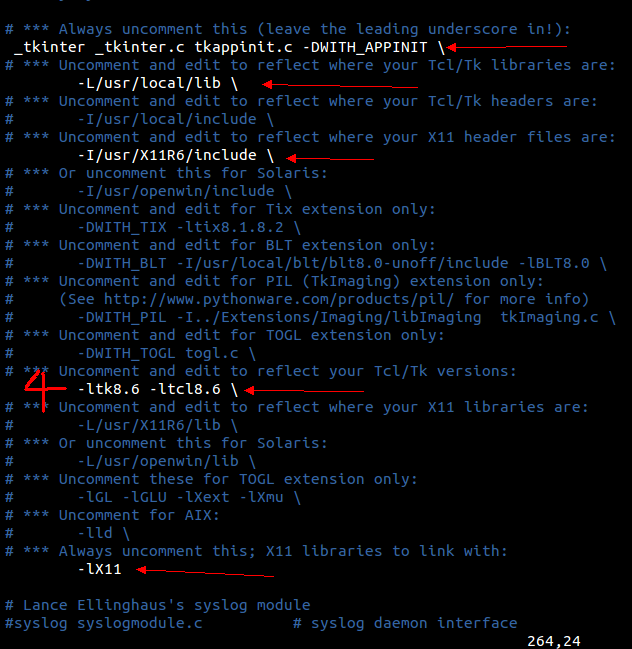
把箭头所指的行数前面的注释去掉,同时在第4个箭头处,修改tcl和tk的版本为刚才的安装版本,保持退出。
- sudo apt-get install libreadline-dev这个必须安装,因为不安装,在Python交互中上下左右移动无法成功.
重新编译和安装Python3.5
接下来还需要重新编译和安装一遍Python,
sudo apt-get update
sudo apt-get upgrade
sudo apt-get install python3
重新建立到python3.5的软连接即可:
ortonwu@ubuntu:/usr/bin$ sudo rm -rf /usr/bin/python

ortonwu@ubuntu:/usr/bin$ sudo ln -s /usr/bin/python3.5 /usr/bin/python
ortonwu@ubuntu:/usr/bin$ sudo rm -rf /usr/bin/pip3ortonwu@ubuntu:/usr/bin$ sudo ln -s /usr/bin/python3.5/pip3 /usr/bin/pip3
ortonwu@ubuntu:/usr/bin$ sudo rm -rf /usr/bin/python3ortonwu@ubuntu:/usr/bin$ sudo ln -s /usr/bin/python3.5 /usr/bin/python3
在3.6后,pip3的使用方法On Unix-like systems use:
python3.6 -m pip install [Package_to_install]
或来到Python3.5.2的源文件目录的
- ./configure
- make
- sudo make install
【转】在python3.5安装tkinter的更多相关文章
- python安装tkinter
python2安装tkinter sudo apt-get install python-tk python3 安装tkinter sudo apt-get install python3-tk
- [No00004B]Windows 下面为Python3.5安装NoteBook
python3.5安装NoteBook,网上搜了一下教程,几乎很多转帖,或者是2.x版本的,很少有直接可以用的.自己琢磨了一下午,终于搞定了,现在贴出来.希望大家以后转帖什么的都先测试一下,互联网时代 ...
- python3.4安装suds
使用suds访问webservice十分方便 python3.x安装suds会报错“No module named client” 在stackoverflow上找到了替代方法,安装suds-jurk ...
- python3.7安装pylint
python3.7安装pylint之"setuptools"版本错误 借鉴:错题集(已解决):pyinstaller报错ModuleNotFoundError: No module ...
- Python2.X和Python3.X中Tkinter模块的文件对话框、下拉列表的不同
Python2.X和Python3.X文件对话框.下拉列表的不同 今天初次使用Python Tkinter来做了个简单的记事本程序.发现Python2.x和Python3.x的Tkinter模块的好多 ...
- boost python3依赖安装
之前写过python dlib依赖的安装,当时是使用了系统默认的python2.7安装的boost.Python,如果自己编译好python3,想安装支持python3的boost.Python也是可 ...
- windows python3.7安装numpy问题的解决方法
我的是win7的系统,去python官网下载python3.7安装 CMD #打开命令窗口 pip install numpy #在cmd中输入 提示 需要c++14.0, 解决办法: 1, 进入h ...
- Python3 离线安装TensorFlow包
Python3 离线安装TensorFlow包 1,下载包 官网地址:https://pypi.org/project/tensorflow/1.1.0rc2/#files 清华镜像:https:// ...
- linux --- 2.常用命令 , python3, django安装
一.常用命令 1.常识命令 ① w 显示终端连接数 ②pwd 我在哪 ③whoami 我是谁 ④which 命令 找到命令的绝对路径 2.linux 命令行的组 ...
随机推荐
- 509. Fibonacci Number斐波那契数列
网址:https://leetcode.com/problems/fibonacci-number/ 原始的斐波那契数列 运用自底向上的动态规划最佳! 可以定义vector数组,但是占用较多内存空间 ...
- MySQL5.6复制技术(2)-主从部署以及半同步配置详细过程
当前环境规划 主机名称 ec2t-pgtest-01 ec2t-pgtest-02 IP地址 10.189.102.118 10.189.100.195 角色 master slave 系统版本 Ce ...
- Qt_qwt图形开发
QWT,全称是Qt Widgets for Technical Applications,是一个基于LGPL版权协议的开源项目, 可生成各种统计图.它为具有技术专业背景的程序提供GUI组件和一组实用类 ...
- Swagger 路径过滤 -PreSerializeFilters
Swagger 默认显示所有api, 如果要做路径过滤,可以这样做. //过滤,只显示部分api app.UseSwagger(c=> { c.PreSerializeFilters.Add(( ...
- API设计和命名
1.前言 对于前端开发而言,肯定会和API打交道,大家也都会想过怎么设计自己的API.优秀的 API 之于代码,就如良好内涵对于每个人.好的 API 不但利于使用者理解,开发时也会事半功倍,后期维护更 ...
- response对象、转发、重定向
1.response:响应. 该对象是用来响应用户请求后的结果.2.response中的常用方法: response.setCharacterEncoding();该方法用来处理响应时的字符集 ...
- laravel处理菜单保持的方法:
<!-- 左侧菜单区域 --> <div class="col-md-3"> @section('leftmenu') <div class=&quo ...
- UVa LA 3695 - Distant Galaxy 前缀和,状态拆分,动态规划 难度: 2
题目 https://icpcarchive.ecs.baylor.edu/index.php?option=com_onlinejudge&Itemid=8&page=show_pr ...
- python之路 ---计算机硬件基础
计算机(computer)俗称电脑,是现代一种用于高速计算的电子计算机器,可以进行数值计算,又可以进行逻辑计算,还具有存储记忆功能.是能够按照程序运行,自动.高速处理海量数据的现代化智能电子设备.一个 ...
- caffe模型参数解释
作者:wjmishuai 出处: http://blog.csdn.net/wjmishuai/article/details/50890214 原始数据是28*28 1:数据层: layer { n ...