
elk之elasticsearch安装
环境:
centos7
jdk8
参考:
https://www.elastic.co/guide/en/elasticsearch/reference/current/rpm.html
http://blog.csdn.net/wh211212/article/details/54015645
1. 将Elasticsearch公共GPG密钥导入rpm
rpm --import https://artifacts.elastic.co/GPG-KEY-elasticsearch
2.在/etc/yum.repos.d/目录中创建一个名为elasticsearch.repo的文件
touch /etc/yum.repos.d/elasticsearch.repo

vi /etc/yum.repos.d/elasticsearch.repo

[elasticsearch-5.x]

name=Elasticsearch repository for 5.x packages

baseurl=https://artifacts.elastic.co/packages/5.x/yum

gpgcheck=1

gpgkey=https://artifacts.elastic.co/GPG-KEY-elasticsearch

enabled=1

autorefresh=1

type=rpm-md
3.Elasticsearch 源创建完成之后,通过makecache查看源是否可用,然后通过yum安装Elasticsearch
yum makecache

yum install elasticsearch -y
4.关闭防火墙
systemctl stop firewalld.service
5.禁用防火墙
system disable firewalld.service
6.启动 elasticsearch
systemctl start elasticsearch.service
7.访问是否成功启动
curl -XGET localhost:
响应
curl: () Failed connect to localhost:; Connection refused
查看端口
netstat -ano|grep elasticsearch

[root@guo yum.repos.d]# netstat -ano|grep

tcp6              127.0.0.1:          :::*                    LISTEN      off (0.00//)

tcp6              :::                :::*                    LISTEN
访问 curl -XGET 127.0.0.1:9200 正常
[root@guo yum.repos.d]# curl -XGET 127.0.0.1:

{

  "name" : "QcB_mvr",

  "cluster_name" : "elasticsearch",

  "cluster_uuid" : "-eNBlNxoRfeCRwLMDVQQcw",

  "version" : {

    "number" : "5.5.1",

    "build_hash" : "19c13d0",

    "build_date" : "2017-07-18T20:44:24.823Z",

    "build_snapshot" : false,

    "lucene_version" : "6.6.0"

  },

  "tagline" : "You Know, for Search"

}
添加/etc/hosts
127.0.0.1 localhost
再次访问就ok了
[root@guo yum.repos.d]# curl -XGET localhost:

{

  "name" : "QcB_mvr",

  "cluster_name" : "elasticsearch",

  "cluster_uuid" : "-eNBlNxoRfeCRwLMDVQQcw",

  "version" : {

    "number" : "5.5.1",

    "build_hash" : "19c13d0",

    "build_date" : "2017-07-18T20:44:24.823Z",

    "build_snapshot" : false,

    "lucene_version" : "6.6.0"

  },

  "tagline" : "You Know, for Search"

}
8.修改配置,打开注释 network.host,http.port
vi /etc/elasticsearch/elasticsearch.yml

# ---------------------------------- Network -----------------------------------

#

# Set the bind address to a specific IP (IPv4 or IPv6):

#

network.host: guo

#

# Set a custom port for HTTP:

#

http.port:

#

# For more information, consult the network module documentation.
9.重启,然后再宿主机浏览器访问
systemctl stop elasticsearch.service

systemctl start elasticsearch.service
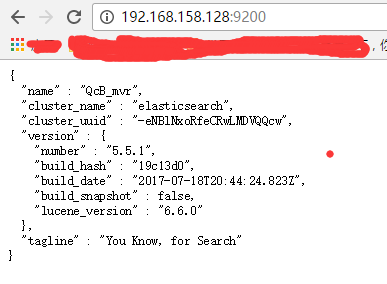
10.查看日志
tail -f /var/log/elasticsearch/elasticsearch.log
elk之elasticsearch安装的更多相关文章
- ELK之elasticsearch安装&&kibana安装
1.ES和Kibana安装都是开箱即用的? 解压缩就可以用 elasticsearch解压缩之后,双击下图中的elasticsearch.bat,启动,kibana也是一样 双击之后, 我们看到上图有 ...
- ELK实战-elasticsearch安装
操作系统: centos版本 7.4 防火墙 关闭 selinux 关闭 elasticsearch版本 6.3.2 java版本 1.8 server1 192.168.10.126 server2 ...
- ELK日志监控平台安装部署简介--Elasticsearch安装部署
最近由于工作需要,需要搭建一个ELK日志监控平台,本次采用Filebeat(采集数据)+Elasticsearch(建立索引)+Kibana(展示)架构,实现日志搜索展示功能. 一.安装环境描述: 1 ...
- ELK技术实战-安装Elk 5.x平台
ELK技术实战–了解Elk各组件 转载 http://www.ywnds.com/?p=9776 ELK技术实战-部署Elk 2.x平台 ELK Stack是软件集合Elasticsearch. ...
- ELK之elasticsearch6安装认证模块search guard
参考:https://www.cnblogs.com/marility/p/9392645.html 1,安装环境及软件版本 程序 版本 安装方式 elasticsearch 6.3.1 rpm ...
- Centos7中ELK集群安装流程
Centos7中ELK集群安装流程 说明:三个版本必须相同,这里安装5.1版. 一.安装Elasticsearch5.1 hostnamectl set-hostname elk vim /e ...
- Kibana安装(图文详解)(多节点的ELK集群安装在一个节点就好)
对于Kibana ,我们知道,是Elasticsearch/Logstash/Kibana的必不可少成员. 前提: Elasticsearch-2.4.3的下载(图文详解) Elasticsearch ...
- 全文搜索引擎 Elasticsearch 安装
全文搜索引擎 Elasticsearch 安装 学习了:http://www.ruanyifeng.com/blog/2017/08/elasticsearch.html 拼音:https://www ...
- Filebeat-1.3.1安装和设置(图文详解)(多节点的ELK集群安装在一个节点就好)(以Console Output为例)
前期博客 Filebeat的下载(图文讲解) 前提 Elasticsearch-2.4.3的下载(图文详解) Elasticsearch-2.4.3的单节点安装(多种方式图文详解) Elasticse ...
随机推荐
- LeetCode--404--左叶子之和
问题描述: 计算给定二叉树的所有左叶子之和. 示例: 3 / \ 9 20 / \ 15 7 在这个二叉树中,有两个左叶子,分别是 9 和 15,所以返回 24 方法:recursive class ...
- Bitmap Byte[] 互转
严正声明:作者:psklf出处: http://www.cnblogs.com/psklf/p/5889978.html欢迎转载,但未经作者同意,必须保留此段声明:必须在文章中给出原文连接:否则必究法 ...
- 深刻理解Web标准,对可用性、可访问性、可维护性等相关知识有实际的了解和实践经验
WEB标准不是某一个标准,而是一系列标准的集合.网页主要由三部分组成:结构(Structure).表现(Presentation)和行为(Behavior).对应的标准也分三方面:结构化标准语言主要包 ...
- vux,vue 苹果手机使用position:fixed有问题,如何解决
苹果手机真是各种坑,导致我都想摔手机呀,但没办法,用苹果的人太多,程序员还是继续在坑的路上行走! 上一篇文章介绍了一些组件,就是使用vux可以解决,苹果手机使用position:fixed的问题 给需 ...
- 【洛谷p1319】压缩技术
(许久不见,甚是想念) 压缩技术[传送门] 洛谷上滴算法标签: 然而这是一道入门难度的题.(不管不管,就写它了) 好的先说一下思路吧wait!我忘记了咋做的当时. 首先做题第一道坎儿,如何输入若干个( ...
- Lowest Common Ancestor of a Binary Search Tree(Java 递归与非递归)
题目描述: Given a binary search tree (BST), find the lowest common ancestor (LCA) of two given nodes in ...
- hdu-6438-贪心
Buy and Resell Time Limit: 2000/1000 MS (Java/Others) Memory Limit: 65536/65536 K (Java/Others)To ...
- 函数使用三:采购过账BAPI_GOODSMVT_CREATE
一.货物移动.bapi BAPI_GOODSMVT_CREATE其中 参数 : GOODSMVT_CODE 有 GMCODE Table T158G - 01 - MB01 - Goods Rece ...
- C# 条件表达式max=(a>b)?a:b;含义
a?b:c 这个是条件表达式,表示如果a为真,则表达式值为b,如果a为假,则表达式值为c条件表达式具体说明如下条件语句: if(a>b) max=a; else max=b; 可用条件表达式写为 ...
- ThinkPHP3自动加载公共函数文件
7d 根目录 ├─Application 应用目录 │ ├─Common 公共模块 │ │ ├─Common 公共函数文件目录 │ │ │ ├─index.html │ │ ├─Config 配置文件 ...