
android studio maven 仓库的使用
转自:http://www.cnblogs.com/sihaixuan/p/4852974.html
原文:How to distribute your own Android library through jCenter and Maven Central from Android Studio
转自:翻译 http://www.jcodecraeer.com/a/anzhuokaifa/androidkaifa/2015/0623/3097.html
博客:http://blog.csdn.net/jinyp/article/details/55095310
首先在maven上添加一个jcenter库。

如果你想在Android Studio中引入一个library到你的项目,你只需添加如下的一行代码到模块的build.gradle文件中。

这样就可以使用maven库上的library了。
1.我们需要把本地的library上传到jcenter服务器上,才可以使用maven.
2,开始上传首先我们在build.gradle上面添加两行代码:
buildscript {

    repositories {

        jcenter()

    }

    dependencies {

        classpath 'com.android.tools.build:gradle:2.3.0'

        // NOTE: Do not place your application dependencies here; they belong

        // in the individual module build.gradle files

        // 添加下面两行代码即可。

        classpath 'com.github.dcendents:android-maven-gradle-plugin:1.5'

        classpath 'com.jfrog.bintray.gradle:gradle-bintray-plugin:1.4'

    }

}
3.配置library里面的build.gradle
apply plugin: 'com.android.library'

// 这里添加下面两行代码。

apply plugin: 'com.github.dcendents.android-maven'

apply plugin: 'com.jfrog.bintray'

// 项目引用的版本号,比如compile 'com.yanzhenjie:andserver:1.0.1'中的1.0.1就是这里配置的。

version = "1.1.1"

// 定义两个链接,下面会用到。

def siteUrl = 'https://gitee.com/lixiangyang8080/zxing_lxy_module' // 项目主页。

def gitUrl = 'https://gitee.com/lixiangyang8080/zxing_lxy_module.git' // Git仓库的url。

// 唯一包名,比如compile 'com.yanzhenjie:andserver:1.0.1'中的com.yanzhenjie就是这里配置的。

group = "com.example.lenovo.zxing_lxy"

android {

    compileSdkVersion 26

    buildToolsVersion "26.0.1"

    defaultConfig {

        minSdkVersion 15

        targetSdkVersion 26

        versionCode 1

        versionName "1.0"

        testInstrumentationRunner "android.support.test.runner.AndroidJUnitRunner"

    }

    buildTypes {

        release {

            minifyEnabled false

            proguardFiles getDefaultProguardFile('proguard-android.txt'), 'proguard-rules.pro'

        }

    }

}

dependencies {

    compile fileTree(include: ['*.jar'], dir: 'libs')

    androidTestCompile('com.android.support.test.espresso:espresso-core:2.2.2', {

        exclude group: 'com.android.support', module: 'support-annotations'

    })

    compile 'com.android.support:appcompat-v7:26.+'

    testCompile 'junit:junit:4.12'

    compile files('libs/zxing-core-3.3.0.jar')

}

install {

    repositories.mavenInstaller {

        // 生成pom.xml和参数

        pom {

            project {

                packaging 'aar'

                // 项目描述,复制我的话,这里需要修改。

                name 'zxing For Android'// 可选,项目名称。

                description 'The Android build the framework of the Http server.'// 可选,项目描述。

                url siteUrl // 项目主页,这里是引用上面定义好。

                // 软件开源协议,现在一般都是Apache License2.0吧,复制我的,这里不需要修改。

                licenses {

                    license {

                        name 'The Apache Software License, Version 2.0'

                        url 'http://www.apache.org/licenses/LICENSE-2.0.txt'

                    }

                }

                //填写开发者基本信息,复制我的,这里需要修改。

                developers {

                    developer {

                        id '278918014' // 开发者的id。

                        name '巷阳' // 开发者名字。

                        email '[lixiangyang8080@gmail.com]' // 开发者邮箱。

                    }

                }

                // SCM,复制我的,这里不需要修改。

                scm {

                    connection gitUrl // Git仓库地址。

                    developerConnection gitUrl // Git仓库地址。

                    url siteUrl // 项目主页。

                }

            }

        }

    }

}

// 生成jar包的task,不需要修改。

task sourcesJar(type: Jar) {

    from android.sourceSets.main.java.srcDirs

    classifier = 'sources'

}

// 生成jarDoc的task,不需要修改。

task javadoc(type: Javadoc) {

    source = android.sourceSets.main.java.srcDirs

    classpath += project.files(android.getBootClasspath().join(File.pathSeparator))

    // destinationDir = file("../javadoc/")

    failOnError false // 忽略注释语法错误,如果用jdk1.8你的注释写的不规范就编译不过。

}

// 生成javaDoc的jar,不需要修改。

task javadocJar(type: Jar, dependsOn: javadoc) {

    classifier = 'javadoc'

    from javadoc.destinationDir

}

artifacts {

    archives javadocJar

    archives sourcesJar

}

// 这里是读取Bintray相关的信息,我们上传项目到github上的时候会把gradle文件传上去,所以不要把帐号密码的信息直接写在这里,写在local.properties中,这里动态读取。

Properties properties = new Properties()

properties.load(project.rootProject.file('local.properties').newDataInputStream())

bintray {

    user = properties.getProperty("bintray.user") // Bintray的用户名。

    key = properties.getProperty("bintray.apikey") // Bintray刚才保存的ApiKey。

    configurations = ['archives']

    pkg {

        repo = "lxy-like"  // 上传到maven库。(这里要特别注意,如果写了maven报404错误,请在bintray创建一个仓库,这里填改成你创建的仓库的名字,如何创建请看下图。)

        name = "zxing-lxy"  // 发布到Bintray上的项目名字,这里的名字不是compile 'com.yanzhenjie:andserver:1.0.1'中的andserver。

        userOrg = '278918014' // Bintray的用户名,2016年11月更新。

        websiteUrl = siteUrl

        vcsUrl = gitUrl

        licenses = ["Apache-2.0"]

        publish = true // 是否是公开项目。

    }

}
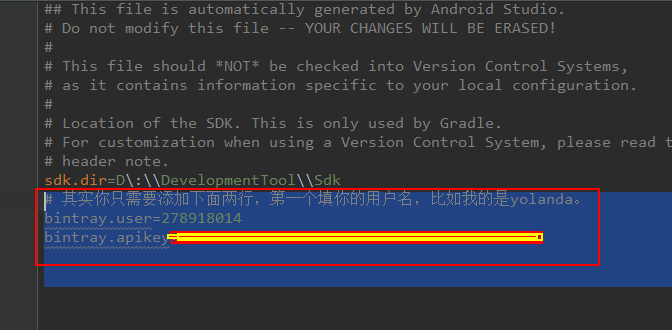
4.配置local.properties
5.配置,上传。
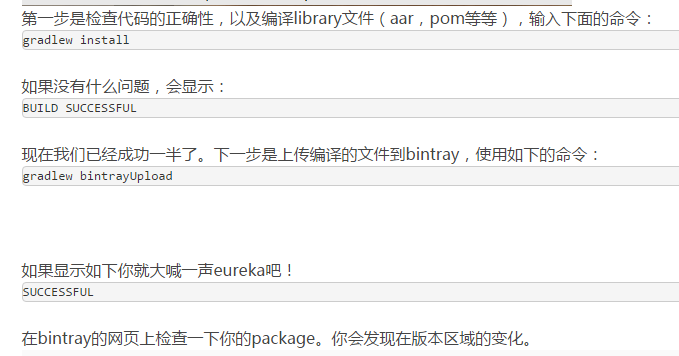
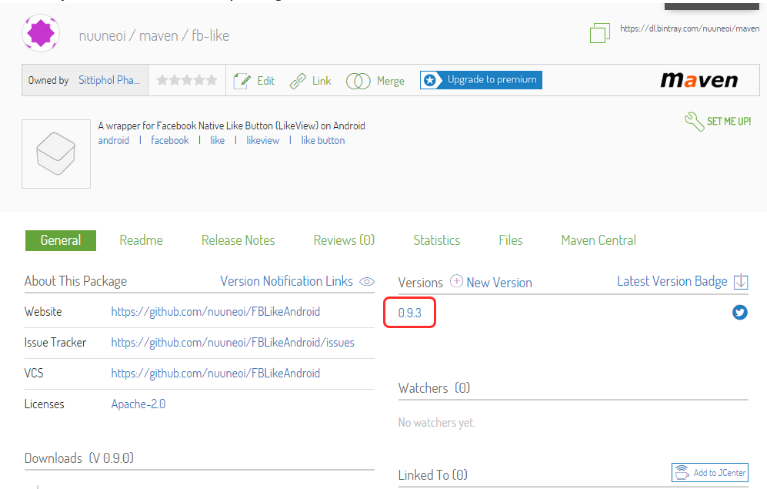
6.在bintray的网页上检查一下你的package。你会发现在版本区域的变化。
7.点击进去,进入Files选项卡,你会看见那里有我们所上传的library文件。
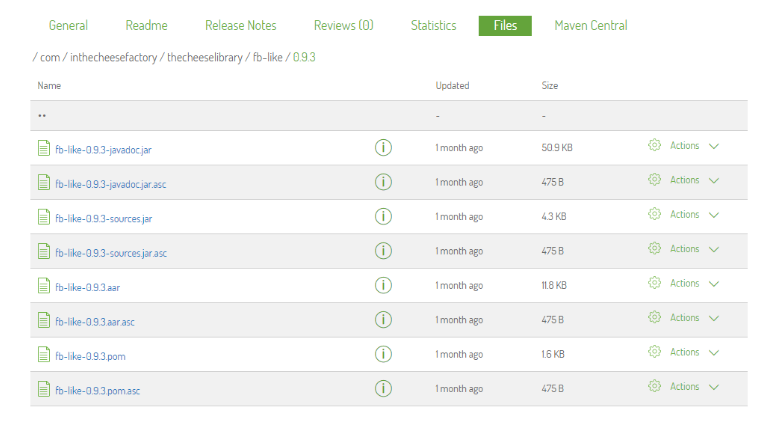
恭喜,你的library终于放在了互联网上,任何人都可以使用了!
不过也别高兴过头,library现在仍然只是在你自己的Maven仓库,而不是在jcenter上。如果有人想使用你的library,他必须定义仓库的url,如下:
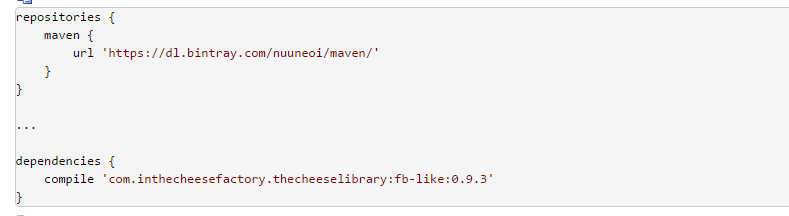
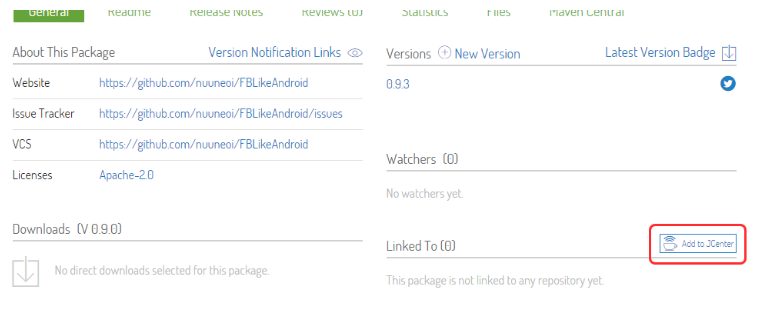
8.同步bintray用户仓库到jcenter
9.什么也不做直接点击Send。
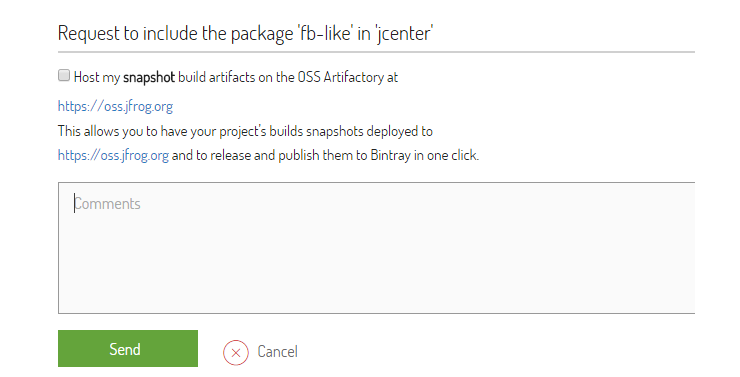
现在我们所能做的就是等待bintray团队审核我们的请求,大概2-3个小时。一旦同步的请求审核通过,你会收到一封确认此更改的邮件。现在我们去网页上确认,你会在 Linked To 部分看到一些变化。

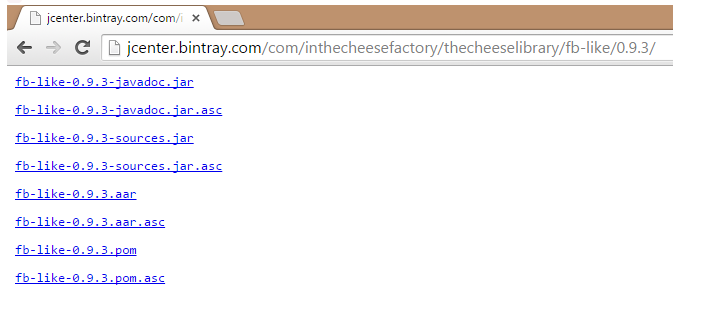
10.搞定。
android studio maven 仓库的使用的更多相关文章
- Android studio Maven仓库使用
原文:How to distribute your own Android library through jCenter and Maven Central from Android Studio ...
- 推荐几款实用的Android Studio 插件
推荐几款实用的Android Studio 插件 泡在网上的日子 发表于 2015-10-09 10:47 第 17453 次阅读 插件,Android Studio 10 编辑推荐:稀土掘金,这是一 ...
- Android Studio美化之优雅的logcat
博客: 安卓之家 微博: 追风917 CSDN: 蒋朋的家 简书: 追风917 博客园: 追风917 先来个图,图样吐sexy: 很简单,跟我走吧,两步: 1. 引入Logger库 首先,这个sexy ...
- Android Studio开发快速创建MVP框架插件AndroidMVP
转载:https://www.jianshu.com/p/60cd98bbc358 Android开发中,我们为了代码的解耦以及后期的维护方便,都会采用一些开发框架,常用的有MVC.MVP.MVVM. ...
- 拥抱 Android Studio 之四:Maven 仓库使用与私有仓库搭建
使用.创造和分享 笔者曾经不思量力的思考过『是什么推动了互联网技术的快速发展?』这种伟大的命题.结论是,除了摩尔定律之外,技术经验的快速积累和广泛分享,也是重要的原因. 有人戏称,『写 Java,首先 ...
- android studio发布公共类库到服务器maven仓库
在上一篇中提到了怎么创建私有maven库,这篇主要结合android studio的使用,直接进入正题,看以下步骤 1.创建android项目 创建Project,然后加一个library的modul ...
- Android Studio使用阿里云Aliyun Maven仓库
如下所示,在build.gradle中添加Aliyun Maven仓库 // Top-level build file where you can add configuration options ...
- 【转】如何使用Android Studio把自己的Android library分发到jCenter和Maven Central
转自:http://www.devtf.cn/?p=760&utm_source=tuicool 如何使用Android Studio把自己的Android library分发到jCenter ...
- 如何通过Android Studio发布library到jCenter和Maven Central
http://www.jianshu.com/p/3c63ae866e52# 在Android Studio里,如果你想引入任何library到自己的项目中,只需要很简单的在module的build. ...
随机推荐
- ext4.2常用的几种弹框
以下记录了自己在做项目时,经常用到的几种ext弹框.项目中使用的ext是4.2版本的. 1. Ext.Msg.alert() 使用此种方式时,如果提示信息过长则提示信息会被覆盖掉一部分. Ext.Ms ...
- 详解Vue中watch的高级用法
我们通过实例代码给大家分享了Vue中watch的高级用法,对此知识点有需要的朋友可以跟着学习下. 假设有如下代码: <div> <p>FullName: {{fullName} ...
- SqlServer中exists和in的区别
1.in 2.exists
- ArrayList list = new ArrayList()在这个泛型为Integer的ArrayList中存放一个String类型的对象
java面试要点---ArrayList list = new ArrayList(); 在这个泛型为Integer的ArrayList中存放一个String类型的对象. ArrayList list ...
- Linux中ulimit -c生成core文件()
理解这六个shell脚本语言的功能 echo "kernel.core_pattern = /tmp/core-%e-%p-%t" >> /etc/sysctl.con ...
- jdk8新特性:在用Repository实体查询是总是提示要java.util.Optional, 原 Inferred type 'S' for type parameter 'S' is not within its bound;
jdk8新特性:在用Repository实体查询是总是提示要java.util.Optional 在使用springboot 方法报错: Inferred type 'S' for type para ...
- 雷林鹏分享:XML to HTML
XML to HTML 在 HTML 页面中显示 XML 数据 在下面的实例中,我们打开一个 XML 文件("cd_catalog.xml"),然后遍历每个 CD 元素,并显示HT ...
- LeetCode--367--有效的完全平方数
问题描述: 给定一个正整数 num,编写一个函数,如果 num 是一个完全平方数,则返回 True,否则返回 False. 说明:不要使用任何内置的库函数,如 sqrt. 示例 1: 输入:16 输 ...
- 20170821xlVBA隐藏空行
Sub HideBlankRowsBetweenUsedRange() Dim URows As Range, i As Long, EndRow As Long With ActiveSheet E ...
- 0.11内核rd_load@ramdisk.c中memcpy函数好像有bug
0.11内核rd_load@ramdisk.c中memcpy函数好像有bug,如:#define memcpy(dst,src,n) \ __asm__("cld;rep;movsl& ...