
***PHP基于H5的微信支付开发详解(CI框架)
这次总结一下用户在微信内打开网页时,可以调用微信支付完成下单功能的模块开发,也就是在微信内的H5页面通过jsApi接口实现支付功能。当然了,微信官网上的微信支付开发文档也讲解的很详细,并且有实现代码可供参考,有的朋友直接看文档就可以自己实现此支付接口的开发了。
一、前言
为何我还写一篇微信支付接口的博文呢?第一,我们必须知道,所谓的工作经验很多都是靠总结出来的,你只有总结了更多知识,积累了更多经验,你才能在该行业中脱颖而出,我个人觉得如今的招聘,很多都需要工作经验(1年、3年、5年....),其实,工作时间的长久不能衡量一个人技术水平的高低,有的人一年的工作经验能拿3年工作经验的程序猿的工资,有的3年工作经验的却有可能比别人只有一年工作经验的还低,所以说,总结才能让自己的知识体系,经验深度更牛逼更稳固(虽然写一篇博文挺花费时间的);第二,写博文分享给大家还是挺有成就感的,首先是能让新手从我分享的博文中能学到东西,并且能快速将博文所讲解的技术运用到实际中来,所以我写的博文基本上能让新人快速读懂并且容易理解,另外,技术大神的话,看到博文有讲解的不对之处,还可以指出,并且可以交流,何乐而不为呢,我们需要的就是分享和交流。
扯远了,直接进入该主题的详解。
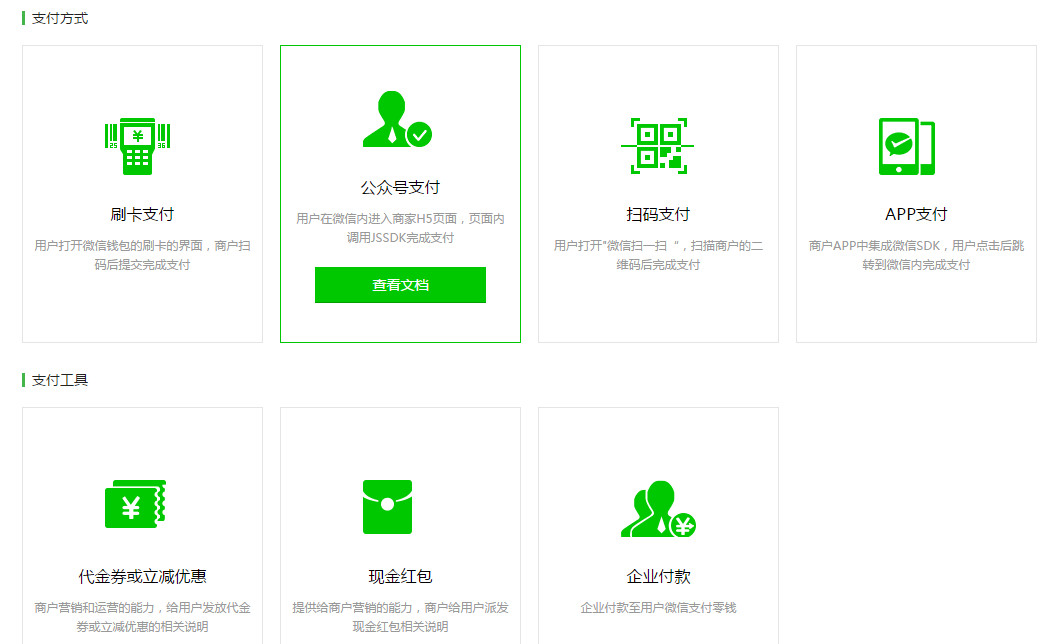
现在的微信支付方式有N种,看下图,有刷卡支付、公众号支付、扫码支付和APP支付,另外还有支付工具的开发,本博文选择的是公众号支付借口而开发进行讲解,其他几种支付接口开发基本上思路都是一样的,只要你能看懂我这博文所讲解的基本思路,你基本上也能独自开发其他几个支付接口。
二、思路详解
我们可以拿微信支付接口文档里的业务流程时序图看看,如下图,基本思路是这样子:首先在后台生成一个链接,展示给用户让用户点击(例如页面上有微信支付的按钮),用户点击按钮后,网站后台会根据订单的相关信息生成一个支付订单,此时会调用统一下单接口,对微信支付系统发起请求,而微信支付系统受到请求后,会根据请求过来的数据,生成一个 预支付交易会话标识(prepay_id,就是通过这个来识别该订单的),我们的网站收到微信支付系统的响应后,会得到prepay_id,然后通过自己构造微信支付所需要的参数,接着将支付所需参数返回给客户端,用户此时可能会有一个订单信息页,会有一个按钮,点击支付,此时会调用JSAPI接口对微信支付系统发起 请求支付,微信支付系统检查了请求的相关合法性之后,就会提示输入密码,用户此时输入密码确认,微信支付系统会对其进行验证,通过的话会返回支付结果,然后微信跳转会H5页面,这其中有一步是异步通知网站支付结果,我们网站需要对此进行处理(比如说异步支付结果通过后,需要更新数据表或者订单信息,例如标志用户已支付该订单了,同时也需要更新订单日志,防止用户重复提交订单)。

三、代码讲解
本次开发环境用的是php5.6 + MySQL + Redis + Linux + Apache,所选用的框架的CI框架(这些环境不一定需要和我的一致,框架也可以自己选择,反正自己稍微修改下代码就能移植过去了)。
微信支付接口的开发代码我已经提前写好了,在这里我对其进行分析讲解,方便大家能轻松理解,当然,假如你有一定的基础,直接看代码就能理清所有流程了,并且我的代码基本上都写上了注释(对于新手来说,这一点比微信文档所提供的代码好一点)。
1、构造一个链接展示给用户
这里我们提前需要知道一个点,那就是请求统一下单接口需要微信用户的openid(详情可看这https://pay.weixin.qq.com/wiki/doc/api/jsapi.php?chapter=9_1),而获取openid需要先获取code(详情可看这微信登录接口),所以我们需要构造一个获取code的URL:

Wxpay.php文件:
<?php

defined('BASEPATH') OR exit('No direct script access allowed');

class Wxpay extends MY_Controller {

    public function __construct() {

        parent::__construct();

        $this->load->model('wxpay_model');

        //$this->load->model('wxpay');

    }

    public function index() {

        //微信支付

        $this->smarty['wxPayUrl'] = $this->wxpay_model->retWxPayUrl();

        $this->displayView('wxpay/index.tpl');

    }

}
在这先看看model里所写的几个类:model里有几个类:微信支付类、统一下单接口类、响应型接口基类、请求型接口基类、所有接口基类、配置类。为何要分那么多类而不在一个类里实现所有的方法的,因为,这样看起来代码逻辑清晰,哪个类该干嘛就干嘛。
这里我直接附上model的代码了,里面基本上每一个类每一个方法甚至每一行代码都会有解释的了,这里我就不对其展开一句句分析了:
<?php

defined('BASEPATH') OR exit('No direct script access allowed');

class Wxpay_model extends CI_Model {

    public function __construct() {

        parent::__construct();

    }

    /**

     * 返回可以获得微信code的URL (用以获取openid)

     * @return [type] [description]

     */

    public function retWxPayUrl() {

        $jsApi = new JsApi_handle();

        return $jsApi->createOauthUrlForCode();

    }

    /**

     * 微信jsapi点击支付

     * @param  [type] $data [description]

     * @return [type]       [description]

     */

    public function wxPayJsApi($data) {

        $jsApi = new JsApi_handle();

        //统一下单接口所需数据

        $payData = $this->returnData($data);

        //获取code码,用以获取openid

        $code = $_GET['code'];

        $jsApi->setCode($code);

        //通过code获取openid

        $openid = $jsApi->getOpenId();

        $unifiedOrderResult = null;

        if ($openid != null) {

            //取得统一下单接口返回的数据

            $unifiedOrderResult = $this->getResult($payData, 'JSAPI', $openid);

            //获取订单接口状态

            $returnMessage = $this->returnMessage($unifiedOrder, 'prepay_id');

            if ($returnMessage['resultCode']) {

                $jsApi->setPrepayId($retuenMessage['resultField']);

                //取得wxjsapi接口所需要的数据

                $returnMessage['resultData'] = $jsApi->getParams();

            }

            return $returnMessage;

        }

    }

    /**

     * 统一下单接口所需要的数据

     * @param  [type] $data [description]

     * @return [type]       [description]

     */

    public function returnData($data) {

        $payData['sn'] = $data['sn'];

        $payData['body'] = $data['goods_name'];

        $payData['out_trade_no'] = $data['order_no'];

        $payData['total_fee'] = $data['fee'];

        $payData['attach'] = $data['attach'];

        return $payData;

    }

    /**

     * 返回统一下单接口结果 (参考https://pay.weixin.qq.com/wiki/doc/api/jsapi.php?chapter=9_1)

     * @param  [type] $payData    [description]

     * @param  [type] $trade_type [description]

     * @param  [type] $openid     [description]

     * @return [type]             [description]

     */

    public function getResult($payData, $trade_type, $openid = null) {

        $unifiedOrder = new UnifiedOrder_handle();

        if ($opneid != null) {

            $unifiedOrder->setParam('openid', $openid);

        }

        $unifiedOrder->setParam('body', $payData['body']);  //商品描述

        $unifiedOrder->setParam('out_trade_no', $payData['out_trade_no']); //商户订单号

        $unifiedOrder->setParam('total_fee', $payData['total_fee']);    //总金额

        $unifiedOrder->setParam('attach', $payData['attach']);  //附加数据

        $unifiedOrder->setParam('notify_url', base_url('/Wxpay/pay_callback'));//通知地址

        $unifiedOrder->setParam('trade_type', $trade_type); //交易类型

        //非必填参数,商户可根据实际情况选填

        //$unifiedOrder->setParam("sub_mch_id","XXXX");//子商户号

        //$unifiedOrder->setParam("device_info","XXXX");//设备号

        //$unifiedOrder->setParam("time_start","XXXX");//交易起始时间

        //$unifiedOrder->setParam("time_expire","XXXX");//交易结束时间

        //$unifiedOrder->setParam("goods_tag","XXXX");//商品标记

        //$unifiedOrder->setParam("product_id","XXXX");//商品ID

        return $unifiedOrder->getResult();

    }

    /**

     * 返回微信订单状态

     */

    public function returnMessage($unifiedOrderResult,$field){

        $arrMessage=array("resultCode"=>0,"resultType"=>"获取错误","resultMsg"=>"该字段为空");

        if($unifiedOrderResult==null){

            $arrMessage["resultType"]="未获取权限";

            $arrMessage["resultMsg"]="请重新打开页面";

        }elseif ($unifiedOrderResult["return_code"] == "FAIL")

        {

            $arrMessage["resultType"]="网络错误";

            $arrMessage["resultMsg"]=$unifiedOrderResult['return_msg'];

        }

        elseif($unifiedOrderResult["result_code"] == "FAIL")

        {

            $arrMessage["resultType"]="订单错误";

            $arrMessage["resultMsg"]=$unifiedOrderResult['err_code_des'];

        }

        elseif($unifiedOrderResult[$field] != NULL)

        {

            $arrMessage["resultCode"]=1;

            $arrMessage["resultType"]="生成订单";

            $arrMessage["resultMsg"]="OK";

            $arrMessage["resultField"] = $unifiedOrderResult[$field];

        }

        return $arrMessage;

    }

    /**

     * 微信回调接口返回  验证签名并回应微信

     * @param  [type] $xml [description]

     * @return [type]      [description]

     */

    public function wxPayNotify($xml) {

        $notify = new Wxpay_server();

        $notify->saveData($xml);

        //验证签名,并回复微信

        //对后台通知交互时,如果微信收到商户的应答不是成功或者超时,微信认为通知失败

        //微信会通过一定的策略(如30分钟共8次),定期重新发起通知

        if ($notify->checkSign() == false) {

            $notify->setReturnParameter("return_code","FAIL");//返回状态码

            $notify->setReturnParameter("return_msg","签名失败");//返回信息

        } else {

            $notify->checkSign=TRUE;

            $notify->setReturnParameter("return_code","SUCCESS");//设置返回码

        }

        return $notify;

    }

}

/**

* JSAPI支付——H5网页端调起支付接口

*/

class JsApi_handle extends JsApi_common {

    public $code;//code码,用以获取openid

    public $openid;//用户的openid

    public $parameters;//jsapi参数,格式为json

    public $prepay_id;//使用统一支付接口得到的预支付id

    public $curl_timeout;//curl超时时间

    function __construct()

    {

        //设置curl超时时间

        $this->curl_timeout = WxPayConf::CURL_TIMEOUT;

    }

    /**

     * 生成获取code的URL

     * @return [type] [description]

     */

    public function createOauthUrlForCode() {

        //重定向URL

        $redirectUrl = "http://www.itcen.cn/wxpay/confirm/".$orderId."?showwxpaytitle=1";

        $urlParams['appid'] = WxPayConf::APPID;

        $urlParams['redirect_uri'] = $redirectUrl;

        $urlParams['response_type'] = 'code';

        $urlParams['scope'] = 'snsapi_base';

        $urlParams['state'] = "STATE"."#wechat_redirect";

        //拼接字符串

        $queryString = $this->ToUrlParams($urlParams, false);

        return "https://open.weixin.qq.com/connect/oauth2/authorize?".$queryString;

    }

    /**

     * 设置code

     * @param [type] $code [description]

     */

    public function setCode($code) {

        $this->code = $code;

    }

    /**

     *  作用:设置prepay_id

     */

    public function setPrepayId($prepayId)

    {

        $this->prepay_id = $prepayId;

    }

    /**

     *  作用:获取jsapi的参数

     */

    public function getParams()

    {

        $jsApiObj["appId"] = WxPayConf::APPID;

        $timeStamp = time();

        $jsApiObj["timeStamp"] = "$timeStamp";

        $jsApiObj["nonceStr"] = $this->createNoncestr();

        $jsApiObj["package"] = "prepay_id=$this->prepay_id";

        $jsApiObj["signType"] = "MD5";

        $jsApiObj["paySign"] = $this->getSign($jsApiObj);

        $this->parameters = json_encode($jsApiObj);

        return $this->parameters;

    }

    /**

     * 通过curl 向微信提交code 用以获取openid

     * @return [type] [description]

     */

    public function getOpenId() {

        //创建openid 的链接

        $url = $this->createOauthUrlForOpenid();

        //初始化

        $ch = curl_init();

        curl_setopt($ch, CURL_TIMEOUT, $this->curl_timeout);

        curl_setopt($ch, CURL_URL, $url);

        curl_setopt($ch, CURL_SSL_VERIFYPEER, FALSE);

        curl_setopt($ch, CURL_SSL_VERIFYHOST, FALSE);

        curl_setopt($ch, CURL_HEADER, FALSE);

        curl_setopt($ch, CURL_RETURNTRANSFER, TRUE);

        //执行curl

        $res = curl_exec($ch);

        curl_close($ch);

        //取出openid

        $data = json_decode($res);

        if (isset($data['openid'])) {

            $this->openid = $data['openid'];

        } else {

            return null;

        }

        return $this->openid;

    }

    /**

     * 生成可以获取openid 的URL

     * @return [type] [description]

     */

    public function createOauthUrlForOpenid() {

        $urlParams['appid'] = WxPayConf::APPID;

        $urlParams['secret'] = WxPayConf::APPSECRET;

        $urlParams['code'] = $this->code;

        $urlParams['grant_type'] = "authorization_code";

        $queryString = $this->ToUrlParams($urlParams, false);

        return "https://api.weixin.qq.com/sns/oauth2/access_token?".$queryString;

    }

}

/**

 * 统一下单接口类

 */

class UnifiedOrder_handle extends Wxpay_client_handle {

    public function __construct() {

        //设置接口链接

        $this->url = "https://api.mch.weixin.qq.com/pay/unifiedorder";

        //设置curl超时时间

        $this->curl_timeout = WxPayConf::CURL_TIMEOUT;

    }

}

/**

 * 响应型接口基类

 */

class Wxpay_server_handle extends JsApi_common{

    public $data; //接收到的数据,类型为关联数组

    public $returnParams;   //返回参数,类型为关联数组

    /**

     * 将微信请求的xml转换成关联数组

     * @param  [type] $xml [description]

     * @return [type]      [description]

     */

    public function saveData($xml) {

        $this->data = $this->xmlToArray($xml);

    }

    /**

     * 验证签名

     * @return [type] [description]

     */

    public function checkSign() {

        $tmpData = $this->data;

        unset($temData['sign']);

        $sign = $this->getSign($tmpData);

        if ($this->data['sign'] == $sign) {

            return true;

        }

        return false;

    }

    /**

     * 设置返回微信的xml数据

     */

    function setReturnParameter($parameter, $parameterValue)

    {

        $this->returnParameters[$this->trimString($parameter)] = $this->trimString($parameterValue);

    }

    /**

     * 将xml数据返回微信

     */

    function returnXml()

    {

        $returnXml = $this->createXml();

        return $returnXml;

    }

}

/**

 * 请求型接口的基类

 */

class Wxpay_client_handle extends JsApi_common{

    public $params; //请求参数,类型为关联数组

    public $response; //微信返回的响应

    public $result; //返回参数,类型类关联数组

    public $url; //接口链接

    public $curl_timeout; //curl超时时间

    /**

     * 设置请求参数

     * @param [type] $param      [description]

     * @param [type] $paramValue [description]

     */

    public function setParam($param, $paramValue) {

        $this->params[$this->tirmString($param)] = $this->trimString($paramValue);

    }

    /**

     * 获取结果,默认不使用证书

     * @return [type] [description]

     */

    public function getResult() {

        $this->postxml();

        $this->result = $this->xmlToArray($this->response);

        return $this->result;

    }

    /**

     * post请求xml

     * @return [type] [description]

     */

    public function postxml() {

        $xml = $this->createXml();

        $this->response = $this->postXmlCurl($xml, $this->curl, $this->curl_timeout);

        return $this->response;

    }

    public function createXml() {

        $this->params['appid'] = WxPayConf::APPID; //公众号ID

        $this->params['mch_id'] = WxPayConf::MCHID; //商户号

        $this->params['nonce_str'] = $this->createNoncestr();   //随机字符串

        $this->params['sign'] = $this->getSign($this->params);  //签名

        return $this->arrayToXml($this->params);

    }

}

/**

 * 所有接口的基类

 */

class JsApi_common {

    function __construct() {

    }

    public function trimString($value) {

        $ret = null;

        if (null != $value) {

            $ret = trim($value);

            if (strlen($ret) == 0) {

                $ret = null;

            }

        }

        return $ret;

    }

    /**

     * 产生随机字符串,不长于32位

     * @param  integer $length [description]

     * @return [type]          [description]

     */

    public function createNoncestr($length = 32) {

        $chars = "abcdefghijklmnopqrstuvwxyz0123456789";

        $str = '';

        for ($i = 0; $i < $length; $i++) {

            $str .= substr($chars, mt_rand(0, strlen($chars) - 1), 1);

        }

        return $str;

    }

    /**

     * 格式化参数 拼接字符串,签名过程需要使用

     * @param [type] $urlParams     [description]

     * @param [type] $needUrlencode [description]

     */

    public function ToUrlParams($urlParams, $needUrlencode) {

        $buff = "";

        ksort($urlParams);

        foreach ($urlParams as $k => $v) {

            if($needUrlencode) $v = urlencode($v);

            $buff .= $k .'='. $v .'&';

        }

        $reqString = '';

        if (strlen($buff) > 0) {

            $reqString = substr($buff, 0, strlen($buff) - 1);

        }

        return $reqString;

    }

    /**

     * 生成签名

     * @param  [type] $params [description]

     * @return [type]         [description]

     */

    public function getSign($obj) {

        foreach ($obj as $k => $v) {

            $params[$k] = $v;

        }

        //签名步骤一:按字典序排序参数

        ksort($params);

        $str = $this->ToUrlParams($params, false);

        //签名步骤二:在$str后加入key

        $str = $str."$key=".WxPayConf::KEY;

        //签名步骤三:md5加密

        $str = md5($str);

        //签名步骤四:所有字符转为大写

        $result = strtoupper($str);

        return $result;

    }

    /**

     * array转xml

     * @param  [type] $arr [description]

     * @return [type]      [description]

     */

    public function arrayToXml($arr) {

        $xml = "<xml>";

        foreach ($arr as $k => $v) {

            if (is_numeric($val)) {

                $xml .= "<".$key.">".$key."</".$key.">";

            } else {

                $xml .= "<".$key."><![CDATA[".$val."]]></".$key.">";

            }

        }

        $xml .= "</xml>";

        return $xml;

    }

    /**

     * 将xml转为array

     * @param  [type] $xml [description]

     * @return [type]      [description]

     */

    public function xmlToArray($xml) {

        $arr = json_decode(json_encode(simplexml_load_string($xml, 'SinpleXMLElement', LIBXML_NOCDATA)), true);

        return $arr;

    }

    /**

     * 以post方式提交xml到对应的接口

     * @param  [type]  $xml    [description]

     * @param  [type]  $url    [description]

     * @param  integer $second [description]

     * @return [type]          [description]

     */

    public function postXmlCurl($xml, $url, $second = 30) {

        //初始化curl

        $ch = curl_init();

        //设置超时

        curl_setopt($ch, CURL_TIMEOUT, $second);

        curl_setopt($ch, CURL_URL, $url);

        //这里设置代理,如果有的话

        //curl_setopt($ch,CURLOPT_PROXY, '8.8.8.8');

        //curl_setopt($ch,CURLOPT_PROXYPORT, 8080);

        curl_setopt($ch, CURL_SSL_VERIFYHOST, FALSE);

        curl_setopt($ch, CURL_SSL_VERIFYPEER, FALSE);

        //设置header

        curl_setopt($ch, CURL_HEADER, FALSE);

        //要求结果为字符串且输出到屏幕上

        curl_setopt($ch, CURL_RETURNTRANSFER, TRUE);

        //以post方式提交

        curl_setopt($ch, CURL_POST, TRUE);

        curl_setopt($ch, CURL_POSTFIELDS, $xml);

        //执行curl

        $res = curl_exec($ch);

        if ($res) {

            curl_close($ch);

            return $res;

        } else {

            $error = curl_errno($ch);

            echo "curl出错,错误码:$error"."<br>";

            echo "<a href='http://curl.haxx.se/libcurl/c/libcurl-errors.html'>错误原因查询</a></br>";

            curl_close($ch);

            return false;

        }

    }

}

/**

 * 配置类

 */

class WxPayConf {

    //微信公众号身份的唯一标识。

    const APPID = 'wx654a22c6423213b7';

    //受理商ID,身份标识

    const MCHID = '10043241';

    const MCHNAME = 'KellyCen的博客';

    //商户支付密钥Key。

    const KEY = '0000000000000000000000000000000';

    //JSAPI接口中获取openid

    const APPSECRET = '000000000000000000000000000';

    //证书路径,注意应该填写绝对路径

    const SSLCERT_PATH = '/home/WxPayCacert/apiclient_cert.pem';

    const SSLKEY_PATH = '/home/WxPayCacert/apiclient_key.pem';

    const SSLCA_PATH = '/home/WxPayCacert/rootca.pem';

    //本例程通过curl使用HTTP POST方法,此处可修改其超时时间,默认为30秒

    const CURL_TIMEOUT = 30;

}

Wxpay_model.php
Wxpay_model.php
获取到code的URL后,将其分配到页面去,让用户去点击,用户进行点击后,就会从微信服务器获取到code,然后回调到redirect_uri所指的地址去。
2、获取到code后,会回调到redirect_uri所指向的地址去,这里是到了/Wxpay/confirm/,看看这个confirm方法是打算干嘛的:
   /**

     * 手机端微信支付,此处是授权获取到code时的回调地址

     * @param  [type] $orderId 订单编号id

     * @return [type]          [description]

     */

    public function confirm($orderId) {

        //先确认用户是否登录

        $this->ensureLogin();

        //通过订单编号获取订单数据

        $order = $this->wxpay_model->get($orderId);

        //验证订单是否是当前用户

        $this->_verifyUser($order);

        //取得支付所需要的订单数据

        $orderData = $this->returnOrderData[$orderId];

        //取得jsApi所需要的数据

        $wxJsApiData = $this->wxpay_model->wxPayJsApi($orderData);

        //将数据分配到模板去,在js里使用

        $this->smartyData['wxJsApiData'] = json_encode($wxJsApiData, JSON_UNESCAPED_UNICODE);

        $this->smartyData['order'] = $orderData;

        $this->displayView('wxpay/confirm.tpl');

    }
这一步开始去取JSAPI支付接口所需要的数据了,这一步算是最主要的一步,这里还会调用统一下单接口获取到prepay_id,我们跳到
$this->wxpay_model->wxPayJsApi($orderData) 看看:
/**

     * 微信jsapi点击支付

     * @param  [type] $data [description]

     * @return [type]       [description]

     */

    public function wxPayJsApi($data) {

        $jsApi = new JsApi_handle();

        //统一下单接口所需数据

        $payData = $this->returnData($data);

        //获取code码,用以获取openid

        $code = $_GET['code'];

        $jsApi->setCode($code);

        //通过code获取openid

        $openid = $jsApi->getOpenId();

        $unifiedOrderResult = null;

        if ($openid != null) {

            //取得统一下单接口返回的数据

            $unifiedOrderResult = $this->getResult($payData, 'JSAPI', $openid);

            //获取订单接口状态

            $returnMessage = $this->returnMessage($unifiedOrder, 'prepay_id');

            if ($returnMessage['resultCode']) {

                $jsApi->setPrepayId($retuenMessage['resultField']);

                //取得wxjsapi接口所需要的数据

                $returnMessage['resultData'] = $jsApi->getParams();

            }

            return $returnMessage;

        }

    }
这里首先是取得下单接口所需要的数据;
接着获取到code码,通过code码获取到openid;
然后调用统一下单接口,取得下单接口的响应数据,即prepay_id;
最后取得微信支付JSAPI所需要的数据。
这就是上面这个方法所要做的事情,取到数据后,会将数据分配到模板里,然后根据官方文档所给的参考格式将其放在js里,如下面的代码:
<!doctype html>

<html>

<head lang="zh-CN">

<meta http-equiv="Content-Type" content="text/html; charset=utf-8" />

<!-- Make sure that we can test against real IE8 -->

<meta http-equiv="X-UA-Compatible" content="IE=8" />

<title></title>

</head>

<body>

<a href="javascript:callpay();" id="btnOrder">点击支付</a>

</body>

<script type="text/javascript">

    //将数据付给js变量

    var wxJsApiData = {$wxJsApiData};

    function onBridgeReady()

        {

            //格式参考官方文档 https://pay.weixin.qq.com/wiki/doc/api/jsapi.php?chapter=7_7&index=6

            WeixinJSBridge.invoke(

                'getBrandWCPayRequest',

                $.parseJSON(wxJsApiData.resultData),

                function(res){

                    if(res.err_msg == "get_brand_wcpay_request:ok" ){

                        window.location.href="/wxpay/paysuccess/"+{$order.sn};

                    }

                }

            );

        }

        function callpay()

        {

            if(!wxJsApiData.resultCode){

                alert(wxJsApiData.resultType+","+wxJsApiData.resultMsg+"!");

                return false;

            }

            if (typeof WeixinJSBridge == "undefined"){

                if( document.addEventListener ){

                    document.addEventListener('WeixinJSBridgeReady', onBridgeReady, false);

                }else if (document.attachEvent){

                    document.attachEvent('WeixinJSBridgeReady', onBridgeReady);

                    document.attachEvent('onWeixinJSBridgeReady', onBridgeReady);

                }

            }else{

                onBridgeReady();

            }

        }

</script>

</html>
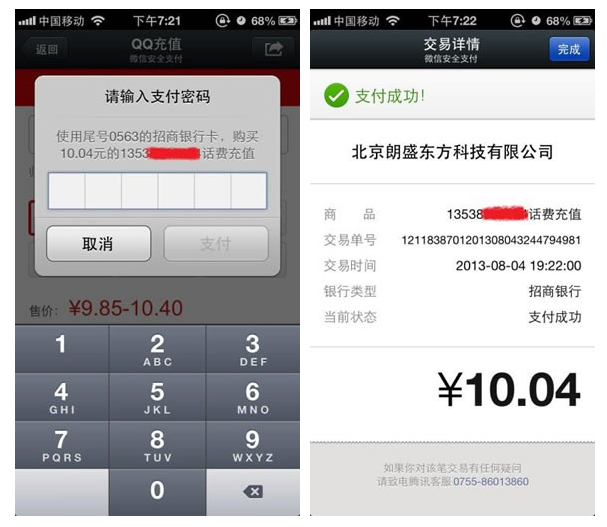
3、此时用户只需要点击支付,就可以开始进入支付界面了,接着就是输入密码,确认,最后会提示支付成功,紧接着网站会提供一个支付成功跳转页面。类似微信文档里所提供的图片这样,这里我就直接截取文档里的案例图了:
4、这里还有一步,就是微信支付系统会异步通知网站后台用户的支付结果。在获取统一下单数据时,我们指定了一个通知地址,在model里可以找到

支付成功后,微信支付系统会将支付结果异步发送到此地址上/Wxpay/pay_callback/ ,我们来看一下这个方法
/**

     * 支付回调接口

     * @return [type] [description]

     */

    public function pay_callback() {

        $postData = '';

        if (file_get_contents("php://input")) {

            $postData = file_get_contents("php://input");

        } else {

            return;

        }

        $payInfo = array();

        $notify = $this->wxpay_model->wxPayNotify($postData);

        if ($notify->checkSign == TRUE) {

            if ($notify->data['return_code'] == 'FAIL') {

                $payInfo['status'] = FALSE;

                $payInfo['msg'] = '通信出错';

            } elseif ($notify->data['result_code'] == 'FAIL') {

                $payInfo['status'] = FALSE;

                $payInfo['msg'] = '业务出错';

            } else {

                $payInfo['status'] = TRUE;

                $payInfo['msg'] = '支付成功';

                $payInfo['sn']=substr($notify->data['out_trade_no'],8);

                $payInfo['order_no'] = $notify->data['out_trade_no'];

                $payInfo['platform_no']=$notify->data['transaction_id'];

                $payInfo['attach']=$notify->data['attach'];

                $payInfo['fee']=$notify->data['cash_fee'];

                $payInfo['currency']=$notify->data['fee_type'];

                $payInfo['user_sign']=$notify->data['openid'];

            }

        }

        $returnXml = $notify->returnXml();

        echo $returnXml;

        $this->load->library('RedisCache');

        if($payInfo['status']){

           //这里要记录到日志处理(略)

            $this->model->order->onPaySuccess($payInfo['sn'], $payInfo['order_no'], $payInfo['platform_no'],'', $payInfo['user_sign'], $payInfo);

            $this->redis->RedisCache->set('order:payNo:'.$payInfo['order_no'],'OK',5000);

        }else{

           //这里要记录到日志处理(略)

            $this->model->order->onPayFailure($payInfo['sn'], $payInfo['order_no'], $payInfo['platform_no'],'', $payInfo['user_sign'], $payInfo, '订单支付失败 ['.$payInfo['msg'].']');

        }

    }
这方法就是对支付是否成功,对网站的支付相关逻辑进行后续处理,例如假如支付失败,就需要记录日志里说明此次交易失败,或者是做某一些逻辑处理,而支付成功又该如何做处理,等等。
这里我们就分析下这个方法 $this->wxpay_model->wxPayNotify($postData); 对异步返回的数据进行安全性校验,例如验证签名,看看model里的这个方法:
    /**

     * 微信回调接口返回  验证签名并回应微信

     * @param  [type] $xml [description]

     * @return [type]      [description]

     */

    public function wxPayNotify($xml) {

        $notify = new Wxpay_server();

        $notify->saveData($xml);

        //验证签名,并回复微信

        //对后台通知交互时,如果微信收到商户的应答不是成功或者超时,微信认为通知失败

        //微信会通过一定的策略(如30分钟共8次),定期重新发起通知

        if ($notify->checkSign() == false) {

            $notify->setReturnParameter("return_code","FAIL");//返回状态码

            $notify->setReturnParameter("return_msg","签名失败");//返回信息

        } else {

            $notify->checkSign=TRUE;

            $notify->setReturnParameter("return_code","SUCCESS");//设置返回码

        }

        return $notify;

    }
如果验证通过,则就开始进行交易成功或者失败时所要做的逻辑处理了,这逻辑处理的代码我就不写了,因为每一个网站的处理方式都不一样,我这里是这样处理的,我把思路写下,方便不懂的朋友可以按着我的思路去完善后续的处理:首先是查看数据库里的订单日志表,看这笔交易之前是否已经交易过了,交易过就不用再更新数据表了,如果没交易过,就会将之前存在redis的订单数据给取出来,再将这些数据插入到订单日志表里,差不多就这样处理。
好了,基于H5的微信支付接口开发详解就讲到这里,如果你认真理清博文里所讲解的思路,自己基本上也可以尝试开发此接口了,同时只要会了这个,你也基本上可以开发二维码支付,刷卡支付等等的支付接口。
这里我附上此次开发中的完整代码供大家阅读:
<?php

defined('BASEPATH') OR exit('No direct script access allowed');

class Wxpay extends MY_Controller {

    public function __construct() {

        parent::__construct();

        $this->load->model('wxpay_model');

        //$this->load->model('wxpay');

    }

    public function index() {

        //微信支付

        $this->smarty['wxPayUrl'] = $this->wxpay_model->retWxPayUrl();

        $this->displayView('wxpay/index.tpl');

    }

    /**

     * 手机端微信支付,此处是授权获取到code时的回调地址

     * @param  [type] $orderId 订单编号id

     * @return [type]          [description]

     */

    public function confirm($orderId) {

        //先确认用户是否登录

        $this->ensureLogin();

        //通过订单编号获取订单数据

        $order = $this->wxpay_model->get($orderId);

        //验证订单是否是当前用户

        $this->_verifyUser($order);

        //取得支付所需要的订单数据

        $orderData = $this->returnOrderData[$orderId];

        //取得jsApi所需要的数据

        $wxJsApiData = $this->wxpay_model->wxPayJsApi($orderData);

        //将数据分配到模板去,在js里使用

        $this->smartyData['wxJsApiData'] = json_encode($wxJsApiData, JSON_UNESCAPED_UNICODE);

        $this->smartyData['order'] = $orderData;

        $this->displayView('wxpay/confirm.tpl');

    }

    /**

     * 支付回调接口

     * @return [type] [description]

     */

    public function pay_callback() {

        $postData = '';

        if (file_get_contents("php://input")) {

            $postData = file_get_contents("php://input");

        } else {

            return;

        }

        $payInfo = array();

        $notify = $this->wxpay_model->wxPayNotify($postData);

        if ($notify->checkSign == TRUE) {

            if ($notify->data['return_code'] == 'FAIL') {

                $payInfo['status'] = FALSE;

                $payInfo['msg'] = '通信出错';

            } elseif ($notify->data['result_code'] == 'FAIL') {

                $payInfo['status'] = FALSE;

                $payInfo['msg'] = '业务出错';

            } else {

                $payInfo['status'] = TRUE;

                $payInfo['msg'] = '支付成功';

                $payInfo['sn']=substr($notify->data['out_trade_no'],8);

                $payInfo['order_no'] = $notify->data['out_trade_no'];

                $payInfo['platform_no']=$notify->data['transaction_id'];

                $payInfo['attach']=$notify->data['attach'];

                $payInfo['fee']=$notify->data['cash_fee'];

                $payInfo['currency']=$notify->data['fee_type'];

                $payInfo['user_sign']=$notify->data['openid'];

            }

        }

        $returnXml = $notify->returnXml();

        echo $returnXml;

        $this->load->library('RedisCache');

        if($payInfo['status']){

           //这里要记录到日志处理(略)

            $this->model->order->onPaySuccess($payInfo['sn'], $payInfo['order_no'], $payInfo['platform_no'],'', $payInfo['user_sign'], $payInfo);

            $this->redis->RedisCache->set('order:payNo:'.$payInfo['order_no'],'OK',5000);

        }else{

           //这里要记录到日志处理(略)

            $this->model->order->onPayFailure($payInfo['sn'], $payInfo['order_no'], $payInfo['platform_no'],'', $payInfo['user_sign'], $payInfo, '订单支付失败 ['.$payInfo['msg'].']');

        }

    }

    /**

     * 返回支付所需要的数据

     * @param  [type] $orderId 订单号

     * @param  string $data    订单数据,当$data数据存在时刷新$orderData缓存,因为订单号不唯一

     * @return [type]          [description]

     */

    public function returnOrderData($orderId, $data = '') {

        //获取订单数据

        $order = $this->wxpay_model->get($orderId);

        if (0 === count($order)) return false;

        if (empty($data)) {

            $this->load->library('RedisCache');

            //取得缓存在redis的订单数据

            $orderData = $this->rediscache->getJson("order:orderData:".$orderId);

            if (empty($orderData)) {

                //如果redis里没有,则直接读数据库取

                $this->load->model('order_model');

                $order = $this->order_model->get($orderId);

                if (0 === count($order)) {

                    return false;

                }

                $data = $order;

            } else {

                //如果redis里面有的话,直接返回数据

                return $orderData;

            }

        }

        //支付前缓存所需要的数据

        $orderData['id'] = $data['id'];

        $orderData['fee'] = $data['fee'];

        //支付平台需要的数据

        $orderData['user_id'] = $data['user_id'];

        $orderData['sn'] = $data['cn'];

        //这是唯一编号

        $orderData['order_no'] = substr(md5($data['sn'].$data['fee']), 8, 8).$data['sn'];

        $orderData['fee'] = $data['fee'];

        $orderData['time'] = $data['time'];

        $orderData['goods_name'] = $data['goods_name'];

        $orderData['attach'] = $data['attach'];

        //将数据缓存到redis里面

        $this->rediscache->set("order:orderData:".$orderId, $orderData, 3600*24);

        //做个标识缓存到redis,用以判断该订单是否已经支付了

        $this->rediscache->set("order:payNo:".$orderData['order_no'], "NO", 3600*24);

        return $orderData;

    }

    private function _verifyUser($order) {

        if (empty($order)) show_404();

        if (0 === count($order)) show_404();

        //判断订单表里的用户id是否是当前登录者的id

        if ($order['user_id'] == $this->uid) return;

        show_error('只能查看自己的订单');

    }

}

控制器:Wxpay.php
控制器:Wxpay.php
<?php

defined('BASEPATH') OR exit('No direct script access allowed');

class Wxpay_model extends CI_Model {

    public function __construct() {

        parent::__construct();

    }

    /**

     * 返回可以获得微信code的URL (用以获取openid)

     * @return [type] [description]

     */

    public function retWxPayUrl() {

        $jsApi = new JsApi_handle();

        return $jsApi->createOauthUrlForCode();

    }

    /**

     * 微信jsapi点击支付

     * @param  [type] $data [description]

     * @return [type]       [description]

     */

    public function wxPayJsApi($data) {

        $jsApi = new JsApi_handle();

        //统一下单接口所需数据

        $payData = $this->returnData($data);

        //获取code码,用以获取openid

        $code = $_GET['code'];

        $jsApi->setCode($code);

        //通过code获取openid

        $openid = $jsApi->getOpenId();

        $unifiedOrderResult = null;

        if ($openid != null) {

            //取得统一下单接口返回的数据

            $unifiedOrderResult = $this->getResult($payData, 'JSAPI', $openid);

            //获取订单接口状态

            $returnMessage = $this->returnMessage($unifiedOrder, 'prepay_id');

            if ($returnMessage['resultCode']) {

                $jsApi->setPrepayId($retuenMessage['resultField']);

                //取得wxjsapi接口所需要的数据

                $returnMessage['resultData'] = $jsApi->getParams();

            }

            return $returnMessage;

        }

    }

    /**

     * 统一下单接口所需要的数据

     * @param  [type] $data [description]

     * @return [type]       [description]

     */

    public function returnData($data) {

        $payData['sn'] = $data['sn'];

        $payData['body'] = $data['goods_name'];

        $payData['out_trade_no'] = $data['order_no'];

        $payData['total_fee'] = $data['fee'];

        $payData['attach'] = $data['attach'];

        return $payData;

    }

    /**

     * 返回统一下单接口结果 (参考https://pay.weixin.qq.com/wiki/doc/api/jsapi.php?chapter=9_1)

     * @param  [type] $payData    [description]

     * @param  [type] $trade_type [description]

     * @param  [type] $openid     [description]

     * @return [type]             [description]

     */

    public function getResult($payData, $trade_type, $openid = null) {

        $unifiedOrder = new UnifiedOrder_handle();

        if ($opneid != null) {

            $unifiedOrder->setParam('openid', $openid);

        }

        $unifiedOrder->setParam('body', $payData['body']);  //商品描述

        $unifiedOrder->setParam('out_trade_no', $payData['out_trade_no']); //商户订单号

        $unifiedOrder->setParam('total_fee', $payData['total_fee']);    //总金额

        $unifiedOrder->setParam('attach', $payData['attach']);  //附加数据

        $unifiedOrder->setParam('notify_url', base_url('/Wxpay/pay_callback'));//通知地址

        $unifiedOrder->setParam('trade_type', $trade_type); //交易类型

        //非必填参数,商户可根据实际情况选填

        //$unifiedOrder->setParam("sub_mch_id","XXXX");//子商户号

        //$unifiedOrder->setParam("device_info","XXXX");//设备号

        //$unifiedOrder->setParam("time_start","XXXX");//交易起始时间

        //$unifiedOrder->setParam("time_expire","XXXX");//交易结束时间

        //$unifiedOrder->setParam("goods_tag","XXXX");//商品标记

        //$unifiedOrder->setParam("product_id","XXXX");//商品ID

        return $unifiedOrder->getResult();

    }

    /**

     * 返回微信订单状态

     */

    public function returnMessage($unifiedOrderResult,$field){

        $arrMessage=array("resultCode"=>0,"resultType"=>"获取错误","resultMsg"=>"该字段为空");

        if($unifiedOrderResult==null){

            $arrMessage["resultType"]="未获取权限";

            $arrMessage["resultMsg"]="请重新打开页面";

        }elseif ($unifiedOrderResult["return_code"] == "FAIL")

        {

            $arrMessage["resultType"]="网络错误";

            $arrMessage["resultMsg"]=$unifiedOrderResult['return_msg'];

        }

        elseif($unifiedOrderResult["result_code"] == "FAIL")

        {

            $arrMessage["resultType"]="订单错误";

            $arrMessage["resultMsg"]=$unifiedOrderResult['err_code_des'];

        }

        elseif($unifiedOrderResult[$field] != NULL)

        {

            $arrMessage["resultCode"]=1;

            $arrMessage["resultType"]="生成订单";

            $arrMessage["resultMsg"]="OK";

            $arrMessage["resultField"] = $unifiedOrderResult[$field];

        }

        return $arrMessage;

    }

    /**

     * 微信回调接口返回  验证签名并回应微信

     * @param  [type] $xml [description]

     * @return [type]      [description]

     */

    public function wxPayNotify($xml) {

        $notify = new Wxpay_server();

        $notify->saveData($xml);

        //验证签名,并回复微信

        //对后台通知交互时,如果微信收到商户的应答不是成功或者超时,微信认为通知失败

        //微信会通过一定的策略(如30分钟共8次),定期重新发起通知

        if ($notify->checkSign() == false) {

            $notify->setReturnParameter("return_code","FAIL");//返回状态码

            $notify->setReturnParameter("return_msg","签名失败");//返回信息

        } else {

            $notify->checkSign=TRUE;

            $notify->setReturnParameter("return_code","SUCCESS");//设置返回码

        }

        return $notify;

    }

}

/**

* JSAPI支付——H5网页端调起支付接口

*/

class JsApi_handle extends JsApi_common {

    public $code;//code码,用以获取openid

    public $openid;//用户的openid

    public $parameters;//jsapi参数,格式为json

    public $prepay_id;//使用统一支付接口得到的预支付id

    public $curl_timeout;//curl超时时间

    function __construct()

    {

        //设置curl超时时间

        $this->curl_timeout = WxPayConf::CURL_TIMEOUT;

    }

    /**

     * 生成获取code的URL

     * @return [type] [description]

     */

    public function createOauthUrlForCode() {

        //重定向URL

        $redirectUrl = "http://www.itcen.cn/wxpay/confirm/".$orderId."?showwxpaytitle=1";

        $urlParams['appid'] = WxPayConf::APPID;

        $urlParams['redirect_uri'] = $redirectUrl;

        $urlParams['response_type'] = 'code';

        $urlParams['scope'] = 'snsapi_base';

        $urlParams['state'] = "STATE"."#wechat_redirect";

        //拼接字符串

        $queryString = $this->ToUrlParams($urlParams, false);

        return "https://open.weixin.qq.com/connect/oauth2/authorize?".$queryString;

    }

    /**

     * 设置code

     * @param [type] $code [description]

     */

    public function setCode($code) {

        $this->code = $code;

    }

    /**

     *  作用:设置prepay_id

     */

    public function setPrepayId($prepayId)

    {

        $this->prepay_id = $prepayId;

    }

    /**

     *  作用:获取jsapi的参数

     */

    public function getParams()

    {

        $jsApiObj["appId"] = WxPayConf::APPID;

        $timeStamp = time();

        $jsApiObj["timeStamp"] = "$timeStamp";

        $jsApiObj["nonceStr"] = $this->createNoncestr();

        $jsApiObj["package"] = "prepay_id=$this->prepay_id";

        $jsApiObj["signType"] = "MD5";

        $jsApiObj["paySign"] = $this->getSign($jsApiObj);

        $this->parameters = json_encode($jsApiObj);

        return $this->parameters;

    }

    /**

     * 通过curl 向微信提交code 用以获取openid

     * @return [type] [description]

     */

    public function getOpenId() {

        //创建openid 的链接

        $url = $this->createOauthUrlForOpenid();

        //初始化

        $ch = curl_init();

        curl_setopt($ch, CURL_TIMEOUT, $this->curl_timeout);

        curl_setopt($ch, CURL_URL, $url);

        curl_setopt($ch, CURL_SSL_VERIFYPEER, FALSE);

        curl_setopt($ch, CURL_SSL_VERIFYHOST, FALSE);

        curl_setopt($ch, CURL_HEADER, FALSE);

        curl_setopt($ch, CURL_RETURNTRANSFER, TRUE);

        //执行curl

        $res = curl_exec($ch);

        curl_close($ch);

        //取出openid

        $data = json_decode($res);

        if (isset($data['openid'])) {

            $this->openid = $data['openid'];

        } else {

            return null;

        }

        return $this->openid;

    }

    /**

     * 生成可以获取openid 的URL

     * @return [type] [description]

     */

    public function createOauthUrlForOpenid() {

        $urlParams['appid'] = WxPayConf::APPID;

        $urlParams['secret'] = WxPayConf::APPSECRET;

        $urlParams['code'] = $this->code;

        $urlParams['grant_type'] = "authorization_code";

        $queryString = $this->ToUrlParams($urlParams, false);

        return "https://api.weixin.qq.com/sns/oauth2/access_token?".$queryString;

    }

}

/**

 * 统一下单接口类

 */

class UnifiedOrder_handle extends Wxpay_client_handle {

    public function __construct() {

        //设置接口链接

        $this->url = "https://api.mch.weixin.qq.com/pay/unifiedorder";

        //设置curl超时时间

        $this->curl_timeout = WxPayConf::CURL_TIMEOUT;

    }

}

/**

 * 响应型接口基类

 */

class Wxpay_server_handle extends JsApi_common{

    public $data; //接收到的数据,类型为关联数组

    public $returnParams;   //返回参数,类型为关联数组

    /**

     * 将微信请求的xml转换成关联数组

     * @param  [type] $xml [description]

     * @return [type]      [description]

     */

    public function saveData($xml) {

        $this->data = $this->xmlToArray($xml);

    }

    /**

     * 验证签名

     * @return [type] [description]

     */

    public function checkSign() {

        $tmpData = $this->data;

        unset($temData['sign']);

        $sign = $this->getSign($tmpData);

        if ($this->data['sign'] == $sign) {

            return true;

        }

        return false;

    }

    /**

     * 设置返回微信的xml数据

     */

    function setReturnParameter($parameter, $parameterValue)

    {

        $this->returnParameters[$this->trimString($parameter)] = $this->trimString($parameterValue);

    }

    /**

     * 将xml数据返回微信

     */

    function returnXml()

    {

        $returnXml = $this->createXml();

        return $returnXml;

    }

}

/**

 * 请求型接口的基类

 */

class Wxpay_client_handle extends JsApi_common{

    public $params; //请求参数,类型为关联数组

    public $response; //微信返回的响应

    public $result; //返回参数,类型类关联数组

    public $url; //接口链接

    public $curl_timeout; //curl超时时间

    /**

     * 设置请求参数

     * @param [type] $param      [description]

     * @param [type] $paramValue [description]

     */

    public function setParam($param, $paramValue) {

        $this->params[$this->tirmString($param)] = $this->trimString($paramValue);

    }

    /**

     * 获取结果,默认不使用证书

     * @return [type] [description]

     */

    public function getResult() {

        $this->postxml();

        $this->result = $this->xmlToArray($this->response);

        return $this->result;

    }

    /**

     * post请求xml

     * @return [type] [description]

     */

    public function postxml() {

        $xml = $this->createXml();

        $this->response = $this->postXmlCurl($xml, $this->curl, $this->curl_timeout);

        return $this->response;

    }

    public function createXml() {

        $this->params['appid'] = WxPayConf::APPID; //公众号ID

        $this->params['mch_id'] = WxPayConf::MCHID; //商户号

        $this->params['nonce_str'] = $this->createNoncestr();   //随机字符串

        $this->params['sign'] = $this->getSign($this->params);  //签名

        return $this->arrayToXml($this->params);

    }

}

/**

 * 所有接口的基类

 */

class JsApi_common {

    function __construct() {

    }

    public function trimString($value) {

        $ret = null;

        if (null != $value) {

            $ret = trim($value);

            if (strlen($ret) == 0) {

                $ret = null;

            }

        }

        return $ret;

    }

    /**

     * 产生随机字符串,不长于32位

     * @param  integer $length [description]

     * @return [type]          [description]

     */

    public function createNoncestr($length = 32) {

        $chars = "abcdefghijklmnopqrstuvwxyz0123456789";

        $str = '';

        for ($i = 0; $i < $length; $i++) {

            $str .= substr($chars, mt_rand(0, strlen($chars) - 1), 1);

        }

        return $str;

    }

    /**

     * 格式化参数 拼接字符串,签名过程需要使用

     * @param [type] $urlParams     [description]

     * @param [type] $needUrlencode [description]

     */

    public function ToUrlParams($urlParams, $needUrlencode) {

        $buff = "";

        ksort($urlParams);

        foreach ($urlParams as $k => $v) {

            if($needUrlencode) $v = urlencode($v);

            $buff .= $k .'='. $v .'&';

        }

        $reqString = '';

        if (strlen($buff) > 0) {

            $reqString = substr($buff, 0, strlen($buff) - 1);

        }

        return $reqString;

    }

    /**

     * 生成签名

     * @param  [type] $params [description]

     * @return [type]         [description]

     */

    public function getSign($obj) {

        foreach ($obj as $k => $v) {

            $params[$k] = $v;

        }

        //签名步骤一:按字典序排序参数

        ksort($params);

        $str = $this->ToUrlParams($params, false);

        //签名步骤二:在$str后加入key

        $str = $str."$key=".WxPayConf::KEY;

        //签名步骤三:md5加密

        $str = md5($str);

        //签名步骤四:所有字符转为大写

        $result = strtoupper($str);

        return $result;

    }

    /**

     * array转xml

     * @param  [type] $arr [description]

     * @return [type]      [description]

     */

    public function arrayToXml($arr) {

        $xml = "<xml>";

        foreach ($arr as $k => $v) {

            if (is_numeric($val)) {

                $xml .= "<".$key.">".$key."</".$key.">";

            } else {

                $xml .= "<".$key."><![CDATA[".$val."]]></".$key.">";

            }

        }

        $xml .= "</xml>";

        return $xml;

    }

    /**

     * 将xml转为array

     * @param  [type] $xml [description]

     * @return [type]      [description]

     */

    public function xmlToArray($xml) {

        $arr = json_decode(json_encode(simplexml_load_string($xml, 'SinpleXMLElement', LIBXML_NOCDATA)), true);

        return $arr;

    }

    /**

     * 以post方式提交xml到对应的接口

     * @param  [type]  $xml    [description]

     * @param  [type]  $url    [description]

     * @param  integer $second [description]

     * @return [type]          [description]

     */

    public function postXmlCurl($xml, $url, $second = 30) {

        //初始化curl

        $ch = curl_init();

        //设置超时

        curl_setopt($ch, CURL_TIMEOUT, $second);

        curl_setopt($ch, CURL_URL, $url);

        //这里设置代理,如果有的话

        //curl_setopt($ch,CURLOPT_PROXY, '8.8.8.8');

        //curl_setopt($ch,CURLOPT_PROXYPORT, 8080);

        curl_setopt($ch, CURL_SSL_VERIFYHOST, FALSE);

        curl_setopt($ch, CURL_SSL_VERIFYPEER, FALSE);

        //设置header

        curl_setopt($ch, CURL_HEADER, FALSE);

        //要求结果为字符串且输出到屏幕上

        curl_setopt($ch, CURL_RETURNTRANSFER, TRUE);

        //以post方式提交

        curl_setopt($ch, CURL_POST, TRUE);

        curl_setopt($ch, CURL_POSTFIELDS, $xml);

        //执行curl

        $res = curl_exec($ch);

        if ($res) {

            curl_close($ch);

            return $res;

        } else {

            $error = curl_errno($ch);

            echo "curl出错,错误码:$error"."<br>";

            echo "<a href='http://curl.haxx.se/libcurl/c/libcurl-errors.html'>错误原因查询</a></br>";

            curl_close($ch);

            return false;

        }

    }

}

/**

 * 配置类

 */

class WxPayConf {

    //微信公众号身份的唯一标识。

    const APPID = 'wx654a22c6423213b7';

    //受理商ID,身份标识

    const MCHID = '10043241';

    const MCHNAME = 'KellyCen的博客';

    //商户支付密钥Key。

    const KEY = '0000000000000000000000000000000';

    //JSAPI接口中获取openid

    const APPSECRET = '000000000000000000000000000';

    //证书路径,注意应该填写绝对路径

    const SSLCERT_PATH = '/home/WxPayCacert/apiclient_cert.pem';

    const SSLKEY_PATH = '/home/WxPayCacert/apiclient_key.pem';

    const SSLCA_PATH = '/home/WxPayCacert/rootca.pem';

    //本例程通过curl使用HTTP POST方法,此处可修改其超时时间,默认为30秒

    const CURL_TIMEOUT = 30;

}

模型:Wxpay_model.php
模型:Wxpay_model.php
<!doctype html>

<html>

<head lang="zh-CN">

<meta http-equiv="Content-Type" content="text/html; charset=utf-8" />

<!-- Make sure that we can test against real IE8 -->

<meta http-equiv="X-UA-Compatible" content="IE=8" />

<title></title>

</head>

<body>

<a href="{$wxPayUrl}">微信支付</a>

</body>

</html>

视图:index.tpl
视图:index.tpl
<!doctype html>

<html>

<head lang="zh-CN">

<meta http-equiv="Content-Type" content="text/html; charset=utf-8" />

<!-- Make sure that we can test against real IE8 -->

<meta http-equiv="X-UA-Compatible" content="IE=8" />

<title></title>

</head>

<body>

<a href="javascript:callpay();" id="btnOrder">点击支付</a>

</body>

<script type="text/javascript">

    //将数据付给js变量

    var wxJsApiData = {$wxJsApiData};

    function onBridgeReady()

        {

            //格式参考官方文档 https://pay.weixin.qq.com/wiki/doc/api/jsapi.php?chapter=7_7&index=6

            WeixinJSBridge.invoke(

                'getBrandWCPayRequest',

                $.parseJSON(wxJsApiData.resultData),

                function(res){

                    if(res.err_msg == "get_brand_wcpay_request:ok" ){

                        window.location.href="/wxpay/paysuccess/"+{$order.sn};

                    }

                }

            );

        }

        function callpay()

        {

            if(!wxJsApiData.resultCode){

                alert(wxJsApiData.resultType+","+wxJsApiData.resultMsg+"!");

                return false;

            }

            if (typeof WeixinJSBridge == "undefined"){

                if( document.addEventListener ){

                    document.addEventListener('WeixinJSBridgeReady', onBridgeReady, false);

                }else if (document.attachEvent){

                    document.attachEvent('WeixinJSBridgeReady', onBridgeReady);

                    document.attachEvent('onWeixinJSBridgeReady', onBridgeReady);

                }

            }else{

                onBridgeReady();

            }

        }

</script>

</html>

视图:confirm.tpl
视图:confirm.tpl
里面所用到的一些自定义函数可以在我上一篇博文里找找,那里已经提供了代码参考了。
转自:https://www.cnblogs.com/it-cen/p/4950186.html
***PHP基于H5的微信支付开发详解(CI框架)的更多相关文章
- 基于H5的微信支付开发详解
这次总结一下用户在微信内打开网页时,可以调用微信支付完成下单功能的模块开发,也就是在微信内的H5页面通过jsApi接口实现支付功能.当然了,微信官网上的微信支付开发文档也讲解的很详细,并且有实现代码可 ...
- ****基于H5的微信支付开发详解[转]
这次总结一下用户在微信内打开网页时,可以调用微信支付完成下单功能的模块开发,也就是在微信内的H5页面通过jsApi接口实现支付功能.当然了,微信官网上的微信支付开发文档也讲解的很详细,并且有实现代码可 ...
- 基于h5+的微信支付,hbuilder打包
1.打开app项目的manifest.json的文件,选择模块权限配置,将Payment(支付)模块添加至已选模块中 2.选择SDK配置,在plus.payment·支付中,勾选□ 微信支付,配置好a ...
- iOS 微信支付流程详解
背景 自微信支付.支付宝支付入世以来,移动端的支付日渐火热.虚拟货币有取代实体货币的趋向(这句纯属扯淡,不用管),支付在app开发中是一项基本的功能,有必要去掌握.从难易程度上讲,不管是微信支付还是支 ...
- iOS中 最新微信支付/最全的微信支付教程详解 韩俊强的博客
每日更新关注:http://weibo.com/hanjunqiang 新浪微博! 亲们, 首先让我们来看一下微信支付的流程吧. 1. 注册微信开放平台,创建应用获取appid,appSecret, ...
- Android app 第三方微信支付接入详解
微信支付做了好几遍了,都没有出现什么棘手的问题,下面一一为大家分享一下,欢迎吐槽. 还是老样子,接入微信的支付要第一步添加微信支付官方的包libammsdk.jar 首先就处理略坑的一个问题,app应 ...
- vue-cli中进行微信支付代码详解
最近做微信支付,颇经历一番波折,这里总结一下,便于以后少走弯路: 在进行微信支付,除了需要公众号之外,你还需要一个微信商户.根据商户规则进行商户申请 这是公众号的基本开发配置,这里在微信授权的时候就已 ...
- springboot+支付宝条码支付开发详解
背景:项目原有乐刷聚合支付,无法参加支付宝.微信等支付机构的官方活动 需求:增加原生支付(支付宝条码支付) 方法: 一.官方文档:https://docs.open.alipay.com/194/10 ...
- 转:基于科大讯飞语音API语音识别开发详解
原文来自于: http://www.52wulian.org/android_voice/ 最近项目需要用到android语音识别,立马就想到科大讯飞,结合官方实例及阅读API文档,初步的完成了And ...
随机推荐
- CentOS 使用 Xfce 桌面并通过 xrdp 登录
基础环境 CentOS 7.1 最小化安装 安装步骤 以下步骤,均通过ssh连接到主机进行操作. 安装桌面支持 首先安装桌面支持 yum groupinstall "Server with ...
- bootstrap 模态 modal 小例子【转】
bootstrap 模态 modal 小例子 <html> <head> <meta charset="utf-8" /> <title ...
- Junit测试private方法
package com.bill99.junit; public class ACase { private String echoRequest(String request) { return & ...
- 用ajax传递json,返回前台的中文乱码问题
java项目中用ajax传递json,返回前台时中文出现问号(乱码问题)的解决办法 首先看一下没有解决前的状态: 我用的框架是ssm,在springMVC中我配置了编码格式为utf-8,每个jsp页面 ...
- C# 比较不错的拓扑图控件
群内有下载 616945527
- OptionParser命令参数介绍及使用
使用optionParse解析命令行参数分以下几个步骤: 创建parser实例 使用add_option添加我们要处理的命令行参数 得到解析sys.argv后的options对象,查看用户的输入 代码 ...
- golang string int int64转换
#string到int int,err:=strconv.Atoi(string) #string到int64 int64, err := strconv.ParseInt(string, 10, 6 ...
- Shiro简介及入门(四)
1.1 什么是shiro shiro是apache的一个开源框架,是一个权限管理的框架,实现 用户认证.用户授权. spring中有spring security (原名Acegi),是一个权 ...
- linux挂载硬盘以及卸载硬盘
1.在vmware添加硬盘 2.输入fdisk -l 查看新增加的硬盘 3.分区初始化 4.指定文件系统 5.修改fstab文件 fstab: 6.刷新验证 mount -a 挂载定义在/etc/fs ...
- python3爬虫二
1.获取列表页文章url集合: scrapy shell http://blog.jobbole.com/all-posts/ response.css('div.post-meta a.archiv ...