
springboot+支付宝条码支付开发详解
背景:项目原有乐刷聚合支付,无法参加支付宝、微信等支付机构的官方活动
需求:增加原生支付(支付宝条码支付)
方法:
一、官方文档:https://docs.open.alipay.com/194/106039
二、没有真实企业账号的可以使用沙箱环境:https://docs.open.alipay.com/200/105311
三、两种方法实现:
(一)基于支付宝标准SDK:alipay-sdk-java
1、pom文件中添加SDK依赖
地址:https://mvnrepository.com/artifact/com.alipay.sdk/alipay-sdk-java
2、配置支付宝参数
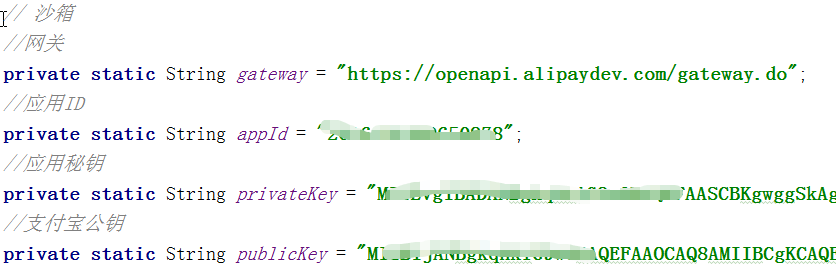
在系统常量类里追加(我这里配的是沙箱参数,就直接写在实现类里)
3.实现代码
 package com.bhp.aaa.bbb.service;

 import com.alibaba.fastjson.JSONObject;

 import com.alipay.api.AlipayApiException;

 import com.alipay.api.AlipayClient;

 import com.alipay.api.DefaultAlipayClient;

 import com.alipay.api.request.AlipayTradeCancelRequest;

 import com.alipay.api.request.AlipayTradePayRequest;

 import com.alipay.api.request.AlipayTradeQueryRequest;

 import com.alipay.api.request.AlipayTradeRefundRequest;

 import com.alipay.api.response.AlipayTradeCancelResponse;

 import com.alipay.api.response.AlipayTradePayResponse;

 import com.alipay.api.response.AlipayTradeQueryResponse;

 import com.alipay.api.response.AlipayTradeRefundResponse;

 import com.google.common.collect.ImmutableMap;

 import org.springframework.beans.factory.annotation.Autowired;

 import org.springframework.stereotype.Service;

 import org.wustrive.java.core.request.ViewResult;

 import org.wustrive.java.dao.jdbc.dao.BaseDao;

 import javax.servlet.http.HttpServletRequest;

 import java.util.Map;

 @Service

 public class AlipayService1 {

     // 正式

     /*private static String gateway = SysConstants.Alipay.gateway;

     private static String appId = SysConstants.Alipay.app_id;

     private static String privateKey = SysConstants.Alipay.app_private_key;

     private static String publicKey = SysConstants.Alipay.alipay_public_key;*/

     // 沙箱

     //网关

     private static String gateway = "https://openapi.alipaydev.com/gateway.do";

     //应用ID

     private static String appId = "你自己的APPID";

     //应用秘钥

     private static String privateKey = "你自己的应用秘钥";

     //支付宝公钥

     private static String publicKey = "你自己的支付宝公钥";

     @Autowired

     private BaseDao baseDao;

     // 初始化一个统一的客户端

     AlipayClient alipayClient = new DefaultAlipayClient(gateway,appId,privateKey,"json","utf-8",publicKey,"RSA2");

     // 发起支付

     public  ViewResult alipayPay(AppUser appUser, String outTradeNo, String payMoney, String authCode){

         ViewResult viewResult = ViewResult.newInstance();

         String sql = "SELECT short_name FROM sys_merchants WHERE id=:merchantsId";

         String short_name =  baseDao.queryForString(sql, ImmutableMap.of("merchantsId",appUser.getMerchantsId()));

         JSONObject data = new JSONObject();

         data.put("out_trade_no",outTradeNo);

         data.put("scene","bar_code");

         data.put("auth_code",authCode);

         data.put("subject",short_name+"消费");

         data.put("store_id",appUser.getShopId());

         data.put("total_amount",payMoney);

         AlipayTradePayRequest request = new AlipayTradePayRequest();

         //request.setNotifyUrl(notifyUrl);

         request.setBizContent(data.toJSONString());

         try {

             AlipayTradePayResponse response = alipayClient.execute(request);

             if(response.isSuccess()){

                 viewResult.success(response.getBody());

             } else {

                 viewResult.fail(response.getBody());

             }

         } catch (AlipayApiException e) {

             viewResult.fail(e);

             e.printStackTrace();

         }finally {

             return viewResult;

         }

     }

     // 发起查询

     public ViewResult alipayQuery(String trade_no ){

         ViewResult viewResult = ViewResult.newInstance();

         JSONObject data = new JSONObject();

         data.put("trade_no",trade_no);

         AlipayTradeQueryRequest request = new AlipayTradeQueryRequest();

         request.setBizContent(data.toJSONString());

         try {

             AlipayTradeQueryResponse response = alipayClient.execute(request);

             if(response.isSuccess()){

                 viewResult.success(response.getBody());

             } else {

                 viewResult.fail(response.getBody());

             }

         } catch (AlipayApiException e) {

             viewResult.fail(e);

             e.printStackTrace();

         } finally {

             return viewResult;

         }

     }

     // 发起撤销

     public ViewResult alipayCancel(String trade_no){

         ViewResult viewResult = ViewResult.newInstance();

         JSONObject data = new JSONObject();

         data.put("trade_no",trade_no);

         AlipayTradeCancelRequest request = new AlipayTradeCancelRequest();

         request.setBizContent(data.toJSONString());

         try {

             AlipayTradeCancelResponse response = alipayClient.execute(request);

             if(response.isSuccess()){

                 viewResult.success(response.getBody());

             } else {

                 viewResult.fail(response.getBody());

             }

         } catch (AlipayApiException e) {

             viewResult.fail(e);

             e.printStackTrace();

         } finally {

             return viewResult;

         }

     }

     // 发起退款

     public ViewResult alipayRefund(String trade_no,String refund_amount){

         ViewResult viewResult = ViewResult.newInstance();

         JSONObject data = new JSONObject();

         data.put("trade_no",trade_no);

         data.put("refund_amount",refund_amount);

         AlipayTradeRefundRequest request = new AlipayTradeRefundRequest();

         request.setBizContent(data.toJSONString());

         try {

             AlipayTradeRefundResponse response = alipayClient.execute(request);

             if(response.isSuccess()){

                 viewResult.success(response.getBody());

             } else {

                 viewResult.fail(response.getBody());

             }

         } catch (AlipayApiException e) {

             viewResult.fail(e);

             e.printStackTrace();

         } finally {

             return viewResult;

         }

     }

 }
支付宝条码支付方法(一)
未完,待续……
springboot+支付宝条码支付开发详解的更多相关文章
- ****基于H5的微信支付开发详解[转]
这次总结一下用户在微信内打开网页时,可以调用微信支付完成下单功能的模块开发,也就是在微信内的H5页面通过jsApi接口实现支付功能.当然了,微信官网上的微信支付开发文档也讲解的很详细,并且有实现代码可 ...
- 基于H5的微信支付开发详解
这次总结一下用户在微信内打开网页时,可以调用微信支付完成下单功能的模块开发,也就是在微信内的H5页面通过jsApi接口实现支付功能.当然了,微信官网上的微信支付开发文档也讲解的很详细,并且有实现代码可 ...
- ***PHP基于H5的微信支付开发详解(CI框架)
这次总结一下用户在微信内打开网页时,可以调用微信支付完成下单功能的模块开发,也就是在微信内的H5页面通过jsApi接口实现支付功能.当然了,微信官网上的微信支付开发文档也讲解的很详细,并且有实现代码可 ...
- springboot项目--传入参数校验-----SpringBoot开发详解(五)--Controller接收参数以及参数校验----https://blog.csdn.net/qq_31001665/article/details/71075743
https://blog.csdn.net/qq_31001665/article/details/71075743 springboot项目--传入参数校验-----SpringBoot开发详解(五 ...
- EasyPR--开发详解(6)SVM开发详解
在前面的几篇文章中,我们介绍了EasyPR中车牌定位模块的相关内容.本文开始分析车牌定位模块后续步骤的车牌判断模块.车牌判断模块是EasyPR中的基于机器学习模型的一个模块,这个模型就是作者前文中从机 ...
- 【转发】NPAPI开发详解,Windows版
NPAPI开发详解,Windows版 9 jiaofeng601, +479 9人支持,来自Meteor.猪爪.hanyuxinting更多 .是非黑白 .Yuan Xulei.hyolin.Andy ...
- 热烈祝贺华清远见《ARM处理器开发详解》第2版正式出版
2014年6月,由华清远见研发中心组织多名业 内顶尖讲师编写的<ARM处理器开发详解>一书正式出版.本书以S5PV210处理器为平台,详细介绍了嵌入式系统开发的各个主要环节,并注重实践,辅 ...
- 嵌入式Linux应用程序开发详解------(创建守护进程)
嵌入式Linux应用程序开发详解 华清远见 本文只是阅读文摘. 创建一个守护进程的步骤: 1.创建一个子进程,然后退出父进程: 2.在子进程中使用创建新会话---setsid(): 3.改变当前工作目 ...
- iOS原生地图开发详解
在上一篇博客中:http://my.oschina.net/u/2340880/blog/414760.对iOS中的定位服务进行了详细的介绍与参数说明,在开发中,地位服务往往与地图框架结合使用,这篇博 ...
随机推荐
- ServiceFabric极简文档-5.0 Service Fabric有状态与无状态
Service Fabric 应用程序方案 2017/08/14 作者 Edward Chen Jack Zeng Azure Service Fabric提供了一个可靠而灵活的平台,可用于编写和运行 ...
- python爬虫笔记之re.match匹配,与search、findall区别
为什么re.match匹配不到?re.match匹配规则怎样?(捕一下seo) re.match(pattern, string[, flags]) pattern为匹配规则,即输入正则表达式. st ...
- JAVA获取公网ip
在ipv4地址稀缺的今天,分配到公网ip几乎是不可能的,但是我拨号之后的ip竟然是公网IP. 将自己的电脑作为服务器·,做点好玩的程序,就成为了可能. 由于运营商的ip是动态分配的公网ip的所以就需要 ...
- Excel催化剂开源第21波-使用Advanced Installer打包VSTO几个注意问题
STO项目开发完毕完,最终需要分发给用户,需要Excel催化剂用的是Clickonce发布方式,但也面临到部分用户环境要求太高,设置过程太繁锁,而要求有一些简单的安装方式,用打包工具将其打包为一个EX ...
- [leetcode] 72. Edit Distance (hard)
原题 dp 利用二维数组dp[i][j]存储状态: 从字符串A的0~i位子字符串 到 字符串B的0~j位子字符串,最少需要几步.(每一次删增改都算1步) 所以可得边界状态dp[i][0]=i,dp[0 ...
- UTF-16 -- 顶级程序员也会忽略的系统编码问题,JDK 错了十年!
Unicode(统一码.万国码.单一码)是计算机科学领域里的一项业界标准,包括字符集.编码方案等.Unicode 是为了解决传统的字符编码方案的局限而产生的,它为每种语言中的每个字符设定了统一并且唯一 ...
- spring使用thymeleaf
一.spring使用thymeleaf做解析器其实很简单,这是基于xml配置的方式 <?xml version="1.0" encoding="UTF-8" ...
- 12. 集合类Collection和Map
*:first-child { margin-top: 0 !important; } body>*:last-child { margin-bottom: 0 !important; } /* ...
- 使用f12定位bug
为什么找到网站中的bug后还要去分析它到底是属于前端bug还是后端bug 三个原因: 1.在一些公司,一个系统可能是由前端团队和后端团队共同开发出来的,因此在分配bug的时候,不同模块的bug一般都会 ...
- windows下hexo+github搭建个人博客
网上利用hexo搭建博客的教程非常多,大部分内容都大同小异,选择一篇合适的参考,跟着一步一步来即可. 但是,很多博客由于发布时间较为久远等问题,其中某些操作在现在已不再适用,从而导致类似于我这样的小白 ...