
C# 如何定义让PropertyGrid控件显示[...]按钮,并且点击后以下拉框形式显示自定义控件编辑属性值
关于PropertyGrid控件的详细用法请参考文献:
首先定义一个要在下拉框显示的控件:
using System;

using System.Windows.Forms;

namespace Simon.WinForms.Examples.PropertyGrid

{

    public class EditorControl : UserControl

    {

        public EditorControl()

        {

            this.label1 = new System.Windows.Forms.Label();

            this.label1.AutoSize = true;

            this.label1.Location = new System.Drawing.Point(, );

            this.label1.Name = "label1";

            this.label1.Size = new System.Drawing.Size(, );

            this.label1.TabIndex = ;

            this.label1.Text = "名称:";

            this.comboBox1 = new System.Windows.Forms.ComboBox();

            this.comboBox1.FormattingEnabled = true;

            this.comboBox1.Items.AddRange(new object[] {

            "名称一",

            "名称二",

            "名称三",

            "名称四"});

            this.comboBox1.Location = new System.Drawing.Point(, );

            this.comboBox1.Name = "comboBox1";

            this.comboBox1.Size = new System.Drawing.Size(, );

            this.comboBox1.TabIndex = ;

            this.comboBox1.SelectedIndexChanged += new System.EventHandler(this.comboBox1_SelectedIndexChanged);

            this.SuspendLayout();

            this.AutoScaleDimensions = new System.Drawing.SizeF(6F, 12F);

            this.AutoScaleMode = System.Windows.Forms.AutoScaleMode.Font;

            this.Controls.Add(this.comboBox1);

            this.Controls.Add(this.label1);

            this.Name = "EditorControl";

            this.Size = new System.Drawing.Size(, );

            this.ResumeLayout(false);

            this.PerformLayout();

        }

        private Label label1;

        private ComboBox comboBox1;

        public string result = "";

        private void comboBox1_SelectedIndexChanged(object sender, EventArgs e)

        {

            result = comboBox1.SelectedItem.ToString();

        }

    }

}
从System.Drawing.Design.UITypeEditor继承一个自定义属性编辑管理器类,参考如下:
using System.Drawing.Design;

using System.Windows.Forms.Design;

namespace Simon.WinForms.Examples.PropertyGrid

{

    public class Editor : UITypeEditor

    {

        public override UITypeEditorEditStyle GetEditStyle(System.ComponentModel.ITypeDescriptorContext context)

        {

            // 编辑属性值时,在右侧显示...更多按钮

            return UITypeEditorEditStyle.Modal;

        }

        public override object EditValue(System.ComponentModel.ITypeDescriptorContext context, System.IServiceProvider provider, object value)

        {

            var edSvc = provider.GetService(typeof(IWindowsFormsEditorService)) as IWindowsFormsEditorService;

            if (edSvc != null)

            {

                var popedControl = new EditorControl();

                // 还有ShowDialog这种方式,可以弹出一个窗体来进行编辑

                edSvc.DropDownControl(popedControl);

                value = popedControl.result;

            }

            return base.EditValue(context, provider, value);

        }

    }

}
定义一个使用PropertyGrid显示属性的类型。
using System.ComponentModel;

namespace Simon.WinForms.Examples.PropertyGrid

{

    public class ShowedClass

    {

        [DisplayName("名称")]

        [Editor(typeof(Editor), typeof(System.Drawing.Design.UITypeEditor))]

        public string Name { get; set; }

        [Editor(typeof(Editor), typeof(System.Drawing.Design.UITypeEditor))]

        public string Description { get; set; }

    }

}
在窗体上放好PropertyGrid,然后把你的类实例化后让PropertyGrid来显示设置就可以看到效果了。
propertyGrid1.SelectedObject = new ShowedClass() { Name="我没名字"};
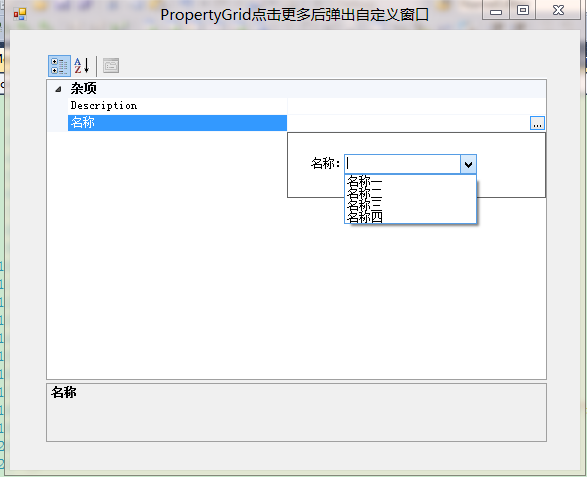
原文连接:C# 如何定义让PropertyGrid控件显示[...]按钮,并且点击后以下拉框形式显示自定义控件编辑属性值
C# 如何定义让PropertyGrid控件显示[...]按钮,并且点击后以下拉框形式显示自定义控件编辑属性值的更多相关文章
- 简述Object(ActiveX)控件遮挡Dialog、select下拉框的解决办法
1.背景 最近在做项目的过程中,我们使用了Object控件,但是同时在上面写了一个select下拉框,因此每次点击下拉框的时候我们会发现,下拉框的部分内容被Object控件给遮挡了,调查研究后发现,我 ...
- 自定义SWT控件一之自定义单选下拉框
一.自定义下拉控件 自定义的下拉框,是自定义样式的,其中的下拉框使用的是独立的window,非复选框的下拉框双击单机其它区域或选择完之后,独立window构成的下拉框会自动消失. package co ...
- bootstrap-table之通用方法( 时间控件,导出,动态下拉框, 表单验证 ,选中与获取信息)
1.bootstrap-table 单击单行选中 $('#gzrwTable').on('click-row.bs.table', function(e, row, $element) { $('.s ...
- 自定义SWT控件三之搜索功能下拉框
3.搜索功能下拉弹出框 package com.view.control.select; import java.util.ArrayList; import java.util.LinkedList ...
- WinForm窗体PropertyGrid控件的使用
使用过 Microsoft Visual Basic 或 Microsoft Visual Studio .NET的朋友,一定使用过属性浏览器来浏览.查看或编辑一个或多个对象的属性..NET 框架 P ...
- PropertyGrid控件由浅入深(二):基础用法
目录 PropertyGrid控件由浅入深(一):文章大纲 PropertyGrid控件由浅入深(二):基础用法 控件的外观构成 控件的外观构成如下图所示: PropertyGrid控件包含以下几个要 ...
- C# PropertyGrid控件应用心得
何处使用 PropertyGrid 控件 在应用程序中的很多地方,您都可以使用户与 PropertyGrid 进行交互,从而获得更丰富的编辑体验.例如,某个应用程序包含多个用户可以设置的“设置”或选项 ...
- C# PropertyGrid控件应用心得 【转】
源文 : http://blog.csdn.net/luyifeiniu/article/details/5426960 c#stringattributesobjectmicrosoftclass ...
- PropertyGrid控件由浅入深(一):文章大纲
Winform中PropertyGrid控件是一个非常好用的对象属性编辑工具,对于Key-Value形式的数据的处理也是非常的好用. 因为Property控件设计良好,在很小的空间内可以展示很多的内容 ...
随机推荐
- Oracle global database name与db link的纠缠关系
ORACLE数据库中Global Database Name与DB LINKS的关系还真是有点纠缠不清,在说清楚这个关系前,我们先来了解一下Global Database Name的概念 Global ...
- EMD_MAINTENANCE.EXECUTE_EM_DBMS_JOB_PROCS的删除创建
在最近的一次优化过程中发现了ORACLE 10g中一个作业EMD_MAINTENANCE.EXECUTE_EM_DBMS_JOB_PROCS执行相当频繁,其实以前也看到过,只是没有做过多的了解和关注. ...
- [Linux 存储管理] LVM结构
linux的LVM灵活且功能强大,当然越强大的就越难理解.lvm和硬盘大致关系应该如下,如果有误请大家左证. lvm中快照功能强大到,很多db的备份都依赖于这个功能,所以不能不理解和熟悉. <鸟 ...
- JQuery插件:遮罩+数据加载中。。。(特点:遮你想遮,罩你想罩)
在很多项目中都会涉及到数据加载.数据加载有时可能会是2-3秒,为了给一个友好的提示,一般都会给一个[数据加载中...]的提示.今天就做了一个这样的提示框. 先去jQuery官网看看怎么写jQuery插 ...
- 通过mdf ldf文件还原数据库
新建查询,执行如下语句: EXEC sp_attach_db @dbname = 'xxx', /*数据库名称*/ @filename1 = 'D:\数据库备份\预发布\201611241045 测试 ...
- .NET序列化的一点技巧(附Demo)
阅读目录 介绍 详细 处理 结论 Demo下载 介绍 序列化是将对象状态转换为可保持或传输的形式的过程.序列化的补集是反序列化,后者将流转换为对象.这两个过程一起保证数据易于存储和传输. .NET F ...
- Java查询大文本
但JAVA本身缺少相应的类库,需要硬编码才能实现结构化文件计算,代码复杂且可读性差,难以实现高效的并行处理. 使用免费的集算器可以弥补这一不足.集算器封装了丰富的结构化文件读写和游标计算函数,书写简单 ...
- linux下如何打包压缩?解包解压?.tar文件.gz文件
===文件打包.压缩 ==打包 tar [root@521478.com]# tar -cvf etc1.tar /etc //c创建 v详细 f打包后文件名 [root@521478.com]# t ...
- 删除myeclipse下svn用户名和密码
在不同的操作系统下,操作基本类似. 以win7为例 1.进入c:/Users/[你的用户名]/AppData/Roaming/Subversion/auth目录,删除该目录下的所有文件: 2.重启ec ...
- Java【小考】
课上, 老师出了一个题: 考察:1.类的定义 2.类的属性 3.类的方法.重载.构造方法.代码块 题目是这样的: 设计 一个 类:Tree 要求: 1.包含main方法 2.属性:静态: String ...