
Android AlertDialog
在Android 4.2 中不推荐使用showDialog弹窗,这里简单总结一下AlertDialog的使用方法,以后复习的时候看着方便,详细使用方法需要的时候再研究。
setTitle :为对话框设置标题
setIcon :为对话框设置图标
setMessage:为对话框设置内容
setView : 给对话框设置自定义样式
setItems :设置对话框要显示的一个list,一般用于显示几个命令时
setMultiChoiceItems :用来设置对话框显示一系列的复选框
setNeutralButton :普通按钮
setPositiveButton :给对话框添加"Yes"按钮
setNegativeButton :对话框添加"No"按钮
create : 创建对话框
show() :显示对话框
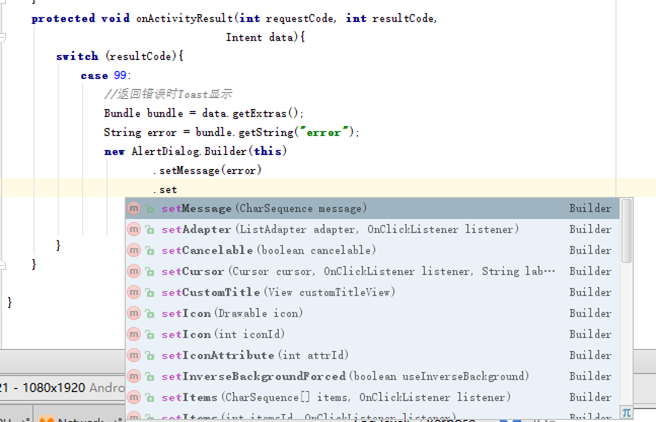
使用示例:
new AlertDialog.Builder(this).

                setTitle("确定删除?").

                setMessage("您确定删除该条信息吗?").

                setIcon(R.drawable.ic_launcher).

                setPositiveButton("确定", new DialogInterface.OnClickListener() {

                    @Override

                    public void onClick(DialogInterface dialog, int which) {

                    }

                }).

                setNegativeButton("取消", new DialogInterface.OnClickListener() {

                    @Override

                    public void onClick(DialogInterface dialog, int which) {

                    }

                }).

                setNeutralButton("查看详情", new DialogInterface.OnClickListener() {

                    @Override

                    public void onClick(DialogInterface dialog, int which) {

                    }

                }).

                .show();   //显示
Android AlertDialog的更多相关文章
- android AlertDialog常见使用
android AlertDialog常见使用 简单提示框: AlertDialog.Builder alertDialog = new AlertDialog.Builder(this); aler ...
- Android AlertDialog去除黑边白边自定义布局(转)
LayoutInflater inflater = this.getLayoutInflater(); View view = inflater.inflate(R.layout.test_alert ...
- Android alertdialog实现确认退出
package com.example.alertdialog; import android.os.Bundle; import android.app.Activity; import andro ...
- 【转】Android AlertDialog 点击对话框外部区域不关闭的设置
原文网址:http://blog.sina.com.cn/s/blog_8f1c79dd0101a63u.html 在Android开发中,常常需要调用对话框,但会遇到这样一种情况,在显示对话框的时候 ...
- Android AlertDialog全屏显示去除白色边框
使用styles.xml风格: Style.xml代码 <style name="FullScreenDialog" parent="android:style/T ...
- xamarin android alertdialog详解
说明一下:学习xamarin android一段时间,准备写一些xamarin android相关的例子,alertdialog也是使用的非常多得空间之一,非常感谢鸟巢上的小猪,我也是看着他写的教程学 ...
- 【转】Android AlertDialog自定义布局
原文网址:https://blog.csdn.net/u010694658/article/details/53022294 由于开发中经常使用弹框,然而系统自带的弹框太局限,也不太美观,经常不能满足 ...
- android AlertDialog设置点击button不退出(转)
转载于http://blog.csdn.net/csh159/article/details/8127280 使用的是java里面的反射机制: dialog = new AlertDialog.Bui ...
- android AlertDialog.Builder
AlertDialog的构造方法全部是Protected的,所以不能直接通过new一个AlertDialog来创建出一个AlertDialog. 要创建一个AlertDialog,就要用到AlertD ...
随机推荐
- JQuery入门——进度条
越来越觉得常规javascript已经跟不上节奏了,打算学点进阶的,从JQuery学起. JQuery是一个Javascript库,可以从JQuery.com下载,放到本地,用 <script ...
- Windows Azure文件共享服务--File Service
部署在Windows Azure上的虚拟机之间如何共享文件?例如:Web Server A和Web Server B组成负载均衡集群,两个服务器需要一个共享目录来存储用户上传的文件.通常,大家可能首先 ...
- 太阳系Demo(openGL)
这个是8年前写的demo,提交的一份作业,按照提出的需求点,以最快和最简单的方式完成功能,因此代码比较简单. 1)截图 2) 功能点描述: 1.公转,自传 2.基础的摄像机运动 3.正视和顶视 4.天 ...
- ZooKeeper开发手册中文翻译(转)
本文Github地址:https://github.com/sundiontheway/zookeeper-guide-cn 本文假设你已经具有一定分布式计算的基础知识.你将在第一部分看到以下内容: ...
- POJ 1696 Space Ant --枚举,模拟,贪心,几何
题意: 有很多点,从最右下角的点开始走起,初始方向水平向右,然后以后每步只能向左边走,问最多能走多少个点. 解法: 贪心的搞的话,肯定每次选左边的与它夹角最小的点,然后走过去. 然后就是相当于模拟地去 ...
- JSP中九大内置对象及其数据类型
JSP中九大内置对象为: request 请求对象 类型 javax.servlet.ServletRequest 作用域 Req ...
- Quartz集群
为什么选择Quartz: 1)资历够老,创立于1998年,比struts1还早,但是一直在更新(27 April 2012: Quartz 2.1.5 Released),文档齐全. 2)完全由Jav ...
- CSS3线性渐变和径向渐变
background:linear-gradient(to top left, blue,orange);//从右下角往左上角渐变 background:radial-gradient(to top ...
- addClass, removeClass, toggleClass(从jquery中抠出来)
<div id="d3" class="cur"></div> var mylibs = (function(){ var rtrim ...
- PAT 1008. 数组元素循环右移问题 (20)
一个数组A中存有N(N>0)个整数,在不允许使用另外数组的前提下,将每个整数循环向右移M(M>=0)个位置,即将A中的数据由(A0 A1--AN-1)变换为(AN-M -- AN-1 A0 ...