
【转】Android AlertDialog自定义布局
原文网址:https://blog.csdn.net/u010694658/article/details/53022294
由于开发中经常使用弹框,然而系统自带的弹框太局限,也不太美观,经常不能满足开发需求,所以就只能自定义布局。其实自定义布局很简单,没不要写出来,但是如果不写一遍的,后面遇到的话就感觉又会忘记,所以在次记一小笔,仅记一个最简单的例子,可以举一反三。
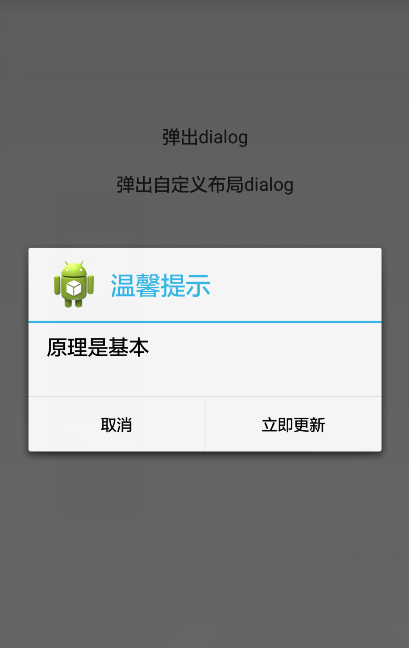
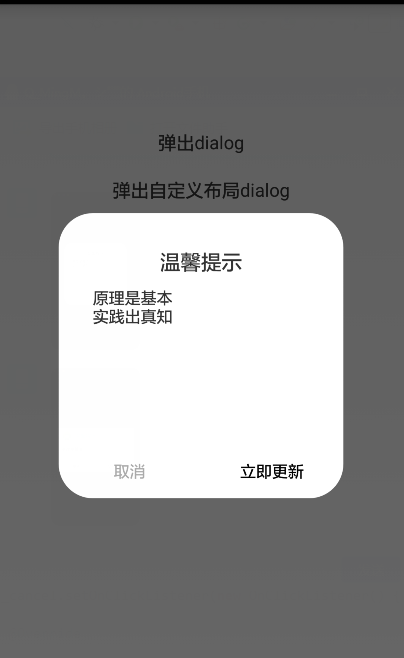
直接上代码
public class MainActivity extends Activity implements OnClickListener {

    private TextView text1, text2;

    private Context mContext;

    @Override

    protected void onCreate(Bundle savedInstanceState) {

        super.onCreate(savedInstanceState);

        requestWindowFeature(Window.FEATURE_NO_TITLE);

        setContentView(R.layout.activity_main);

        mContext = this;

        initView();

    }

    private void initView() {

        text1 = (TextView) findViewById(R.id.text1);

        text2 = (TextView) findViewById(R.id.text2);

        text1.setOnClickListener(this);

        text2.setOnClickListener(this);

    }

    @Override

    public void onClick(View v) {

        switch (v.getId()) {

        case R.id.text1:

            dialogShow1();

            break;

        case R.id.text2:

            dialogShow2();

            break;

        default:

            break;

        }

    }

    private void dialogShow1() {

        AlertDialog.Builder builder = new Builder(mContext);

        builder.setTitle("温馨提示");

        builder.setIcon(R.drawable.ic_launcher);

        builder.setMessage("原理是基本");

        builder.setNegativeButton("取消", new DialogInterface.OnClickListener() {

            @Override

            public void onClick(DialogInterface arg0, int arg1) {

                Toast.makeText(mContext, "no", 1).show();

            }

        });

        builder.setPositiveButton("立即更新",

                new DialogInterface.OnClickListener() {

                    @Override

                    public void onClick(DialogInterface arg0, int arg1) {

                        Toast.makeText(mContext, "ok", 1).show();

                    }

                });

        Dialog dialog = builder.create();

        dialog.show();

    }

    /**

     * 自定义布局

     * setView()只会覆盖AlertDialog的Title与Button之间的那部分,而setContentView()则会覆盖全部,

     * setContentView()必须放在show()的后面

     */

    private void dialogShow2() {

        AlertDialog.Builder builder = new Builder(mContext);

        LayoutInflater inflater = LayoutInflater.from(mContext);

        View v = inflater.inflate(R.layout.update_manage_dialog, null);

        TextView content = (TextView) v.findViewById(R.id.dialog_content);

        Button btn_sure = (Button) v.findViewById(R.id.dialog_btn_sure);

        Button btn_cancel = (Button) v.findViewById(R.id.dialog_btn_cancel);

        //builer.setView(v);//这里如果使用builer.setView(v),自定义布局只会覆盖title和button之间的那部分

        final Dialog dialog = builder.create();

        dialog.show();

        dialog.getWindow().setContentView(v);//自定义布局应该在这里添加,要在dialog.show()的后面

        //dialog.getWindow().setGravity(Gravity.CENTER);//可以设置显示的位置

        btn_sure.setOnClickListener(new OnClickListener() {

            @Override

            public void onClick(View v) {

                dialog.dismiss();

                Toast.makeText(mContext, "ok", 1).show();

            }

        });

        btn_cancel.setOnClickListener(new OnClickListener() {

            @Override

            public void onClick(View arg0) {

                dialog.dismiss();

                Toast.makeText(mContext, "no", 1).show();

            }

        });

    }

}
activity_main的布局
<LinearLayout xmlns:android="http://schemas.android.com/apk/res/android"

    xmlns:tools="http://schemas.android.com/tools"

    android:layout_width="match_parent"

    android:layout_height="match_parent"

    android:layout_marginTop="100dp"

    android:orientation="vertical" >

    <TextView

        android:id="@+id/text1"

        android:layout_width="match_parent"

        android:layout_height="wrap_content"

        android:layout_margin="10dp"

        android:gravity="center"

        android:text="弹出dialog"

        android:textSize="@dimen/activity_horizontal_margin" />

    <TextView

        android:id="@+id/text2"

        android:layout_width="match_parent"

        android:layout_height="wrap_content"

        android:layout_margin="10dp"

        android:gravity="center"

        android:text="弹出自定义布局dialog"

        android:textSize="@dimen/activity_horizontal_margin" />

</LinearLayout>
update_manage_dialog布局
<RelativeLayout xmlns:android="http://schemas.android.com/apk/res/android"

    xmlns:tools="http://schemas.android.com/tools"

    android:layout_width="match_parent"

    android:layout_height="match_parent"

    android:background="#00FFFFFF" >

    <RelativeLayout

        android:layout_width="250dp"

        android:layout_height="250dp"

        android:layout_centerInParent="true"

        android:background="@drawable/update_bg" >

        <TextView

            android:id="@+id/dialog_title"

            android:layout_width="match_parent"

            android:layout_height="wrap_content"

            android:layout_marginTop="30dp"

            android:gravity="center"

            android:text="温馨提示"

            android:textSize="18sp" />

        <TextView

            android:id="@+id/dialog_content"

            android:layout_width="match_parent"

            android:layout_height="wrap_content"

            android:layout_below="@+id/dialog_title"

            android:layout_marginTop="10dp"

            android:layout_marginLeft="30dp"

            android:layout_marginRight="30dp"

            android:text="原理是基本\n实践出真知"

            android:textSize="14sp" />

        <LinearLayout

            android:layout_width="match_parent"

            android:layout_height="wrap_content"

            android:layout_alignParentBottom="true"

            android:orientation="horizontal" >

            <Button

                android:id="@+id/dialog_btn_cancel"

                android:layout_width="0dp"

                android:layout_height="wrap_content"

                android:layout_weight="1"

                android:background="@null"

                android:text="取消"

                android:textColor="#AAAAAA"

                android:textSize="14sp" />

            <Button

                android:id="@+id/dialog_btn_sure"

                android:layout_width="0dp"

                android:layout_height="wrap_content"

                android:layout_weight="1"

                android:background="@null"

                android:text="立即更新"

                android:textSize="14sp" />

        </LinearLayout>

    </RelativeLayout>

</RelativeLayout>
update_bg放在drawable里面,代码如下
<?xml version="1.0" encoding="utf-8"?>

<shape xmlns:android="http://schemas.android.com/apk/res/android" >

    <!-- android:radius 弧形的半径 -->

    <corners android:radius="30dp" />

    <!-- 填充的颜色 -->

    <solid android:color="@android:color/white" />

</shape>
【转】Android AlertDialog自定义布局的更多相关文章
- Android 创建自定义布局
我们所有的控件都是继承至View类的,而所有的布局都是继承至ViewGroup的,所以我们也可以继承某个view类来实现我们自己的布局或者控件. 引入布局 我们新建一个title.xml的layout ...
- 获取 AlertDialog自定义的布局 的控件
AlertDialog自定义的布局 效果图: 创建dialog方法的代码如下: 1 LayoutInflater inflater = getLayoutInflater(); 2 View layo ...
- Android之自定义AlertDialog和PopupWindow实现(仿微信Dialog)
我们知道,在很多时候,我们都不用Android内置的一些控件,而是自己自定义一些自己想要的控件,这样显得界面更美观. 今天主要是讲自定义AlertDialog和popupWindow的使用,在很多需求 ...
- Android之自定义AlertDialog无法监听控件
参考:http://www.cnblogs.com/511mr/archive/2011/10/21/2220253.html 要做一个自定义的弹出框,以前都是用一个Activity来实现,总觉得不是 ...
- Android:创建可穿戴应用 - 自定义布局
创建自定义布局(Creating Custom Layouts) 本文将介绍如何创建自定义通知以及使用可穿戴UI库来创建自定义布局你同时还需要了解可穿戴设计准则(Wear Design Princip ...
- 【Android基础】listview控件的使用(4)-----自定义布局的listview的使用
前面我介绍了listview控件的不同用法,但是这些用法在实际的开发项目中是不足以满足需求的,因为前面的几种用法只能简单的显示文本信息,而且布局都比较单一,很难做出复杂的结果,在实际的开发项目中,90 ...
- Android开发学习之路--UI之自定义布局和控件
新的一年已经开始了,今天已经是初二了,两天没有学习了,还是要来继续学习下.一般手机的title都是actionbar,就像iphone一样可以后退,可以编辑.这里自定义布局就来实现下这个功能,首先准备 ...
- Android创建自定义的布局和控件
Android的自带布局有framelayout.linerlayout.relativelayout,外加两个百分比布局,但是这些无法灵活的满足我们的需要,所以我们要自己自定义并引入自己的布局.首先 ...
- android 开发 使用自定义布局实现标题栏复用(标题栏内容自定义:使用代码实现和xml布局自定义属性2种办法实现)
在个人学习的情况下可能很少使用自定义布局去实现大量复用的情况下,但是在一个开发工作的环境下就会使用到大量复用的自定义控件. 实现思维: 1.写一个xml的布局,用于标题栏的样式,并且添加在标题栏中你想 ...
随机推荐
- L252 小组作业
Hans: Hi Good morning everyone! Let me introduce a new colleague for you, Berry Berry: Hi Good morni ...
- libusb示例
#include <stdio.h> #include <libusb-1.0/libusb.h> #include <stdint.h> #include < ...
- 解决org.springframework.beans.factory.NoSuchBeanDefinitionException: No bean named 'cacheManager' is defined
在Spring配置文件中加入了支持注解,即<mvc:annotation-driven/> 重新启动服务器包 org.springframework.beans.factory.NoSuc ...
- 界面设计-Edit控件的Style设置
以下文字转贴ChinaCock QQ 223717588群: 1. 首先在Form上放一个TEdit类型控件Edit1,最终的效果如下图: 2.选中控件Edit1,点击鼠标右键,在弹出菜单中选择“Ed ...
- linux各种系统下载地址
1.Arch Linux Arch Linux在安装过程中提供了强大的可定制选择,支持你下载和安装自己所需的程序包.虽然这个选择对新手来说没有多大的帮助,但是它确实能够帮助那些使用Arch构建系统和存 ...
- 2--Jmeter 4.0--Excel 数据驱动 接口测试
Excel 模板 通过jmeter的csv data set config 读取 Jmeter注意事项 (1)数据驱动 1..JDBC :SQL 存储在excel中,无法将where条件对应的jmet ...
- 什么是虚拟DOM?为啥虚拟DOM可以提升性能?
现在流行的框架无论是React还是vue,都采用的是虚拟DOM 采用虚拟DOM的好处是,当数据变化的时候,无需像Backbone那样整体重新渲染,而是局部刷新变化部分 所谓虚拟DOM,其实就说用Jav ...
- [转]PLA算法总结及其证明
PLA算法总结及其证明 http://m.blog.csdn.net/article/details?id=45232891 分类: 机器学习 PLA(Perception Learning Algo ...
- Java 经典面试题 —— 性能
1. 性能 String.StringBuffer 与 StringBuilder 两个字符串相加,str1+str2,相当于执行: StringBuilder strBuilder1 = new S ...
- Java中的访问权限细谈
一.成员访问控制权限 作用域 当前类 当前包 子孙类 其他包 public √ √ √ √ protected √ √ √ X private √ X X X default √ √ 当前包下继承可以 ...