
python file模块 替换输入内容脚本
 root@python-10:/home/liujianzuo/python/test# ls

 passwd  rc.local  test1

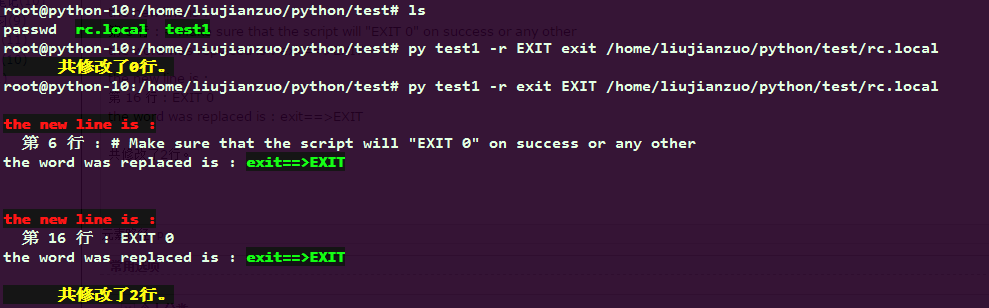
 root@python-10:/home/liujianzuo/python/test# py test1 -r EXIT exit /home/liujianzuo/python/test/rc.local

       共修改了0行。

 root@python-10:/home/liujianzuo/python/test# py test1 -r exit EXIT /home/liujianzuo/python/test/rc.local

 the new line is :

   第 6 行 : # Make sure that the script will "EXIT 0" on success or any other

 the word was replaced is : exit==>EXIT

 the new line is :

   第 16 行 : EXIT 0

 the word was replaced is : exit==>EXIT

       共修改了2行。

 root@python-10:/home/liujianzuo/python/test# cat test1

 #coding:utf-8

 #!/usr/bin/env python

 import sys,os,subprocess

 #a="liujianzuo"

 if len(sys.argv) < 5:

     exit("argc less than 4;like python test.py -r 准备替换的字符 要替换的字符 file_path_name")

 if '-r' in sys.argv:

     ar1=sys.argv.index('-r')

     ar2=sys.argv[ar1+ 1]

     ar3=sys.argv[ar1 + 2]

     filname= sys.argv[ar1 + 3]

 else:

     exit("the first argv must be -r ")

 basedir = "%s/%s"%(os.path.dirname(filname),os.path.basename(filname))

 f=file('%s'%basedir,"r+")

 sum1=0

 numli=0

 while True:

     line=f.readline()

     numli+=1

     #print line

     if ar2 in line:

        # print "now pos+++>",f.tell()

         f.seek(f.tell()-len(line))

         #print f.tell()

         new_line=line.replace(ar2,ar3)

         f.write(new_line)

         print """

 \033[31;1mthe new line is :\033[0m

   第 %s 行 : %s

 the word was replaced is : \033[32;1m%s==>%s\033[0m

         """ % (numli,new_line.strip(),ar2,ar3)

         sum1+=1

         continue

         if line == "":

             print "file is done  bye"

             break

     elif line == "":

         break

 print "\033[33;1m      共修改了%s行。\033[0m"%sum1

 f.close()
python file模块 替换输入内容脚本的更多相关文章
- 批量替换存储过程内容脚本sp_SqlReplace
开始 在数据库开发过程中,如果某一个表字段名被重命名.那么在使用到该字段的存储过程,对应的表字段名也要修改. 当存在多个存储都有使用该表字段,需要逐个去修改替换,是一件比较繁琐的事情,我们需要一个能实 ...
- python全局替换文件内容脚本第1版
#!/usr/bin/python #coding=utf8 """ # Author: xiaoyafei # Created Time : 2018-05-08 09 ...
- python中从键盘输入内容的方法raw_input()和input()的区别
raw_input()输出结果都是字符串 Input()输入什么内容,输出就是什么内容
- Python sh模块--------替换subprocess的利器
官方文档有句话"allows you to call any program",并且: helps you write shell scripts in Python by giv ...
- 孤荷凌寒自学python第三十五天python的文件操作之针对文件操作的os模块的相关内容
孤荷凌寒自学python第三十五天python的文件操作之针对文件操作的os模块的相关内容 (完整学习过程屏幕记录视频地址在文末,手写笔记在文末) 一.打开文件后,要务必记得关闭,所以一般的写法应当 ...
- python 操作excel实现替换特定内容
本文介绍使用python语言,借助openyxl库来实现操作excel(xlsx)文件,实现替换特定内容的需求. 目前实现了3个小功能: 1. 全字匹配替换(mode1):(如:全字匹配 yocich ...
- Python基于正则表达式实现文件内容替换的方法
Python基于正则表达式实现文件内容替换的方法 本文实例讲述了Python基于正则表达式实现文件内容替换的方法.分享给大家供大家参考,具体如下: 最近因为有一个项目需要从普通的服务器移植到SAE,而 ...
- python file对象测试数据的读写操作及OS模块介绍(四)
import from....import 引入模块 引入类 ①import 如果文件在lib下而且是python模块 :import 模块名. ②from....import from 包名.包 ...
- Python+Selenium自动化-清空输入框、输入内容、点击按钮
Python+Selenium自动化-清空输入框.输入内容.点击按钮 1.输入内容 send_keys('valve'):输入内容valve #定位输入框 input_box = browser. ...
随机推荐
- 使用Adobe Edge Inspect在各种设备中轻松测试同一页面
有过移动网站开发经历的开发者都知道,在各种设备中测试同一页面是一项非常繁琐的工作.现在,我们可以使用Adobe Edge Inspect来简化这一工作.如果使用Edge Inspect,可以在各种设备 ...
- ACM 交换输出
交换输出 时间限制:3000 ms | 内存限制:65535 KB 难度:1 描述 输入n(n<100)个数,找出其中最小的数,将它与最前面的数交换后输出这些数.(如果这个第一个数就是最 ...
- 洛谷 P1546 最短网络 Agri-Net Label:Water最小生成树
题目背景 农民约翰被选为他们镇的镇长!他其中一个竞选承诺就是在镇上建立起互联网,并连接到所有的农场.当然,他需要你的帮助. 题目描述 约翰已经给他的农场安排了一条高速的网络线路,他想把这条线路共享给其 ...
- BZOJ 1045 题解
1045: [HAOI2008] 糖果传递 Time Limit: 10 Sec Memory Limit: 162 MBSubmit: 3502 Solved: 1623[Submit][Sta ...
- 【BZOJ1067】【POJ2637】降雨量
1067: [SCOI2007]降雨量 Time Limit: 1 Sec Memory Limit: 162 MBSubmit: 3004 Solved: 767[Submit][Status] ...
- C语言(4)
C语言(4)--数据类型 C语言在用“/”是,注意左右两边都是整数时,商也是只有整数部分. 下面介绍一下C语言常用的数据类型: 注意: 1.char类型数据范围:256中字符. 2.float和do ...
- 深入浅出 - Android系统移植与平台开发(六)- 为Android启动加速
作者:唐老师,华清远见嵌入式学院讲师. Android的启动速度一直以来是他的诟病,虽然现在Android设备的硬件速度越来越快,但是随着新 版本的出现,其启动速度一直都比较慢,当然,作为程序员,我们 ...
- C#后台如何获取客户端访问系统型号
ASP.NET获取客户端.服务器端基础信息 . 在ASP.NET中专用属性: 获取服务器电脑名:Page.Server.ManchineName 获取用户信息:Page.User 获取客户端电脑名:P ...
- 通过hibernate session.connection()获得数据库连接时,导致的查询缓慢甚至假死机问题
在使用hibernate的应用中,如果需要直接使用Java.sql.Connection,一般我们是通过hibernate的session.connection()获得的,然后session.clos ...
- poi excel导入
poi.jar包 import java.io.File;import java.io.FileInputStream;import java.io.IOException; import org.a ...