
[Asp.net]SignalR实现实时日志监控
摘要
昨天吃饭的时候,突然想起来一个好玩的事,如果能有个页面可以实时的监控网站或者其他类型的程序的日志,其实也不错。当然,网上也有很多成熟的类似的监控系统。就想着如果通过.net该如何实现?所以就在想,通过系统内部将消息推送到前端,.net中可以通过pull或者push的方式,pull通常的做法就是ajax方式不停的请求一个接口,这种方式,不太理想。然后就在想如何通过服务端想客户端推送消息。之前看到过SignalR方面的文章可以实现push的功能,signalr也是第一次接触,在这个网站http://www.asp.net/signalr看了一些文章。就自己动手做了这样的日志监控的demo。
一个简单的例子
先上一段代码,如下:
该类是一个监控日志文件是否变化的一个单例类。其中维护一个日志队列。
    public class FileSystemWatcherSingle

    {

        public FileSystemWatcher wather;

        private static FileSystemWatcherSingle _instance;

        private static readonly object _objLock = new object();

        public Queue<Log> MyQueue;

        private string _watherFolderPath = Path.Combine(AppDomain.CurrentDomain.BaseDirectory, "Log");

        private FileSystemWatcherSingle()

        {

            if (MyQueue == null)

            {

                MyQueue = new Queue<Log>();

            }

            if (wather == null)

            {

                wather = new FileSystemWatcher();

                if (!Directory.Exists(_watherFolderPath))

                {

                    Directory.CreateDirectory(_watherFolderPath);

                }

                wather.Path = _watherFolderPath;

                wather.EnableRaisingEvents = true;

            }

        }

        public static FileSystemWatcherSingle CreateInstance()

        {

            if (_instance == null)

            {

                lock (_objLock)

                {

                    if (_instance == null)

                    {

                        _instance = new FileSystemWatcherSingle();

                    }

                }

            }

            return _instance;

        }

    }
写日志的操作
在写入文件之前,将当前的日志加入到日志队列里面。
using Newtonsoft.Json;

using System;

using System.Collections.Generic;

using System.IO;

using System.Linq;

using System.Web;

namespace Wolfy.LogMonitor.Models

{

    public class LogHelper

    {

        public static void WriteLog(Log log)

        {

            string dir = Path.Combine(AppDomain.CurrentDomain.BaseDirectory, "Log");

            if (!Directory.Exists(dir))

            {

                Directory.CreateDirectory(dir);

            }

            string _watherFilePath = Path.Combine(dir, DateTime.Now.ToString("yyyy-MM-dd") + ".log");

            if (!File.Exists(_watherFilePath))

            {

                File.Create(_watherFilePath);

            }

            FileSystemWatcherSingle wather = FileSystemWatcherSingle.CreateInstance();

            wather.MyQueue.Enqueue(log);

            File.AppendAllText(_watherFilePath, string.Format("{0} {1}\r\n{2}", log.Type.ToString(), log.Dt, log.Content));

        }

    }

}
LogHub类
需要安装SignalR,在安装完成时,有个Readme文件,根据里面的提示,需要添加StartUp类,添加对应的owin程序集。
using Microsoft.Owin;

using Owin;

using System;

using System.Collections.Generic;

using System.Linq;

using System.Web;

using Wolfy.LogMonitor.App_Start;

[assembly: OwinStartup(typeof(Startup))]

namespace Wolfy.LogMonitor.App_Start

{

    public class Startup

    {

        public void Configuration(IAppBuilder app)

        {

            app.MapSignalR();

        }

    }

}
LogHub继承Hub类,并在这里想所有客户端推送消息。并在这里面面为文件监控类FileSystemWatcher注册创建和Change事件。
using System;

using System.Collections.Generic;

using System.Linq;

using System.Web;

using Microsoft.AspNet.SignalR;

using Microsoft.AspNet.SignalR.Hubs;

using System.Timers;

using Newtonsoft.Json;

namespace Wolfy.LogMonitor.Models

{

    [HubName("logHub")]

    public class LogHub : Hub

    {

        private FileSystemWatcherSingle fileWather;

        public void Send(string name, string message)

        {

            // Call the addNewMessageToPage method to update clients.

            Clients.All.addNewMessageToPage(name, message);

        }

        public LogHub()

        {

            fileWather = FileSystemWatcherSingle.CreateInstance();

            fileWather.wather.Changed += wather_Changed;

            fileWather.wather.Created += wather_Created;

        }

        void wather_Created(object sender, System.IO.FileSystemEventArgs e)

        {

            this.Send("system", "创建文件:" + e.Name);

        }

        void wather_Changed(object sender, System.IO.FileSystemEventArgs e)

        {

            while (fileWather.MyQueue != null && fileWather.MyQueue.Count > )

            {

                Log log = fileWather.MyQueue.Dequeue();

                if (log != null)

                {

                    this.Send(log.Type.ToString(), JsonConvert.SerializeObject(log));

                }

            }

        }

    }

}
前端
home:log展示的页面。根据日志类型为该条日志显示不同的颜色。
@{

    ViewBag.Title = "Home";

}

<div id="container">

</div>

<script>

    $(function () {

        // Reference the auto-generated proxy for the hub.

        var log = $.connection.logHub;

        console.log(log);

        // Create a function that the hub can call back to display messages.

        log.client.addNewMessageToPage = function (name, message) {

            console.log(name);

            console.log(message);

            // Add the message to the page.

            if (name === "Info") {

                $('#container').append('<p style="color:green;">' + message + '</p>');

            } else {

                $('#container').append('<p style="color:red;">' + message + '</p>');

            }

        };

        // Start the connection.

        $.connection.hub.start().done();

    });

</script>
LogController
Test页面是一个测试页面,通过不停的刷新写入随机类型的日志。
using System;

using System.Collections.Generic;

using System.Linq;

using System.Web;

using System.Web.Mvc;

using Wolfy.LogMonitor.Models;

namespace Wolfy.LogMonitor.Controllers

{

    public class LogController : Controller

    {

        // GET: Log

        public ActionResult Home()

        {

            return View();

        }

        public ActionResult Test()

        {

            LogType[] logtypes = { LogType.Info, LogType.Error };

            Random r = new Random();

            int index = r.Next(, );

            LogHelper.WriteLog(new Log { Content = "这是一次日志", Dt = DateTime.Now, Type = logtypes[index] });

            return View();

        }

    }

}
好了,到现在基本上大功告成。测试一下。
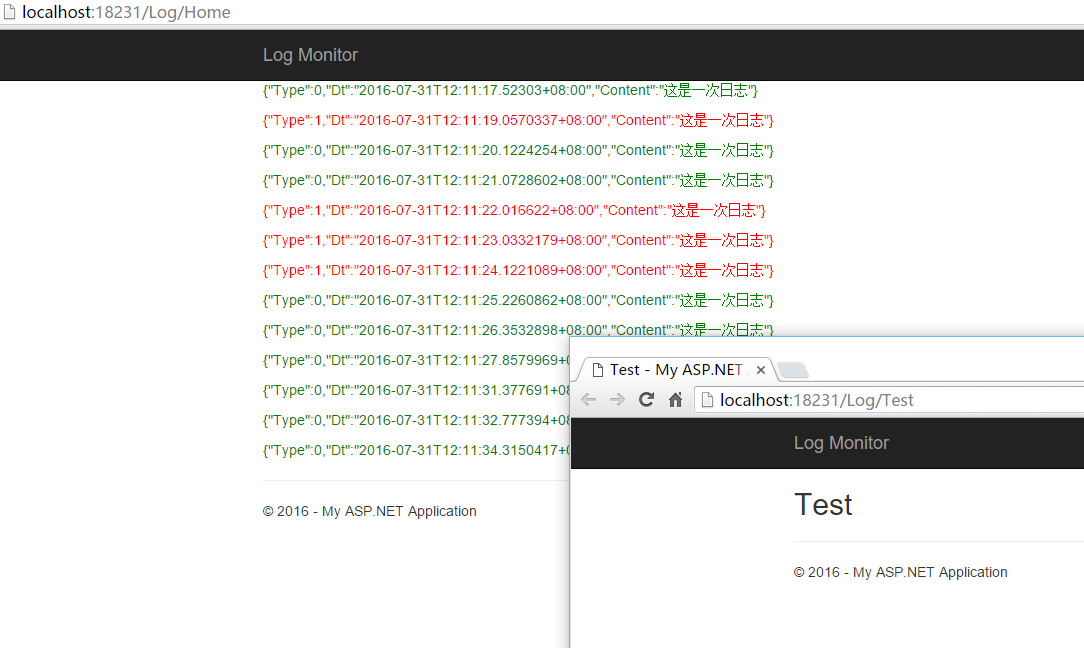
通过不停的刷新test页面,你会发现home页面上会相应的动态展示这次操作的日志。
总结
昨天突然有这个想法,今天就折腾了一上午,将这个想法用代码实现了一下。这里没有signalr的相关介绍,感兴趣的话,可以看下面的参考资料中的内容。
参考资料
http://www.asp.net/signalr
[Asp.net]SignalR实现实时日志监控的更多相关文章
- SignalR实现实时日志监控
.net SignalR实现实时日志监控 摘要 昨天吃饭的时候,突然想起来一个好玩的事,如果能有个页面可以实时的监控网站或者其他类型的程序的日志,其实也不错.当然,网上也有很多成熟的类似的监控系统 ...
- Asp.net SignalR 让实时通讯变得如此简单
巡更项目中,需要发送实时消息,以及需要任务开始提醒,于是便有机会接触到SignalR,在使用过程中,发现用SignalR实现通信非常简单,下面我思明将从三个方面分享一下: 一.SignalR是什么 A ...
- [ASP.NET] 使用 ASP.NET SignalR 添加实时 Web
ASP.NET SignalR 是为 ASP.NET 开发人员提供的一个库,可以简化开发人员将实时 Web 功能添加到应用程序的过程.实时 Web 功能是指这样一种功能:当所连接的客户端变得可用时服务 ...
- Asp.net SignalR 让实时通讯变得简单
巡更项目中,需要发送实时消息,以及需要任务开始提醒,于是便有机会接触到SignalR,在使用过程中,发现用SignalR实现通信非常简单,下面我思明将从三个方面分享一下: 一.SignalR是什么 A ...
- 使用 ASP.NET SignalR实现实时通讯
ASP.NET SignalR 是为 ASP.NET 开发人员提供的一个库,可以简化开发人员将实时 Web 功能添加到应用程序的过程.实时 Web 功能是指这样一种功能:当所连接的客户端变得可用时服务 ...
- 用SignalR实现实时查看WebAPI请求日志
实现的原理比较直接,定义一个MessageHandler记录WebAPI的请求记录,然后将这些请求日志推送到客户端,客户端就是一个查看日志的页面,实时将请求日志展示在页面中. 这个例子的目的是演示如何 ...
- asp.net core结合NLog搭建ELK实时日志分析平台
0.整体架构 整体架构目录:ASP.NET Core分布式项目实战-目录 一.介绍ELK 1.说明(此篇ELK采用rpm的方式安装在服务器上)-牛刀小试 承接上一篇文章的内容准备部署ELK来展示asp ...
- ASP.NET Core之跨平台的实时性能监控(2.健康检查)
前言 上篇我们讲了如何使用App Metrics 做一个简单的APM监控,最后提到过健康检查这个东西. 这篇主要就是讲解健康检查的内容. 没看过上篇的,请移步:ASP.NET Core之跨平台的实时性 ...
- C# ASP.NET MVC 之 SignalR 学习 实时数据推送显示 配合 Echarts 推送实时图表
本文主要是我在刚开始学习 SignalR 的技术总结,网上找的学习方法和例子大多只是翻译了官方给的一个例子,并没有给出其他一些经典情况的示例,所以才有了本文总结,我在实现推送简单的数据后,就想到了如何 ...
随机推荐
- VirtualBox提示:错误,创建一个新任务失败,被召者解决办法
被召者 RC: REGDB_E_CLASSNOTREG (0x80040154) 目前有两种解决办法: 解决方法一: 打开命令窗口(快捷键:窗口键+R,输入cmd点击确定) 输入cd D:\Progr ...
- C语言之贪吃蛇
利用链表的贪吃蛇,感觉自己写的时候还是有很多东西不熟悉, 1.预编译 2.很多关于系统的头文件也不是很熟悉 3.关于内存 第一个是.h头文件 #ifndef _SNAKE_H_H_H #define ...
- 【BZOJ-4519】不同的最小割 最小割树(分治+最小割)
4519: [Cqoi2016]不同的最小割 Time Limit: 20 Sec Memory Limit: 512 MBSubmit: 393 Solved: 239[Submit][Stat ...
- Linux Dynamic Shared Library && LD Linker
目录 . 动态链接的意义 . 地址无关代码: PIC . 延迟版定(PLT Procedure Linkage Table) . 动态链接相关结构 . 动态链接的步骤和实现 . Linux动态链接器实 ...
- iOS @property的默认属性
我是一个比较懒的人,很多情况下@property都不喜欢加属性…所以必须了解默认情况下哪些是已经有的,哪些在需要时是必须要加的. 原文链接:http://blog.sina.com.cn/s/blog ...
- TypeScript Basic Types(基本类型)
在学习TypeScript之前,我们需要先知道怎么才能让TypeScript写的东西正确的运行起来.有两种方式:使用Visual studio 和使用 NodeJs. 这里我选择的是NodeJs来编译 ...
- HDU 2795 Billboard(线段树)
题目链接: 传送门 Billboard Time Limit: 2000MS Memory Limit: 32768 K Description At the entrance to the ...
- ARPSpoofing教程(二) - 获取网络设备中的详细地址信息
WinPcap中文API http://www.ferrisxu.com/WinPcap/html/index.html 1: #include"pcap.h" 2: #incl ...
- 《JavaScript权威指南》学习笔记 第四天 数组
昨天学习了js的对象,了解了js的原型链.在js里面万事万物皆对象,只不过一些原始类型要经过包装对象的包装才能暂时变为对象.数组的本质是什么呢?数组其实就是一组数,也就是链表.每个数只是这个链表上的一 ...
- Mysql学习笔记(四)聊聊数据库索引
小心情(可直接跳到分割线后) 今天心情好些了.一些浓的化不开的坏情绪,也渐渐的在晚上解决掉一个复杂的逻辑问题后,渐渐消散了. 今天中午去吃饭的时候,坤哥漫不经心的说:'我这么多年终于悟出了一个道理,人 ...