
WebAPI 2参数绑定方法
简单类型参数
Example 1: Sending a simple parameter in the Url
[RoutePrefix("api/values")]

public class ValuesController : ApiController

{

  // http://localhost:49407/api/values/example1?id=2

  [Route("example1")]

  [HttpGet]

  public string Get(int id)

  {

     return "value";

  }

}
Example 2: Sending simple parameters in the Url
// http://localhost:49407/api/values/example2?id1=1&id2=2&id3=3

[Route("example2")]

[HttpGet]

public string GetWith3Parameters(int id1, long id2, double id3)

{

    return "value";

}
Example 3: Sending simple parameters using attribute routing
// http://localhost:49407/api/values/example3/2/3/4

[Route("example3/{id1}/{id2}/{id3}")]

[HttpGet]

public string GetWith3ParametersAttributeRouting(int id1, long id2, double id3)

{

   return "value";

}
Example 4: Sending an object in the Url
// http://localhost:49407/api/values/example4?id1=1&id2=2&id3=3

[Route("example4")]

[HttpGet]

public string GetWithUri([FromUri] ParamsObject paramsObject)

{

  return "value:" + paramsObject.Id1;

}
Example 5: Sending an object in the Request body
[Route("example5")]

[HttpPost]

public string GetWithBody([FromBody] ParamsObject paramsObject)

{

  return "value:" + paramsObject.Id1;

}
注意 [FromBody] 只能用一次,多于一次将不能正常工作
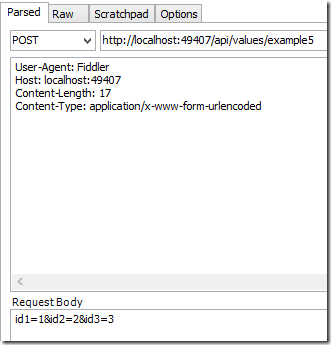
Calling the method using Urlencoded in the body:
User-Agent: Fiddler

Host: localhost:49407

Content-Length: 32

Content-Type: application/x-www-form-urlencoded

id1=1&id2=2&id3=3
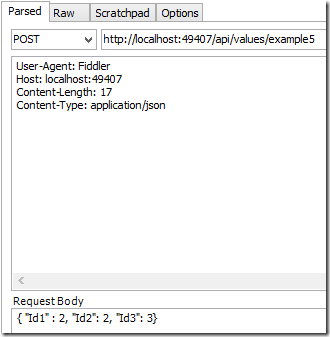
Calling the method using Json in the body:
User-Agent: Fiddler

Host: localhost:49407

Content-Length: 32

Content-Type: application/json

{ "Id1" : 2, "Id2": 2, "Id3": 3}
Calling the method using XML in the body
This requires extra code in the Global.asax
protected void Application_Start()

{

   var xml = GlobalConfiguration.Configuration.Formatters.XmlFormatter;

   xml.UseXmlSerializer = true;

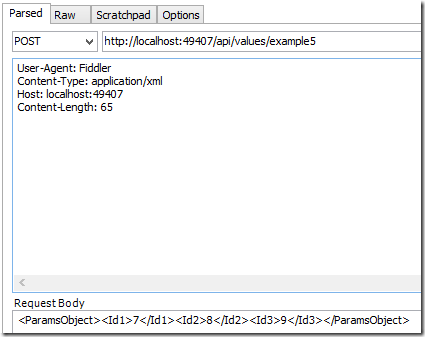
The client request is as follows:

User-Agent: Fiddler

Content-Type: application/xml

Host: localhost:49407

Content-Length: 65

<ParamsObject><Id1>7</Id1><Id2>8</Id2><Id3>9</Id3></ParamsObject>
数组和列表(Array,List)
Example 6: Sending a simple list in the Url
// http://localhost:49407/api/values/example6?paramsObject=2,paramsObject=4,paramsObject=9

[Route("example6")]

[HttpGet]

public string GetListFromUri([FromUri] List<int> paramsObject)

{

  if (paramsObject != null)

  {

	return "recieved a list with length:" + paramsObject.Count;

  }

  return "NOTHING RECIEVED...";

}
Example 7: Sending an object list in the Body
// http://localhost:49407/api/values/example8

[Route("example8")]

[HttpPost]

public string GetListFromBody([FromBody] List<ParamsObject> paramsList)

{

  if (paramsList != null)

  {

     return "recieved a list with length:" + paramsList.Count;

  }

  return "NOTHING RECIEVED...";

}
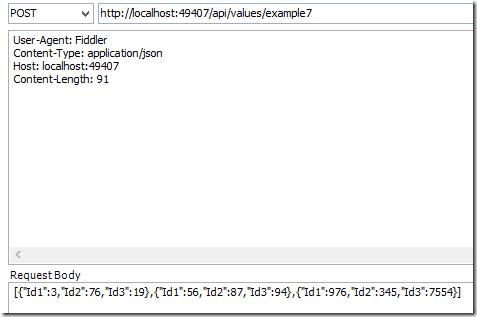
Calling with Json:
User-Agent: Fiddler

Content-Type: application/json

Host: localhost:49407

Content-Length: 91

[{"Id1":3,"Id2":76,"Id3":19},{"Id1":56,"Id2":87,"Id3":94},{"Id1":976,"Id2":345,"Id3":7554}]
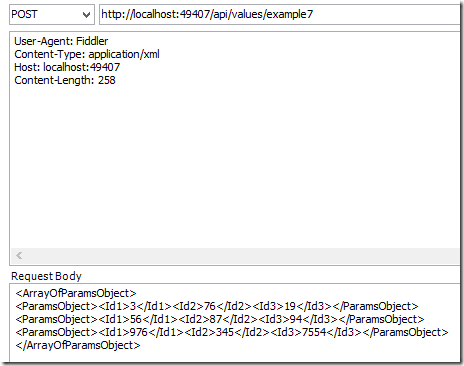
Calling with XML:
User-Agent: Fiddler

Content-Type: application/xml

Host: localhost:49407

Content-Length: 258

<ArrayOfParamsObject>

<ParamsObject><Id1>3</Id1><Id2>76</Id2><Id3>19</Id3></ParamsObject>

<ParamsObject><Id1>56</Id1><Id2>87</Id2><Id3>94</Id3></ParamsObject>

<ParamsObject><Id1>976</Id1><Id2>345</Id2><Id3>7554</Id3></ParamsObject>

</ArrayOfParamsObject>
Example 8: Sending object lists in the Body
[Route("example8")]

[HttpPost]

public string GetListsFromBody([FromBody] List<List<ParamsObject>> paramsList)

{

  if (paramsList != null)

  {

	return "recieved a list with length:" + paramsList.Count;

  }

  return "NOTHING RECIEVED...";

}
This is a little bit different to the previous examples. The body can only send one single object to Web API. Because of this, the lists of objects are wrapped in a list or a parent object.
POST http://localhost:49407/api/values/example8 HTTP/1.1

User-Agent: Fiddler

Content-Type: application/json

Host: localhost:49407

Content-Length: 185

[

 [

  {"Id1":3,"Id2":76,"Id3":19},

  {"Id1":56,"Id2":87,"Id3":94},

  {"Id1":976,"Id2":345,"Id3":7554}

 ],

 [

  {"Id1":3,"Id2":76,"Id3":19},

  {"Id1":56,"Id2":87,"Id3":94},

  {"Id1":976,"Id2":345,"Id3":7554}

 ]

]
自定义参数
What if the default parameter binding is not enough? Then you can use the ModelBinder class to change your parameters and create your own parameter formats. You could also use ActionFilters for this. Many blogs exist which already explains how to use the ModelBinder class. See the links underneath.
文件和二进制
Files or binaries can also be sent to Web API methods. The articledemonstrates how to do this.
参考
http://aspnet.codeplex.com/SourceControl/latest#Samples/WebApi/CustomParameterBinding/
http://www.asp.net/web-api/overview/formats-and-model-binding/parameter-binding-in-aspnet-web-api
http://www.roelvanlisdonk.nl/?p=3505
http://stackoverflow.com/questions/14628576/passing-an-json-array-to-mvc-web-api-via-get
WebAPI 2参数绑定方法的更多相关文章
- WebApi 参数绑定方法
WebAPI 2参数绑定方法 简单类型参数 Example 1: Sending a simple parameter in the Url 01 02 03 04 05 06 07 08 09 ...
- ASP.NET WebAPI 05 参数绑定
ParameterBindingAttribute 在上一篇中重点讲了ModelBinderAttribute的使用场景.这一篇详细的讲一下ModelBinder背后的参数绑定原理. ModelBin ...
- springMVC使用HandlerMethodArgumentResolver 自定义解析器实现请求参数绑定方法参数
http://blog.csdn.net/truong/article/details/30971317 http://blog.csdn.net/fytain/article/details/439 ...
- [译]WebAPI下的如何实现参数绑定
本文将概述在WebAPI方式下将如何将参数绑定到一个action方法,包括参数是如何被读取,一系列规则决定特定环境采用的那种绑定方式,文章最后将给出一些实际的例子. Parameter binding ...
- SpringMVC-简单参数绑定
SpringMVC-简单参数绑定 众所周知,springmvc是用来处理页面的一些请求,然后将数据再通过视图返回给用户的,前面的几篇博文中使用的都是静态数据,为了能快速入门springmvc,在 ...
- 使用ASP.Net WebAPI构建REST服务(四)——参数绑定
默认绑定方式 WebAPI把参数分成了简单类型和复杂类型: 简单类型主要包括CLR的primitive types,(int.double.bool等),系统内置的几个strcut类型(TimeSpa ...
- WebAPI下的如何实现参数绑定
本文将概述在WebAPI方式下将如何将参数绑定到一个action方法,包括参数是如何被读取,一系列规则决定特定环境采用的那种绑定方式,文章最后将给出一些实际的例子. Parameter binding ...
- WebAPI路由、参数绑定
一.测试Web API a)测试Web API可以用来检测请求和返回数据是否正常,可以使用Fiddler.Postman等工具.以Fiddler为例,这是一个http协议调试代理工具,它能够记录客 ...
- 使用@RequestParam绑定请求参数到方法参数
@RequestParam注解用于在控制器中绑定请求参数到方法参数.用法如下:@RequestMapping public void advancedSearch( @RequestParam(& ...
随机推荐
- 故障重现(内存篇2),JAVA内存不足导致频繁回收和swap引起的性能问题
背景起因: 记起以前的另一次也是关于内存的调优分享下 有个系统平时运行非常稳定运行(没经历过大并发考验),然而在一次活动后,人数并发一上来后,系统开始卡. 我按经验开始调优,在每个关键步骤的加入如 ...
- shell注释
sh里没有多行注释,只能每一行加一个#号.只能像这样: #-------------------------------------------- # 这是一个自动打ipa的脚本,基于webfrogs ...
- 开源:Taurus.MVC 框架
为什么要创造Taurus.MVC: 记得被上一家公司忽悠去负责公司电商平台的时候,情况是这样的: 项目原版是外包给第三方的,使用:WebForm+NHibernate,代码不堪入目,Bug无限,经常点 ...
- C# i=0;i=i++,i的值是多少?
昨天看群里dalao们聊天,有一个人出来问这个问题 这个题应该是挺常见的 int i = 0, t; for(t = 0;t <= 5;t++) { ...
- (系统架构)标准Web系统的架构分层
标准Web系统的架构分层 1.架构体系分层图 在上图中我们描述了Web系统架构中的组成部分.并且给出了每一层常用的技术组件/服务实现.需要注意以下几点: 系统架构是灵活的,根据需求的不同,不一定每一层 ...
- 网站定位之---根据IP获得区域
记得以前做一个培训机构网站时候需要定位,那时候用的搜狐的api,不是很精准. demo:https://github.com/dunitian/LoTCodeBase/tree/master/NetC ...
- JAVA GUI编程学习笔记目录
2014年暑假JAVA GUI编程学习笔记目录 1.JAVA之GUI编程概述 2.JAVA之GUI编程布局 3.JAVA之GUI编程Frame窗口 4.JAVA之GUI编程事件监听机制 5.JAVA之 ...
- 反应器(Reactor)和主动器(Proactor)
网络方面用的比较多的库是libevent和boost.asio,两者都是跨平台的.其中libevent是基于Reactor实现的,而boost.asio是基于Proactor实现的.Reactor和P ...
- 原生JavaScript实现hasClass、addClass、removeClass、toggleClass
兼容IE6+,因IE6.IE7.IE8不支持Array.prototype.indexOf()和String.prototype.trim(),分别用Polyfill实现支持. 详细: indexOf ...
- 开源 iOS 项目分类索引大全 - 待整理
开源 iOS 项目分类索引大全 GitHub 上大概600个开源 iOS 项目的分类和介绍,对于你挑选和使用开源项目应该有帮助 系统基础库 Category/Util sstoolkit 一套Cate ...