
WebApi 参数绑定方法
WebAPI 2参数绑定方法
简单类型参数
Example 1: Sending a simple parameter in the Url
|
01
02
03
04
05
06
07
08
09
10
11
|
[RoutePrefix("api/values")]public class ValuesController : ApiController{ // http://localhost:49407/api/values/example1?id=2 [Route("example1")] [HttpGet] public string Get(int id) { return "value"; }} |
Example 2: Sending simple parameters in the Url
|
01
02
03
04
05
06
07
|
// http://localhost:49407/api/values/example2?id1=1&id2=2&id3=3[Route("example2")][HttpGet]public string GetWith3Parameters(int id1, long id2, double id3){ return "value";} |
Example 3: Sending simple parameters using attribute routing
|
01
02
03
04
05
06
07
|
// http://localhost:49407/api/values/example3/2/3/4[Route("example3/{id1}/{id2}/{id3}")][HttpGet]public string GetWith3ParametersAttributeRouting(int id1, long id2, double id3){ return "value";} |
Example 4: Sending an object in the Url
// http://localhost:49407/api/values/example4?id1=1&id2=2&id3=3

[Route("example4")]

[HttpGet]

public string GetWithUri([FromUri] ParamsObject paramsObject)

{

  return "value:" + paramsObject.Id1;

}
Example 5: Sending an object in the Request body
[Route("example5")]

[HttpPost]

public string GetWithBody([FromBody] ParamsObject paramsObject)

{

  return "value:" + paramsObject.Id1;

}
注意 [FromBody] 只能用一次,多于一次将不能正常工作
Calling the method using Urlencoded in the body:
|
01
02
03
04
05
06
|
User-Agent: FiddlerHost: localhost:49407Content-Length: 32Content-Type: application/x-www-form-urlencodedid1=1&id2=2&id3=3 |
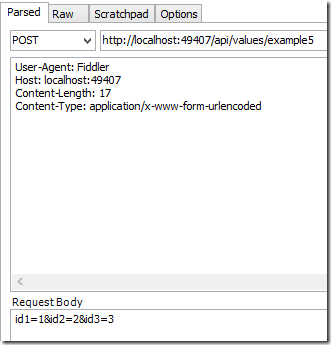
Calling the method using Json in the body
|
01
02
03
04
05
06
|
User-Agent: FiddlerHost: localhost:49407Content-Length: 32Content-Type: application/json{ "Id1" : 2, "Id2": 2, "Id3": 3} |
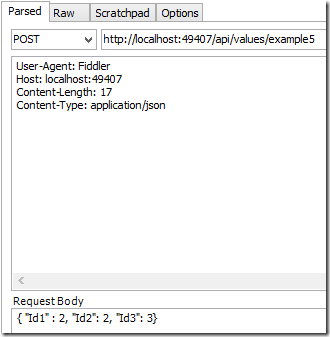
Calling the method using XML in the body
This requires extra code in the Global.asax
|
01
02
03
04
05
06
07
08
09
10
11
12
|
protected void Application_Start(){ var xml = GlobalConfiguration.Configuration.Formatters.XmlFormatter; xml.UseXmlSerializer = true;The client request is as follows:User-Agent: FiddlerContent-Type: application/xmlHost: localhost:49407Content-Length: 65<ParamsObject><Id1>7</Id1><Id2>8</Id2><Id3>9</Id3></ParamsObject> |
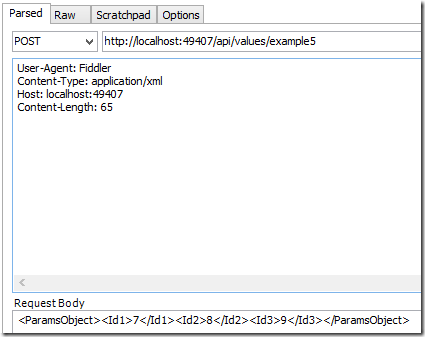
数组和列表(Array,List)
Example 6: Sending a simple list in the Url
|
01
02
03
04
05
06
07
08
09
10
11
12
|
// http://localhost:49407/api/values/example6?paramsObject=2,paramsObject=4,paramsObject=9[Route("example6")][HttpGet]public string GetListFromUri([FromUri] List<int> paramsObject){ if (paramsObject != null) { return "recieved a list with length:" + paramsObject.Count; } return "NOTHING RECIEVED...";} |
Example 7: Sending an object list in the Body
|
01
02
03
04
05
06
07
08
09
10
11
12
|
// http://localhost:49407/api/values/example8[Route("example8")][HttpPost]public string GetListFromBody([FromBody] List<ParamsObject> paramsList){ if (paramsList != null) { return "recieved a list with length:" + paramsList.Count; } return "NOTHING RECIEVED...";} |
Calling with Json:
|
01
02
03
04
05
06
|
User-Agent: FiddlerContent-Type: application/jsonHost: localhost:49407Content-Length: 91[{"Id1":3,"Id2":76,"Id3":19},{"Id1":56,"Id2":87,"Id3":94},{"Id1":976,"Id2":345,"Id3":7554}] |
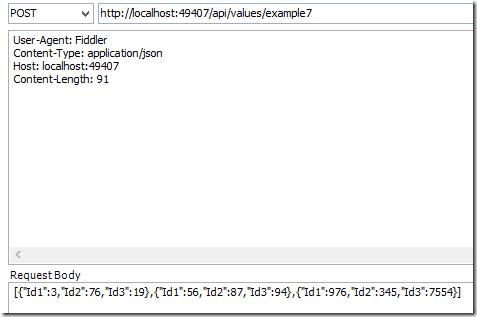
Calling with XML:
|
01
02
03
04
05
06
07
08
09
10
|
User-Agent: FiddlerContent-Type: application/xmlHost: localhost:49407Content-Length: 258<ArrayOfParamsObject><ParamsObject><Id1>3</Id1><Id2>76</Id2><Id3>19</Id3></ParamsObject><ParamsObject><Id1>56</Id1><Id2>87</Id2><Id3>94</Id3></ParamsObject><ParamsObject><Id1>976</Id1><Id2>345</Id2><Id3>7554</Id3></ParamsObject></ArrayOfParamsObject> |
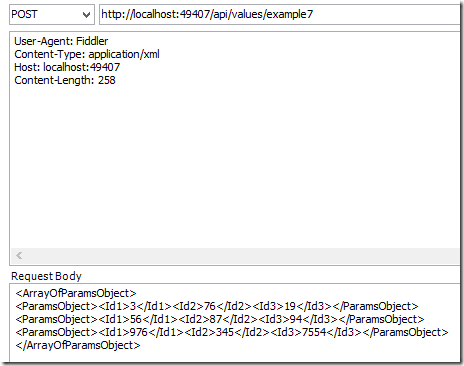
Example 8: Sending object lists in the Body
|
01
02
03
04
05
06
07
08
09
10
11
|
[Route("example8")][HttpPost]public string GetListsFromBody([FromBody] List<List<ParamsObject>> paramsList){ if (paramsList != null) { return "recieved a list with length:" + paramsList.Count; } return "NOTHING RECIEVED...";} |
This is a little bit different to the previous examples. The body can only send one single object to Web API. Because of this, the lists of objects are wrapped in a list or a parent object.
|
01
02
03
04
05
06
07
08
09
10
11
12
13
14
15
16
17
18
|
POST http://localhost:49407/api/values/example8 HTTP/1.1User-Agent: FiddlerContent-Type: application/jsonHost: localhost:49407Content-Length: 185[ [ {"Id1":3,"Id2":76,"Id3":19}, {"Id1":56,"Id2":87,"Id3":94}, {"Id1":976,"Id2":345,"Id3":7554} ], [ {"Id1":3,"Id2":76,"Id3":19}, {"Id1":56,"Id2":87,"Id3":94}, {"Id1":976,"Id2":345,"Id3":7554} ]] |
WebApi 参数绑定方法的更多相关文章
- asp.net webapi 参数绑定总结
首先必须得更正下自己一直以来对于get请求和post请求理解的一个误区:get请求只能通过url传参,post请求只能通过body传参. 其实上面的理解是错误的,翻阅了不少资料及具体实践,正确理解应该 ...
- asp.net webapi参数绑定
content={"content": [{"comb_id": "100323","comb_name": " ...
- WebAPI 2参数绑定方法
简单类型参数 Example 1: Sending a simple parameter in the Url [RoutePrefix("api/values")] public ...
- .net core webapi参数绑定处理
在 Startup的ConfigureServices方法中添加: services.Configure<ApiBehaviorOptions>(options => { optio ...
- springMVC使用HandlerMethodArgumentResolver 自定义解析器实现请求参数绑定方法参数
http://blog.csdn.net/truong/article/details/30971317 http://blog.csdn.net/fytain/article/details/439 ...
- webapi简介及参数绑定
介绍:WebAPI用来开发系统间接口的技术,基于HTTP协议,返回默认是json格式.比wcf简单 更通用,更轻量级,更省流量(json格式):WebAPI尽可能复用MVC路由.ModelBinder ...
- SpringMVC-简单参数绑定
SpringMVC-简单参数绑定 众所周知,springmvc是用来处理页面的一些请求,然后将数据再通过视图返回给用户的,前面的几篇博文中使用的都是静态数据,为了能快速入门springmvc,在 ...
- WebAPI下的如何实现参数绑定
本文将概述在WebAPI方式下将如何将参数绑定到一个action方法,包括参数是如何被读取,一系列规则决定特定环境采用的那种绑定方式,文章最后将给出一些实际的例子. Parameter binding ...
- [译]WebAPI下的如何实现参数绑定
本文将概述在WebAPI方式下将如何将参数绑定到一个action方法,包括参数是如何被读取,一系列规则决定特定环境采用的那种绑定方式,文章最后将给出一些实际的例子. Parameter binding ...
随机推荐
- js设置滚动条位置
JS控制滚动条的位置: window.scrollTo(x,y); 竖向滚动条置顶(window.scrollTo(0,0); 竖向滚动条置底 window.scrollTo(0,document.b ...
- 【转】城市CORS系统建设
随着GPS技术的飞速进步和应用普及,它在城市测量中的作用已越来越重要.当前,利用多基站网络RTK技术建立的连续运行卫星定位服务综合系统(Continuous Operational Reference ...
- 取IP的几个方法
ifconfig eth0|grep " inet add"|cut -d":" -f2|cut -d " " -f1 ifconfig e ...
- Java中的try catch finaly先后调用顺序
自我总结,有什么不足或好的方案,希望大家给予纠正,感激不尽! 目的:try catch finaly的顺序执行,和大家复习一遍. 方法:debug来确认执行顺序.(需要引入junit包) 废话不多说, ...
- xBIM 多个IFC文件合并
目录 xBIM 应用与学习 (一) xBIM 应用与学习 (二) xBIM 基本的模型操作 xBIM 日志操作 XBIM 3D 墙壁案例 xBIM 格式之间转换 xBIM 使用Linq 来优化查询 x ...
- java文件监控[转]
原文链接:http://blog.csdn.net/dancen/article/details/7786987#comments 问题:存在两个文件目录,且称之为源目录和目标目录,需要不定期将源目录 ...
- BZOJ 3640: JC的小苹果 [概率DP 高斯消元 矩阵求逆]
3640: JC的小苹果 题意:求1到n点权和\(\le k\)的概率 sengxian orz的题解好详细啊 容易想到\(f[i][j]\)表示走到i点权为j的概率 按点权分层,可以DP 但是对于\ ...
- poj1265&&2954 [皮克定理 格点多边形]【学习笔记】
Q:皮克定理这种一句话的东西为什么还要写学习笔记啊? A:多好玩啊... PS:除了蓝色字体之外都是废话啊... Part I 1.顶点全在格点上的多边形叫做格点多边形(坐标全是整数) 2.维基百科 ...
- 二维码开源库ZBar-MDK STM32F429移植
前两篇文章已经实现ZBar在Windows平台下的编译和使用,本文将介绍如何把ZBar移植到STM32F429,IDE使用MDK. 1. MDK工程设置 (1)不勾选Use MicroLIB ,使用I ...
- LeetCode - 520. Detect Capital
Given a word, you need to judge whether the usage of capitals in it is right or not. We define the u ...