
Netty5 + HTTPS 练习
本次以《Netty权威指南》第十章里面的例子为基础修改而来
HttpsFileServerHandler.java
 package com.jieli.nettytest.httpsfile;

 import java.io.File;

 import java.io.RandomAccessFile;

 import java.net.URLDecoder;

 import java.util.regex.Pattern;

 import javax.activation.MimetypesFileTypeMap;

 import io.netty.buffer.ByteBuf;

 import io.netty.buffer.Unpooled;

 import io.netty.channel.ChannelFuture;

 import io.netty.channel.ChannelFutureListener;

 import io.netty.channel.ChannelHandlerContext;

 import io.netty.channel.ChannelProgressiveFuture;

 import io.netty.channel.ChannelProgressiveFutureListener;

 import io.netty.channel.SimpleChannelInboundHandler;

 import io.netty.handler.codec.http.DefaultFullHttpResponse;

 import io.netty.handler.codec.http.DefaultHttpResponse;

 import io.netty.handler.codec.http.FullHttpRequest;

 import io.netty.handler.codec.http.FullHttpResponse;

 import io.netty.handler.codec.http.HttpHeaderNames;

 import io.netty.handler.codec.http.HttpHeaderUtil;

 import io.netty.handler.codec.http.HttpHeaderValues;

 import io.netty.handler.codec.http.HttpMethod;

 import io.netty.handler.codec.http.HttpResponse;

 import io.netty.handler.codec.http.HttpResponseStatus;

 import io.netty.handler.codec.http.HttpVersion;

 import io.netty.handler.codec.http.LastHttpContent;

 import io.netty.handler.stream.ChunkedFile;

 import io.netty.util.CharsetUtil;

 public class HttpsFileServerHandler extends SimpleChannelInboundHandler<FullHttpRequest>{

     private final String url;

     public HttpsFileServerHandler(String url){

         this.url = url;

     }

     @Override

     protected void messageReceived(ChannelHandlerContext ctx,

             FullHttpRequest request) throws Exception {

         if(!request.decoderResult().isSuccess()){

             sendError(ctx, HttpResponseStatus.BAD_REQUEST);

             return ;

         }

         if(request.method() != HttpMethod.GET){

             sendError(ctx, HttpResponseStatus.METHOD_NOT_ALLOWED);

             return ;

         }

         final String uri = request.uri();

         final String path = sanitizeUri(uri);

         if(path == null){

             sendError(ctx, HttpResponseStatus.FORBIDDEN);

             return ;

         }

         File file = new File(path);

         if(file.isHidden() || !file.exists()){

             sendError(ctx, HttpResponseStatus.NOT_FOUND);

             return ;

         }

         if(file.isDirectory()){

             if(uri.endsWith("/")){

                 sendListing(ctx, file);

             }else{

                 sendRedirect(ctx, uri+'/');

             }

             return ;

         }

         if(!file.isFile()){

             sendError(ctx, HttpResponseStatus.FORBIDDEN);

         }

         RandomAccessFile accessFile = null;

         try {

             accessFile = new RandomAccessFile(file, "r");

         } catch (Exception e) {

             e.printStackTrace();

             sendError(ctx, HttpResponseStatus.NOT_FOUND);

             return ;

         }

         long len = accessFile.length();

         HttpResponse response = new DefaultHttpResponse(HttpVersion.HTTP_1_1, HttpResponseStatus.OK);

         HttpHeaderUtil.setContentLength(response, len);

         setContentTypeHeader(response, file);

         if(HttpHeaderUtil.isKeepAlive(request)){

             response.headers().set(HttpHeaderNames.CONNECTION, HttpHeaderValues.KEEP_ALIVE);

         }

         ctx.write(response);

         ChannelFuture future;

         future = ctx.write(new ChunkedFile(accessFile, 0, len, 8192), ctx.newProgressivePromise());

         future.addListener(new ChannelProgressiveFutureListener() {

             @Override

             public void operationComplete(ChannelProgressiveFuture arg0)

                     throws Exception {

                 System.out.println("Transfer complete.");

             }

             @Override

             public void operationProgressed(ChannelProgressiveFuture future, long progress,

                     long total) throws Exception {

                 if(total < 0){

                     System.err.println("Transfer progress:" + progress);

                 }else{

                     System.err.println("Transfer progress:" + progress +"/" +total);

                 }

             }

         });

         ChannelFuture lastfuture = ctx.writeAndFlush(LastHttpContent.EMPTY_LAST_CONTENT);

         if(!HttpHeaderUtil.isKeepAlive(request)){

             lastfuture.addListener(ChannelFutureListener.CLOSE);

         }

     }

     @Override

     public void exceptionCaught(ChannelHandlerContext ctx, Throwable cause)

             throws Exception {

         cause.printStackTrace();

         if(ctx.channel().isActive()){

             sendError(ctx, HttpResponseStatus.INTERNAL_SERVER_ERROR);

         }

     }

     private static final Pattern INSECURE_URI = Pattern.compile(".*[<>&\"].*");

     private String sanitizeUri(String uri){

         try {

             uri = URLDecoder.decode(uri, "UTF-8");

         } catch (Exception e) {

             try {

                 uri = URLDecoder.decode(uri, "ISO-8859-1");

             } catch (Exception e2) {

                 throw new Error();

             }

         }

         if(!uri.startsWith(url)){

             return null;

         }

         if(!uri.startsWith("/")){

             return null;

         }

         uri = uri.replace('/', File.separatorChar);

         if(uri.contains('.'+File.separator) || uri.startsWith(".")

                 || uri.endsWith(".") || INSECURE_URI.matcher(uri).matches()){

             return null;

         }

         return System.getProperty("user.dir") + File.separator + uri;

     }

     private static final Pattern ALLOWED_FILE_NAME = Pattern.compile("[A-Za-z0-9][-_A-Za-z0-9\\.]*");

     private static void sendListing(ChannelHandlerContext ctx, File dir){

         FullHttpResponse response = new DefaultFullHttpResponse(HttpVersion.HTTP_1_1, HttpResponseStatus.OK);

         response.headers().set(HttpHeaderNames.CONTENT_TYPE, "text/html; charset=UTF-8");

         StringBuilder buf = new StringBuilder();

         String dirPath = dir.getPath();

         buf.append("<!DOCTYPE html\r\n");

         buf.append("<html><head><title>");

         buf.append(dirPath);

         buf.append(" 目录: ");

         buf.append("</title></head><body>\r\n");

         buf.append("<h3>");

         buf.append(dirPath).append(" 目录 :");

         buf.append("</h3>");

         buf.append("<ul>");

         buf.append("<li>链接: <a href=\"../\">..</a></li>\r\n");

         for(File f :dir.listFiles()){

             if(f.isHidden() || !f.canRead()){

                 continue;

             }

             String name = f.getName();

             if(!ALLOWED_FILE_NAME.matcher(name).matches()){

                 continue;

             }

             buf.append("<li>链接:<a href=\"");

             buf.append(name);

             buf.append("\">");

             buf.append(name);

             buf.append("</a></li>\r\n");

         }

         buf.append("</ul></body></html>\r\n");

         ByteBuf buffer = Unpooled.copiedBuffer(buf, CharsetUtil.UTF_8);

         response.content().writeBytes(buffer);

         buffer.release();

         ctx.writeAndFlush(response).addListener(ChannelFutureListener.CLOSE);

     }

     private static void sendRedirect(ChannelHandlerContext ctx, String newuri){

         FullHttpResponse response = new DefaultFullHttpResponse(HttpVersion.HTTP_1_1, HttpResponseStatus.FOUND);

         response.headers().set(HttpHeaderNames.LOCATION, newuri);

         ctx.writeAndFlush(response).addListener(ChannelFutureListener.CLOSE);

     }

     private static void sendError(ChannelHandlerContext ctx,

             HttpResponseStatus status){

         FullHttpResponse response = new DefaultFullHttpResponse(HttpVersion.HTTP_1_1, status,

                 Unpooled.copiedBuffer("Failure: " + status.toString()+"\r\n", CharsetUtil.UTF_8));

         response.headers().set(HttpHeaderNames.CONTENT_TYPE, "text/plain; charset=UTF-8");

         ctx.writeAndFlush(response).addListener(ChannelFutureListener.CLOSE); //异步发送 发送完成后就关闭连接

     }

     private static void setContentTypeHeader(HttpResponse response, File file){

         MimetypesFileTypeMap typeMap = new MimetypesFileTypeMap();

         response.headers().set(HttpHeaderNames.CONTENT_TYPE, typeMap.getContentType(file.getPath()));

     }

 }
HttpsFileServer.java
 package com.jieli.nettytest.httpsfile;

 import io.netty.bootstrap.ServerBootstrap;

 import io.netty.channel.ChannelFuture;

 import io.netty.channel.ChannelInitializer;

 import io.netty.channel.EventLoopGroup;

 import io.netty.channel.nio.NioEventLoopGroup;

 import io.netty.channel.socket.SocketChannel;

 import io.netty.channel.socket.nio.NioServerSocketChannel;

 import io.netty.handler.codec.http.HttpObjectAggregator;

 import io.netty.handler.codec.http.HttpRequestDecoder;

 import io.netty.handler.codec.http.HttpResponseEncoder;

 import io.netty.handler.ssl.SslContext;

 import io.netty.handler.ssl.util.SelfSignedCertificate;

 import io.netty.handler.stream.ChunkedWriteHandler;

 public class HttpsFileServer {

     private static final String DEFAULT_URL = "/src/com/";

     public void run(final int port, final String url) throws Exception{

         final SslContext sslCtx;

         SelfSignedCertificate ssc = new SelfSignedCertificate();

          //具体场景要通过文件

         sslCtx = SslContext.newServerContext(ssc.certificate(), ssc.privateKey());

         EventLoopGroup bossGroup = new NioEventLoopGroup();

         EventLoopGroup workerGroup = new NioEventLoopGroup();

         try {

             ServerBootstrap b = new ServerBootstrap();

             b.group(bossGroup, workerGroup)

              .channel(NioServerSocketChannel.class)

              .childHandler(new ChannelInitializer<SocketChannel>() {

                  @Override

                  protected void initChannel(SocketChannel ch) throws Exception {

                      ch.pipeline().addLast(sslCtx.newHandler(ch.alloc()));

                      ch.pipeline().addLast("http_decoder", new HttpRequestDecoder())

                                    .addLast("http-aggregator", new HttpObjectAggregator(65536))

                                   .addLast("http-encoder", new HttpResponseEncoder())

                                   .addLast("http-chunked", new ChunkedWriteHandler())

                                   .addLast("fileserverhandler", new HttpsFileServerHandler(url));

                 }

             });

             ChannelFuture f = b.bind(port).sync();

             System.out.println("HTTP File Server Start..  http://localhost:"+port+url);

             f.channel().closeFuture().sync();

         } catch (Exception e) {

             e.printStackTrace();

         } finally {

             bossGroup.shutdownGracefully();

             workerGroup.shutdownGracefully();

         }

     }

     public static void main(String[] args) throws Exception {

         new HttpsFileServer().run(7777, DEFAULT_URL);

     }

 }
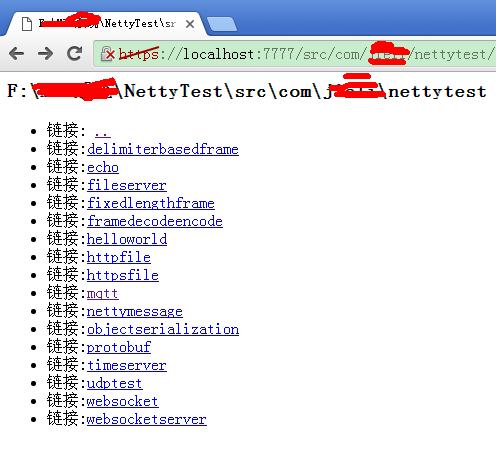
运行结果
Netty5 + HTTPS 练习的更多相关文章
- netty5 HTTP协议栈浅析与实践
一.说在前面的话 前段时间,工作上需要做一个针对视频质量的统计分析系统,各端(PC端.移动端和 WEB端)将视频质量数据放在一个 HTTP 请求中上报到服务器,服务器对数据进行解析.分拣后从不同的 ...
- Netty5 + WebSocket 练习
1. 了解WebSocket知识 略2. websocket实现系统简单反馈时间 WebSocketServerHandler.java package com.jieli.nettytest.web ...
- Netty5 + Protobuf 使用
1. 安装开发环境 1.1 Netty环境 这里我使用Netty5.0.0版本 到这里下载即可http://netty.io/ 下载netty-all-5.0.0.Alpha2.jar 这个jar包简 ...
- 《Netty5.0架构剖析和源码解读》【PDF】下载
<Netty5.0架构剖析和源码解读>[PDF]下载链接: https://u253469.pipipan.com/fs/253469-230062545 内容简介 Netty 是个异步的 ...
- Netty5客户端源码解析
Netty5客户端源码解析 今天来分析下netty5的客户端源码,示例代码如下: import io.netty.bootstrap.Bootstrap; import io.netty.channe ...
- Netty5服务端源码解析
Netty5源码解析 今天让我来总结下netty5的服务端代码. 服务端(ServerBootstrap) 示例代码如下: import io.netty.bootstrap.ServerBootst ...
- SSM整合Netty5.0详细说明
阅读本文约“3.2分钟” 最近又有粉丝加Q群讨论netty整合SSM项目的方式等,我在这里抽了休息日的时候整理一下,一步一步的记录,注意的是,本案例仅实现了用netty整合SSM后与单片机等类TCP应 ...
- Netty5.x 和3.x、4.x的区别及注意事项(官方翻译)
Netty5.x 和3.x.4.x的区别及注意事项 (官方翻译) 本文档列出了Netty5新版本中值得注意变化和新特性列表.帮助你的应用更好的适应新的版本. 不像Netty3.x和4.x之间的变化 ...
- nio之netty5应用
1.netty5和netty4的区别不是很大,但是与netty3差别还是有的.这里不介绍netty4,因为和netty5的方式都差不多.netty5的复杂性相对于netty3要多很多了.基本上架构都被 ...
随机推荐
- 【系统移植】kernel分析
内核启动流程 第二阶段 starte_kernel: | rest_init: | kernel_init | do_basic_setup(); // 加载驱动 | do_i ...
- Java面向对象概述
一.什么是面向对象? 现实世界中,随处可见的一种事物就是对象,对象是事物存在的实体,如人类.书桌.计算机.高楼大厦等.人类解决问题的方式总是将复杂的事物简单化,于是就会思考这些对象都是由哪些部分组成的 ...
- Struts2入门1 Struts2基础知识
Struts2入门1 Struts2基础知识 20131130 代码下载: 链接: http://pan.baidu.com/s/11mYG1 密码: aua5 前言: 之前学习了Spring和Hib ...
- Jquery EasyUI封装简化操作
//confirm function Confirm(msg, control) { $.messager.confirm('确认', msg, function (r) { if (r) { eva ...
- 如何向Openstack社区提交一个新项目
前几天有个朋友问我:自己有一个idea不错的项目,也把基本的框架写好了,想贡献到Openstack社区,却不知道应该怎么做.正好之前我有过类似的经历,那么来分享一下我是如何向Openstack社区提交 ...
- c#连接SFTP上传文件
名词解释(百度百科) sftp是Secure File Transfer Protocol的缩写,安全文件传送协议.可以为传输文件提供一种安全的加密方法.sftp 与 ftp 有着几乎一样的语法和功能 ...
- IOS UISearchDisplayController 点击搜索出现黑条问题解决方案
最近项目遇到一个很奇葩的问题 点击按钮启动 presentViewController 的时候出现下图效果: 代码: AddFriendViewController *addFriendVC = [[ ...
- db2 表授权语句
grant insert/update/delete on table schema.table_name to user user_name;
- 2013eoe移动开发者大会圆满落幕
(国内知名Android开发论坛.安卓开发社区推荐:http://www.eoeandroid.com/) 2013eoe移动开发者大会9月14号于国家会议中心盛大召开并圆满结束,超过2000个开发者 ...
- 迁移至个人blog
该博客的部分内容已迁移至个人站点:http://dxjia.cn/ 这里后续不再维护,欢迎访问新站点.