
Netty5 + WebSocket 练习
1. 了解WebSocket知识
略
2. websocket实现系统简单反馈时间
WebSocketServerHandler.java
 package com.jieli.nettytest.websocketserver;

 import io.netty.bootstrap.ServerBootstrap;

 import io.netty.channel.ChannelFuture;

 import io.netty.channel.ChannelInitializer;

 import io.netty.channel.EventLoopGroup;

 import io.netty.channel.nio.NioEventLoopGroup;

 import io.netty.channel.socket.SocketChannel;

 import io.netty.channel.socket.nio.NioServerSocketChannel;

 import io.netty.handler.codec.http.HttpObjectAggregator;

 import io.netty.handler.codec.http.HttpServerCodec;

 import io.netty.handler.stream.ChunkedWriteHandler;

 public class WebSocketServer {

     public void run(int port){

         EventLoopGroup bossGroup = new NioEventLoopGroup();

         EventLoopGroup workerGroup = new NioEventLoopGroup();

         try {

             ServerBootstrap b = new ServerBootstrap();

             b.group(bossGroup, workerGroup)

              .channel(NioServerSocketChannel.class)

              .childHandler(new ChannelInitializer<SocketChannel>() {

                 @Override

                 protected void initChannel(SocketChannel ch) throws Exception {

                     //HttpServerCodec将请求和应答消息编码或解码为HTTP消息

                     //通常接收到的http是一个片段,如果想要完整接受一次请求所有数据,我们需要绑定HttpObjectAggregator

                     //然后就可以收到一个FullHttpRequest完整的请求信息了

                     //ChunkedWriteHandler 向客户端发送HTML5文件,主要用于支持浏览器和服务器进行WebSocket通信

                     //WebSocketServerHandler自定义Handler

                     ch.pipeline().addLast("http-codec", new HttpServerCodec())

                                  .addLast("aggregator", new HttpObjectAggregator(65536)) //定义缓冲大小

                                  .addLast("http-chunked", new ChunkedWriteHandler())

                                  .addLast("handler", new WebSocketServerHandler());

                 }

             });

             ChannelFuture f = b.bind(port).sync();

             System.out.println("start...");

             f.channel().closeFuture().sync();

         } catch (Exception e) {

             e.printStackTrace();

         } finally {

             workerGroup.shutdownGracefully();

             bossGroup.shutdownGracefully();

         }

     }

     public static void main(String[] args) {

         new WebSocketServer().run(7777);

     }

 }
WebSocketServerHandler.java
 package com.jieli.nettytest.websocketserver;

 import java.util.logging.Level;

 import java.util.logging.Logger;

 import io.netty.buffer.ByteBuf;

 import io.netty.buffer.Unpooled;

 import io.netty.channel.ChannelFuture;

 import io.netty.channel.ChannelFutureListener;

 import io.netty.channel.ChannelHandlerContext;

 import io.netty.channel.SimpleChannelInboundHandler;

 import io.netty.handler.codec.http.DefaultFullHttpResponse;

 import io.netty.handler.codec.http.FullHttpRequest;

 import io.netty.handler.codec.http.FullHttpResponse;

 import io.netty.handler.codec.http.HttpHeaderUtil;

 import io.netty.handler.codec.http.HttpResponseStatus;

 import io.netty.handler.codec.http.HttpVersion;

 import io.netty.handler.codec.http.websocketx.CloseWebSocketFrame;

 import io.netty.handler.codec.http.websocketx.PingWebSocketFrame;

 import io.netty.handler.codec.http.websocketx.PongWebSocketFrame;

 import io.netty.handler.codec.http.websocketx.TextWebSocketFrame;

 import io.netty.handler.codec.http.websocketx.WebSocketFrame;

 import io.netty.handler.codec.http.websocketx.WebSocketServerHandshaker;

 import io.netty.handler.codec.http.websocketx.WebSocketServerHandshakerFactory;

 import io.netty.util.CharsetUtil;

 public class WebSocketServerHandler extends SimpleChannelInboundHandler<Object>{

     /**

      * 日志

      */

     private static final Logger logger =

             Logger.getLogger(WebSocketServerHandler.class.getName());

     /**

      * 全局websocket

      */

     private WebSocketServerHandshaker handshaker;

     @Override

     protected void messageReceived(ChannelHandlerContext ctx, Object msg)

             throws Exception {

         //普通HTTP接入

         if(msg instanceof FullHttpRequest){

             handleHttpRequest(ctx, (FullHttpRequest) msg);

         }else if(msg instanceof WebSocketFrame){ //websocket帧类型 已连接

             //BinaryWebSocketFrame CloseWebSocketFrame ContinuationWebSocketFrame

             //PingWebSocketFrame PongWebSocketFrame TextWebScoketFrame

             handleWebSocketFrame(ctx, (WebSocketFrame) msg);

         }

     }

     @Override

     public void channelReadComplete(ChannelHandlerContext ctx) throws Exception {

         ctx.flush();

     }

     private void handleHttpRequest(ChannelHandlerContext ctx, FullHttpRequest request){

         //如果http解码失败 则返回http异常 并且判断消息头有没有包含Upgrade字段(协议升级)

         if(!request.decoderResult().isSuccess()

                 || (!"websocket".equals( request.headers().get("Upgrade")))    ){

             sendHttpResponse(ctx, request, new DefaultFullHttpResponse(

                     HttpVersion.HTTP_1_1, HttpResponseStatus.BAD_REQUEST));

             return ;

         }

         //构造握手响应返回

         WebSocketServerHandshakerFactory ws = new WebSocketServerHandshakerFactory("", null, false);

         handshaker = ws.newHandshaker(request);

         if(handshaker == null){

             //版本不支持

             WebSocketServerHandshakerFactory.sendUnsupportedVersionResponse(ctx.channel());

         }else{

             handshaker.handshake(ctx.channel(), request);

         }

     }

     /**

      * websocket帧

      * @param ctx

      * @param frame

      */

     private void handleWebSocketFrame(ChannelHandlerContext ctx, WebSocketFrame frame){

         //判断是否关闭链路指令

         if(frame instanceof CloseWebSocketFrame){

             handshaker.close(ctx.channel(), (CloseWebSocketFrame) frame.retain());

             return ;

         }

         //判断是否Ping消息 -- ping/pong心跳包

         if(frame instanceof PingWebSocketFrame){

             ctx.channel().write(new PongWebSocketFrame(frame.content().retain()));

             return ;

         }

         //本程序仅支持文本消息, 不支持二进制消息

         if(!(frame instanceof TextWebSocketFrame)){

             throw new UnsupportedOperationException(

                     String.format("%s frame types not supported", frame.getClass().getName()));

         }

         //返回应答消息 text文本帧

         String request = ((TextWebSocketFrame) frame).text();

         //打印日志

         if(logger.isLoggable(Level.FINE)){

             logger.fine(String.format("%s received %s", ctx.channel(), request));

         }

         //发送到客户端websocket

         ctx.channel().write(new TextWebSocketFrame(request

                 + ", 欢迎使用Netty WebSocket服务, 现在时刻:"

                 + new java.util.Date().toString()));

     }

     /**

      * response

      * @param ctx

      * @param request

      * @param response

      */

     private static void sendHttpResponse(ChannelHandlerContext ctx,

             FullHttpRequest request, FullHttpResponse response){

         //返回给客户端

         if(response.status().code() != HttpResponseStatus.OK.code()){

             ByteBuf buf = Unpooled.copiedBuffer(response.status().toString(), CharsetUtil.UTF_8);

             response.content().writeBytes(buf);

             buf.release();

             HttpHeaderUtil.setContentLength(response, response.content().readableBytes());

         }

         //如果不是keepalive那么就关闭连接

         ChannelFuture f = ctx.channel().writeAndFlush(response);

         if(!HttpHeaderUtil.isKeepAlive(response)

                 || response.status().code() != HttpResponseStatus.OK.code()){

             f.addListener(ChannelFutureListener.CLOSE);

         }

     }

     /**

      * 异常 出错

      */

     @Override

     public void exceptionCaught(ChannelHandlerContext ctx, Throwable cause)

             throws Exception {

         cause.printStackTrace();

         ctx.close();

     }

 }
WebSocketServer.html (这个随便放都可以,到时候双击打开这个即可,不由服务器提供)
 <html>

     <head>

         <meta charset="utf-8">

         <title>Netty websocket 时间服务器</title>

     </head>

     <body>

         <form action="" onsubmit="return false;">

             <input type="text" name="message" value="..."/>

             <br>

             <input type="button" value="send" value="发送websocket请求消息" onclick="send(this.form.message.value);" />

             <hr color="blue">

             <h3>服务器返回信息</h3>

             <textarea id="responseText" rows="10" cols=""></textarea>

         </form>

     </body>

     <script type="text/javascript">

         var socket;

         if(!window.WebSocket){

             window.WebSocket = window.MozWebSocket;

         }

         if(window.WebSocket){

             socket = new WebSocket("ws://localhost:7777/websocket");

             socket.onmessage = function(event){

                 var ta = document.getElementById('responseText');

                 ta.value="";

                 ta.value=event.data;

             };

             socket.onopen = function(event){

                 var ta = document.getElementById('responseText');

                 ta.value = "打开websocket服务正常";

             }

             socket.onclose = function(event){

                 var ta = document.getElementById('responseText');

                 ta.value="";

                 ta.value="websocket关闭";

             }

         }else{

             alert("对不起,您的浏览器不支持WebSocket.");

         }

         function send(message){

             if(!window.WebSocket){

                 return ;

             }

             if(socket.readyState == WebSocket.OPEN){

                 socket.send(message);

             }else{

                 alert("WebSocket 连接创建失败.");

             }

         }

     </script>

 </html>
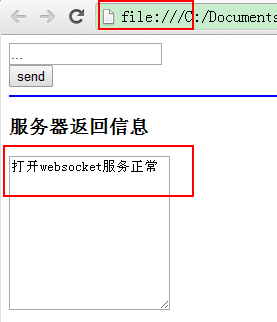
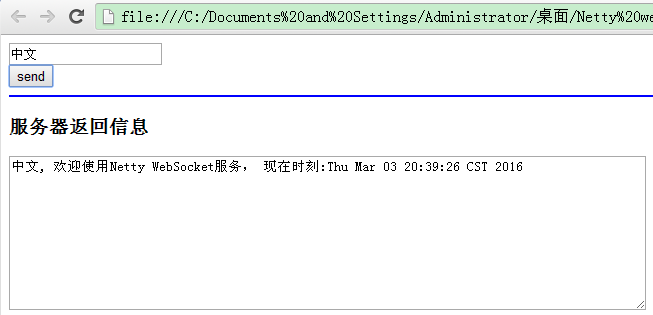
运行结果
3. websocket实现简单聊天室
WebSocketChatServer.java
 package com.jieli.nettytest.websocket;

 import io.netty.bootstrap.ServerBootstrap;

 import io.netty.channel.ChannelFuture;

 import io.netty.channel.ChannelOption;

 import io.netty.channel.EventLoopGroup;

 import io.netty.channel.nio.NioEventLoopGroup;

 import io.netty.channel.socket.nio.NioServerSocketChannel;

 public class WebsocketChatServer {

     private int port;

     public WebsocketChatServer(int port){

         this.port = port;

     }

     public void run() throws Exception{

         EventLoopGroup bossGroup = new NioEventLoopGroup();

         EventLoopGroup workerGroup = new NioEventLoopGroup();

         try {

             ServerBootstrap b = new ServerBootstrap();

             b.group(bossGroup, workerGroup)

              .channel(NioServerSocketChannel.class)

              .childHandler(new WebsocketChatServerInitializer())

              .option(ChannelOption.SO_BACKLOG, 128)

              .childOption(ChannelOption.SO_KEEPALIVE, true);

             System.out.println("websocket start..");

             ChannelFuture f = b.bind(port).sync();

             f.channel().closeFuture().sync();

         } catch (Exception e) {

             e.printStackTrace();

         } finally {

             workerGroup.shutdownGracefully();

             bossGroup.shutdownGracefully();

             System.out.println("websocket close.");

         }

     }

     public static void main(String[] args) throws Exception{

         new WebsocketChatServer(8080).run();

     }

 }
WebsocketChatServerInitializer.java
 package com.jieli.nettytest.websocket;

 import io.netty.channel.ChannelInitializer;

 import io.netty.channel.ChannelPipeline;

 import io.netty.channel.socket.SocketChannel;

 import io.netty.handler.codec.http.HttpObjectAggregator;

 import io.netty.handler.codec.http.HttpServerCodec;

 import io.netty.handler.codec.http.websocketx.WebSocketServerProtocolHandler;

 import io.netty.handler.stream.ChunkedWriteHandler;

 public class WebsocketChatServerInitializer extends ChannelInitializer<SocketChannel>{

     @Override

     protected void initChannel(SocketChannel ch) throws Exception {

         ChannelPipeline pipeline = ch.pipeline();

         pipeline.addLast(new HttpServerCodec())

                 .addLast(new HttpObjectAggregator(64*1024))

                 .addLast(new ChunkedWriteHandler())

                 .addLast(new HttpRequestHandler("/ws")) //如果访问的是RUI"/ws",处理WebSocket升级

                 .addLast(new WebSocketServerProtocolHandler("/ws"))

                 .addLast(new TextWebSocketFrameHandler());

     }

 }
HttpRequestHandler.java
 package com.jieli.nettytest.websocket;

 import java.io.File;

 import java.io.RandomAccessFile;

 import java.net.URL;

 import io.netty.channel.Channel;

 import io.netty.channel.ChannelFuture;

 import io.netty.channel.ChannelFutureListener;

 import io.netty.channel.ChannelHandlerContext;

 import io.netty.channel.DefaultFileRegion;

 import io.netty.channel.SimpleChannelInboundHandler;

 import io.netty.handler.codec.http.DefaultHttpResponse;

 import io.netty.handler.codec.http.FullHttpRequest;

 import io.netty.handler.codec.http.FullHttpResponse;

 import io.netty.handler.codec.http.HttpHeaderNames;

 import io.netty.handler.codec.http.HttpHeaderUtil;

 import io.netty.handler.codec.http.HttpHeaderValues;

 import io.netty.handler.codec.http.HttpResponse;

 import io.netty.handler.codec.http.HttpResponseStatus;

 import io.netty.handler.codec.http.HttpVersion;

 import io.netty.handler.codec.http.LastHttpContent;

 import io.netty.handler.ssl.SslHandler;

 import io.netty.handler.stream.ChunkedNioFile;

 public class HttpRequestHandler extends SimpleChannelInboundHandler<FullHttpRequest>{

     //扩展SimpleChannelInboundHandler用于处理FullHttpRequest信息

     private final String wsuri;

 //    private static final File index;

 //

 //    static {

 //        URL location = HttpRequestHandler.class

 //                .getProtectionDomain().getCodeSource().getLocation();

 //        try {

 //            String path = location.toURI() + "html/index.html";

 //            path = !path.contains("file:") ? path : path.substring(5);

 //            index = new File(path);

 //        } catch (Exception e) {

 //            e.printStackTrace();

 //            throw new IllegalStateException("can't find index.html");

 //        }

 //    }

     public HttpRequestHandler(String wsuri){

         this.wsuri = wsuri;

     }

     @Override

     protected void messageReceived(ChannelHandlerContext ctx,

             FullHttpRequest request) throws Exception {

         if(wsuri.equalsIgnoreCase(request.uri())){

             //如果请求的是WebSocket升级,将其传递给在ChannelPipeline中的下一个ChannelInboundHandler处理

             //这里跟第一个例子的websocket协议升级判断方式是不同的 因为只只是判断uri路径而已

             //对应的js请求路径 socket = new WebSocket("ws://localhost:8080/ws");

             ctx.fireChannelRead(request.retain());

         }else{

             //处理100continue

             if(HttpHeaderUtil.is100ContinueExpected(request)){

                 send100Continue(ctx);

             }

             //读取默认页

             RandomAccessFile file = new RandomAccessFile("C:\\html\\index.html", "r");

             HttpResponse response = new DefaultHttpResponse(

                     request.protocolVersion(), HttpResponseStatus.OK);

             response.headers().set(HttpHeaderNames.CONTENT_TYPE,

                     "text/html; charset=UTF-8");

             boolean keepAlive = HttpHeaderUtil.isKeepAlive(request);

             if(keepAlive){

                 response.headers().setInt(HttpHeaderNames.CONTENT_LENGTH, (int) file.length());

                 response.headers().set(HttpHeaderNames.CONNECTION, HttpHeaderValues.KEEP_ALIVE);

             }

             ctx.write(response);

             if(ctx.pipeline().get(SslHandler.class) == null){

                 //如果不是https安全连接的话 要达到最大效率的话,可以通过把index.html直接存储在DefaultFileRegion中

                 //实现零拷贝传输 就是不拷贝到内存,直接读取文件通过文件输出流进行处理

                 ctx.write(new DefaultFileRegion(file.getChannel(), 0, file.length()));

             }else{

                 //否则要读取全部文件,然后处理加密,在发送,只不过这一切都有netty内部处理

                 //A ChunkedInput that fetches data from a file chunk by chunk using NIO FileChannel.

                 //If your operating system supports zero-copy file transfer such as sendfile(),

                 //you might want to use FileRegion instead.

                 ctx.write(new ChunkedNioFile(file.getChannel()));

             }

             ChannelFuture future = ctx.writeAndFlush(LastHttpContent.EMPTY_LAST_CONTENT);

             if(!keepAlive){

                 future.addListener(ChannelFutureListener.CLOSE);

             }

             file.close();

         }

     }

     private static void send100Continue(ChannelHandlerContext ctx){

         FullHttpResponse response = (FullHttpResponse) new DefaultHttpResponse(

                 HttpVersion.HTTP_1_1, HttpResponseStatus.CONTINUE);

         ctx.writeAndFlush(response);

     }

     @Override

     public void exceptionCaught(ChannelHandlerContext ctx, Throwable cause)

             throws Exception {

         Channel incoming = ctx.channel();

         System.out.println("Client:"+incoming.remoteAddress()+"exception.");

         cause.printStackTrace();

         ctx.close();

     }

 }
html/index.html
 <!DOCTYPE html>

 <html>

 <head>

 <meta charset="UTF-8">

 <title>WebSocket Chat</title>

 </head>

 <body>

     <script type="text/javascript">

         var socket;

         if (!window.WebSocket) {

             window.WebSocket = window.MozWebSocket;

         }

         if (window.WebSocket) {

             socket = new WebSocket("ws://localhost:8080/ws");

             socket.onmessage = function(event) {

                 var ta = document.getElementById('responseText');

                 ta.value = ta.value + '\n' + event.data

             };

             socket.onopen = function(event) {

                 var ta = document.getElementById('responseText');

                 ta.value = "连接开启!";

             };

             socket.onclose = function(event) {

                 var ta = document.getElementById('responseText');

                 ta.value = ta.value + "连接被关闭";

             };

         } else {

             alert("你的浏览器不支持 WebSocket!");

         }

         function send(message) {

             if (!window.WebSocket) {

                 return;

             }

             if (socket.readyState == WebSocket.OPEN) {

                 socket.send(message);

             } else {

                 alert("连接没有开启.");

             }

         }

     </script>

     <form onsubmit="return false;">

         <h3>WebSocket 聊天室:</h3>

         <textarea id="responseText" style="width: 500px; height: 300px;"></textarea>

         <br>

         <input type="text" name="message"  style="width: 300px" value="Welcome to localhost">

         <input type="button" value="发送消息" onclick="send(this.form.message.value)">

         <input type="button" onclick="javascript:document.getElementById('responseText').value=''" value="清空聊天记录">

     </form>

     <br>

         Netty SEO 优化

         Netty 是什么

         Netty 怎么样

         Netty4 Netty5 区别

         Netty 效率

         Netty 版本区别

         Netty 和 Mina

         Netty 网络编程

         Netty Java 网络编程

         Netty Java Socket NIO

         NIO 编程

         Netty NIO 开发

         Netty3 Netty4 Netty5

         Netty 好处

         Netty 一般注意什么

         Netty 例子程序

         Netty Hello World

         Netty 聊天程序

         Netty Web HTML HTTP FTP SSL

         Netty UDP TCP WebSocket 练习

         Netty 连接数

         Netty 源码

     <br>

 </body>

 </html>
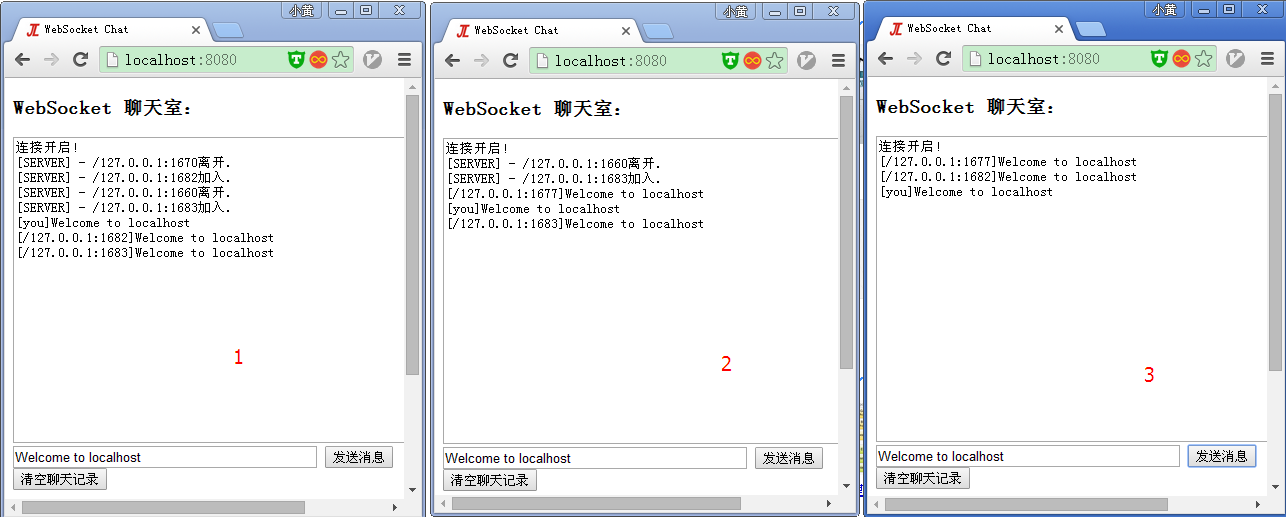
运行结果,依次运行1,2,3
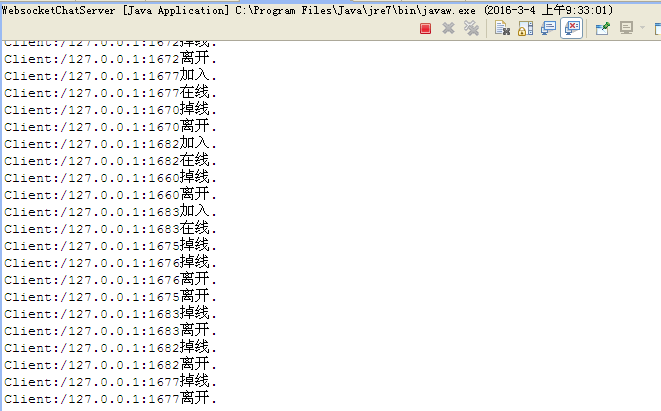
服务器打印结果
参考资料:
《Netty 权威指南》
https://zh.wikipedia.org/wiki/WebSocket
https://www.zhihu.com/question/20215561
http://waylau.com/netty-websocket-chat/
本文地址:http://www.cnblogs.com/wunaozai/p/5240006.html
Netty5 + WebSocket 练习的更多相关文章
- 漫扯:从polling到Websocket
Http被设计成了一个单向的通信的协议,即客户端发起一个request,然后服务器回应一个response.这让服务器很为恼火:我特么才是老大,我居然不能给小弟发消息... 轮询 老大发火了,小弟们自 ...
- 细说WebSocket - Node篇
在上一篇提高到了 web 通信的各种方式,包括 轮询.长连接 以及各种 HTML5 中提到的手段.本文将详细描述 WebSocket协议 在 web通讯 中的实现. 一.WebSocket 协议 1. ...
- netty5 HTTP协议栈浅析与实践
一.说在前面的话 前段时间,工作上需要做一个针对视频质量的统计分析系统,各端(PC端.移动端和 WEB端)将视频质量数据放在一个 HTTP 请求中上报到服务器,服务器对数据进行解析.分拣后从不同的 ...
- java使用websocket,并且获取HttpSession,源码分析
转载请在页首注明作者与出处 http://www.cnblogs.com/zhuxiaojie/p/6238826.html 一:本文使用范围 此文不仅仅局限于spring boot,普通的sprin ...
- WebSocket - ( 一.概述 )
说到 WebSocket,不得不提 HTML5,作为近年来Web技术领域最大的改进与变化,包含CSS3.离线与存储.多媒体.连接性( Connectivity )等一系列领域,而即将介绍的 WebSo ...
- php+websocket搭建简易聊天室实践
1.前言 公司游戏里面有个简单的聊天室,了解了之后才知道是node+websocket做的,想想php也来做个简单的聊天室.于是搜集各种资料看文档.找实例自己也写了个简单的聊天室. http连接分为短 ...
- Demo源码放送:打通B/S与C/S !让HTML5 WebSocket与.NET Socket公用同一个服务端!
随着HTML5 WebSocket技术的日益成熟与普及,我们可以借助WebSocket来更加方便地打通BS与CS -- 因为B/S中的WebSocket可以直接连接到C/S的服务端,并进行双向通信.如 ...
- Cowboy 开源 WebSocket 网络库
Cowboy.WebSockets 是一个托管在 GitHub 上的基于 .NET/C# 实现的开源 WebSocket 网络库,其完整的实现了 RFC 6455 (The WebSocket Pro ...
- Netty5使用自签证书实现SSL安全连接
这次使用的Netty是最新的5.0 Alpha2版本,下载地址是:http://dl.bintray.com/netty/downloads/netty-5.0.0.Alpha2.tar.bz2,发布 ...
随机推荐
- Android Studio 生成Release版,报Warning的解决办法
转载请注明出处:http://www.cnblogs.com/cnwutianhao/p/6242227.html 请尊重知识产权!!! 同步更新到CSDN:http://blog.csdn.net/ ...
- iOS开发-友盟分享(1)
1.集成友盟分享,需要先注册一个友盟账号,注册地址 友盟开发者平台官网 友盟集成文档 友盟sdk下载地址友盟sdk下载地址 2,成功下载sdk集成后,微信分享需要配置一下 新浪微博 之类到同样配置就 ...
- jquery时间倒计时
代码: js: function countDown(time, id) { //time的格式yyyy/MM/dd hh:mm:ss var day_elem = $(id).find('. ...
- React Native入门遇到的一些问题
本文示例参考自<React Native第一课> React Native官方文档中文版(含最新Android内容) 这里只大概记录下我的操作步骤和遇到的问题,一定要牢记下面这条: 如果你 ...
- RFID 基础/分类/编码/调制/传输
不同频段的RFID产品会有不同的特性,本文详细介绍了无源的感应器在不同工作频率产品的特性以及主要的应用. 目前定义RFID产品的工作频率有低频.高频和甚高频的频率范围内的符合不同标准的不同的产品,而且 ...
- OpenCV相机标定和姿态更新
原帖地址: http://blog.csdn.net/aptx704610875/article/details/48914043 http://blog.csdn.net/aptx704610875 ...
- 分布式Hadoop安装(一)
本文旨在介绍通过两台物理节点,实现完全分布式hadoop程序的部署 writen by Bob Pan@20140609 环境介绍: 主机名 机器IP 用途 描述 Hadoop0 192.168.80 ...
- android CheckBox的运用
CheckBox定义一个同意协议的按钮,只要同意button才可以点击 XML代码 <CheckBox android:id="@+id/checkbox1" android ...
- 3D碰撞检测
为了确保任何区域的空间不被多于1个物体占用,我们需要基于物体间的空间信息来做碰撞检测. 碰撞检测中重要的事情是有大量的测试,因此需要理由GPU资源. 例如:如果我们有n个物体,一个物体将会碰撞n-1个 ...
- 每日英语:The Secret About Online Ad Traffic: One-Third Is Bogus
Billions of dollars are flowing into online advertising. But marketers also are confronting an uncom ...