
SiteMesh3使用实例和详解
一、SiteMesh介绍
SiteMesh是一个网页布局和修饰的框架,利用它可以将网页的内容和页面结构分离,以达到页面结构共享的目的。[来自百度百科]
通俗的理解就是,SiteMesh把页面中变化的和不变的分离开来,用不变的去装饰各种变化的内容。从而使页面具有统一的布局,而且方便页面的管理。不变的页面称之为装饰页面,内容变化的页面称之为被装饰页面。
装饰页面一般包括:页面标题、头部、底部、主体以及公共的css、js。
被装饰页面只需要写它自己需要的内容就可以了。
根据页面需要,装饰页面可以有多个,被装饰页面也可以有不被装饰而保持自己风格的选择,这只需要在配置文件中配置一下就可以了。
siteMesh3.0运行环境:servlet、 jdk

二、SiteMesh使用
SiteMesh的使用也非常简单。这里使用的是sitemesh3.0。整个项目结构如图:
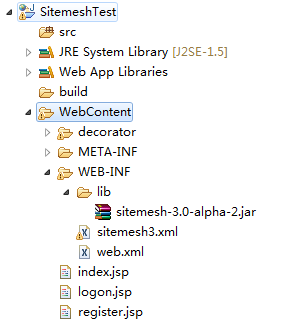
1. 下载sitemesh3.0 ,将disk文件夹下的sitemesh-3.0-alpha-2.jar放到lib目录下。
2. 建立装饰页面,装饰页可以是静态文件,也可以是动态文件,这里用jsp来测试
(1)带有菜单栏的装饰页面:decorator.jsp
- <html xmlns="http://www.w3.org/1999/xhtml">
- <head>
- <sitemesh:write property='head'/>
- <style type='text/css'>
- .mainBody {
- padding: 10px;
- border: 1px solid #555555;
- }
- .conbgbtm {
- width:100%;
- min-height:400px;
- height:auto;
- overflow:hidden;
- zoom:1;
- }
- </style>
- </head>
- <body>
- <!--头部 -->
- <div align="center">
- <h1 >头部信息:
- <sitemesh:write property='title' />
- </h1>
- </div>
- <hr>
- <!--左侧菜单栏 -->
- <div class="conbgbtm">
- <div class="leftbox">
- <ul>
- <li><a href="#">菜单1</a></li>
- <li><a href="#">菜单2</a></li>
- <li><a href="#">菜单3</a></li>
- </ul>
- </div>
- <sitemesh:write property='body'></sitemesh:write>
- </div>
- <hr>
- <div align="center">
- <span>Copyright © 2012-2013 廊坊信息技术提高班 版权所有</span>
- </div>
- </body>
- </html>
(2)不带菜单栏的装饰页面:registerDecorator.jsp
- <html xmlns="http://www.w3.org/1999/xhtml">
- <head>
- <sitemesh:write property='head'/>
- <style type='text/css'>
- .mainBody {
- padding: 10px;
- border: 1px solid #555555;
- }
- .conbgbtm {
- width:100%;
- min-height:400px;
- height:auto;
- overflow:hidden;
- zoom:1;
- }
- </style>
- </head>
- <body>
- <!--头部 -->
- <div align="center">
- <h1 >头部信息:
- <sitemesh:write property='title' />
- </h1>
- </div>
- <hr>
- <!--主体内容 -->
- <div class="conbgbtm">
- <sitemesh:write property='body'></sitemesh:write>
- </div>
- <hr>
- <!--底部 -->
- <div align="center">
- <span>Copyright © 2012-2013 廊坊信息技术提高班 版权所有</span>
- </div>
- </body>
- </html>
3. 建立被装饰页
(1)index首页
- <html>
- <head>
- <meta http-equiv="Content-Type" content="text/html; charset=GB18030">
- <title>SiteMesh3 title</title>
- </head>
- <body>
- <span>sitemesh3 body</span>
- </body>
- </html>
(2)logon.jsp、register.jsp页面
- <html>
- <head>
- <meta http-equiv="Content-Type" content="text/html; charset=GB18030">
- <title></title>
- </head>
- <body>
- <div align="center">
- <p>用户名:<input type="text" id="userName" ></p>
- <p>密码: <input type="text" id="pwd"></p>
- <p>验证码:<input type="text" id="validate"></p>
- </div>
- </body>
- </html>
4. web-inf/lib下建立Sitemesh3.xml配置文件
- <?xml version="1.0" encoding="UTF-8"?>
- <sitemesh>
- <!--register页面的装饰页面为没有菜单栏 的registerDecorator.jsp -->
- <mapping>
- <path>/register.jsp</path>
- <decorator>/decorator/registerDecorator.jsp</decorator>
- </mapping>
- <!--带有菜单栏的装饰页面 -->
- <mapping decorator="/decorator/decorator.jsp"/>
- <!--登录页面不被装饰。没有配置为true的页面,表示使用装饰页面,例如index.jsp -->
- <mapping path="/logon.jsp" exclue="true"/>
- </sitemesh>
5. Web.xml里加载sitemesh模板系统
- <!-- 加载sitemesh模板系统 -->
- <filter>
- <filter-name>sitemesh</filter-name>
- <filter-class>org.sitemesh.config.ConfigurableSiteMeshFilter</filter-class>
- </filter>
- <filter-mapping>
- <filter-name>sitemesh</filter-name>
- <url-pattern>/*</url-pattern>
- </filter-mapping>
6. sitemesh3.xml 配置详解

 1 <sitemesh>

 2     <!--默认情况下,

 3         sitemesh 只对 HTTP 响应头中 Content-Type 为 text/html 的类型进行拦截和装饰,

 4         我们可以添加更多的 mime 类型-->

 5   <mime-type>text/html</mime-type>

 6   <mime-type>application/vnd.wap.xhtml+xml</mime-type>

 7   <mime-type>application/xhtml+xml</mime-type>

 8   ...

 9

10   <!-- 默认装饰器,当下面的路径都不匹配时,启用该装饰器进行装饰 -->

11   <mapping decorator="/default-decorator.html"/>

12

13   <!-- 对不同的路径,启用不同的装饰器 -->

14   <mapping path="/admin/*" decorator="/another-decorator.html"/>

15   <mapping path="/*.special.jsp" decorator="/special-decorator.html"/>

16

17   <!-- 对同一路径,启用多个装饰器 -->

18   <mapping>

19     <path>/articles/*</path>

20     <decorator>/decorators/article.html</decorator>

21     <decorator>/decorators/two-page-layout.html</decorator>

22     <decorator>/decorators/common.html</decorator>

23   </mapping>

24

25   <!-- 排除,不进行装饰的路径 -->

26   <mapping path="/javadoc/*" exclue="true"/>

27   <mapping path="/brochures/*" exclue="true"/>

28

29   <!-- 自定义 tag 规则 -->

30   <content-processor>

31     <tag-rule-bundle class="com.something.CssCompressingBundle" />

32     <tag-rule-bundle class="com.something.LinkRewritingBundle"/>

33   </content-processor>

34   ...

35

36 </sitemesh>
7 . 自定义 tag 规则
Sitemesh 3 默认只提供了 body,title,head 等 tag 类型,我们可以通过实现 TagRuleBundle 扩展自定义的 tag 规则:
 1 public class MyTagRuleBundle implements TagRuleBundle {

 2     @Override

 3     public void install(State defaultState, ContentProperty contentProperty,

 4             SiteMeshContext siteMeshContext) {

 5         defaultState.addRule("myHeader", new ExportTagToContentRule(contentProperty.getChild("myHeader"), false));

 6

 7     }

 8

 9     @Override

10     public void cleanUp(State defaultState, ContentProperty contentProperty,

11             SiteMeshContext siteMeshContext) {

12     }

13 }
最后在 sitemesh3.xml 中配置即可:
1 <content-processor>

2     <tag-rule-bundle class="com.lt.common.ext.sitemesh3.MyTagRuleBundle" />

3 </content-processor>
SiteMesh3使用实例和详解的更多相关文章
- Android EventBus 3.0 实例使用详解
EventBus的使用和原理在网上有很多的博客了,其中泓洋大哥和启舰写的非常非常棒,我也是跟着他们的博客学会的EventBus,因为是第一次接触并使用EventBus,所以我写的更多是如何使用,源码解 ...
- Java经典设计模式之十一种行为型模式(附实例和详解)
Java经典设计模式共有21中,分为三大类:创建型模式(5种).结构型模式(7种)和行为型模式(11种). 本文主要讲行为型模式,创建型模式和结构型模式可以看博主的另外两篇文章:Java经典设计模式之 ...
- Java经典设计模式之七大结构型模式(附实例和详解)
博主在大三的时候有上过设计模式这一门课,但是当时很多都基本没有听懂,重点是也没有细听,因为觉得没什么卵用,硬是要搞那么复杂干嘛.因此设计模式建议工作半年以上的猿友阅读起来才会理解的比较深刻.当然,你没 ...
- mybatis中的mapper接口文件以及selectByExample类的实例函数详解
记录分为两个部分,第一部分主要关注selectByExample类的实例函数的实现:第二部分讨论Mybatis框架下基本的实例函数. (一)selectByExample类的实例函数的实现 当你启动项 ...
- Java设计模式之七大结构型模式(附实例和详解)
博主在大三的时候有上过设计模式这一门课,但是当时很多都基本没有听懂,重点是也没有细听,因为觉得没什么卵用,硬是要搞那么复杂干嘛.因此设计模式建议工作半年以上的猿友阅读起来才会理解的比较深刻.当然,你没 ...
- Java设计模式之十一种行为型模式(附实例和详解)
Java经典设计模式共有21中,分为三大类:创建型模式(5种).结构型模式(7种)和行为型模式(11种). 本文主要讲行为型模式,创建型模式和结构型模式可以看博主的另外两篇文章:J设计模式之五大创建型 ...
- js replace 与replaceall实例用法详解
这篇文章介绍了js replace 与replaceall实例用法详解,有需要的朋友可以参考一下stringObj.replace(rgExp, replaceText) 参数 stringObj 必 ...
- (转)Java经典设计模式(3):十一种行为型模式(附实例和详解)
原文出处: 小宝鸽 Java经典设计模式共有21中,分为三大类:创建型模式(5种).结构型模式(7种)和行为型模式(11种). 本文主要讲行为型模式,创建型模式和结构型模式可以看博主的另外两篇文章:J ...
- (转)Java经典设计模式(2):七大结构型模式(附实例和详解)
原文出处: 小宝鸽 总体来说设计模式分为三大类:创建型模式.结构型模式和行为型模式. 博主的上一篇文章已经提到过创建型模式,此外该文章还有设计模式概况和设计模式的六大原则.设计模式的六大原则是设计模式 ...
随机推荐
- (转)Hibernate的一级缓存
http://blog.csdn.net/yerenyuan_pku/article/details/70148567 Hibernate的一级缓存 Hibernate的一级缓存就是指Session缓 ...
- IOS: Xcode报 Undecleared selector Warning错误的解决方法
Undecleared selector Warning 是编译器报的,特别是升级到IOS7 默认PROJ设定的时候,会出现这种问题,如果从代码上看语法完全没有问题,那么就可以在Xcode里面设置禁 ...
- Mysql 之show status数据详解
状态名 作用域 详细解释 Aborted_clients Global 由于客户端没有正确关闭连接导致客户端终止而中断的连接数 Aborted_connects Global 试图连接到MySQL服务 ...
- Slides使用
1.引入 import { ViewChild } from '@angular/core'; import { Slides } from 'ionic-angular'; export class ...
- windows程序设为开机自启动
在Windows文件管理器中输入 %APPDATA%\Microsoft\Windows\Start Menu\Programs\Startup 把程序快捷方式放到此处即可.
- includes() 方法用来判断一个数组是否包含一个指定的值,根据情况,如果包含则返回 true,否则返回false。
注意:对象数组不能使用includes方法来检测. JavaScript Demo: Array.includes() var array1 = [1, 2, 3]; console.log(arra ...
- PAT_A1114#Family Property
Source: PAT A1114 Family Property (25 分) Description: This time, you are supposed to help us collect ...
- jquery操作元素之间相邻的元素的获取方式
<!DOCTYPE html><html> <head> <style> .siblings * { display: block; border: 2 ...
- 【数据结构】C语言栈的基本操作
#include<stdio.h> #include<stdlib.h> #include<malloc.h> //定义节点 struct Node { int d ...
- case....when ...多重判断
CASE...WHEN 进行多重判断 CASE WHEN A IS NOT NULL THEN B WHEN C IS NULL THEN CASE WHEN D IS NOT NULL THEN ...