
Springboot与Mybatis整合
最近自己用springboot和mybatis做了整合,记录一下:
1.先导入用到的jar包
     <dependency>

            <groupId>org.springframework.boot</groupId>

            <artifactId>spring-boot-starter-web</artifactId>

        </dependency>

        <dependency>

            <groupId>org.springframework.boot</groupId>

            <artifactId>spring-boot-starter-test</artifactId>

            <scope>test</scope>

        </dependency>

        <dependency>

            <groupId>mysql</groupId>

            <artifactId>mysql-connector-java</artifactId>

        </dependency>

        <dependency>

            <groupId>org.mybatis.generator</groupId>

            <artifactId>mybatis-generator-core</artifactId>

            <version>1.3.3</version>

        </dependency>

        <!-- 阿里数据源 -->

        <dependency>

          <groupId>com.alibaba</groupId>

          <artifactId>druid</artifactId>

          <version>${druid.version}</version>

        </dependency>

        <dependency>

          <groupId>org.mybatis</groupId>

          <artifactId>mybatis-spring</artifactId>

          <version>1.3.0</version>

        </dependency>

        <dependency>

          <groupId>org.mybatis</groupId>

          <artifactId>mybatis</artifactId>

          <version>3.4.0</version>

        </dependency>

        <dependency>

            <groupId>org.springframework</groupId>

            <artifactId>spring-tx</artifactId>

        </dependency>

        <dependency>

            <groupId>org.springframework</groupId>

            <artifactId>spring-jdbc</artifactId>

        </dependency>
2.配置配置文件(有些大家用不着的可以不配置)
spring.datasource.type=com.alibaba.druid.pool.DruidDataSource

spring.datasource.driver-class-name=com.mysql.jdbc.Driver

spring.datasource.url=jdbc:mysql://localhost:3306/test

spring.datasource.username=root

spring.datasource.password=

spring.datasource.initialSize=20

spring.datasource.minIdle=50

spring.datasource.maxActive=200

spring.datasource.maxWait=60000

spring.datasource.timeBetweenEvictionRunsMillis=60000

spring.datasource.minEvictableIdleTimeMillis=300000

spring.datasource.validationQuery=SELECT 1 FROM DUAL

spring.datasource.testWhileIdle=true

spring.datasource.testOnBorrow=false

spring.datasource.testOnReturn=false

spring.datasource.poolPreparedStatements=true

spring.datasource.maxPoolPreparedStatementPerConnectionSize=20

spring.datasource.filters=stat,log4j

spring.datasource.connectionProperties=druid.stat.mergeSql=true;druid.stat.slowSqlMillis=5000

#mybatis
mybatis.mapper-locations=classpath:/com/sxf/**/*Mapper.xml
mybatis.type-aliases-package=com.sxf.**.entity
3.解析数据源
package com.sxf.config;

import java.util.Properties;

import javax.sql.DataSource;

import org.springframework.beans.factory.annotation.Autowired;

import org.springframework.boot.web.servlet.FilterRegistrationBean;

import org.springframework.boot.web.servlet.ServletRegistrationBean;

import org.springframework.context.annotation.Bean;

import org.springframework.context.annotation.Configuration;

import org.springframework.core.env.Environment;

import com.alibaba.druid.pool.DruidDataSource;

import com.alibaba.druid.support.http.StatViewServlet;

import com.alibaba.druid.support.http.WebStatFilter;

@Configuration

public class DatasourceConfig {

    @Autowired

    private Environment env;

    @Bean

    public DataSource dataSource() {

        DruidDataSource druidDataSource = new DruidDataSource();

        druidDataSource.setDbType(env.getProperty("spring.datasource.type"));

        druidDataSource.setDriverClassName(env.getProperty("spring.datasource.driver-class-name"));

        druidDataSource.setUrl(env.getProperty("spring.datasource.url"));

        druidDataSource.setUsername(env.getProperty("spring.datasource.username"));

        druidDataSource.setPassword(env.getProperty("spring.datasource.password"));

        druidDataSource.setInitialSize(Integer.parseInt(env.getProperty("spring.datasource.initialSize")));

        druidDataSource.setMinIdle(Integer.parseInt(env.getProperty("spring.datasource.minIdle")));

        druidDataSource.setMaxActive(Integer.parseInt(env.getProperty("spring.datasource.maxActive")));

        druidDataSource.setMaxWait(Long.parseLong(env.getProperty("spring.datasource.maxWait")));

        // 配置间隔多久才进行一次检测,检测需要关闭的空闲连接,单位是毫秒

        druidDataSource.setTimeBetweenEvictionRunsMillis(

                Long.parseLong(env.getProperty("spring.datasource.timeBetweenEvictionRunsMillis")));

        // 配置一个连接在池中最小生存的时间,单位是毫秒

        druidDataSource.setMinEvictableIdleTimeMillis(

                Long.parseLong(env.getProperty("spring.datasource.minEvictableIdleTimeMillis")));

        druidDataSource.setValidationQuery(env.getProperty("spring.datasource.validationQuery"));

        druidDataSource.setTestWhileIdle(Boolean.getBoolean(env.getProperty("spring.datasource.testWhileIdle")));

        druidDataSource.setTestOnBorrow(Boolean.getBoolean(env.getProperty("spring.datasource.testOnBorrow")));

        druidDataSource.setTestOnReturn(Boolean.getBoolean(env.getProperty("spring.datasource.testOnReturn")));

        // 打开PSCache,并且指定每个连接上PSCache的大小

        druidDataSource.setPoolPreparedStatements(

                Boolean.getBoolean(env.getProperty("spring.datasource.poolPreparedStatements")));

        druidDataSource.setMaxPoolPreparedStatementPerConnectionSize(

                Integer.parseInt(env.getProperty("spring.datasource.maxPoolPreparedStatementPerConnectionSize")));

        // 配置监控统计拦截的filters,去掉后监控界面sql无法统计,'wall'用于防火墙

        // 通过connectProperties属性来打开mergeSql功能;慢SQL记录

        String cpStr = env.getProperty("spring.datasource.connectionProperties");

        if (null != cpStr) {

            Properties pro = new Properties();

            String[] kvArr = cpStr.split("\\;");

            if (null != kvArr && kvArr.length > 0) {

                for (String cp : kvArr) {

                    String[] arr = cp.split("\\=");

                    if (null != arr && arr.length == 2) {

                        pro.put(arr[0], arr[1]);

                    }

                }

            }

            druidDataSource.setConnectProperties(pro);

        }

        return druidDataSource;

    }

    @Bean

    public ServletRegistrationBean druidServlet() {

        return new ServletRegistrationBean(new StatViewServlet(), "/druid/*");

    }

}
这里配置@MapperScan扫描mybatis接口, 不需要在每个接口里面配置@Mapper
package com.sxf.config;

import org.apache.ibatis.session.SqlSessionFactory;

import org.mybatis.spring.SqlSessionFactoryBean;

import org.mybatis.spring.annotation.MapperScan;

import org.springframework.beans.factory.annotation.Autowired;

import org.springframework.context.annotation.Bean;

import org.springframework.context.annotation.Configuration;

import org.springframework.core.env.Environment;

import org.springframework.core.io.support.PathMatchingResourcePatternResolver;

import org.springframework.core.io.support.ResourcePatternResolver;

import org.springframework.jdbc.datasource.DataSourceTransactionManager;

import org.springframework.transaction.PlatformTransactionManager;

import org.springframework.transaction.annotation.EnableTransactionManagement;

@Configuration

@EnableTransactionManagement

@MapperScan(basePackages="com.sxf.**.mapper", sqlSessionFactoryRef = "sqlSessionFactory")

public class MyBatisConfig{

    @Autowired

    private DatasourceConfig dataSource;

    @Autowired

    private Environment env;

    @Bean(name = "sqlSessionFactory")

    public SqlSessionFactory sqlSessionFactoryBean() {

        SqlSessionFactoryBean bean = new SqlSessionFactoryBean();

        bean.setDataSource(dataSource.dataSource());

        bean.setTypeAliasesPackage(env.getProperty("type-aliases-package"));

        //添加XML目录

        ResourcePatternResolver resolver = new PathMatchingResourcePatternResolver();

        try {

//            bean.setConfigLocation(resolver.getResource(env.getProperty("mybatis.page-plugins-config")));

            bean.setMapperLocations(resolver.getResources(env.getProperty("mybatis.mapper-locations")));

            return bean.getObject();

        } catch(IllegalArgumentException e){

            e.printStackTrace();

             throw new RuntimeException(e);

        }catch (Exception e) {

            e.printStackTrace();

            e.getMessage();

            throw new RuntimeException(e);

        }

    }

    @Bean

    public PlatformTransactionManager annotationDrivenTransactionManager() {

        return new DataSourceTransactionManager(dataSource.dataSource());

    }

}
mybatis接口,不需要添加@Mapper
package com.sxf.profit.mapper;

import com.sxf.profit.entity.InviteCode;

public interface InviteCodeMapper {

    int deleteByPrimaryKey(Long id);

    int insert(InviteCode record);

    int insertSelective(InviteCode record);

    InviteCode selectByPrimaryKey(Long id);

    int updateByPrimaryKeySelective(InviteCode record);

    int updateByPrimaryKey(InviteCode record);

}
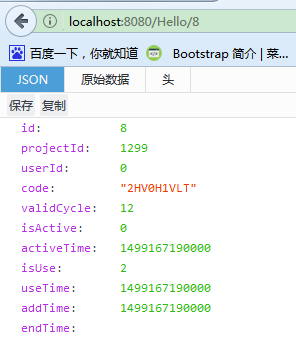
4.写个测试controller,测试成功
package com.sxf.controller;

import org.springframework.beans.factory.annotation.Autowired;

import org.springframework.web.bind.annotation.GetMapping;

import org.springframework.web.bind.annotation.PathVariable;

import org.springframework.web.bind.annotation.RestController;

import com.sxf.profit.entity.InviteCode;

import com.sxf.profit.mapper.InviteCodeMapper;

@RestController

public class InviteCodeController {

    @Autowired

    private InviteCodeMapper inviteCodeMapper;

    @GetMapping("/Hello/{id}")

    public InviteCode selectInviteCode(@PathVariable("id") Long id){

        return inviteCodeMapper.selectByPrimaryKey(id);

    }

}
成功!!!
Springboot与Mybatis整合的更多相关文章
- SpringBoot与Mybatis整合方式01(源码分析)
前言:入职新公司,SpringBoot和Mybatis都被封装了一次,光用而不知道原理实在受不了,于是开始恶补源码,由于刚开始比较浅,存属娱乐,大神勿喷. 就如网上的流传的SpringBoot与Myb ...
- 30分钟带你了解Springboot与Mybatis整合最佳实践
前言:Springboot怎么使用想必也无需我多言,Mybitas作为实用性极强的ORM框架也深受广大开发人员喜爱,有关如何整合它们的文章在网络上随处可见.但是今天我会从实战的角度出发,谈谈我对二者结 ...
- SpringBoot+Shiro+mybatis整合实战
SpringBoot+Shiro+mybatis整合 1. 使用Springboot版本2.0.4 与shiro的版本 引入springboot和shiro依赖 <?xml version=&q ...
- SpringBoot系列——MyBatis整合
前言 MyBatis官网:http://www.mybatis.org/mybatis-3/zh/index.html 本文记录springboot与mybatis的整合实例:1.以注解方式:2.手写 ...
- SpringBoot与Mybatis整合实例详解
介绍 从Spring Boot项目名称中的Boot可以看出来,SpringBoot的作用在于创建和启动新的基于Spring框架的项目,它的目的是帮助开发人员很容易的创建出独立运行的产品和产品级别的基于 ...
- spring-boot、mybatis整合
一.MyBatis 是一款优秀的持久层框架,它支持定制化 SQL.存储过程以及高级映射.MyBatis 避免了几乎所有的 JDBC 代码和手动设置参数以及获取结果集.MyBatis 可以使用简单的 X ...
- springBoot和MyBatis整合中出现SpringBoot无法启动时处理方式
在springBoot和Myatis 整合中出现springBoot无法启动 并且报以下错误 Description: Field userMapper in cn.lijun.control ...
- springboot+Druid+mybatis整合
一.添加Druid.MySQL连接池.mybatis依赖 <!--整合Druid--> <dependency> <groupId>com.alibaba</ ...
- SpringBoot与Mybatis整合的设置
Mybatis和Spring Boot的整合有两种方式: 第一种:使用mybatis官方提供的Spring Boot整合包实现,地址:https://github.com/mybatis/spring ...
随机推荐
- axios.js
Vue 原本有一个官方推荐的 ajax 插件 vue-resource,但是自从 Vue 更新到 2.0 之后,官方就不再更新 vue-resource 目前主流的 Vue 项目,都选择 axios ...
- Sql Server数据库使用触发器和sqlbulkcopy大批量数据插入更新
需要了解的知识 1.触发器 2.sqlbulkcopy 我的用途 开发数据库同步的工具,需要大批量数据插入和数据更新. 方式 使用SqlBulkCopy类对数据进行数据批量复制,将需要同步数据的表新建 ...
- python 之 计数器(counter)
Counter是对字典类型的补充,用于追踪值的出现次数. ps:具备字典的所有功能 + 自己的功能 c = Counter('abcdeabcdabcaba') print c 输出:Counter( ...
- 数据库面试技巧,通过JDBC展示自己专业性,摘自java web轻量级开发面试教程
这篇文章是我之前写的博文 数据库方面的面试技巧,如何从建表方面展示自己能力 和 面试技巧,如何通过索引说数据库优化能力,内容来自Java web轻量级开发面试教程是一个系列的,通过面试官的视角和大家分 ...
- CSS display使用
.今天我们来分析一下display的一些用法,display样式在我们整个CSS设置中,非常重要,掌握好display,才能有效的解决CSS布局的问题,在理解display之前,我们先了解两个概念:块 ...
- 马士兵讲jsp项目--BBS项目分析笔记
1 导言 作为一个新手JAVA程序员,我相信很多人和我一样急切的想要寻找项目来做,这里我把马士兵老师讲的JAVA WEB的第一个小项目拿过来给大家分享一下. 首先,对一个项目而言我们先要认识清楚我们要 ...
- Akka(23): Stream:自定义流构件功能-Custom defined stream processing stages
从总体上看:akka-stream是由数据源头Source,流通节点Flow和数据流终点Sink三个框架性的流构件(stream components)组成的.这其中:Source和Sink是stre ...
- [js高手之路]深入浅出webpack教程系列4-插件使用之html-webpack-plugin配置(上)
还记得我们上文中的index.html文件吗? 那里面的script标签还是写死的index.bundle.js文件,那么怎么把他们变成动态的index.html文件,这个动态生成的index.htm ...
- Swift4.0 Array详解
数组的介绍 数组(Array)是一串有序的由相同类型元素构成的集合,数组中的集合元素是有序的,可以重复出现.在Swift中数组类型是Array,是一个泛型集合.数组分成:可变数组和不可变数组,分别使用 ...
- Java线程调度—休眠
线程休眠的方法是Thread.sleep(long millis) 和Thread.sleep(long millis, int nanos) ,均为静态方法,那调用sleep休眠的哪个线程呢?简单说 ...