
How the Kernel Manages Your Memory
http://duartes.org/gustavo/blog/post/how-the-kernel-manages-your-memory/
After examining the virtual address layout of a process, we turn to the kernel and its mechanisms for managing user memory. Here is gonzo again:
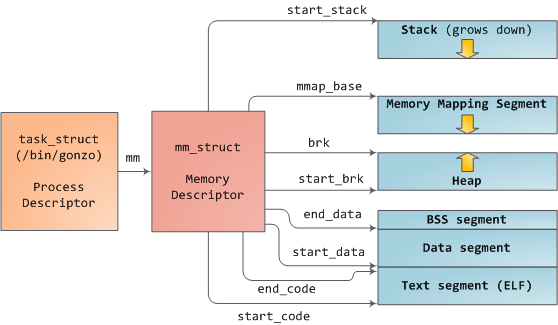
Linux processes are implemented in the kernel as instances of task_struct, the process descriptor. The mm field in task_struct points to the memory descriptor, mm_struct, which is an executive summary of a program’s memory. It stores the start and end of memory segments as shown above, the number of physical memory pages used by the process (rss stands for Resident Set Size), the amount of virtual address space used, and other tidbits. Within the memory descriptor we also find the two work horses for managing program memory: the set of virtual memory areas and thepage tables. Gonzo’s memory areas are shown below:
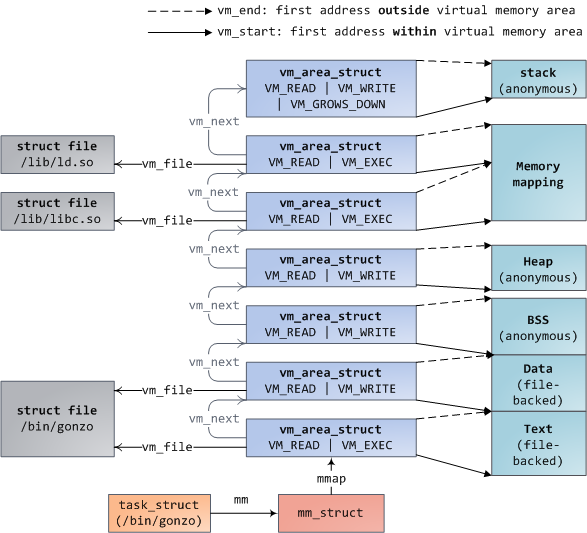
Each virtual memory area (VMA) is a contiguous range of virtual addresses; these areas never overlap. An instance of vm_area_struct fully describes a memory area, including its start and end addresses, flags to determine access rights and behaviors, and the vm_file field to specify which file is being mapped by the area, if any. A VMA that does not map a file is anonymous. Each memory segment above (e.g., heap, stack) corresponds to a single VMA, with the exception of the memory mapping segment. This is not a requirement, though it is usual in x86 machines. VMAs do not care which segment they are in.
A program’s VMAs are stored in its memory descriptor both as a linked list in the mmap field, ordered by starting virtual address, and as a red-black tree rooted at the mm_rb field. The red-black tree allows the kernel to search quickly for the memory area covering a given virtual address. When you read file /proc/pid_of_process/maps, the kernel is simply going through the linked list of VMAs for the process and printing each one.
In Windows, the EPROCESS block is roughly a mix of task_struct and mm_struct. The Windows analog to a VMA is the Virtual Address Descriptor, or VAD; they are stored in an AVL tree. You know what the funniest thing about Windows and Linux is? It’s the little differences.
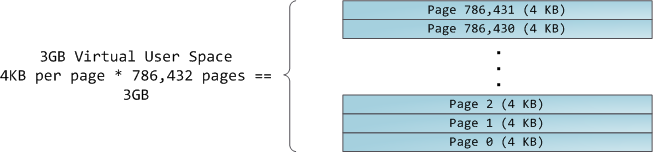
The 4GB virtual address space is divided into pages. x86 processors in 32-bit mode support page sizes of 4KB, 2MB, and 4MB. Both Linux and Windows map the user portion of the virtual address space using 4KB pages. Bytes 0-4095 fall in page 0, bytes 4096-8191 fall in page 1, and so on. The size of a VMA must be a multiple of page size. Here’s 3GB of user space in 4KB pages:
The processor consults page tables to translate a virtual address into a physical memory address. Each process has its own set of page tables; whenever a process switch occurs, page tables for user space are switched as well. Linux stores a pointer to a process’ page tables in the pgd field of the memory descriptor. To each virtual page there corresponds one page table entry (PTE) in the page tables, which in regular x86 paging is a simple 4-byte record shown below:

Linux has functions to read and set each flag in a PTE. Bit P tells the processor whether the virtual page is present in physical memory. If clear (equal to 0), accessing the page triggers a page fault. Keep in mind that when this bit is zero, the kernel can do whatever it pleases with the remaining fields. The R/W flag stands for read/write; if clear, the page is read-only. Flag U/S stands for user/supervisor; if clear, then the page can only be accessed by the kernel. These flags are used to implement the read-only memory and protected kernel space we saw before.
Bits D and A are for dirty and accessed. A dirty page has had a write, while an accessed page has had a write or read. Both flags are sticky: the processor only sets them, they must be cleared by the kernel. Finally, the PTE stores the starting physical address that corresponds to this page, aligned to 4KB. This naive-looking field is the source of some pain, for it limits addressable physical memory to 4 GB. The other PTE fields are for another day, as is Physical Address Extension.
A virtual page is the unit of memory protection because all of its bytes share the U/S and R/W flags. However, the same physical memory could be mapped by different pages, possibly with different protection flags. Notice that execute permissions are nowhere to be seen in the PTE. This is why classic x86 paging allows code on the stack to be executed, making it easier to exploit stack buffer overflows (it’s still possible to exploit non-executable stacks using return-to-libc and other techniques). This lack of a PTE no-execute flag illustrates a broader fact: permission flags in a VMA may or may not translate cleanly into hardware protection. The kernel does what it can, but ultimately the architecture limits what is possible.
Virtual memory doesn’t store anything, it simply maps a program’s address space onto the underlying physical memory, which is accessed by the processor as a large block called thephysical address space. While memory operations on the bus are somewhat involved, we can ignore that here and assume that physical addresses range from zero to the top of available memory in one-byte increments. This physical address space is broken down by the kernel into page frames. The processor doesn’t know or care about frames, yet they are crucial to the kernel because the page frame is the unit of physical memory management. Both Linux and Windows use 4KB page frames in 32-bit mode; here is an example of a machine with 2GB of RAM:
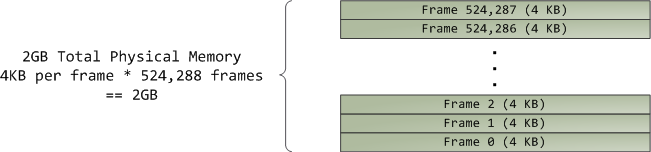
In Linux each page frame is tracked by a descriptor and several flags. Together these descriptors track the entire physical memory in the computer; the precise state of each page frame is always known. Physical memory is managed with the buddy memory allocation technique, hence a page frame is free if it’s available for allocation via the buddy system. An allocated page frame might beanonymous, holding program data, or it might be in the page cache, holding data stored in a file or block device. There are other exotic page frame uses, but leave them alone for now. Windows has an analogous Page Frame Number (PFN) database to track physical memory.
Let’s put together virtual memory areas, page table entries and page frames to understand how this all works. Below is an example of a user heap:
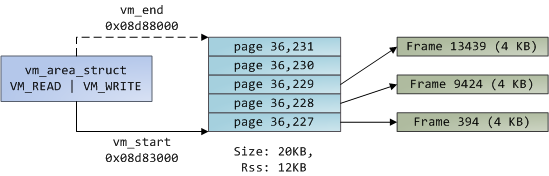
Blue rectangles represent pages in the VMA range, while arrows represent page table entries mapping pages onto page frames. Some virtual pages lack arrows; this means their corresponding PTEs have the Present flag clear. This could be because the pages have never been touched or because their contents have been swapped out. In either case access to these pages will lead to page faults, even though they are within the VMA. It may seem strange for the VMA and the page tables to disagree, yet this often happens.
A VMA is like a contract between your program and the kernel. You ask for something to be done (memory allocated, a file mapped, etc.), the kernel says “sure”, and it creates or updates the appropriate VMA. But it does not actually honor the request right away, it waits until a page fault happens to do real work. The kernel is a lazy, deceitful sack of scum; this is the fundamental principle of virtual memory. It applies in most situations, some familiar and some surprising, but the rule is that VMAs record what has been agreed upon, while PTEs reflect what has actually been done by the lazy kernel. These two data structures together manage a program’s memory; both play a role in resolving page faults, freeing memory, swapping memory out, and so on. Let’s take the simple case of memory allocation:
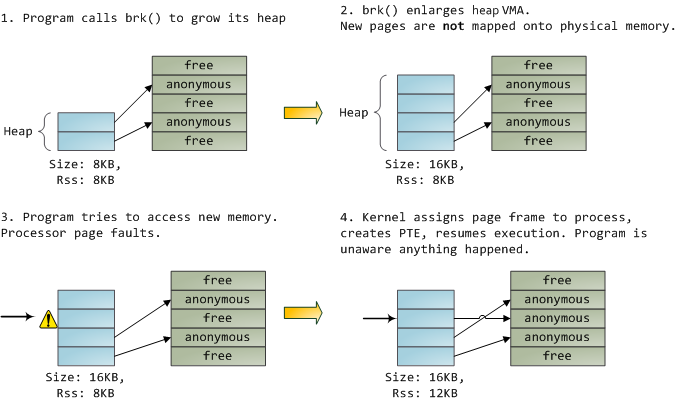
When the program asks for more memory via the brk() system call, the kernel simply updates the heap VMA and calls it good. No page frames are actually allocated at this point and the new pages are not present in physical memory. Once the program tries to access the pages, the processor page faults and do_page_fault() is called. It searches for the VMA covering the faulted virtual address using find_vma(). If found, the permissions on the VMA are also checked against the attempted access (read or write). If there’s no suitable VMA, no contract covers the attempted memory access and the process is punished by Segmentation Fault.
When a VMA is found the kernel must handle the fault by looking at the PTE contents and the type of VMA. In our case, the PTE shows the page is not present. In fact, our PTE is completely blank (all zeros), which in Linux means the virtual page has never been mapped. Since this is an anonymous VMA, we have a purely RAM affair that must be handled by do_anonymous_page(), which allocates a page frame and makes a PTE to map the faulted virtual page onto the freshly allocated frame.
Things could have been different. The PTE for a swapped out page, for example, has 0 in the Present flag but is not blank. Instead, it stores the swap location holding the page contents, which must be read from disk and loaded into a page frame by do_swap_page() in what is called a major fault.
This concludes the first half of our tour through the kernel’s user memory management. In the next post, we’ll throw files into the mix to build a complete picture of memory fundamentals, including consequences for performance.
How the Kernel Manages Your Memory的更多相关文章
- How The Kernel Manages Your Memory.内核是如何管理内存的
原文标题:How The Kernel Manages Your Memory 原文地址:http://duartes.org/gustavo/blog/ [注:本人水平有限,只好挑一些国外高手的精彩 ...
- Memory Allocation API In Linux Kernel && Linux Userspace、kmalloc vmalloc Difference、Kernel Large Section Memory Allocation
目录 . 内核态(ring0)内存申请和用户态(ring3)内存申请 . 内核态(ring0)内存申请:kmalloc/kfree.vmalloc/vfree . 用户态(ring3)内存申请:mal ...
- Linux kernel Programming - Allocating Memory
kmalloc #include <linux/slab.h> void *kmalloc(size_t size,int flags); void kfree(void *addr); ...
- 工作于内存和文件之间的页缓存, Page Cache, the Affair Between Memory and Files
原文作者:Gustavo Duarte 原文地址:http://duartes.org/gustavo/blog/post/what-your-computer-does-while-you-wait ...
- Page Cache, the Affair Between Memory and Files
Previously we looked at how the kernel manages virtual memory for a user process, but files and I/O ...
- 转:如何实现一个malloc
如何实现一个malloc 转载后排版效果很差,看原文! 任何一个用过或学过C的人对malloc都不会陌生.大家都知道malloc可以分配一段连续的内存空间,并且在不再使用时可以通过free释放掉. ...
- CPU与内存的那些事
下面是网上看到的一些关于内存和CPU方面的一些很不错的文章. 整理如下: 转: CPU的等待有多久? 原文标题:What Your Computer Does While You Wait 原文地址: ...
- What Your Computer Does While You Wait
转: CPU的等待有多久? 原文标题:What Your Computer Does While You Wait 原文地址:http://duartes.org/gustavo/blog/ [注:本 ...
- 转:CPU与内存的那些事
下面是网上看到的一些关于内存和CPU方面的一些很不错的文章. 整理如下: 转: CPU的等待有多久? 原文标题:What Your Computer Does While You Wait 原文地址: ...
随机推荐
- Flume 与Kafka区别
今天开会讨论日志处理为什么要同时使用Flume和Kafka,是否可以只用Kafka 不使用Flume?当时想到的就只用Flume的接口多,不管是输入接口(socket 和 文件)以及输出接口(Kafk ...
- [GRYZ2015]阿Q的停车场
题目描述 刚拿到驾照的KJ 总喜欢开着车到处兜风,玩完了再把车停到阿Q的停车场里,虽然她对自己停车的水平很有信心,但她还是不放心其他人的停车水平,尤其是Kelukin.于是,她每次都把自己的爱车停在距 ...
- sizeof的作用——解释类中与类之外static变量的情况
今天看程序员面试宝典的时候遇到一个问题,书上有这么一句话:sizeof计算栈中分配的大小.咋一看这句话的时候,很不理解,难道像函数中类似于static.extern const类型的变量的sizeof ...
- mysql日期加减问题
有一个date列,我想修改下,让该列里每个日期都加上7天,怎么写代码? update [表名] set date=date_add(date, interval 7 day); SELECT * f ...
- JQuery原理
1.简单模拟JQuery工作原理 (function(window){ var JQuery ={ a: function(){ alert('a'); }, b: function(){ alert ...
- android 链接蓝牙不稳定的解决建议
My workaround I scan BLE for a short period of time 3-4 seconds then I turn scan OFF for 3-4 seconds ...
- TreeView节点
TreeView由节点构成,建树通过对TreeView.items属性进行操作.Items是一个TTreeNodes对象,这是一个TTreeNode集. 一.针对TTreeNodes,也就是 Tree ...
- 第十三章、学习 Shell Scripts 条件判断式
利用 if .... then 单层.简单条件判断式 if [ 条件判断式 ]; then 当条件判断式成立时,可以进行的命令工作内容: fi <==将 if 反过来写,就成为 fi !结束 i ...
- [Objective-c 基础 - 2.4] 多态
A.对象的多种形态 1.父类指针指向子类对象 2.调用方法的时候,会动态监测真实地对象的方法 3.没有继承,就没有多态 4.好处:用一个父类指针可以指向不同的子类对象 5.强制转换类型之后就能使用子类 ...
- Oracle- 表的自增长创建
Oracle创建自增长要先写序列还要去写触发器,不像MSSQLSERVER那样方便.但也是麻烦,记录如下: Oracle中,可以为每张表的主键创建一个单独的序列,然后从这个序列中获取自动增加的标识符, ...