
MySQL慢SQL语句常见诱因
原创转载请注明出处:https://www.cnblogs.com/agilestyle/p/11429037.html
1. 无索引、索引失效导致慢查询
如果在一张几千万数据的表中以一个没有索引的列作为查询条件,大部分情况下查询会非常耗时,这种查询毫无疑问是一个慢SQL查询。所以对于大数据量的查询,需要建立适合的索引来优化查询。
虽然很多时候建立了索引,但在一些特定的场景下,索引还有可能会失效,所以索引失效也是导致慢查询的主要原因之一。
2. 锁等待
常用的存储引擎有 InnoDB 和 MyISAM,前者支持行锁和表锁,后者只支持表锁。
如果数据库操作是基于表锁实现的,试想下,如果一张订单表在更新时,需要锁住整张表,那么其它大量数据库操作(包括查询)都将处于等待状态,这将严重影响到系统的并发性能。
这时,InnoDB 存储引擎支持的行锁更适合高并发场景。但在使用 InnoDB 存储引擎时,要特别注意行锁升级为表锁的可能。在批量更新操作时,行锁就很可能会升级为表锁。
MySQL认为如果对一张表使用大量行锁,会导致事务执行效率下降,从而可能造成其它事务长时间锁等待和更多的锁冲突问题发生,致使性能严重下降,所以MySQL会将行锁升级为表锁。还有,行锁是基于索引加的锁,如果在更新操作时,条件索引失效,那么行锁也会升级为表锁。
因此,基于表锁的数据库操作,会导致SQL阻塞等待,从而影响执行速度。在一些更新操作(insert\update\delete)大于或等于读操作的情况下,MySQL不建议使用MyISAM存储引擎。
除了锁升级之外,行锁相对表锁来说,虽然粒度更细,并发能力提升了,但也带来了新的问题,那就是死锁。因此,在使用行锁时,要注意避免死锁。
3. 不恰当的SQL语句
使用不恰当的SQL语句也是慢SQL最常见的诱因之一。例如,习惯使用<SELECT *>,<SELECT COUNT(*)> SQL语句,在大数据表中使用<LIMIT M,N>分页查询,以及对非索引字段进行排序等等。
Note:
慢查询问题,很可能是没有利用好索引导致的,MySQL 内置的 explain 命令,可以帮助确认查询语句是否利用了索引。
| Column name | Description |
|---|---|
| id | Sequence number that shows in which order tables are joined. |
| select_type | What kind of SELECT the table comes from. |
| table | Alias name of table. Materialized temporary tables for sub queries are named <subquery#> |
| type | How rows are found from the table (join type). |
| possible_keys | keys in table that could be used to find rows in the table |
| key | The name of the key that is used to retrieve rows. NULL is no key was used. |
| key_len | How many bytes of the key that was used (shows if we are using only parts of the multi-column key). |
| ref | The reference that is used to as the key value. |
| rows | An estimate of how many rows we will find in the table for each key lookup. |
| Extra | Extra information about this join. |
其中 type 表示 表中找到所需行的方式
| Value | Description |
|---|---|
| ALL | A full table scan is done for the table (all rows are read). This is bad if the table is large and the table is joined against a previous table! This happens when the optimizer could not find any usable index to access rows. |
| const | There is only one possibly matching row in the table. The row is read before the optimization phase and all columns in the table are treated as constants. |
| eq_ref | A unique index is used to find the rows. This is the best possible plan to find the row. |
| fulltext | A fulltext index is used to access the rows. |
| index_merge | A 'range' access is done for for several index and the found rows are merged. The key column shows which keys are used. |
| index_subquery | This is similar as ref, but used for sub queries that are transformed to key lookups. |
| index | A full scan over the used index. Better than ALL but still bad if index is large and the table is joined against a previous table. |
| range | The table will be accessed with a key over one or more value ranges. |
| ref_or_null | Like 'ref' but in addition another search for the 'null' value is done if the first value was not found. This happens usually with sub queries. |
| ref | A non unique index or prefix of an unique index is used to find the rows. Good if the prefix doesn't match many rows. |
| system | The table has 0 or 1 rows. |
| unique_subquery | This is similar as eq_ref, but used for sub queries that are transformed to key lookups |
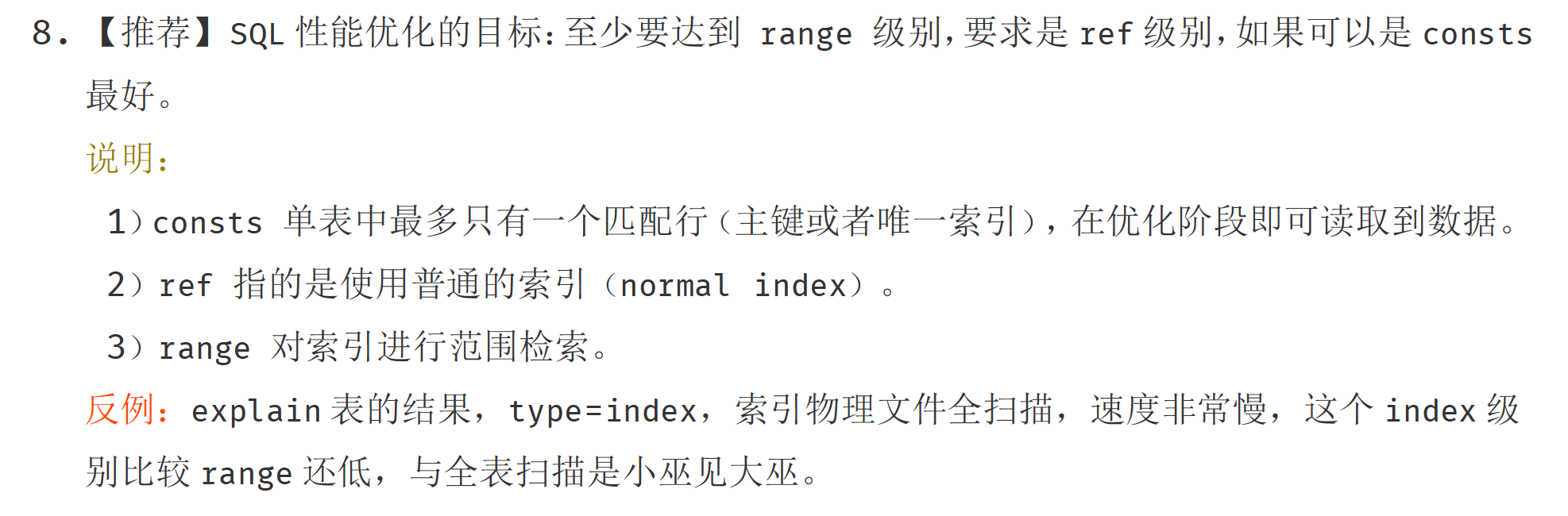
常用的类型有: ALL, index, range, ref, eq_ref, const, system, NULL(从左到右,性能从差到好)
ALL:Full Table Scan, MySQL将遍历全表以找到匹配的行
index: Full Index Scan,index与ALL区别为index类型只遍历索引树
range: 只检索给定范围的行,使用一个索引来选择行
ref: 表示上述表的连接匹配条件,即哪些列或常量被用于查找索引列上的值
eq_ref: 类似ref,区别就在使用的索引是唯一索引,对于每个索引键值,表中只有一条记录匹配,简单来说,就是多表连接中使用primary key或者 unique key作为关联条件
const、system: 当MySQL对查询某部分进行优化,并转换为一个常量时,使用这些类型访问。如将主键置于where列表中,MySQL就能将该查询转换为一个常量,system是const类型的特例,当查询的表只有一行的情况下,使用system
NULL: MySQL在优化过程中分解语句,执行时甚至不用访问表或索引,例如从一个索引列里选取最小值可以通过单独索引查找完成。
SQL性能优化目标
Reference
https://time.geekbang.org/column/article/113440
https://mariadb.com/kb/en/library/show-processlist/
https://mariadb.com/kb/en/library/thread-command-values/
https://mariadb.com/kb/en/library/explain/
MySQL慢SQL语句常见诱因的更多相关文章
- MySQL中SQL语句常见优化策略
1.避免全表扫描 对查询进行优化,应尽量避免全表扫描,首先应考虑在where 及order by 涉及的列上建立索引. 2.避免判断null 值 应尽量避免在where 子句中对字段进行null 值判 ...
- mysql优化sql语句
mysql优化sql语句 常见误区 www.2cto.com 误区1: count(1)和count(primary_key) 优于 count(*) 很多人为了统计记录条数,就使 ...
- MySQL数据库SQL语句基本操作
一.用户管理: 创建用户: create user '用户名'@'IP地址' identified by '密码'; 删除用户: drop user '用户名'@'IP地址'; 修改用户: renam ...
- php面试专题---MySQL常用SQL语句优化
php面试专题---MySQL常用SQL语句优化 一.总结 一句话总结: 原理,万变不离其宗:其实SQL语句优化的过程中,无非就是对mysql的执行计划理解,以及B+树索引的理解,其实只要我们理解执行 ...
- Mysql常用sql语句(20)- 子查询重点知识
测试必备的Mysql常用sql语句系列 https://www.cnblogs.com/poloyy/category/1683347.html 子查询语句可以嵌套在 sql 语句中任何表达式出现的位 ...
- Mysql常用sql语句(22)- insert 插入数据
测试必备的Mysql常用sql语句系列 https://www.cnblogs.com/poloyy/category/1683347.html 前言 终于讲完基础的查询语句了...这篇讲的就是插入数 ...
- Mysql常用sql语句(3)- select 查询语句基础使用
测试必备的Mysql常用sql语句系列 https://www.cnblogs.com/poloyy/category/1683347.html 前言 针对数据表里面的每条记录,select查询语句叫 ...
- Mysql常用sql语句(4)- distinct 去重数据
测试必备的Mysql常用sql语句系列 https://www.cnblogs.com/poloyy/category/1683347.html 前言 我们使用select进行数据查询时是会返回所有匹 ...
- Mysql 常用 SQL 语句集锦
Mysql 常用 SQL 语句集锦 基础篇 //查询时间,友好提示 $sql = "select date_format(create_time, '%Y-%m-%d') as day fr ...
随机推荐
- idea 离线安装 lombok插件
Lombok简介 Lombok是Java语言的实用工具,确切的说,应该说是一个很好用的插件,对,插件!可以用来帮助开发人员消除Java代码的冗长,尤其是对于简单的Java对象(POJO),它通过注解实 ...
- 聊聊Dubbo - Dubbo可扩展机制实战
1. Dubbo的扩展机制 在Dubbo的官网上,Dubbo描述自己是一个高性能的RPC框架.今天我想聊聊Dubbo的另一个很棒的特性, 就是它的可扩展性. 如同罗马不是一天建成的,任何系统都一定是从 ...
- SQL SERVER内部函数大全
SQL SERVER内部函数是SQL数据库中非常重要的一类函数,下面就为您介绍SQL SERVER内部函数,如果您对此方面感兴趣的话,不妨一看. SQL SERVER内部函数: select @@CO ...
- php htmlentities()函数 语法
php htmlentities()函数 语法 作用:把字符转换为 HTML 实体 语法:htmlentities(string,flags,character-set,double_encode) ...
- 组合的输出(回溯、dfs)
问题 O: [回溯法]组合的输出 题目描述 排列与组合是常用的数学方法,其中组合就是从n个元素中抽出r个元素(不分顺序且r<=n),我们可以简单地将n个元素理解为自然数1,2,…,n,从中任取r ...
- 【CF741D】Arpa’s letter-marked tree and Mehrdad’s Dokhtar-kosh paths(dsu on tree)
题意:我们称一个字符串为周驿东串当且仅当重排它的字符可以组成一个回文串. 给出一个n个点的有根树,根为1,每条边上有一个从a到v的字符,求每个点的子树中所有简单路径可以组成的周驿东串中的最长长度. n ...
- PHP之面向对象小结
PHP 中创建对象 类创建后,我们可以使用 new 运算符来实例化该类的对象: $runoob = new Site; PHP 构造函数 构造函数 ,是一种特殊的方法.主要用来在创建对象时初始化对象, ...
- [CSP-S模拟测试]:God Knows(线段树维护单调栈)
题目描述 小$w$来到天堂的门口,对着天堂的大门发呆.大门上有一个二分图,左边第$i$个点连到右边第$p_i$个点.(保证$p_i$是一个排列).小$w$每次可以找左边某个对应连线尚未被移除的点$i$ ...
- SPRING CLOUD微服务DEMO-上篇
目录 1. 微服务架构 2. 远程调用方式 2.1 RPC/RMI 2.2 Http 2.3 如何选择 3. Http客户端工具 3.1 RestTemplate 4. Spring Boot 搭建项 ...
- Mybatis简介与原理
经常面试别人或者被面试,对Mybatis简介与原理这个问题的回答千差万别,为了更好的服务与以后,来个原理介绍. 什么是Mybatis MyBatis 本是apache的一个开源项目iBatis, 20 ...