
jumpserver安装和使用
jumpserver安装
#centos6 centos7都可用
yum -y install git python-pip mysql-devel gcc automake autoconf python-devel vim sshpass lrzsz readline-devel
#下载:
#下载0.3.2版本:https://github.com/jumpserver/jumpserver
#src: D:\share\src\jumpserver-master.zip
#安装pip
wget https://bootstrap.pypa.io/get-pip.py
python get-pip.py
#centos7需要以下步聚 yum安装mariadb
    yum install -y mariadb-server mariadb mariadb-devel

    systemctl start mariadb

    [root@localhost /opt/tools ::&&]#mysql

    Welcome to the MariaDB monitor.  Commands end with ; or \g.

    Your MariaDB connection id is

    Server version: 5.5.-MariaDB MariaDB Server

    Copyright (c) , , Oracle, MariaDB Corporation Ab and others.

    Type 'help;' or '\h' for help. Type '\c' to clear the current input statement.

    MariaDB [(none)]> CREATE DATABASE `jumpserver` DEFAULT CHARACTER SET utf8 COLLATE utf8_general_ci;

    Query OK,  row affected (0.00 sec)

    MariaDB [(none)]> grant all on jumpserver.* to 'jumpserver'@'127.0.0.1' identified by '';

    Query OK,  rows affected (0.00 sec)

    MariaDB [(none)]> flush privileges;

    Query OK,  rows affected (0.00 sec)
#centos6直接用jumpserver新安装mysql
#上传jumpserver-master.zip 到 /opt/tools
cd /opt/tools
unzip jumpserver-master.zip
cd jumpserver-master/install
pip install -r requirements.txt
pip freeze #查看安装的包
python install.py
输入jumpserver的地址,默认为:”192.168.159.10”,回车即可。
是否安装MySQL:centos6选择”y”进行安装 centos7选择no,前面已经装过mariadb

MySQL 启动后会要求用户输入 邮件服务器及账户(后期用来发送用户名、ssh pass、web pass、ssh key)阿里云关闭25端口,要改用465加密

输入smtp信息之后发现报错了,是python的pycrypto模块问题,需要卸载重装:
pip uninstall pycrypto
easy_install pycrypto


安装之后继续 python install.py 进行安装,并且输入 web管理员用户名和管理员密码,ok


运行 crontab,定期处理失效连接,定期更新资产信息
cd /opt/tools/jumpserver-master
python manage.py crontab add

注:
1)根据提示输入相关信息,完成安装,安装完成后,请访问web,继续查看后续文档
2)如果启动失败,请返回上层目录,手动运行 ./service.sh start 启动
3)如果 ./service.sh start 启动失败
cd /opt/tools/jumpserver-master/
python manage.py runserver 0.0.0.0:80
#python run_websocket.py
4)如果启动失败,可能是由于80端口和3000端口已经被占用,或者数据库账号密码不对,请检查
五、Web登录
http://192.168.159.10
到此jumpserver安装完毕。
2)配置和使用jumpserver
2.1) cd /opt/tools/jumpserver-master/
cat jumpserver.conf #这个文件是jumpserver的配置文件。记得更改配置好要重启jumpserver
2.2)使用jumpserver
配置管理用户【此用户是客户机sudo权限的系统用户,客户机指的是要接入jumpserver管理的电脑】
例:192.168.159.10这台机器让jumpserver来管理,需要操作的步骤如下:
(1)客户机上添加管理用户,指拱sudo权限。所有需要让jumpserver来管理的客户机都需要做这个操作。不过私钥跟公钥是共用的
[root@localhost /home ::&&]#useradd jump

[root@localhost /home ::&&]#su - jump

[jump@localhost ~ ::&&]$mkdir .ssh

[jump@localhost ~ ::&&]$ssh-keygen -f jump  #一直回车,会在jump家目录下生成ssh公钥和私钥

[jump@localhost ~ ::&&]$ls

jump  jump.pub

[jump@localhost ~ ::&&]$cat jump.pub > .ssh/authorized_keys

[jump@localhost ~ ::&&]$chmod  .ssh

[jump@localhost ~ ::&&]$chmod  .ssh/authorized_keys

[jump@localhost ~ ::&&]$exit

logout

[root@localhost /home ::&&]#sed -i '/jump/'d /etc/sudoers && sed -i '/^root/a\jump    ALL=(ALL) NOPASSWD: ALL' /etc/sudoers

[root@localhost /home/jump ::&&]#cat /home/jump/jump #这个私钥 配置jumpserver控制台默认管理用户要使用
(2)jumpserver控制台添加默认管理用户
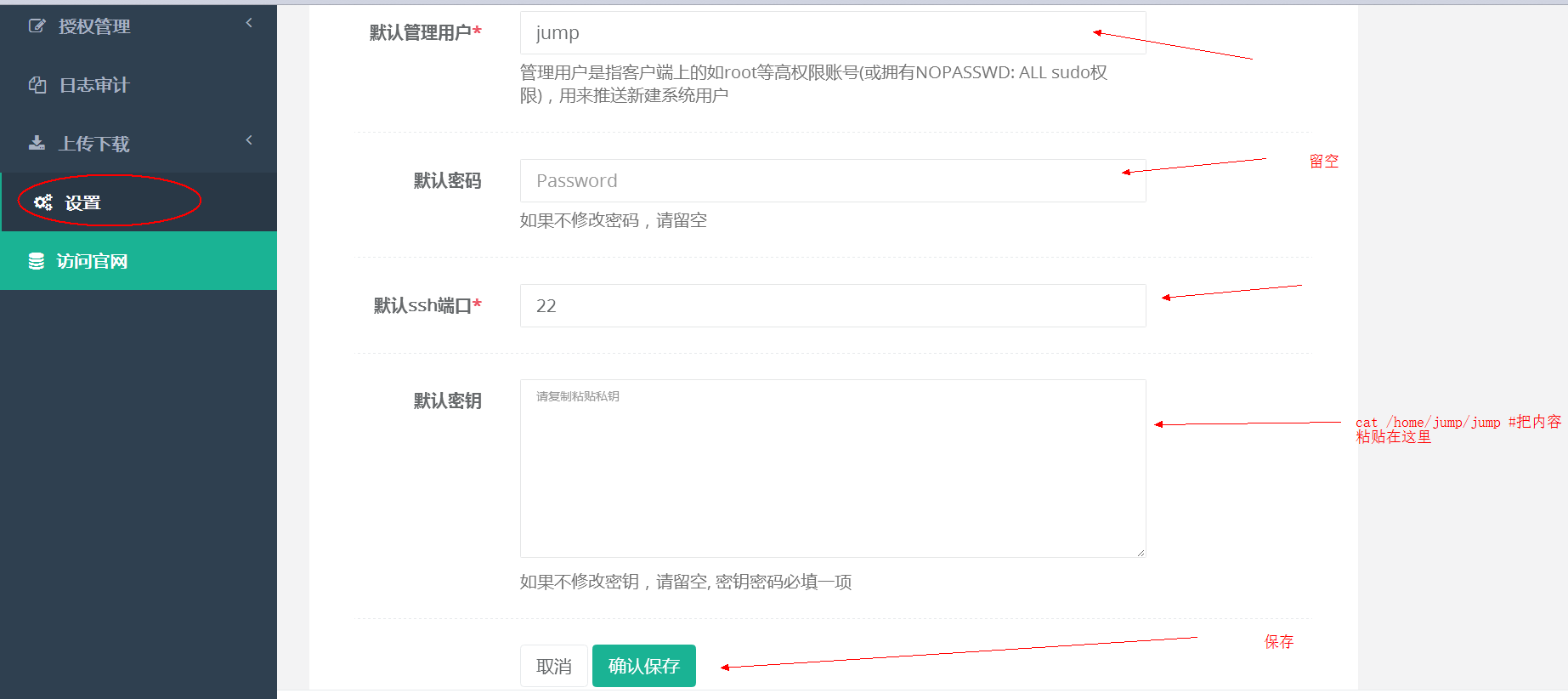
(3)添加jumpserver用户【用来登陆jumpserver控制面板,和xshell登陆jumpserver服务器】

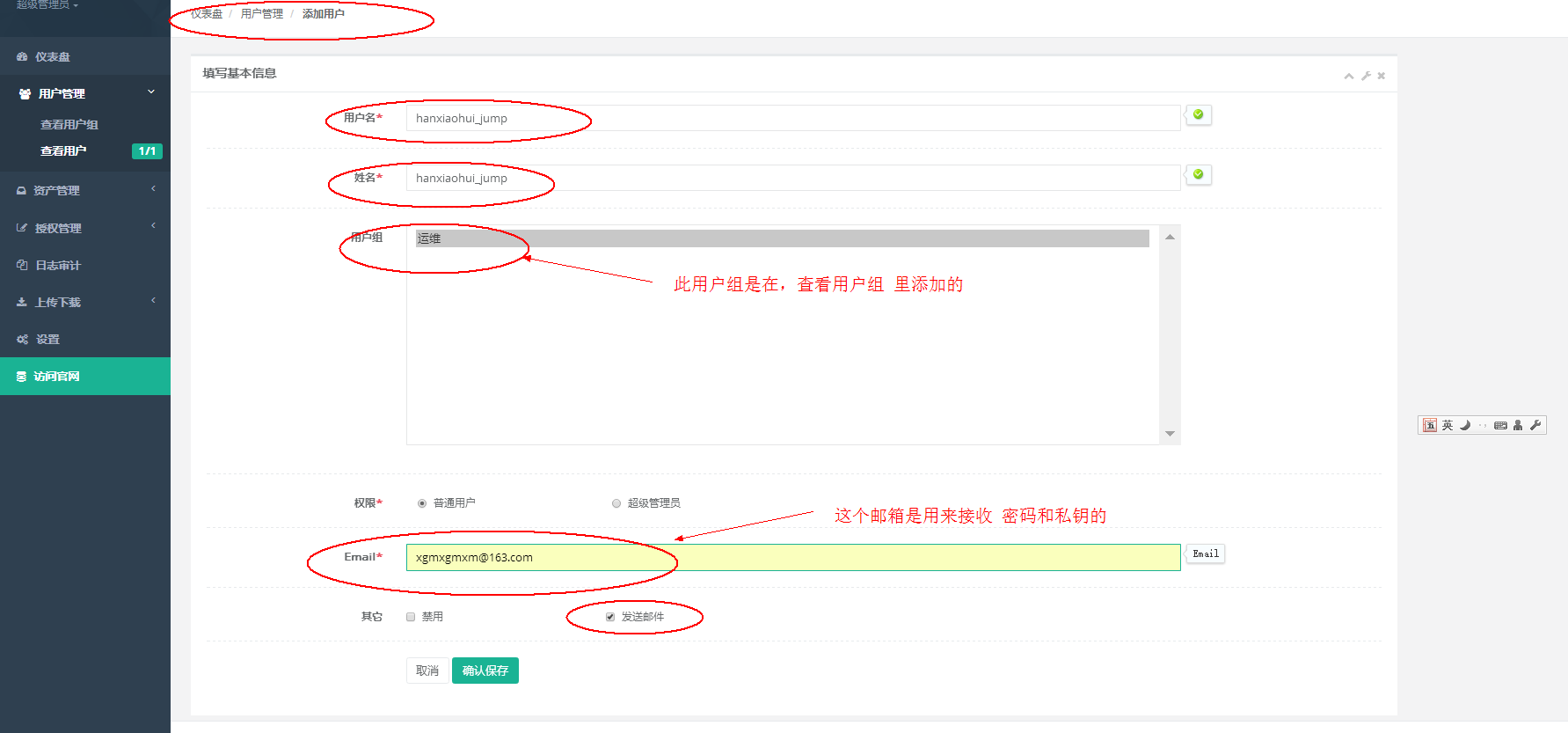

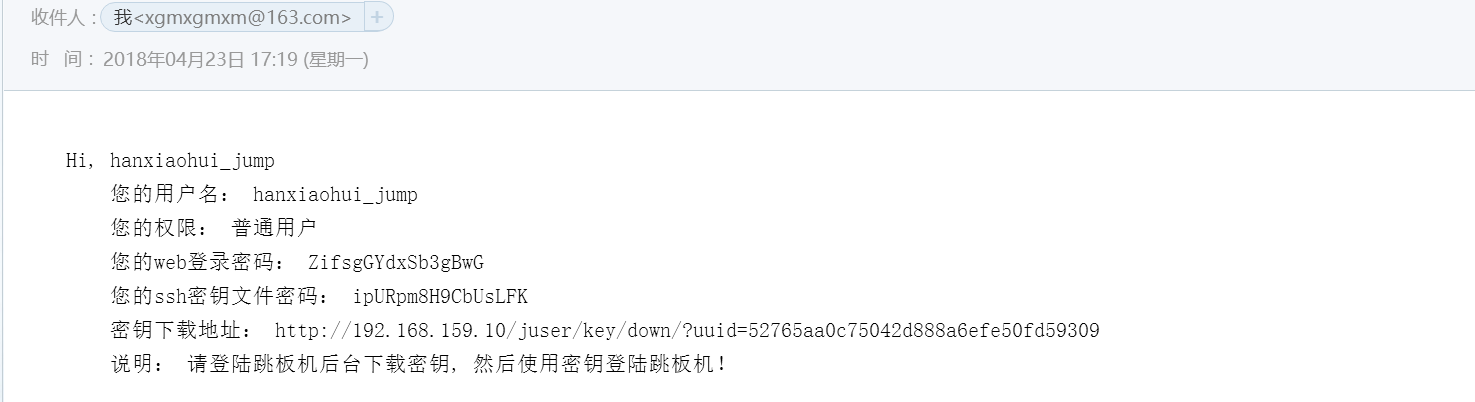
登入邮件可以查看这个账号的密码和私钥下载地址
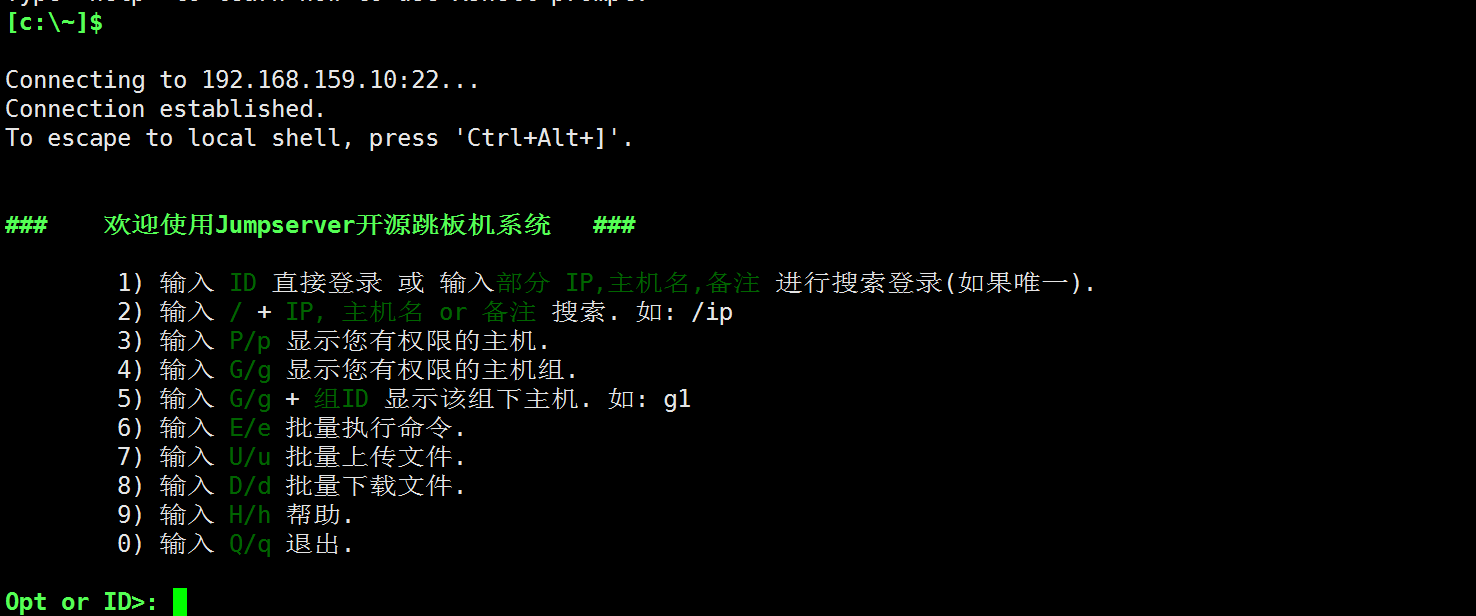
使用账号和私钥及密码登入 xshell jumpserver
(4)添加资产
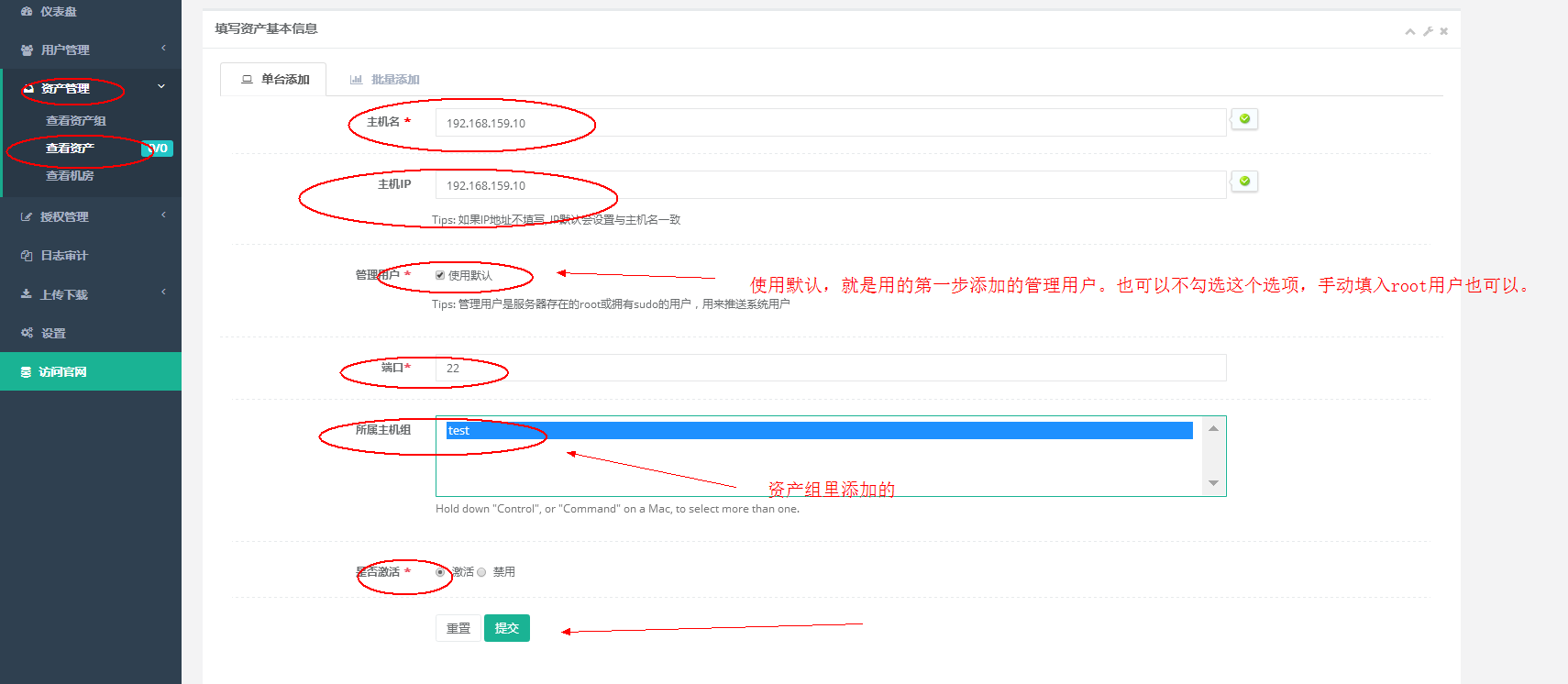

(5)授权管理
添加sudo
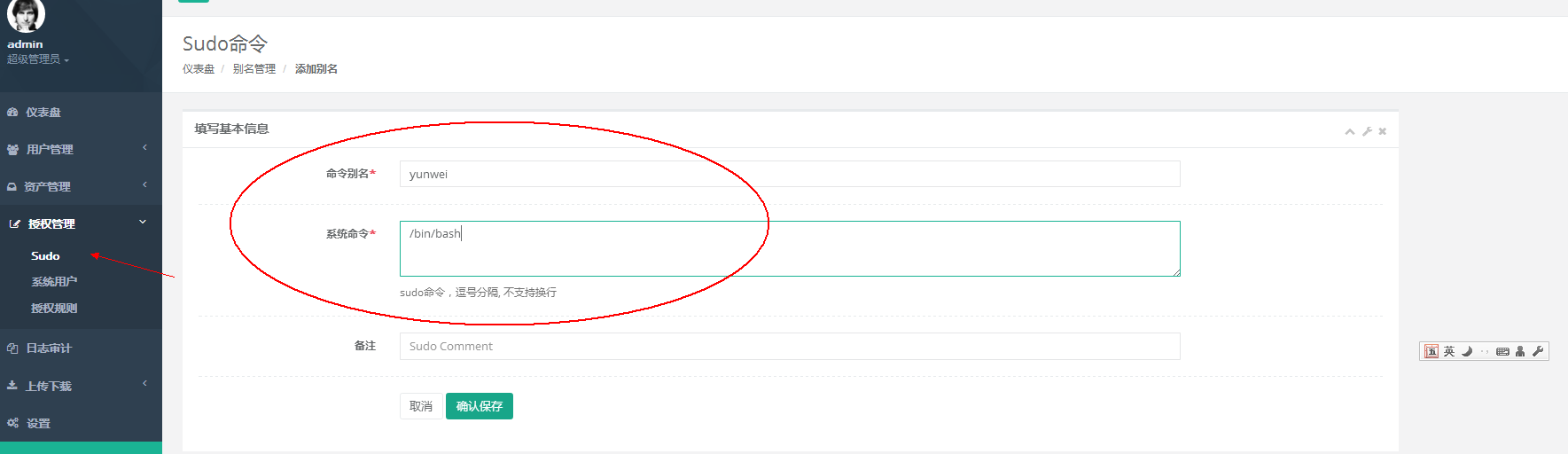
添加系统用户
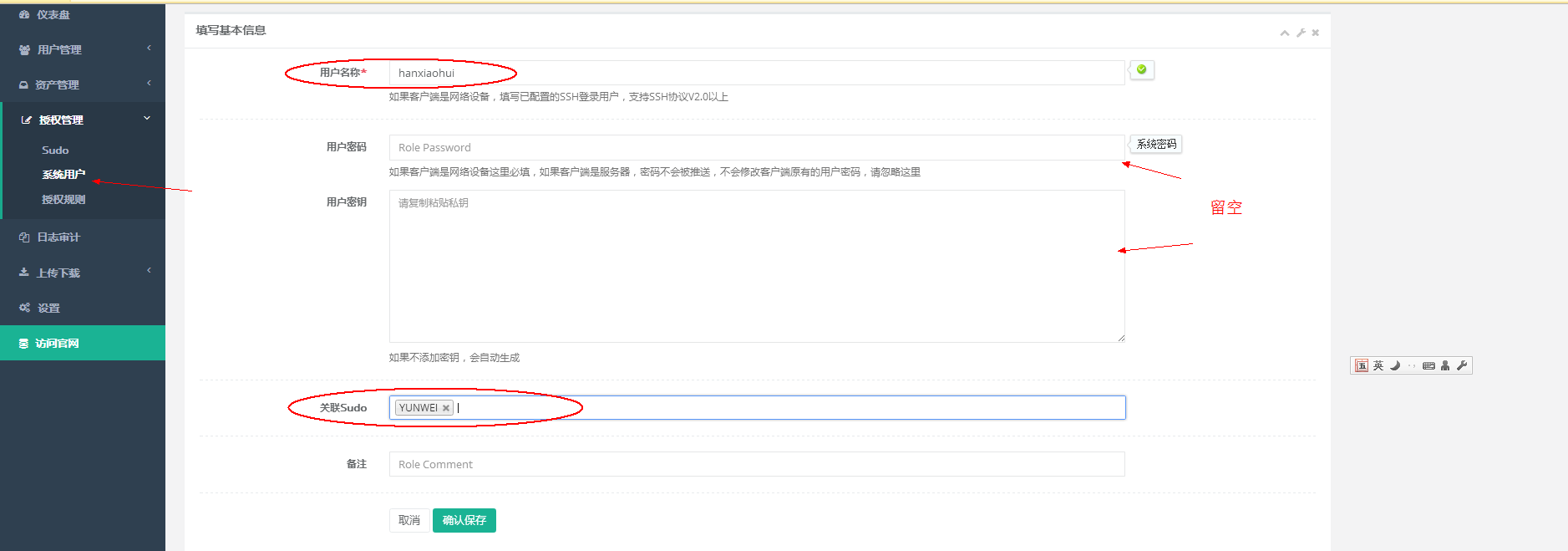
推送系统用户
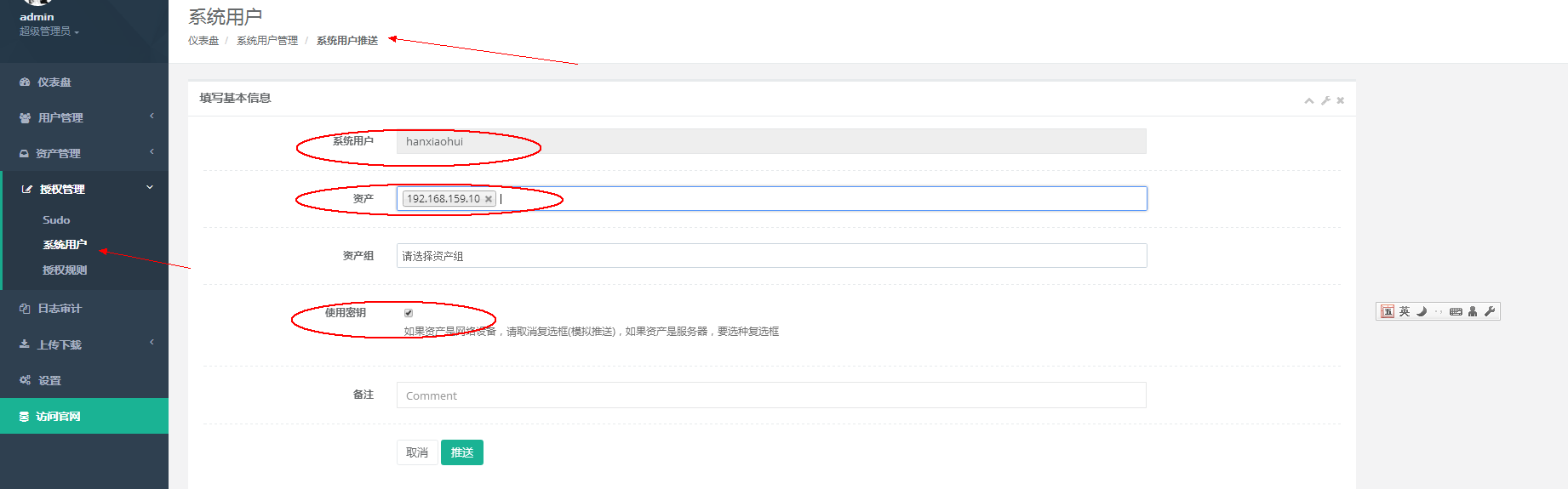
授权规则【授权名随便写,用户选择的是登入jumpserver的用户,选择完资产才能登入那台服务器,系统用户是使用哪个用户去登入服务器】

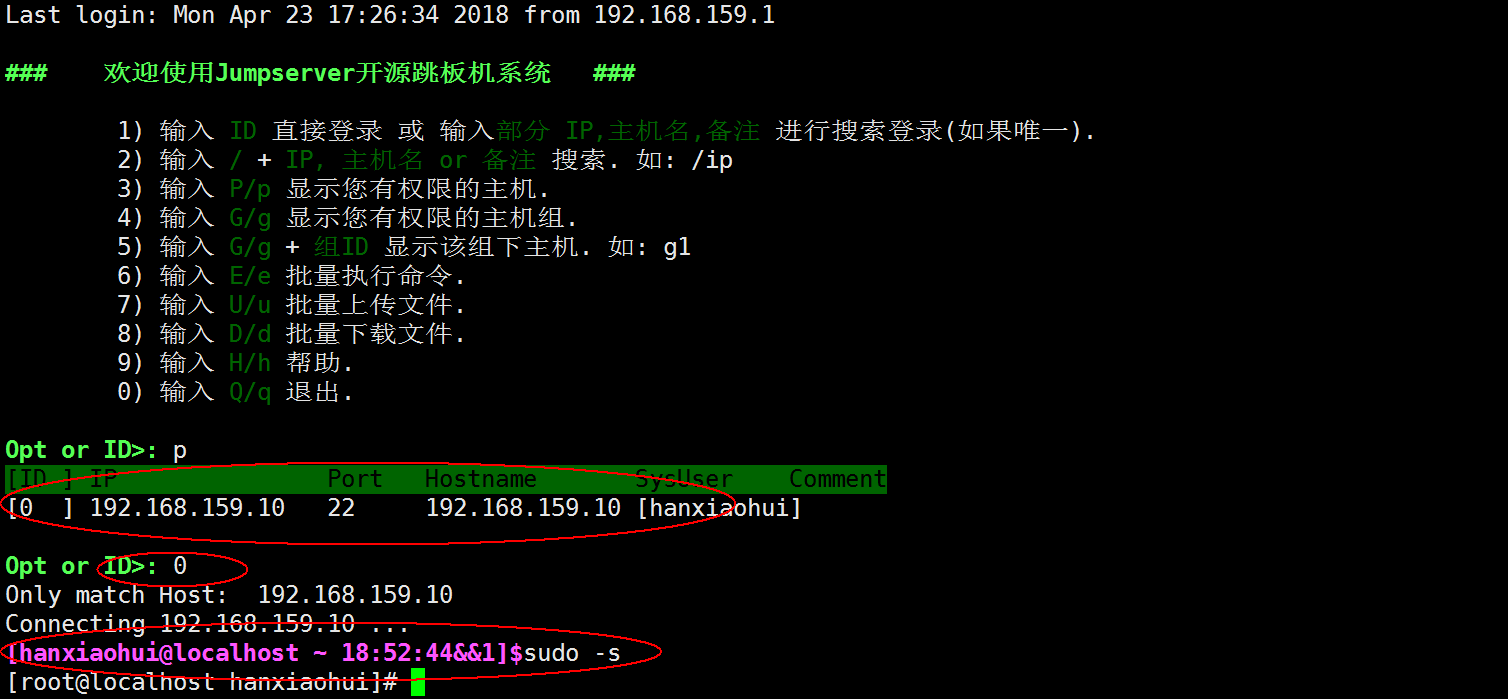
xshell登入服务器
jumpserver安装和使用的更多相关文章
- jumpserver安装详解
环境说明 主机为最小 安装的centos6.9 x86_64. [root@m01 ~]# cat /etc/redhat-release CentOS release 6.9 (Final) [ro ...
- JumpServer 安装配置
环境 系统:Centos 7.4 阿里云ECS,单独绑定弹性公网IP 关闭selinux,防火墙对本机公司IP全开 #CentOS 7 $ setenforce 0 # 临时关闭,重启后失效 #修改字 ...
- jumpserver安装
一. 准备 Python3 和 Python 虚拟环境 1.1 安装依赖包 yum -y install wget sqlite-devel xz gcc automake zlib-devel o ...
- jumpserver安装与部署
1.简介 Jumpserver 是一款由Python编写开源的跳板机(堡垒机)系统,实现了跳板机应有的功能.基于ssh协议来管理,客户端无需安装agent.特点: 完全开源,GPL授权 Pyth ...
- CentOS 7下JumpServer安装及配置
环境 系统 # cat /etc/redhat-release CentOS Linux release 7.4.1708 (Core) # uname -r 3.10.0-693.21.1.el7. ...
- Jumpserver安装过程
Jumpserver 安装过程 可参照此官方文档搭建: http://docs.jumpserver.org/zh/docs/step_by_step.html 其中,需注意处: # docker ...
- jumpserver安装及使用教程
我自己是jumpserver的新手,以下两个链接是比较好的教程: 安装教程:http://blog.csdn.net/wanglei_storage/article/details/51001810 ...
- jumpserver安装教程
centos7系统一步一步安装jumpserver 参照官方文档,查找了百度所有的文档,基本上都是按照官方的文档操作的 官方文档点我-> 安装jumpserver需注意: 1:网络环境要好,有的 ...
- jumpserver 安装详解
一,下载软件 下载前安装依赖软件 yum install -y epel-release yum -y install git python-pip my ...
随机推荐
- 上海站赛后总结&反思
上海站赛后总结&反思 赛后反思一下,本应该做出3~4题的场,最后只出了2题. 先回顾一下比赛,比赛开始10分钟,队友dy就想出了B题是trie树的模板题,然后让mqy码,第一次交的时候有地方打 ...
- js 函数 写法
// function ckeckName(){}; // function checkUser(){}; // function checkPassWorld(){}; // var checkNa ...
- [Linux] 010 权限管理命令 chmod
1. 权限管理命令:chmod 命令名称:chmod 命令英文原意:change the permissions mode of a file 命令所在路径:/bin/chmod 执行权限:所有用户 ...
- 基于Netty重构RPC框架
下面的这张图,大概很多小伙伴都见到过,这是Dubbo 官网中的一张图描述了项目架构的演进过程.随着互联网的发展,网站应用的规模不断扩大,常规的垂直应用架构已无法应对,分布式服务架构以及流动计算架构势在 ...
- 2.openshift授权策略和scc理解
policy管理概念 查看policy的方式可以通过cli进行查看 Roles grant various levels of access in the system-wide cluster po ...
- U33405 纽约 (二分)
[题目描述] 牧民 Azone 需要多次往返于两个草场之间运输家当.为了顺利转场,Azone 决定花费 w元津巴布韦币,购买一辆载重为 w 的汽车.共有 n 件家具需要搬运,每件家具的重量为 wi ...
- An easy problem (位运算)
[题目描述] 给出一个整数,输出比其大的第一个数,要求输出的数二进制表示和原数二进制表示下1的个数相同. [题目链接] http://noi.openjudge.cn/ch0406/1455/ [算法 ...
- asp.net ajax的使用
参考:https://www.cnblogs.com/acles/articles/2385648.html https://www.cnblogs.com/xujingyang/p/5560646. ...
- vue,一路走来(9)--聊天窗口
闲暇时间,介绍一下我做一个聊天窗口的心得.如图: 首先要考虑的是得判断出是自己的信息还是对方发来的信息,给出如图的布局,切换不同的类. <li class="clearfix" ...
- oralce 日期 date 相关操作
1.当前时间加减一年 加一年 select sysdate,add_month(sysdate,12) from dual; 减一年 select sysdate,add_month(sysdate, ...