
spring boot+layui分页实战
项目用了layui,做了个简单的图书搜索页,分享出来。
喜欢的朋友给点个赞!!!
实现效果
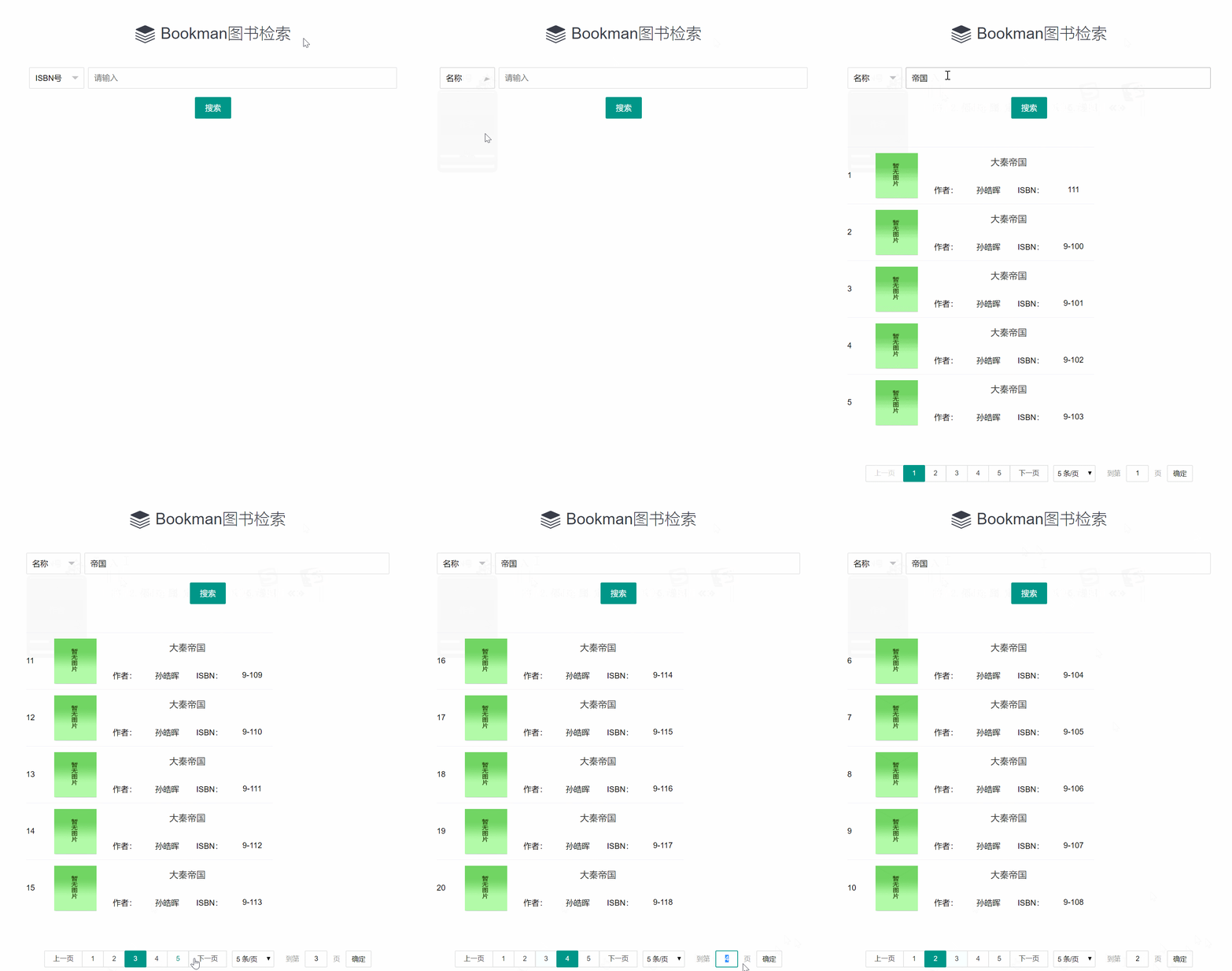
开发步骤
1.前端页面和JS
<!DOCTYPE html>
<html xmlns="http://www.w3.org/1999/xhtml" xmlns:th="http://www.thymeleaf.org">
<head>
<meta charset="UTF-8">
<meta name="viewport" content="width=device-width, initial-scale=1.0">
<meta http-equiv="X-UA-Compatible" content="ie=edge">
<title>搜索图书</title>
<link rel="stylesheet" href="/static/layui/css/layui.css" th:href="@{/static/layui/css/layui.css}">
<style type="text/css">
省略...
</style>
</head>
<body>
<div class="main">
<h1 class="site-h1"><i class="layui-icon"></i>Bookman图书检索</h1>
<form class="layui-form">
<div class="layui-form-item">
<div class="input-opt">
<select name="condition" lay-verify="required">
<option value="isbn">ISBN号</option>
<option value="author">作者</option>
<option value="name">名称</option>
</select>
</div>
<div class="input-text">
<input type="text" name="keyword" required lay-verify="required" placeholder="请输入" autocomplete="off"
class="layui-input">
</div>
</div>
<div class="layui-form-item">
<button class="layui-btn layui-btn-submit" lay-submit="" lay-filter="formDemo">搜索</button>
</div>
</form>
<!-- 列表 -->
<div class="booklist">
<table class="items">
</table>
<!--分页-->
<div id="pager"></div>
</div>
</div>
<script src="/static/js/jquery-1.11.3.min.js" th:src="@{/static/js/jquery-1.11.3.min.js}"></script>
<script src="/static/layui/layui.js" th:src="@{/static/layui/layui.js}"></script>
<!--ctx-->
<script th:replace="~{fragment::ctx}"/>
<script>
var form, laypage;
// 请求参数
var param = {};
layui.use(['form','laypage','jquery'], function () {
form = layui.form;
laypage = layui.laypage, $ = layui.$;
//监听提交
form.on('submit(formDemo)', function (data) {
param.name = "";
param.isbn = "";
param.author = "";
if (data.field.condition == "isbn") {
param.isbn = data.field.keyword;
}
if (data.field.condition == "name") {
param.name = data.field.keyword;
}
if (data.field.condition == "author") {
param.author = data.field.keyword;
}
showRecord(1,5,param);
return false;
});
});
function showRecord(pageNo, pageSize, param) {
$.get(ctx+"api/book/list",
{
author: param.author,
name: param.name,
isbn: param.isbn,
page: pageNo,
limit: pageSize
},
function (result) {
// 展示数据
fillPage(pageNo, pageSize, result.data);
// 渲染分页
laypage.render({
elem: $('#pager')
,count: result.count //数据总数,从服务端得到
, limit: 5 //每页显示条数
, limits: [5, 10, 15]
, curr: 1 //起始页
, groups: 5 //连续页码个数
, prev: '上一页' //上一页文本
, netx: '下一页' //下一页文本
, first: 1 //首页文本
, last: 100 //尾页文本
, layout: ['prev', 'page', 'next','limit','skip']
//跳转页码时调用
, jump: function (obj, first) { //obj为当前页的属性和方法,第一次加载first为true
//非首次加载 do something
if (!first) {
//调用加载函数加载数据
getPage(obj.curr,obj.limit,param);
}
}
});
}
);
}
function getPage(pageNo, pageSize, param) {
var result1;
$.get(ctx+"api/book/list",
{
author: param.author,
name: param.name,
isbn: param.isbn,
page: pageNo,
limit: pageSize
},
function (result) {
fillPage(pageNo, pageSize, result.data);
}
);
}
function fillPage(pageNo, pageSize, data) {
var start=pageNo==1?1:(pageNo-1)*pageSize+1;
$('.items').empty();
//加载后台返回的List集合数据
var href="";
for (var i = 0; i < data.length; i++) {
href=ctx+"bookDetail/"+data[i].id;
var td = $("<td class='col1'></td>").text(start+i);
var td2 = $("<td class='cover'><a href='"+href+"' target='_blank'><img src='static/img/nopic.png'></a></td>");
var td3 = $("<td class='col2'></td>");
var div = $("<div class='itemtitle'><a href='"+href+"' target='_blank'>"+data[i].name+"</a></div>");
var tb = $("<table><tr><td class='label1'>作者:</td><td class='content'>"+data[i].author+"</td>" +
"<td class='label1'>ISBN:</td><td class='content'>"+data[i].isbn+"</td></tr></table>")
td3.append(div,tb);
var tr = $("<tr class='item'></tr>").append(td, td2, td3);
$('.items').append(tr);
}
}
</script>
</body>
</html>2.数据层
<select id="count" parameterType="Map" resultType="java.lang.Integer">

        select count(*) from tb_book

        <where>

            <if test="isbn!=null and isbn!=''">

                and isbn = #{isbn}

            </if>

            <if test="name!=null and name!=''">

                and name like concat('%',#{name},'%')

            </if>

            <if test="author!=null and author!=''">

                and author like concat('%',#{author},'%')

            </if>

        </where>

    </select>
<select id="selectPageResult" parameterType="map" resultType="com.laoxu.java.bookman.model.Book">
select *
from tb_book
<where>
<if test="isbn!=null and isbn!=''">
and isbn = #{isbn}
</if>
<if test="name!=null and name!=''">
and name like concat('%',#{name},'%')
</if>
<if test="author!=null and author!=''">
and author like concat('%',#{author},'%')
</if>
</where>
limit #{offset}, #{rows}
</select>3.服务层
package com.laoxu.java.bookman.service;

import com.laoxu.java.bookman.framework.AbstractService;

import com.laoxu.java.bookman.model.Book;

import org.springframework.stereotype.Service;

import java.util.List;

import java.util.Map;

/**

 * @Description: 图书服务

 * @Author laoxu

 * @Date 2019/5/2 9:26

 **/

@Service

public class BookService extends AbstractService {

    public void add(Book entity) {

        //String username = SecurityUtil.getLoginUser();

        insert("bookMapper.insert",entity);

    }

    public void modify(Book entity) {

        update("bookMapper.update",entity);

    }

    public void remove(Long id) {

        delete("bookMapper.delete",id);

    }

    public void removes(Long[] ids) {

        delete("bookMapper.deletes",ids);

    }

    public Book get(Long id) {

        return selectOne("bookMapper.select",id);

    }

    public Book getByIsbn(String isbn) {

        return selectOne("bookMapper.selectByIsbn",isbn);

    }

    public List<Book> getParentList(Long id) {

        return selectList("bookMapper.selectParentList",id);

    }

    public int count(Map<String, Object> param) {

        return selectOne("bookMapper.count",param);

    }

    public List<Book> getList(Map<String, Object> param) {

        return selectList("bookMapper.selectList",param);

    }

    public List<Book> getPageResult(Map<String, Object> param) {

        return selectList("bookMapper.selectPageResult",param);

    }

    public int checkCode(Book entity){

        return selectOne("bookMapper.countCode",entity);

    }

}
4.控制层
@GetMapping("/list")

    public ResultBean<List<Book>> getPageResult(

            @RequestParam(required = false) String name,

            @RequestParam(required = false) String isbn,

            @RequestParam(required = false) String author,

            @RequestParam(defaultValue = "1") Integer page,

            @RequestParam(defaultValue = "10") Integer limit) {

        Map<String, Object> param = new HashMap<>();

        // 计算起始行号

        int offset = (page - 1) * limit;

        int rows = limit;

        param.put("name",name);

        param.put("isbn",isbn);

        param.put("author",author);

        param.put("offset", offset);

        param.put("rows", rows);

        // 统计记录数

        int totalRows = bookService.count(param);

        // 获取当前页结果集

        List<Book> entities = bookService.getPageResult(param);

        ResultBean result = new ResultBean(0, "查询成功", totalRows, entities);

        return result;

    }
5.数据格式参考
{
"code": 0,
"msg": "查询成功",
"count": 1,
"data": [{
"id": 10,
"createTime": "2020-01-12T11:22:49.000+0000",
"creater": null,
"updateTime": "2020-02-04T15:31:28.000+0000",
"updater": null,
"name": "大秦帝国",
"isbn": "111",
"categoryCode": "10",
"categoryName": "K 历史、地理",
"author": "孙皓晖",
"publisherCode": "7-302",
"publisherName": "清华大学出版社-北京",
"price": 588,
"edition": 1,
"translator": "",
"languageCode": "CH",
"languageName": "汉语",
"pages": 1200,
"words": 5000000,
"locationCode": "一号架",
"locationName": "一号架",
"totalNumber": 122,
"leftNumber": 4,
}]
}
spring boot+layui分页实战的更多相关文章
- Spring Boot 揭秘与实战 附录 - Spring Boot 公共配置
Spring Boot 公共配置,配置 application.properties/application.yml 文件中. 摘自:http://docs.spring.io/spring-boot ...
- Spring Boot 揭秘与实战 自己实现一个简单的自动配置模块
文章目录 1. 实战的开端 – Maven搭建 2. 参数的配置 - 属性参数类 3. 真的很简单 - 简单的服务类 4. 自动配置的核心 - 自动配置类 5. spring.factories 不要 ...
- Spring Boot 揭秘与实战 源码分析 - 工作原理剖析
文章目录 1. EnableAutoConfiguration 帮助我们做了什么 2. 配置参数类 – FreeMarkerProperties 3. 自动配置类 – FreeMarkerAutoCo ...
- Spring Boot 揭秘与实战 源码分析 - 开箱即用,内藏玄机
文章目录 1. 开箱即用,内藏玄机 2. 总结 3. 源代码 Spring Boot提供了很多”开箱即用“的依赖模块,那么,Spring Boot 如何巧妙的做到开箱即用,自动配置的呢? 开箱即用,内 ...
- Spring Boot 揭秘与实战(九) 应用监控篇 - 自定义监控端点
文章目录 1. 继承 AbstractEndpoint 抽象类 2. 创建端点配置类 3. 运行 4. 源代码 Spring Boot 提供的端点不能满足我们的业务需求时,我们可以自定义一个端点. 本 ...
- Spring Boot 揭秘与实战(九) 应用监控篇 - HTTP 健康监控
文章目录 1. 内置 HealthIndicator 监控检测 2. 自定义 HealthIndicator 监控检测 3. 源代码 Health 信息是从 ApplicationContext 中所 ...
- Spring Boot 揭秘与实战(九) 应用监控篇 - HTTP 应用监控
文章目录 1. 快速开始 2. 监控和管理端点3. 定制端点 2.1. health 应用健康指标 2.2. info 查看应用信息 2.3. metrics 应用基本指标 2.4. trace 基本 ...
- Spring Boot 揭秘与实战(八) 发布与部署 - 远程调试
文章目录 1. 依赖 2. 部署 3. 调试 4. 源代码 设置远程调试,可以在正式环境上随时跟踪与调试生产故障. 依赖 在 pom.xml 中增加远程调试依赖. <plugins> &l ...
- Spring Boot 揭秘与实战(八) 发布与部署 - 开发热部署
文章目录 1. spring-boot-devtools 实现热部署 2. Spring Loaded 实现热部署 3. 模板文件热部署 4. 源代码 Spring Boot 支持页面与类文件的热部署 ...
- Spring Boot 揭秘与实战(七) 实用技术篇 - StateMachine 状态机机制
文章目录 1. 环境依赖 2. 状态和事件 2.1. 状态枚举 2.2. 事件枚举 3. 状态机配置4. 状态监听器 3.1. 初始化状态机状态 3.2. 初始化状态迁移事件 5. 总结 6. 源代码 ...
随机推荐
- [转帖]mysql8 ALGORITHM=INSTANT 亿级数据秒速增加字段
一.概述 登录后复制 在线DDL之快速增加列(秒级别的),并不会造成业务抖动.该功能自 MySQL 8.0.12 版本引入,是由腾讯游戏DBA团队贡献,此功能只适用于 InnoDB 表.实际上MySQ ...
- Redis不同版本,内存分配,硬件的性能研究
Redis不同版本,内存分配,硬件的性能研究 前言 Konw more ! Do more ! Gain more ! 骨折之后开始减肥. 前段时间跳绳导致膝盖不舒服,现在改骑车和走路. 在有限的没人 ...
- [转帖]Linux Shell编程 循环语法
https://zhuanlan.zhihu.com/ for循环 for 循环是固定循环,也就是在循环时已经知道需要进行几次循环.有时也把 for 循环称为计数循环.语法: for 变量 in 值1 ...
- [转帖]Kubernetes-15:一文详解Pod、Node调度规则(亲和性、污点、容忍、固定节点)
https://www.cnblogs.com/v-fan/p/13609124.html Kubernetes Pod调度说明 简介 Scheduler 是 Kubernetes 的调度器,主要任务 ...
- 【转帖】关于网卡特性TSO、UFO、GSO、LRO、GRO
https://www.cnblogs.com/larrypeng/p/12496810.html 我们来看下关于网卡特性的解释,不过记住GSO和GRO两个特性就好. TSO(TCP Segmenta ...
- Rsync原理的学习与总结
Rsync原理的简单学习 前言 工作这么多年, 感觉对自己帮助最大的是rsync. 用了很多rsync的脚本, 甚至因为这个脚本授权了两个专利. 但是昨天晚上在跟高手聊天时发现 自己对rsync 其实 ...
- [转帖]History of Web Browser Engines from 1990 until today
https://eylenburg.github.io/browser_engines.htm Many tried, few remain... Last updated: January 2023 ...
- ABP无法使用异步操作,但要调用异步方法
使用 AsyncHelper.RunSync(() => _studentRepository.FirstOrDefaultAsync(x => x.Code == studentCode ...
- 因为命名被diss无数次。简单聊聊编程最头疼的事情之一:命名
本文已经收录进我的 80K+ Star 的 Java 开源项目 JavaGuide:https://github.com/Snailclimb/JavaGuide (「Java学习+面试指南」一份涵盖 ...
- SpringBoot2.7集成Swagger3
1.引入pom坐标 <!--swagger--> <dependency> <groupId>io.springfox</groupId> <ar ...