
Cesium之CustomShader
1. 引言
Cesium自1.87.1版本,开始支持3DTileset使用CustomShader:
Added CustomShader class for styling Cesium3DTileset or ModelExperimental with custom GLSL shaders
在CesiumJS 1.97版本,支持Model entities使用CustomShader:
Model entities now support CustomShader
具体可参考:Releases · CesiumGS/cesium (github.com)
使用CustomShader,编写自定义的Shader,可以实现一些炫酷的特效
本文描述使用CustomShader,实现3D Tiles模型的一些特效
数据来源:功能示例(Vue版) | Mars3D三维可视化平台 | 火星科技
数据地址:http://data.mars3d.cn/3dtiles/jzw-hefei/tileset.json
2. CustomShader
Cesium中Cesium3DTileset的加载代码如下:
<body>

  <!-- Include the CesiumJS JavaScript and CSS files -->

  <script src="https://cesium.com/downloads/cesiumjs/releases/1.101/Build/Cesium/Cesium.js"></script>

  <link href="https://cesium.com/downloads/cesiumjs/releases/1.101/Build/Cesium/Widgets/widgets.css" rel="stylesheet">

  <div id="cesiumContainer"></div>

  <script>

    Cesium.Ion.defaultAccessToken = 'eyJhbGciOiJIUzI1NiIsInR5cCI6IkpXVCJ9.eyJqdGkiOiJlMTk4ZTYyNy00MjkxLTRmZWYtOTg1MS0wOThjM2YzMzIzYzEiLCJpZCI6NzEyMSwic2NvcGVzIjpbImFzciIsImdjIl0sImlhdCI6MTU0ODMxNzI5OX0.rKV8Ldl_bgR3lVvNsbHhTX62j8JH8ADCIWAwk7tXpr8';

    const viewer = new Cesium.Viewer('cesiumContainer');

    const tilesets = viewer.scene.primitives.add(new Cesium.Cesium3DTileset({

      url: "//data.mars3d.cn/3dtiles/jzw-hefei/tileset.json"

    }));

    tilesets.readyPromise.then(function (tileset) {

      viewer.flyTo(tileset);

    });

  </script>

</body>
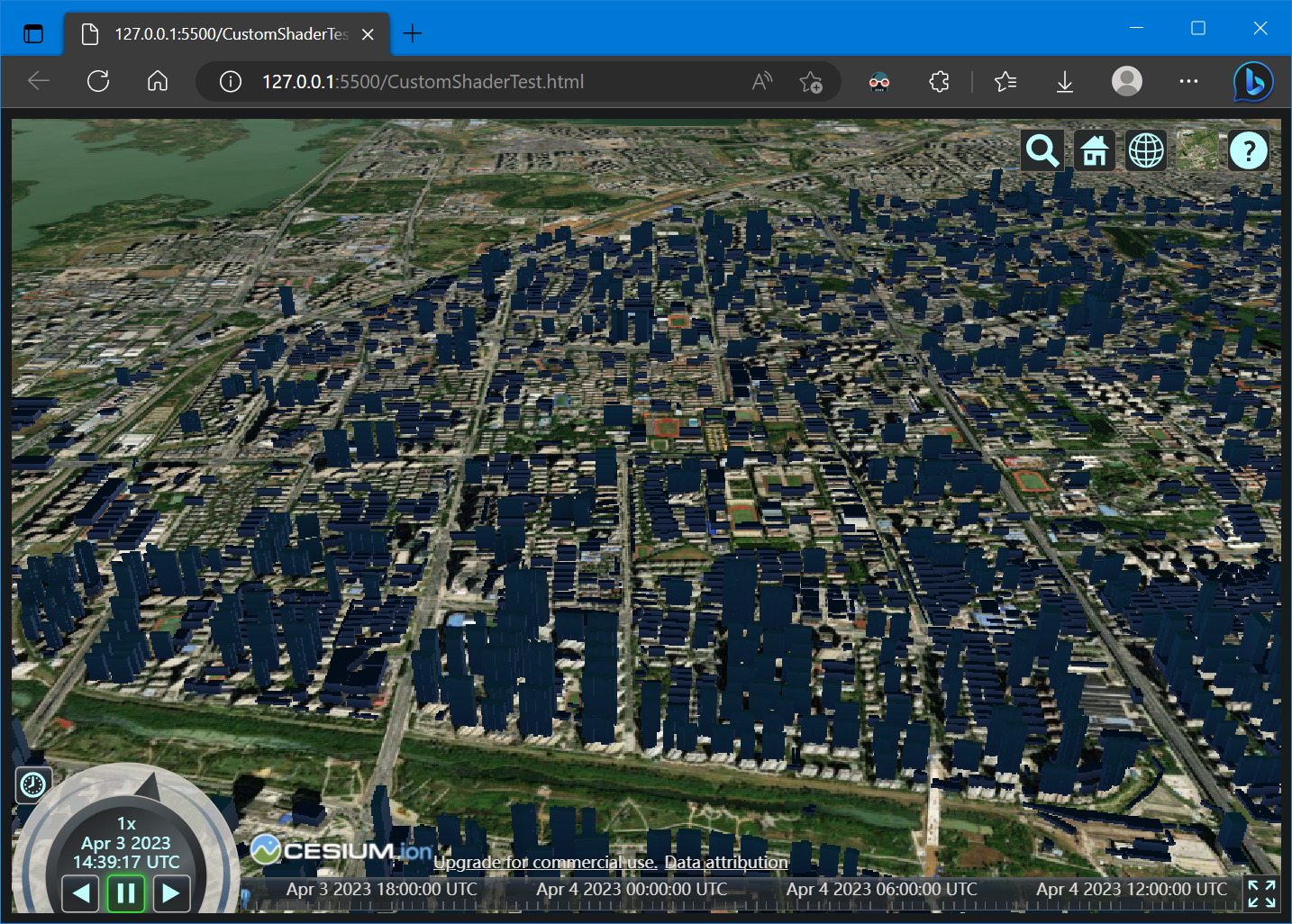
效果如下:
在Cesium3DTileset中,支持设置CustomShader,示例如下:
const customShader = new Cesium.CustomShader(/* ... */);

// Applying to all tiles in a tileset.

const tileset = await Cesium.Cesium3DTileset.fromUrl(

  "http://example.com/tileset.json", {

    customShader: customShader

});

viewer.scene.primitives.add(tileset);
具体信息可参考:
- Cesium3DTileset - Cesium Documentation
- cesium/Documentation/CustomShaderGuide at main · CesiumGS/cesium (github.com)
参考:CustomShader - Cesium Documentation,CustomShader的构造示例如下:
const customShader = new CustomShader({

  uniforms: {

    u_colorIndex: {

      type: Cesium.UniformType.FLOAT,

      value: 1.0

    },

    u_normalMap: {

      type: Cesium.UniformType.SAMPLER_2D,

      value: new Cesium.TextureUniform({

        url: "http://example.com/normal.png"

      })

    }

  },

  varyings: {

    v_selectedColor: Cesium.VaryingType.VEC3

  },

  vertexShaderText: `

  void vertexMain(VertexInput vsInput, inout czm_modelVertexOutput vsOutput) {

    v_selectedColor = mix(vsInput.attributes.color_0, vsInput.attributes.color_1, u_colorIndex);

    vsOutput.positionMC += 0.1 * vsInput.attributes.normal;

  }

  `,

  fragmentShaderText: `

  void fragmentMain(FragmentInput fsInput, inout czm_modelMaterial material) {

    material.normal = texture(u_normalMap, fsInput.attributes.texCoord_0);

    material.diffuse = v_selectedColor;

  }

  `

});
具体的参数及含义如下:
| 名字 | 类型 | 描述 |
|---|---|---|
mode |
CustomShaderMode | (可选)自定义着色器模式 |
lightingModel |
LightingModel | (可选)照明模型(例如 PBR 或未照明) |
| translucencyMode | CustomShaderTranslucencyMode | (可选)用于定义半透明模式 |
uniforms |
Object <string, UniformSpecifier> | (可选)用于定义uniforms |
varyings |
Object <string, VaryingType> | (可选)用于声明着色器中使用的其他 GLSL varyings |
vertexShaderText |
string | (可选)作为 GLSL 代码字符串的自定义顶点着色器,必须包含一个名为 vertexMain 的 GLSL 函数 |
fragmentShaderText |
string | (可选)作为 GLSL 代码字符串的自定义片段着色器,必须包含一个名为fragmentMain的GLSL函数 |
更为具体的CustomShader使用可参考CustomShader指南:CustomShaderGuide
通过阅读这份指南,基本可以完全了解CustomShader的使用,此处主要讲述FragmentShader的使用
FragmentShaderText必须包含函数void fragmentMain(FragmentInput fsInput, inout czm_modelMaterial material),其中FragmentInput包含的数据与结构如下:
struct FragmentInput {

    // Processed attribute values. See the Attributes Struct section below.

    Attributes attributes;

    // Feature IDs/Batch IDs. See the FeatureIds Struct section below.

    FeatureIds featureIds;

    // Metadata properties. See the Metadata Struct section below.

    Metadata metadata;

    // Metadata class properties. See the MetadataClass Struct section below.

    MetadataClass metadataClass;

    // Metadata statistics. See the Metadata Statistics Struct section below

    MetadataStatistics metadataStatistics;

};
czm_modelMaterial 包含的数据与结构如下:
/**

 * @property {vec3} diffuse Incoming light that scatters evenly in all directions.

 * @property {float} alpha Alpha of this material. 0.0 is completely transparent; 1.0 is completely opaque.

 * @property {vec3} specular Color of reflected light at normal incidence in PBR materials. This is sometimes referred to as f0 in the literature.

 * @property {float} roughness A number from 0.0 to 1.0 representing how rough the surface is. Values near 0.0 produce glossy surfaces, while values near 1.0 produce rough surfaces.

 * @property {vec3} normalEC Surface's normal in eye coordinates. It is used for effects such as normal mapping. The default is the surface's unmodified normal.

 * @property {float} occlusion Ambient occlusion recieved at this point on the material. 1.0 means fully lit, 0.0 means fully occluded.

 * @property {vec3} emissive Light emitted by the material equally in all directions. The default is vec3(0.0), which emits no light.

 */

struct czm_modelMaterial {

    vec3 diffuse;

    float alpha;

    vec3 specular;

    float roughness;

    vec3 normalEC;

    float occlusion;

    vec3 emissive;

};
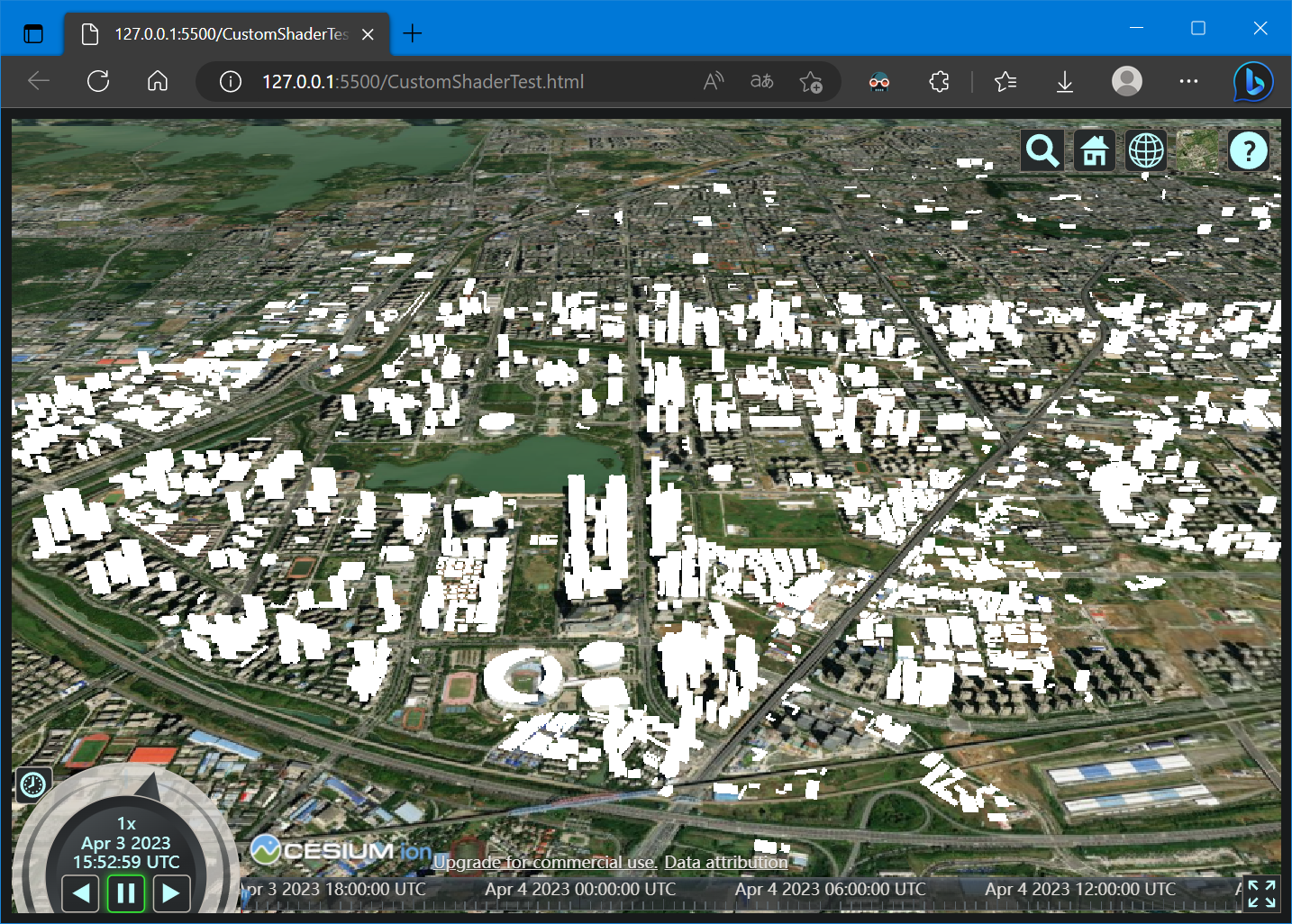
综上,将Cesium3DTileset设置为白色的示例代码如下:
<body>

   <!-- Include the CesiumJS JavaScript and CSS files -->

   <script src="https://cesium.com/downloads/cesiumjs/releases/1.101/Build/Cesium/Cesium.js"></script>

   <link href="https://cesium.com/downloads/cesiumjs/releases/1.101/Build/Cesium/Widgets/widgets.css" rel="stylesheet">

  <div id="cesiumContainer"></div>

  <script>

    Cesium.Ion.defaultAccessToken = 'eyJhbGciOiJIUzI1NiIsInR5cCI6IkpXVCJ9.eyJqdGkiOiJlMTk4ZTYyNy00MjkxLTRmZWYtOTg1MS0wOThjM2YzMzIzYzEiLCJpZCI6NzEyMSwic2NvcGVzIjpbImFzciIsImdjIl0sImlhdCI6MTU0ODMxNzI5OX0.rKV8Ldl_bgR3lVvNsbHhTX62j8JH8ADCIWAwk7tXpr8';

    const viewer = new Cesium.Viewer('cesiumContainer');

    const customShader = new Cesium.CustomShader({

      lightingModel: Cesium.LightingModel.UNLIT,

      fragmentShaderText: `

        void fragmentMain(FragmentInput fsInput, inout czm_modelMaterial material) {

            material.diffuse = vec3(1.0);

            material.alpha = 1.0;

        }

      `,

    });

    // Applying to all tiles in a tileset.

    const tilesets = viewer.scene.primitives.add(new Cesium.Cesium3DTileset({

      url: "//data.mars3d.cn/3dtiles/jzw-hefei/tileset.json",

      customShader: customShader

    }));

    tilesets.readyPromise.then(function (tileset) {

      viewer.flyTo(tileset);

    });

  </script>

</body>
效果如下:
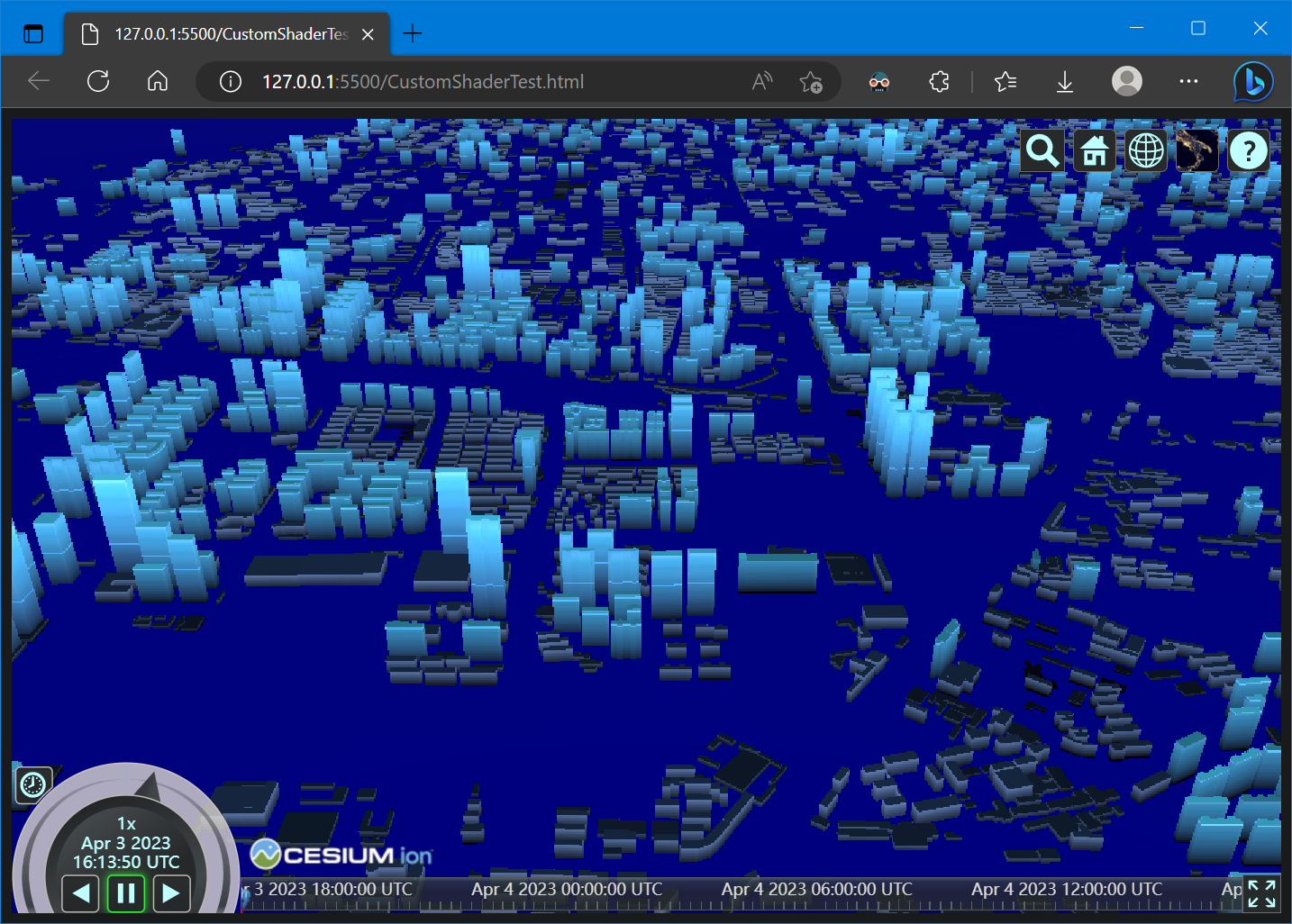
将Cesium3DTileset设置光带的示例代码如下:
<body>

   <!-- Include the CesiumJS JavaScript and CSS files -->

   <script src="https://cesium.com/downloads/cesiumjs/releases/1.101/Build/Cesium/Cesium.js"></script>

   <link href="https://cesium.com/downloads/cesiumjs/releases/1.101/Build/Cesium/Widgets/widgets.css" rel="stylesheet">

  <div id="cesiumContainer"></div>

  <script>

    Cesium.Ion.defaultAccessToken = 'eyJhbGciOiJIUzI1NiIsInR5cCI6IkpXVCJ9.eyJqdGkiOiJlMTk4ZTYyNy00MjkxLTRmZWYtOTg1MS0wOThjM2YzMzIzYzEiLCJpZCI6NzEyMSwic2NvcGVzIjpbImFzciIsImdjIl0sImlhdCI6MTU0ODMxNzI5OX0.rKV8Ldl_bgR3lVvNsbHhTX62j8JH8ADCIWAwk7tXpr8';

    const viewer = new Cesium.Viewer('cesiumContainer');

    const customShader = new Cesium.CustomShader({

      lightingModel: Cesium.LightingModel.UNLIT,

      fragmentShaderText: `

          void fragmentMain(FragmentInput fsInput, inout czm_modelMaterial material) {

              float _baseHeight = 0.0; // 物体的基础高度,需要修改成一个合适的建筑基础高度

              float _heightRange = 60.0; // 高亮的范围(_baseHeight ~ _baseHeight + _heightRange) 默认是 0-60米

              float _glowRange = 300.0; // 光环的移动范围(高度)

              float vtxf_height = fsInput.attributes.positionMC.z-_baseHeight;

              float vtxf_a11 = fract(czm_frameNumber / 120.0) * 3.14159265 * 2.0;

              float vtxf_a12 = vtxf_height / _heightRange + sin(vtxf_a11) * 0.1;

              material.diffuse*= vec3(vtxf_a12, vtxf_a12, vtxf_a12);

              float vtxf_a13 = fract(czm_frameNumber / 360.0);

              float vtxf_h = clamp(vtxf_height / _glowRange, 0.0, 1.0);

              vtxf_a13 = abs(vtxf_a13 - 0.5) * 2.0;

              float vtxf_diff = step(0.005, abs(vtxf_h - vtxf_a13));

              material.diffuse += material.diffuse * (1.0 - vtxf_diff);

          }

      `,

    });

    // Applying to all tiles in a tileset.

    const tilesets = viewer.scene.primitives.add(new Cesium.Cesium3DTileset({

      url: "//data.mars3d.cn/3dtiles/jzw-hefei/tileset.json",

      customShader: customShader

    }));

    tilesets.readyPromise.then(function (tileset) {

      viewer.flyTo(tileset);

    });

  </script>

</body>
fragmentShaderText代码复制自:Cesium1.87+ 实现建筑泛光效果 - 简书 (jianshu.com)
效果如下:
3. 参考资料
[1] Custom Shaders 3D Tiles - Cesium Sandcastle
[2] cesium/Documentation/CustomShaderGuide at main · CesiumGS/cesium · GitHub
[3] CustomShader - Cesium Documentation
[4] 功能示例(Vue版) | Mars3D三维可视化平台 | 火星科技
[5] Cesium1.87+ 实现建筑泛光效果 - 简书 (jianshu.com)
[6] Cesium3Dtilesets 使用customShader的解读以及泛光效果示例_cesium customshader_liuqing0.0的博客-CSDN博客
Cesium之CustomShader的更多相关文章
- CesiumJS 2022^ 原理[5] - 着色器相关的封装设计
目录 1. 对 WebGL 接口的封装 1.1. 缓冲对象封装 1.2. 纹理与采样参数封装 1.3. 着色器封装 1.4. 上下文对象与渲染通道 1.5. 统一值(uniform)封装 1.6. 渲 ...
- cesium自定义气泡窗口infoWindow
一.自定义气泡窗口与cesium默认窗口效果对比: 1.cesium点击弹出气泡窗口显示的位置固定在地图的右上角,默认效果: 2.对于习惯arcgis或者openlayer气泡窗口样式的giser来说 ...
- cesium核心类Viewer简介
1.简单描述Viewer Viewer类是cesium的核心类,是地图可视化展示的主窗口,cesium程序应用的切入口,扮演必不可少的核心角色. 官网的英文解析如下: A base widget fo ...
- Cesium简介以及离线部署运行
Cesium简介 cesium是国外一个基于JavaScript编写的使用WebGL的地图引擎,一款开源3DGIS的js库.cesium支持3D,2D,2.5D形式的地图展示,可以自行绘制图形,高亮区 ...
- Cesium教程系列汇总
Cesium系列目录: 应用篇 入门 Cesium应用篇:1快速搭建 影像 Cesium应用篇:2影像服务(上) Cesium应用篇:2影像服务(下) 控件 Cesium应用篇:3控件(1)Clock ...
- Cesium原理篇:GroundPrimitive
今天来看看GroundPrimitive,选择GroundPrimitive有三个目的:1 了解GroundPrimitive和Primitive的区别和关系 2 createGeometry的特殊处 ...
- Cesium原理篇:Batch
通过之前的Material和Entity介绍,不知道你有没有发现,当我们需要添加一个rectangle时,有两种方式可供选择,我们可以直接添加到Scene的PrimitiveCollection,也可 ...
- Cesium原理篇:Material
Shader 首先,在本文开始前,我们先普及一下材质的概念,这里推荐材质,普及材质的内容都是截取自该网站,我觉得他写的已经够好了.在开始普及概念前,推荐一首我此刻想到的歌<光---陈粒>. ...
- Cesium原理篇:Property
之前主要是Entity的一个大概流程,本文主要介绍Cesium的属性,比如defineProperties,Property(ConstantProperty,CallbackProperty,Con ...
- Cesium原理篇:5最长的一帧之影像
如果把地球比做一个人,地形就相当于这个人的骨骼,而影像就相当于这个人的外表了.之前的几个系列,我们全面的介绍了Cesium的地形内容,详见: Cesium原理篇:1最长的一帧之渲染调度 Cesium原 ...
随机推荐
- Power BI 14 DAY
快消行业销售情况分析 分析目的 帮助经销商优化进.销.存各环节业务流程行为,实现进销存一体化管理,加快资金运转速度,实现销售利润最大化的目的 重要指标 销售类指标 动销次数:在一段期间内产品的销售次数 ...
- JS Leetcode 74. 搜索二维矩阵题解分析,二分法与坐标轴法
壹 ❀ 引 本题来自Leetcode74. 搜索二维矩阵,虽然难度是中等,但如果站在做出来的角度,你会发现其实并不难,题目描述如下: 编写一个高效的算法来判断 m x n 矩阵中,是否存在一个目标值. ...
- NC50454 A Simple Problem with Integers
题目链接 题目 题目描述 给定数列 \(a[1],a[2], \dots,a[n]\) ,你需要依次进行q个操作,操作有两类: 1 l r x:给定l,r,x,对于所有 \(i \in[l,r]\) ...
- shell脚本实现进度条程序
1.实现效果 2.shell脚本 #!/bin/bash i=0 bar='' index=0 arr=( "|" "/" "-" &quo ...
- docker基于commit方式为镜像添加SSH服务
下载启动镜像 docker pull ubuntu: 18.04 docker run -it ubuntu:18.04 bash 配置软件源 备份/etc/apt/sources.list#备份cp ...
- Spring源码阅读系列--全局目录
阅读之前要注意的东西:本文就是主打流水账式的源码阅读,主导的是一个参考,主要内容需要看官自己去源码中验证.全系列文章基于 spring 源码 5.x 版本. 写在开始前的话: 阅读spring 源码实 ...
- 信捷电气 - C++工程师面试题(社招:3-5年工作经验)
1. char i = 1; printf("%d",i); // char字节用printf以整数型打印出来 2. int (*a[10])int a[10]是函数指针数组 ...
- 深入理解Go语言(08):sync.WaitGroup源码分析
一.sync.WaitGroup简介 1.1 sync.WaitGroup 解决了什么问题 在编程的时候,有时遇到一个大的任务,为了提高计算速度,会用到并发程序,把一个大的任务拆分成几个小的独立的任务 ...
- 启动HDFS伪分布式环境时报权限错误
问题描述 操作系统:Ubuntu18.04 LTS HDFS版本:hadoop-3.2.3 普通用户登录,参照官方文档在单机上安装伪分布式环境时,启动HDFS报权限错误. 具体报错信息如下: $ ./ ...
- Gin框架使用jwt-go配合中间件认证
参考文档 // 文档 https://github.com/golang-jwt/jwt https://pkg.go.dev/github.com/golang-jwt/jwt@v3.2.2+inc ...