
配置postcss-pxtorem报:options has an unknown property 'plugins'
闲聊:
小颖最近在坐大屏相关的项目,要写适配,之前用的:postcss-px2rem、px2rem-loader,和朋友闲聊呢他说他们也在写大屏,不过他们用的 postcss-pxtorem,在写另外一个项目时,小颖就想着试试 postcss-pxtorem ,结果配置到 vue.config.js 后就报错················如下图所示:
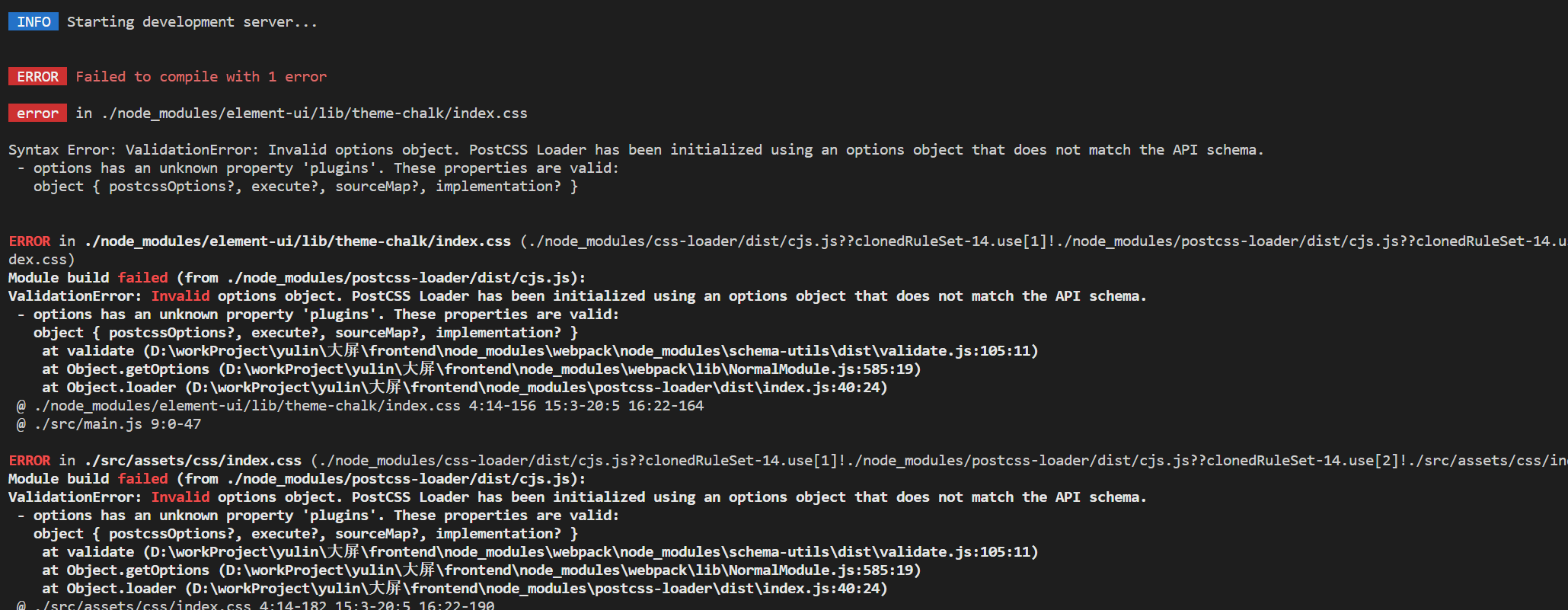
报错分析及解决方案:
vue项目安装使用postcss-pxtorem,在vue.config.js中进行配置,需要注意vue-cli-service的版本。如若vue-cli-service的版本为4,可直接在vue.config.js中进行配置。代码如下:
const { defineConfig } = require('@vue/cli-service')

const name = process.env.VUE_APP_TITLE || 'xxxxx' // 网页标题

const pxtorem = require('postcss-pxtorem');

module.exports = defineConfig({

  transpileDependencies: true,

  configureWebpack: { name: name, },

  css: {

    loaderOptions: {

      sass: {

        sassOptions: { outputStyle: "expanded" }

      },

      postcss: {

        plugins: [

          pxtorem({

            rootValue: 37.5,

            propList: ['*'],

          }),

        ]

      }

    }

  }

})
如若vue-cli-service的版本为5,则按以上配置无效,将 vue.config.js 中的 postcss 配置修改成下面的配置
const { defineConfig } = require('@vue/cli-service')

const name = process.env.VUE_APP_TITLE || 'xxxx' // 网页标题

const pxtorem = require('postcss-pxtorem');

module.exports = defineConfig({

  transpileDependencies: true,

  configureWebpack: { name: name, },

  css: {

    loaderOptions: {

      sass: {

        sassOptions: { outputStyle: "expanded" }

      },

      postcss: {

        postcssOptions: {

          plugins: [

            pxtorem({

              rootValue: 37.5,

              propList: ['*'],

            }),

          ],

        }

      }

    }

  }

})
相关内容:
在vue项目中如何解决适配问题:
方案一:使用 postcss-pxtorem 插件
1.下载插件
npm i postcss-pxtorem@5.1.1 -D
2.在 utils 文件 中创建 rem.js
const baseSize = 16

function setRem() {

    const scale = document.documentElement.clientWidth / 1920

    let fontSize = (baseSize * Math.min(scale, 2)) > 12 ? (baseSize * Math.min(scale, 2)) : 12

    document.documentElement.style.fontSize = fontSize + 'px'

}

setRem()

window.onresize = function () {

    setRem()

}
3.在 main.js 中引入 rem.js
import './utils/rem'//屏幕适配
方案二:使用 postcss-px2rem、px2rem-loader 插件
希望对大家有所帮助呦·································
配置postcss-pxtorem报:options has an unknown property 'plugins'的更多相关文章
- options has an unknown property 'modifyVars'. These properties are valid: 处理方法
webpack 编译时提示 ValidationError: Invalid options object. Less Loader has been initialized using an opt ...
- Nginx配置SSL报错 nginx: [emerg] unknown directive "ssl"
Nginx配置SSL报错 nginx: [emerg] unknown directive "ssl" 出现如图所示错误,处理办法如下 去nginx解压目录下执行 ./co ...
- 疑难杂症:org.hibernate.MappingException: Unknown entity,annotation配置Entity类报错
引言: 夜声人静,外面下着稀里哗啦的雨,周末的晚上,还在键盘上舞动手指. 此刻很感激一个人一篇随笔,感谢xiaochao以及他的<org.hibernate.MappingException: ...
- nuxt/eapress 安装报错Module build failed: ValidationError: PostCSS Loader Invalid OptionsModule build failed: ValidationError: PostCSS Loader Invalid Options options['useConfigFile'] is an invalid additi
错误信息: Module build failed: ValidationError: PostCSS Loader Invalid Options options['useConfigFile'] ...
- springboot 配置jpa启动报Error processing condition on org.springframework.boot.autoconfigure.data.web.SpringDataWebAutoConfiguration.pageableCustomizer
springboot +gradle 配置jpa启动报Error processing condition on org.springframework.boot.autoconfigure.data ...
- appium报错:An unknown server-side error occurred while processing the command. Original error: Could not proxy command to remote server. Original error: Error: read ECONNRESET
Appium Desktop版本:1.9.0 xcode版本:9.4.1 测试机:iPhone7 11.3系统 问题描述:在xcode上的produc的text运行是可以将WebDriverAgen ...
- 配置MySQL主从复制报错Last_IO_Error: Fatal error: The slave I/O thread stops because master and slave have equal MySQL server ids; these ids must be different for replication to work
配置MySQL主从复制报错 ``` Last_IO_Error: Fatal error: The slave I/O thread stops because master and slave ha ...
- 解决jira配置gmail邮箱报错
具体报错: AuthenticationFailedException: 535-5.7.8 Username and Password not accepted. Learn more at 535 ...
- Vue项目 invalid host header 问题 配置 disableHostCheck:true报错
项目场景: 解决 Vue 项目 invalid host header 问题disableHostCheck:true报错 问题描述 使用内网穿透时出现 invalid host header 找了好 ...
- - configuration.module has an unknown property 'loader' 问题解决
错误提示: Invalid configuration object. Webpack has been initialised using a configuration object that d ...
随机推荐
- Unity 编辑器选择器工具类Selection 常用函数和用法
Unity 编辑器选择器工具类Selection 常用函数和用法 点击封面跳转下载页面 简介 在Unity中,Selection类是一个非常有用的工具类,它提供了许多函数和属性,用于操作和管理编辑器中 ...
- C# OpenCVSharp图像入门_给绿幕图片视频加背景
OpenCV的全称是Open Source Computer Vision Library,是一个跨平台的计算机视觉库.OpenCV是由英特尔公司发起并参与开发,以BSD许可证授权发行,可以在商业和研 ...
- 干货分享:用ChatGPT调教批量出Midjourney咒语,出图效率Nice ,附资料。
Prompts就是AI绘图的核心竞争力. 您是不是觉得用Midjourney生成的图不够完美? 又让ChatGPT去生成Prompt,然后效果还不理想? 其实ChatGPT你给他投喂资料后,经过调教的 ...
- Python连接Neo4j工具比较 Neo4j Driver、py2neo
Python有许多可以连接Neo4j的库和工具,以下是一些常用的: Neo4j Driver for Python 这是官方提供的Python驱动程序,它使用Cypher查询语言与Neo4j数据库进行 ...
- ETL之apache hop系列4-hop开发数据增量同步功能
ETL增量数据抽取CDC 概念:Change Data Capture,变化的数据捕获,也称:[增量数据抽取](名词解释) CDC是一种实现数据的增量抽取解决方案,是实现[ETL整体解决方案]中的一项 ...
- 58同城二手车数据爬虫——数字加密解码(Python原创)
一.基础首页爬取 def crawler(): # 设置cookie cookie = '''cisession=19dfd70a27ec0e t_f805f7762a9a237a0deac37015 ...
- 15种实时uv实现方案系列(附源码)之一:Flink基于set实时uv统计
UVStatMultiPlans(GitHub)项目持续收集各种高性能实时uv实现方案并对各种实现方案的优缺点进行对比分析! 需求描述 统计每分钟用户每个页面的uv访问量. Kafka数据格式 {&q ...
- VOLTE:MIUI14无5G信号、通话质量差、短信收不到的原因之一
在最近一次miui版本更新后的一段时间里,先后出现以下一些情况: 1. 在"双卡与移动网络"设置中,无论如何折腾"5G网络"开关或者"5G网络模式选择 ...
- 【纯干货】IOS手机使用Charles抓包
一.Charles 下载地址 https://www.charlesproxy.com/ 二.Charles 激活 1.生成激活码 生成激活码:https://www.zzzmode.com/myto ...
- 【学习】fhq-treap
fhq-treap 是一种好写.复杂度低,且功能的优秀数据结构,涵盖了 treap 几乎所有的功能,其巧妙之处,就在于运用分离和合并两种操作代替了旋转操作. 1. BST 的定义 (摘自 OI Wik ...