
【Spring-Security】Re04 Matchers配置规则API
一、使用antMatchers放行静态资源:
package cn.zeal4j.configuration;

import cn.zeal4j.handler.FarsAuthenticationFailureHandler;

import cn.zeal4j.handler.FarsAuthenticationSuccessHandler;

import org.springframework.context.annotation.Bean;

import org.springframework.context.annotation.Configuration;

import org.springframework.security.config.annotation.web.builders.HttpSecurity;

import org.springframework.security.config.annotation.web.configuration.WebSecurityConfigurerAdapter;

import org.springframework.security.crypto.bcrypt.BCryptPasswordEncoder;

import org.springframework.security.crypto.password.PasswordEncoder;

/**

 * @author Administrator

 * @file IntelliJ IDEA Spring-Security-Tutorial

 * @create 2020 09 27 21:55

 */

@Configuration

public class SecurityConfiguration extends WebSecurityConfigurerAdapter {

    @Bean

    public PasswordEncoder getPasswordEncoder() {

        return new BCryptPasswordEncoder();

    }

    @Override

    protected void configure(HttpSecurity httpSecurity) throws Exception {

        httpSecurity.formLogin(). // 设置登陆行为方式为表单登陆

                // 登陆请求参数设置

                usernameParameter("username").

                passwordParameter("password").

                loginPage("/login.html"). // 设置登陆页面URL路径

                loginProcessingUrl("/login.action"). // 设置表单提交URL路径

                // successForwardUrl("/main.page"). // 设置认证成功跳转URL路径 POST请求

                successHandler(new FarsAuthenticationSuccessHandler("https://www.acfun.cn/")). // 使用自定义的重定向登陆

                // failureForwardUrl("/error.page");  // 设置认证失败跳转URL路径 POST请求

                failureHandler(new FarsAuthenticationFailureHandler("/error.html")); // 跨域处理,不需要跳转了

        httpSecurity.authorizeRequests().

                antMatchers("/**/*.js", "/**/*.css", "/**/images/**/*.*").permitAll(). // 静态资源放行

                antMatchers("/login.html").permitAll(). // 登陆页面允许任意访问

                antMatchers("/error.html").permitAll(). // 失败跳转后重定向的页面也需要被允许访问

                anyRequest().authenticated(); // 其他请求均需要被授权访问

        // CSRF攻击拦截关闭

        httpSecurity.csrf().disable();

    }

}
一般JS和CSS这两个很好确定,因为后缀很简单就是js + css 所以对URL的匹配规则只要是后缀符合这两个条件的就放行
但是如果算图片在内的话就不行了,因为图片的种类非常多,无法根据后缀名拦截,所以我这里折中的办法是指定一个
目录存放图片。
二、使用regxMatchers放行资源:
如果这种常规的过滤设置不够简单,Secuirty还提供了正则表达式拦截处理:
package cn.zeal4j.configuration;

import cn.zeal4j.handler.FarsAuthenticationFailureHandler;

import cn.zeal4j.handler.FarsAuthenticationSuccessHandler;

import org.springframework.context.annotation.Bean;

import org.springframework.context.annotation.Configuration;

import org.springframework.http.HttpMethod;

import org.springframework.security.config.annotation.web.builders.HttpSecurity;

import org.springframework.security.config.annotation.web.configuration.WebSecurityConfigurerAdapter;

import org.springframework.security.crypto.bcrypt.BCryptPasswordEncoder;

import org.springframework.security.crypto.password.PasswordEncoder;

/**

 * @author Administrator

 * @file IntelliJ IDEA Spring-Security-Tutorial

 * @create 2020 09 27 21:55

 */

@Configuration

public class SecurityConfiguration extends WebSecurityConfigurerAdapter {

    @Bean

    public PasswordEncoder getPasswordEncoder() {

        return new BCryptPasswordEncoder();

    }

    @Override

    protected void configure(HttpSecurity httpSecurity) throws Exception {

        httpSecurity.formLogin(). // 设置登陆行为方式为表单登陆

                // 登陆请求参数设置

                usernameParameter("username").

                passwordParameter("password").

                loginPage("/login.html"). // 设置登陆页面URL路径

                loginProcessingUrl("/login.action"). // 设置表单提交URL路径

                // successForwardUrl("/main.page"). // 设置认证成功跳转URL路径 POST请求

                successHandler(new FarsAuthenticationSuccessHandler("https://www.acfun.cn/")). // 使用自定义的重定向登陆

                // failureForwardUrl("/error.page");  // 设置认证失败跳转URL路径 POST请求

                failureHandler(new FarsAuthenticationFailureHandler("/error.html")); // 跨域处理,不需要跳转了

        httpSecurity.authorizeRequests().

                regexMatchers(HttpMethod.POST, "正则表达式").permitAll(). // 还可以对符合正则表达式的请求方式进行要求,这个属性使用来制定请求的方式

                antMatchers("/**/*.js", "/**/*.css", "/**/images/*.*").permitAll(). // 静态资源放行

                antMatchers("/login.html").permitAll(). // 登陆页面允许任意访问

                antMatchers("/error.html").permitAll(). // 失败跳转后重定向的页面也需要被允许访问

                anyRequest().authenticated(); // 其他请求均需要被授权访问

        // CSRF攻击拦截关闭

        httpSecurity.csrf().disable();

    }

}
三、使用mvcMatchers访问资源
使用该方法,适用于配置MVC-Servlet-Path的一个情况
MSP是对整个项目的地址增加前缀,也就是
http://localhost:8080/MSP前缀/你的具体的控制器接口
MVC-Servlet-Path的配置:
application.yml配置
spring:

  # spring.mvc.servlet.path

  mvc:

    servlet:

      path: /xxx
application.properties配置
spring.mvc.servlet.path = /xxx
我的疑问:
除了MVC之外,其实SpringBoot还允许设置项目根路径:
server:

  servlet:

    context-path: /ctx-path
那么是不是应该连接起来的情况:
http://localhost:8080/ctx-path/MSP前缀/你的具体的控制器接口
mvcMatchers使用:
上述的项目URL就原封不动了,项目根路径 + MSP路径:
package cn.zeal4j.configuration;

import cn.zeal4j.handler.FarsAuthenticationFailureHandler;

import cn.zeal4j.handler.FarsAuthenticationSuccessHandler;

import org.springframework.context.annotation.Bean;

import org.springframework.context.annotation.Configuration;

import org.springframework.http.HttpMethod;

import org.springframework.security.config.annotation.web.builders.HttpSecurity;

import org.springframework.security.config.annotation.web.configuration.WebSecurityConfigurerAdapter;

import org.springframework.security.crypto.bcrypt.BCryptPasswordEncoder;

import org.springframework.security.crypto.password.PasswordEncoder;

/**

 * @author Administrator

 * @file IntelliJ IDEA Spring-Security-Tutorial

 * @create 2020 09 27 21:55

 */

@Configuration

public class SecurityConfiguration extends WebSecurityConfigurerAdapter {

    @Bean

    public PasswordEncoder getPasswordEncoder() {

        return new BCryptPasswordEncoder();

    }

    @Override

    protected void configure(HttpSecurity httpSecurity) throws Exception {

        httpSecurity.formLogin(). // 设置登陆行为方式为表单登陆

                // 登陆请求参数设置

                usernameParameter("username").

                passwordParameter("password").

                loginPage("/login.html"). // 设置登陆页面URL路径

                loginProcessingUrl("/login.action"). // 设置表单提交URL路径

                // successForwardUrl("/main.page"). // 设置认证成功跳转URL路径 POST请求

                successHandler(new FarsAuthenticationSuccessHandler("https://www.acfun.cn/")). // 使用自定义的重定向登陆

                // failureForwardUrl("/error.page");  // 设置认证失败跳转URL路径 POST请求

                failureHandler(new FarsAuthenticationFailureHandler("/error.html")); // 跨域处理,不需要跳转了

        httpSecurity.authorizeRequests().

                regexMatchers(HttpMethod.POST, "正则表达式").permitAll(). // 还可以对符合正则表达式的请求方式进行要求,这个属性使用来制定请求的方式

                antMatchers("/**/*.js", "/**/*.css", "/**/images/*.*").permitAll(). // 静态资源放行

                antMatchers("/login.html").permitAll(). // 登陆页面允许任意访问

                antMatchers("/error.html").permitAll().

                mvcMatchers("/main.page").servletPath("/xxx").permitAll().// 失败跳转后重定向的页面也需要被允许访问

                anyRequest().authenticated(); // 其他请求均需要被授权访问

        // CSRF攻击拦截关闭

        httpSecurity.csrf().disable();

    }

}
访问测试:
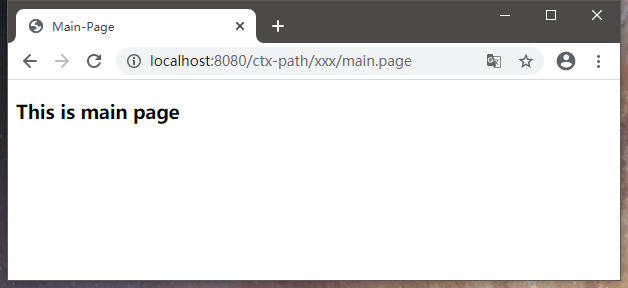
或者自行补上MSP前缀
package cn.zeal4j.configuration;

import cn.zeal4j.handler.FarsAuthenticationFailureHandler;

import cn.zeal4j.handler.FarsAuthenticationSuccessHandler;

import org.springframework.context.annotation.Bean;

import org.springframework.context.annotation.Configuration;

import org.springframework.http.HttpMethod;

import org.springframework.security.config.annotation.web.builders.HttpSecurity;

import org.springframework.security.config.annotation.web.configuration.WebSecurityConfigurerAdapter;

import org.springframework.security.crypto.bcrypt.BCryptPasswordEncoder;

import org.springframework.security.crypto.password.PasswordEncoder;

/**

 * @author Administrator

 * @file IntelliJ IDEA Spring-Security-Tutorial

 * @create 2020 09 27 21:55

 */

@Configuration

public class SecurityConfiguration extends WebSecurityConfigurerAdapter {

    @Bean

    public PasswordEncoder getPasswordEncoder() {

        return new BCryptPasswordEncoder();

    }

    @Override

    protected void configure(HttpSecurity httpSecurity) throws Exception {

        httpSecurity.formLogin(). // 设置登陆行为方式为表单登陆

                // 登陆请求参数设置

                usernameParameter("username").

                passwordParameter("password").

                loginPage("/login.html"). // 设置登陆页面URL路径

                loginProcessingUrl("/login.action"). // 设置表单提交URL路径

                // successForwardUrl("/main.page"). // 设置认证成功跳转URL路径 POST请求

                successHandler(new FarsAuthenticationSuccessHandler("https://www.acfun.cn/")). // 使用自定义的重定向登陆

                // failureForwardUrl("/error.page");  // 设置认证失败跳转URL路径 POST请求

                failureHandler(new FarsAuthenticationFailureHandler("/error.html")); // 跨域处理,不需要跳转了

        httpSecurity.authorizeRequests().

                regexMatchers(HttpMethod.POST, "正则表达式").permitAll(). // 还可以对符合正则表达式的请求方式进行要求,这个属性使用来制定请求的方式

                antMatchers("/**/*.js", "/**/*.css", "/**/images/*.*").permitAll(). // 静态资源放行

                antMatchers("/login.html").permitAll(). // 登陆页面允许任意访问

                antMatchers("/error.html").permitAll(). // 失败跳转后重定向的页面也需要被允许访问

                // mvcMatchers("/main.page").servletPath("/xxx").permitAll(). // mvcMatchers资源放行匹配

                antMatchers("/xxx/main.page").permitAll(). // 或者多写MSP的前缀

                anyRequest().authenticated(); // 其他请求均需要被授权访问

        // CSRF攻击拦截关闭

        httpSecurity.csrf().disable();

    }

}
【Spring-Security】Re04 Matchers配置规则API的更多相关文章
- spring boot rest 接口集成 spring security(2) - JWT配置
Spring Boot 集成教程 Spring Boot 介绍 Spring Boot 开发环境搭建(Eclipse) Spring Boot Hello World (restful接口)例子 sp ...
- Spring Security(三) —— 核心配置解读
摘要: 原创出处 https://www.cnkirito.moe/spring-security-3/ 「老徐」欢迎转载,保留摘要,谢谢! 3 核心配置解读 上一篇文章<Spring Secu ...
- CAS Spring Security 3 整合配置(转)
一般来说, Web 应用的安全性包括用户认证( Authentication )和用户授权( Authorization )两个部分.用户认证指的是验证某个用户是否为系统中的合法主体,也就是说用户能否 ...
- Spring Security基于Java配置
Maven依赖 <dependencies> <!-- ... other dependency elements ... --> <dependency> < ...
- Spring Security Oauth2 的配置
使用oauth2保护你的应用,可以分为简易的分为三个步骤 配置资源服务器 配置认证服务器 配置spring security 前两点是oauth2的主体内容,但前面我已经描述过了,spring sec ...
- Spring Security之动态配置资源权限
在Spring Security中实现通过数据库动态配置url资源权限,需要通过配置验证过滤器来实现资源权限的加载.验证.系统启动时,到数据库加载系统资源权限列表,当有请求访问时,通过对比系统资源权限 ...
- spring security实现动态配置url权限的两种方法
缘起 标准的RABC, 权限需要支持动态配置,spring security默认是在代码里约定好权限,真实的业务场景通常需要可以支持动态配置角色访问权限,即在运行时去配置url对应的访问角色. 基于s ...
- spring-security-4 (2)spring security 基于Java配置的搭建
一.spring security的模块 搭建spring security首先我们要导入必须的jar,即maven的依赖.spring security按模块划分,一个模块对应一个jar. spri ...
- Spring Security(3):配置与自动配置的介绍及源码分析
基于注解的配置(Java Configuration)从Spring Security 3.2开始就已经支持,本篇基于Spring boot注解的配置进行讲解,如果需要基于XML配置(Security ...
- spring security 3.2 配置详解(结合数据库)
没事就来了解下spring security.网上找了很多资料.有过时的,也有不是很全面的.各种问题也算是让我碰了个遍.这样吧.我先把整个流程写下来,之后在各个易混点分析吧. 1.建立几个必要的页面. ...
随机推荐
- linux系统下,redis如何设置密码
1.命令方式 首先查看下密码是否存在,发现并未设置为空. -bash-4.2# cd /usr/local/redis-6.2.6/src -bash-4.2# ./redis-cli 127.0.0 ...
- 实战 k8s----初识
什么是k8s?k8s是谷歌开源的一套完整的容器管理平台,方便我们直接管理容器应用.谷歌称之为,kubernetes,[kubə'netis] ,(跟我一起读库波尔耐题思,重音在耐的音上),由于字母太多 ...
- n. Elasticsearch JAVA API操作
引言 Elasticsearch所支持的客户端连接方式有两种 Transport 连接 底层使用socket连接,用官方提供的TransPort客户端,网络IO框架使用的是netty Http连接(R ...
- 讯飞有一个可以根据描述文本自动生成PPT的AI接口,有趣
文档:https://www.xfyun.cn/doc/spark/PPTGeneration.html 价格方面提供了免费1000点的额度,生成一次是10点,正好100次,如果要购买的话最低要购买1 ...
- 第四届物联网与机器学习国际学术会议(IoTML 2024)
[ACM独立出版,高录用,见刊检索快速稳定]第四届物联网与机器学习国际学术会议(IoTML 2024) [IoTML 2023会后三个半月内完成EI检索]2024 4th International ...
- Java映射 转换post response T data
Java映射 转换post response data 接上篇Java泛型对象在http请求和响应对象中的封装https://www.cnblogs.com/oktokeep/p/17688322.h ...
- windows 安装mysql 非常之详细
安装 1.下载安装包 2.解压包 3.文件夹内创建my.ini配置文件,并添加内容 # For advice on how to change settings please see # http: ...
- P6623 [省选联考 2020 A 卷] 树
day2t2但难度不大,和AGC044C解法类似 题目大意: 给定一棵 \(n\) 个结点的有根树 \(T\),结点从 \(1\) 开始编号,根结点为 \(1\) 号结点,每个结点有一个正整数权值 \ ...
- OpenBMB × Hugging Face × THUNLP,联袂献上经典大模型课
这个夏天,THUNLP 携手 Hugging Face 和 OpenBMB,推出 大模型公开课第二季.在大模型公开课第二季中,将有全球知名开源社区 OpenBMB X Hugging Face 梦幻联 ...
- 【Grafana】Grafana模板自定义-1-创建选择框
如何创建选择框 第一步:编辑模板 第二步:配置变量 配置说明: General: [Name]变量名,后面模板中如果要按条件筛选,会用到这个变量名. [Type]类型,目前没仔细研究,使用默认的Que ...